
> ## Documentation Index
> Fetch the complete documentation index at: https://docs.snowflake.com/llms.txt
> Use this file to discover all available pages before exploring further.

<a id="provider-basic-information"></a>

<a id="standard-listing-auto-fulfillment-ui"></a>

<a id="manually-replicate-the-data"></a>

<a id="provider"></a>

<a id="private-listing"></a>

<a id="about-listing-consumers"></a>

# Supported cloud regions

- [Understanding data transfer cost](/user-guide/cost-understanding-data-transfer)

Regions let your organization choose where your data is geographically stored across your regional, national, and international operations.
Regions also determine where your compute resources are provisioned.

Snowflake supports regions across all of the Snowflake-supported [cloud platforms](/user-guide/intro-cloud-platforms), grouped into
three global geographic segments (North/South America, Europe/Middle East/Africa, and Asia Pacific/China).

![World map of cloud regions supported by Snowflake](/static/images/snowflake-regions.png)

Each Snowflake account is hosted in a single region. If you wish to use Snowflake across multiple regions, you must maintain a Snowflake
account in each of the desired regions.

For details about the cloud regions where your data can be hosted when using the Egress Cost Optimizer,
see [Optimizing data transfer costs with Egress Cost Optimizer](/collaboration/provider-listings-auto-fulfillment-eco) documentation.

## North and South America

These regions are supported for organizations that prefer or require their data to be stored in the United States, Canada, or Brazil. Multiple
regions are provided to allow your organization to meet its individual compliance requirements for general purpose use.

Additional regions are provided in the United States for organizations that must comply with US government regulations.

<a id="label-na-general-regions"></a>

### Commercial regions

![Map of North and South American commercial cloud regions supported by Snowflake](/static/images/snowflake-regions-americas.png)

Snowflake supports the following regions in North America (U.S., Canada, and Mexico) and South America (Brazil) for general commercial use:

<div className="multi-row-table">

  <thead>
    <tr>
      <th>Cloud Platform</th>
      <th>Cloud Region ID <sup>[1]</sup></th>
      <th>Region Name</th>
      <th>Additional Notes</th>
    </tr>
  </thead>
  <tbody>
    <tr>
      <td colSpan={4}>**Amazon Web Services (AWS)**</td>
    </tr>
    <tr>
      <td rowSpan={5}><img src="/static/images/pin-aws.png" alt="AWS" width="140" height="70" /></td>
      <td>ca-central-1</td>
      <td>Canada (Central)</td>
      <td>Completed assessment and supports compliance with Canadian government's CCCS Medium Cloud Control Security Profile (fka, Protected B, Medium Integrity, Medium Availability [PB/M/M])</td>
    </tr>
    <tr>
      <td>sa-east-1</td>
      <td>South America (Sao Paulo)</td>
      <td></td>
    </tr>
    <tr>
      <td>us-west-2</td>
      <td>US West (Oregon)</td>
      <td>Supports U.S. government compliance (see next section for details).</td>
    </tr>
    <tr>
      <td>us-east-2</td>
      <td>US East (Ohio)</td>
      <td></td>
    </tr>
    <tr>
      <td>us-east-1</td>
      <td>US East (N. Virginia)</td>
      <td>Supports U.S. government compliance (see next section for details).</td>
    </tr>
    <tr>
      <td colSpan={4}>**Google Cloud Platform (GCP)**</td>
    </tr>
    <tr>
      <td rowSpan={2}><img src="/static/images/pin-gcp.png" alt="GCP" width="140" height="70" /></td>
      <td>us-central1</td>
      <td>US Central1 (Iowa)</td>
      <td></td>
    </tr>
    <tr>
      <td>us-east4</td>
      <td>US East4 (N. Virginia)</td>
      <td></td>
    </tr>
    <tr>
      <td colSpan={4}>**Microsoft Azure**</td>
    </tr>
    <tr>
      <td rowSpan={7}><img src="/static/images/pin-msazure.png" alt="Microsoft Azure" width="140" height="70" /></td>
      <td>canadacentral</td>
      <td>Canada Central (Toronto)</td>
      <td>Completed assessment and supports compliance with the CCCS Medium Cloud Control Security Profile (fka, Protected B, Medium Integrity, Medium Availability [PB/M/M])</td>
    </tr>
    <tr>
      <td>centralus</td>
      <td>Central US (Iowa)</td>
      <td></td>
    </tr>
    <tr>
      <td>eastus</td>
      <td>East US (Virginia)</td>
      <td></td>
    </tr>
    <tr>
      <td>eastus2</td>
      <td>East US 2 (Virginia)</td>
      <td></td>
    </tr>
    <tr>
      <td>mexicocentral</td>
      <td>Mexico Central (Querétaro)</td>
      <td></td>
    </tr>
    <tr>
      <td>southcentralus</td>
      <td>South Central US (Texas)</td>
      <td>Supports U.S. government compliance (see next section for details).</td>
    </tr>
    <tr>
      <td>westus2</td>
      <td>West US 2 (Washington)</td>
      <td></td>
    </tr>
  </tbody>

</div>

<p><sub>[1] See the map preceding this table for the location of each supported region, labeled by cloud region ID.</sub></p>
<a id="label-us-gov-regions"></a>

### U.S. regions supporting public sector workloads
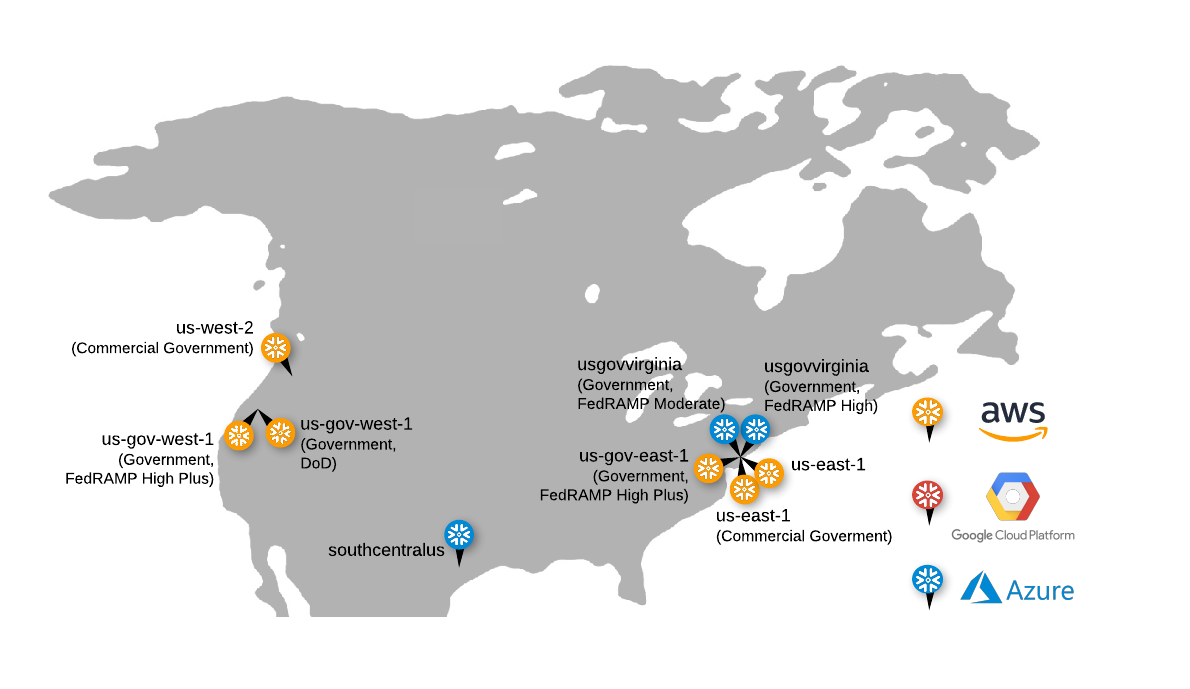
![Map of U.S. cloud regions that support public sector/government workloads](/static/images/snowflake-regions-us-gov.png)

Snowflake makes the following regions available to customers that require compliance with common U.S.
Federal and state government standards. Compliance with such standards is only supported for Snowflake accounts
on Business Critical Edition (or higher).

If your Snowflake account is in a [U.S. government region](#label-us-gov-regions) and you want to access data products that are
offered privately or on the %sf-marketplace%, or offer listings either privately or on the %sf-marketplace%, you must review and
acknowledge a cross-region disclaimer for your [organization](/user-guide/organizations).

For details, see:

- [Prepare to provide listings from accounts in U.S. government regions](https://other-docs.snowflake.com/en/collaboration/provider-becoming#label-listings-setup-gov-provider)
- [Prepare to access listings from accounts in U.S. government regions](https://other-docs.snowflake.com/en/collaboration/consumer-becoming#label-listings-setup-gov-consumer)
- [Limitations for accessing listings from accounts in U.S. government regions](https://other-docs.snowflake.com/en/collaboration/consumer-listings-access#label-listings-gov-consumer-limitations)

<dl>
<dt>U.S. commercial regions with some support for government standards</dt>
<dd>

The following commercial regions meet the requirements for Snowflake's compliance with the U.S. government standards set forth in the
table below. By uploading workloads covered by the below compliance standards, customers agree to
[Snowflake's U.S. Government Commercial Compliance Addendum](https://www.snowflake.com/legal-gov/us-gov-commercial-compliance-addendum/).

<div className="colwidths-auto multi-row-table">

  <thead>
    <tr>
      <th>Cloud Region ID</th>
      <th>Region Name</th>
      <th>Supported Workloads</th>
    </tr>
  </thead>
  <tbody>
    <tr>
      <td>**Amazon** **Web** **Services**</td>
      <td></td>
      <td></td>
    </tr>
    <tr>
      <td>us-east-1</td>
      <td>US East (Commercial Gov - N. Virginia)</td>
      <td>

- [FedRAMP Class C (Moderate)](/user-guide/cert-fedramp)
- [GovRAMP (Moderate)](/user-guide/cert-stateramp)
- [TX-RAMP (Level 2)](/user-guide/cert-txramp)
- FIPS 140-2 and 140-3
- NIST 800-171
- [DOJ CJIS Security Policy](/user-guide/cert-cjis) - Requires Supplemental Contract Terms
- IRS Publication 1075 - Requires Supplemental Contract Terms

</td>
    </tr>
    <tr>
      <td>us-east-1</td>
      <td>US East (N. Virginia)</td>
      <td>
- [TX-RAMP (Level 2)](/user-guide/cert-txramp)
</td>
    </tr>
    <tr>
      <td>us-west-2</td>
      <td>US West (Commercial Gov - Oregon)</td>
      <td>

- [FedRAMP Class C (Moderate)](/user-guide/cert-fedramp)
- [GovRAMP (Moderate)](/user-guide/cert-stateramp)
- [TX-RAMP (Level 2)](/user-guide/cert-txramp)
- FIPS 140-2 and 140-3
- [DOJ CJIS Security Policy](/user-guide/cert-cjis) - Requires Supplemental Contract Terms
- IRS Publication 1075 - Requires Supplemental Contract Terms

- NIST 800-171

</td>
    </tr>
    <tr>
      <td>**Microsoft Azure**</td>
      <td></td>
      <td></td>
    </tr>
    <tr>
      <td>southcentralus</td>
      <td>South Central US (Texas)</td>
      <td>

- [GovRAMP (Moderate)](/user-guide/cert-stateramp)
- [TX-RAMP (Level 2)](/user-guide/cert-txramp)

</td>
    </tr>
  </tbody>

</div>

</dd>
</dl>

<dl>
<a id="label-intro-regions-snowgov-regions"></a>
<dt>U.S. SnowGov Regions</dt>
<dd>

Snowflake makes the following SnowGov Regions on AWS GovCloud (US) and Microsoft Azure Government available to customers who require additional
security designed for US government regulated workloads and other types of sensitive data. Certain features that are available in Snowflake’s
commercial regions might not be available or might be different in its SnowGov Regions. Use of and access to Snowflake in any of the SnowGov
Regions are limited solely to U.S. Government Customers or U.S. Government Contractors
(unless otherwise agreed upon by Snowflake in its sole discretion) and are subject to Snowflake’s U.S. SnowGov Region Terms of Service.

The SnowGov Regions support U.S. government standards, such as FedRAMP, Department of War (DoW) Impact Levels, GovRAMP, TX-RAMP, FIPS, and
the International Traffic in Arms Regulations (ITAR) among others. As noted in the table below, certain standards require the customer to
accept supplemental contract terms. You must contact Snowflake and agree to the supplemental terms before uploading workloads covered by these standards.

Self-provisioning of initial Snowflake accounts is not available in the SnowGov Regions. To provision an initial account in these regions,
you must contact Snowflake.

<div className="colwidths-given multi-row-table">

  <colgroup>
    <col style={{width: "10.0%"}} />
    <col style={{width: "20.0%"}} />
    <col style={{width: "30.0%"}} />
    <col style={{width: "40.0%"}} />
  </colgroup>
  <thead>
    <tr>
      <th>Cloud Region ID</th>
      <th>Region Name</th>
      <th>Workloads Supported by Default</th>
      <th>Workloads Requiring Supplemental Contract Terms</th>
    </tr>
  </thead>
  <tbody>
    <tr>
      <td>**Amazon** **Web** **Services**</td>
      <td></td>
      <td></td>
      <td></td>
    </tr>
    <tr>
      <td>us-gov-east-1</td>
      <td>US Gov East 1 (FedRAMP High Plus)</td>
      <td>

- [FedRAMP Class D (High)](/user-guide/cert-fedramp)
- [DoW Impact Level 4 (IL4)](/user-guide/cert-dodIL5)
- [GovRAMP (High)](/user-guide/cert-stateramp)
- [TX-RAMP (Level 2)](/user-guide/cert-txramp)
- FIPS 140-2
- NIST 800-171
- [ITAR](/user-guide/cert-itar)

</td>
      <td>

- DFARS 252.204-7012
- DFARS 252.239-7010
- [DOJ CJIS Security Policy](/user-guide/cert-cjis) - Requires Supplemental Contract Terms
- IRS Publication 1075 - Requires Supplemental Contract Terms

</td>
    </tr>
    <tr>
      <td>us-gov-west-1</td>
      <td>US Gov West 1 (FedRAMP High Plus)</td>
      <td>

- [FedRAMP Class D (High)](/user-guide/cert-fedramp)
- [DoW Impact Level 4 (IL4)](/user-guide/cert-dodIL5)
- [GovRAMP (High)](/user-guide/cert-stateramp)
- [TX-RAMP (Level 2)](/user-guide/cert-txramp)
- FIPS 140-2
- NIST 800-171
- [ITAR](/user-guide/cert-itar)

</td>
      <td>

- DFARS 252.204-7012
- DFARS 252.239-7010
- [DOJ CJIS Security Policy](/user-guide/cert-cjis) - Requires Supplemental Contract Terms
- IRS Publication 1075 - Requires Supplemental Contract Terms

</td>
    </tr>
    <tr>
      <td>us-gov-west-1</td>
      <td>US Gov West 1 (DoW)</td>
      <td>

- [DoW Impact Level 5 (IL5)](/user-guide/cert-dodIL5)
- FIPS 140-2 and 140-3
- NIST 800-171
- [ITAR](/user-guide/cert-itar)

</td>
      <td>

- DFARS 252.204-7012
- DFARS 252.239-7010
- [DOJ CJIS Security Policy](/user-guide/cert-cjis) - Requires Supplemental Contract Terms
- IRS Publication 1075 - Requires Supplemental Contract Terms

</td>
    </tr>
    <tr>
      <td>**Microsoft Azure Government**</td>
      <td></td>
      <td></td>
      <td></td>
    </tr>
    <tr>
      <td>usgovvirginia</td>
      <td>US Gov Virginia (FedRAMP High Plus)</td>
      <td>

- [FedRAMP Class D (High)](/user-guide/cert-fedramp)
- [GovRAMP (High)](/user-guide/cert-stateramp) — *Planned*
- [TX-RAMP (Level 2)](/user-guide/cert-txramp)
- FIPS 140-2 and 140-3
- NIST 800-171
- [ITAR](/user-guide/cert-itar)

</td>
      <td>

- DFARS 252.204-7012
- DOJ [CJIS](/user-guide/cert-cjis) Security Policy
- IRS Publication 1075 - Requires Supplemental Contract Terms

</td>
    </tr>
    <tr>
      <td>usgovvirginia</td>
      <td>US Gov Virginia</td>
      <td>

This deployment has reached end of life, and will be decommissioned at the beginning of 2027.

</td>
    </tr>
  </tbody>

</div>

</dd>
</dl>

Note that the government regions of the cloud providers do not allow event notifications to be sent to or from other commercial regions.
For more information, see [AWS GovCloud (US)](https://docs.aws.amazon.com/govcloud-us/latest/UserGuide/govcloud-s3.html) and
[Azure Government](https://learn.microsoft.com/en-us/azure/azure-government/).

<a id="label-europe-regions"></a>

## Europe, Middle East, and Africa

These regions are supported for organizations that prefer or require their data to be stored in the European Union (EU), United
Kingdom (UK), Middle East, or Africa. Multiple regions are provided to allow your organization to meet its individual compliance and data
residency requirements.
![Map of Europe, Middle East, and Africa cloud regions supported by Snowflake](/static/images/snowflake-regions-europe.png)

Snowflake supports the following European, Middle East, and African regions. Regions in the European Economic Area (EEA) have achieved the
Hébergeurs de Données de Santé (HDS) certification for the hosting and protection of personal health data governed by French law (requires
supplemental contract terms).

<div className="multi-row-table">

  <thead>
    <tr>
      <th>Cloud Platform</th>
      <th>Cloud Region ID <sup>[1]</sup></th>
      <th>Region Name</th>
      <th>Additional Notes</th>
    </tr>
  </thead>
  <tbody>
    <tr>
      <td colSpan={4}>**Amazon Web Services (AWS)**</td>
    </tr>
    <tr>
      <td rowSpan={8}><img src="/static/images/pin-aws.png" alt="AWS" width="140" height="70" /></td>
      <td>af-south-1</td>
      <td>Africa (Cape Town)</td>
      <td></td>
    </tr>
    <tr>
      <td>eu-central-1</td>
      <td>EU (Frankfurt)</td>
      <td></td>
    </tr>
    <tr>
      <td>eu-central-2</td>
      <td>EU (Zurich)</td>
      <td></td>
    </tr>
    <tr>
      <td>eu-north-1</td>
      <td>EU (Stockholm)</td>
      <td></td>
    </tr>
    <tr>
      <td>eu-west-1</td>
      <td>EU (Ireland)</td>
      <td></td>
    </tr>
    <tr>
      <td>eu-west-2</td>
      <td>Europe (London)</td>
      <td></td>
    </tr>
    <tr>
      <td>eu-west-3</td>
      <td>EU (Paris)</td>
      <td></td>
    </tr>
    <tr>
      <td>me-central-1</td>
      <td>Middle East (UAE)</td>
      <td></td>
    </tr>
    <tr>
      <td colSpan={4}>**Google Cloud Platform (GCP)**</td>
    </tr>
    <tr>
      <td rowSpan={4}><img src="/static/images/pin-gcp.png" alt="GCP" width="140" height="70" /></td>
      <td>europe-west2</td>
      <td>Europe West2 (London)</td>
      <td></td>
    </tr>
    <tr>
      <td>europe-west3</td>
      <td>Europe West3 (Frankfurt)</td>
      <td></td>
    </tr>
    <tr>
      <td>europe-west4</td>
      <td>Europe West4 (Netherlands)</td>
      <td></td>
    </tr>
    <tr>
      <td>me-central2</td>
      <td>Middle East Central2 (Dammam)</td>
      <td></td>
    </tr>
    <tr>
      <td colSpan={4}>**Microsoft Azure**</td>
    </tr>
    <tr>
      <td rowSpan={6}><img src="/static/images/pin-msazure.png" alt="Microsoft Azure" width="140" height="70" /></td>
      <td>northeurope</td>
      <td>North Europe (Ireland) <sup>[2]</sup></td>
      <td></td>
    </tr>
    <tr>
      <td>swedencentral</td>
      <td>Sweden Central (Gävle)</td>
      <td></td>
    </tr>
    <tr>
      <td>switzerlandnorth</td>
      <td>Switzerland North (Zurich)</td>
      <td></td>
    </tr>
    <tr>
      <td>westeurope</td>
      <td>West Europe (Netherlands)</td>
      <td></td>
    </tr>
    <tr>
      <td>uaenorth</td>
      <td>UAE North (Dubai)</td>
      <td></td>
    </tr>
    <tr>
      <td>uksouth</td>
      <td>UK South (London)</td>
      <td></td>
    </tr>
  </tbody>

</div>

<p><sub>[1] See the map preceding this table for the location of each supported region, labeled by cloud region ID.</sub></p>
<p><sub>[2] Available only for customers with existing accounts in the region. Due to Microsoft's requirements, Snowflake will determine eligibility for any new customers in this region on a case-by-case basis.</sub></p>
<a id="label-asia-pacific-regions"></a>

## Asia Pacific and China

These regions are supported for organizations that prefer or require their data to be stored in Japan, Korea, India, Southeast Asia,
Australia, and China. Multiple regions are provided to allow your organization to meet its individual compliance and data residency
requirements.

![Map of Asia Pacific and China cloud regions supported by Snowflake](/static/images/snowflake-regions-asiapacific.png)

Snowflake supports the following Asia Pacific and China regions:

<div className="multi-row-table">

  <thead>
    <tr>
      <th>Cloud Platform</th>
      <th>Cloud Region ID <sup>[1]</sup></th>
      <th>Region Name</th>
      <th>Additional Notes</th>
    </tr>
  </thead>
  <tbody>
    <tr>
      <td colSpan={4}>**Amazon Web Services (AWS)**</td>
    </tr>
    <tr>
      <td rowSpan={11}><img src="/static/images/pin-aws.png" alt="AWS" width="140" height="70" /></td>
      <td>ap-northeast-1</td>
      <td>Asia Pacific (Tokyo)</td>
      <td>Completed assessment and supports compliance with the Japanese government's Information System Security Management and Assessment Program (ISMAP)</td>
    </tr>
    <tr>
      <td>ap-northeast-2</td>
      <td>Asia Pacific (Seoul)</td>
      <td></td>
    </tr>
    <tr>
      <td>ap-northeast-3</td>
      <td>Asia Pacific (Osaka)</td>
      <td>Completed assessment and supports compliance with ISMAP</td>
    </tr>
    <tr>
      <td>ap-south-1</td>
      <td>Asia Pacific (Mumbai)</td>
      <td></td>
    </tr>
    <tr>
      <td>ap-southeast-1</td>
      <td>Asia Pacific (Singapore)</td>
      <td></td>
    </tr>
    <tr>
      <td>ap-southeast-2</td>
      <td>Asia Pacific (Sydney)</td>
      <td>Completed assessment and supports compliance with the Australian government's Infosec Registered Assessors Program (IRAP) - Protected</td>
    </tr>
    <tr>
      <td>ap-southeast-3</td>
      <td>Asia Pacific (Jakarta)</td>
      <td></td>
    </tr>
    <tr>
      <td>ap-southeast-5</td>
      <td>Asia Pacific (Malaysia)</td>
      <td></td>
    </tr>
    <tr>
      <td>ap-southeast-6</td>
      <td>Asia Pacific (New Zealand)</td>
      <td></td>
    </tr>
    <tr>
      <td>ap-southeast-7</td>
      <td>Asia Pacific (Thailand)</td>
      <td></td>
    </tr>
    <tr>
      <td>cn-northwest-1</td>
      <td>China (Ningxia)</td>
      <td>

The China region is separate from other Snowflake regions. It utilizes a separate domain name (`snowflakecomputing.cn`) and is wholly operated by Digital China Cloud Technology Limited (DCC), an authorized operating partner of Snowflake, Inc. Customers who wish to create and use Snowflake accounts in the China region must sign a separate agreement with DCC in accordance with all applicable rules and regulations.

Additionally, customers cannot use self-service to create their initial account in the China region. Instead, they must request the account through [DCC](mailto:snowflake.hosting@dcclouds.com). Once the initial account is created within their org, they can create additional accounts in the org using all other supported methods.

Customers with existing Snowflake accounts are not able to access resources in the China region, and vice versa. Some features might not be available in the China region.

</td>
    </tr>
    <tr>
      <td colSpan={4}>**Google Cloud Platform (GCP)**</td>
    </tr>
    <tr>
      <td><img src="/static/images/pin-gcp.png" alt="GCP" width="140" height="70" /></td>
      <td>australia-southeast2</td>
      <td>Australia Southeast 2 (Melbourne)</td>
      <td>Completed assessment and supports compliance with IRAP - Protected</td>
    </tr>
    <tr>
      <td colSpan={4}>**Microsoft Azure**</td>
    </tr>
    <tr>
      <td rowSpan={6}><img src="/static/images/pin-msazure.png" alt="Microsoft Azure" width="140" height="70" /></td>
      <td>australiaeast</td>
      <td>Australia East (New South Wales)</td>
      <td>Completed assessment and supports compliance with IRAP - Protected</td>
    </tr>
    <tr>
      <td>centralindia</td>
      <td>Central India (Pune)</td>
      <td></td>
    </tr>
    <tr>
      <td>eastasia</td>
      <td>East Asia (Hong Kong)</td>
      <td></td>
    </tr>
    <tr>
      <td>japaneast</td>
      <td>Japan East (Tokyo)</td>
      <td>Completed assessment and supports compliance with ISMAP</td>
    </tr>
    <tr>
      <td>koreacentral</td>
      <td>Korea Central (Seoul)</td>
      <td></td>
    </tr>
    <tr>
      <td>southeastasia</td>
      <td>Southeast Asia (Singapore)</td>
      <td></td>
    </tr>
  </tbody>

</div>

<p><sub>[1] See the map preceding this table for the location of each supported region, labeled by cloud region ID.</sub></p>
## Region time zones for support

Snowflake supports multiple [editions](/user-guide/intro-editions) with each edition offering different levels of service.

Effective May 1, 2020:

- All new accounts, regardless of Snowflake Edition, receive Premier support, which includes 24/7 coverage.
- Standard Edition accounts that were provisioned before this date will continue to receive Standard support until the accounts are
  transitioned to Premier support.

  Standard support hours are Monday - Friday, 6:00 AM - 6:00 PM, across all regions, but the time zones vary depending on the geographic
  location of the region:

  <dl className="field-list">
   <dt>North America<span className="colon">:</span></dt>
   <dd>

  Pacific Time (PST or PDT)

  </dd>
   <dt>Europe, Middle East, & Africa<span className="colon">:</span></dt>
   <dd>

  Central Europe Time (CET or CEST)

  </dd>
   <dt>Asia Pacific<span className="colon">:</span></dt>
   <dd>

  Australian Eastern Time (AEST or AEDT)

  </dd>
   </dl>

## Differences between regions

Snowflake features and services are identical across regions except for some newly-introduced features (based on cloud platform or region).
However, there are some differences in unit costs for credits and data storage between regions.

Another factor that impacts unit costs is whether your Snowflake account is *On Demand* or *Capacity*.

For more information about pricing as it pertains to a specific region and account type, see the
[pricing page](http://www.snowflake.com/pricing) (on the Snowflake website).

<a id="label-show-organization-regions"></a>

## View a list of regions available for an organization

An [organization administrator](/user-guide/organization-administrators) can view a list of regions available for an organization
through %sf-web-interface-link% or using SQL:

<blockquote>

<dl className="field-list">
<dt>%sf-web-interface%<span className="colon">:</span></dt>
<dd>

In the navigation menu, select **Admin** %raa% **Accounts**, and then select **+ Account**. Browse through **Region**.

</dd>
<dt>SQL<span className="colon">:</span></dt>
<dd>

Execute the [SHOW REGIONS](/sql-reference/sql/show-regions) command.

</dd>
</dl>

</blockquote>

## Considerations for choosing a region for your account

When you request a Snowflake account, either through self-service or a Snowflake representative, you can choose the region where the
account is located. For example, you can decide to locate an account in a particular region on a particular cloud platform to address
latency concerns and/or provide additional backup and disaster recovery beyond the standard recovery support provided by Snowflake.
Snowflake does not place any restrictions on the region where you choose to locate each account.

If latency is a concern, you should choose the available region with the closest geographic proximity to your end users; however, this might
have cost implications, due to pricing differences between the regions. For more details, see the
[pricing page](http://www.snowflake.com/pricing) (on the Snowflake website).

If you are a government agency or a commercial organization that must comply with specific privacy and security requirements of the US
government, you can choose between two dedicated government regions provided by Snowflake.

Regions do not limit user access to Snowflake; they only dictate the geographic location where data is stored and compute resources are
provisioned.

In addition, Snowflake does not move data between accounts, so any data in an account in a region remains in the region unless users
explicitly choose to copy, move, or [replicate](/user-guide/account-replication-intro) the data.

<a id="label-region-ids"></a>

## Specify region information in your account hostname

A hostname for a Snowflake account starts with an *account identifier* and ends with the Snowflake domain
(`snowflakecomputing.com`). Snowflake supports two formats to use as the
[account identifier](/user-guide/admin-account-identifier) in your hostname:

- Account name (preferred)
- Account locator

If you choose the account locator as your account identifier, you might need to include <span className="emph">additional</span> segments in the locator that
specify the cloud region and [cloud platform](/user-guide/intro-cloud-platforms) where your account is hosted.

For more details, see [](#label-account-locator).