External lineage
External lineage extends Snowflake’s native lineage to include external data sources and destinations, providing you with visibility into data flows across your entire data ecosystem. It captures lineage from external ETL tools and source databases to create a unified view of how data moves through your data pipeline.
Lineage can be captured between a Snowflake object and an external object, and also between two external objects. Because an event isn’t required to include a Snowflake object, a pipeline that moves data through several external systems is represented as a connected chain even where no Snowflake object sits between them. External lineage captures lineage between individual columns as well as between objects.
OpenLineage is an open standard for capturing and sharing data lineage information across diverse data tools and platforms. Snowflake leverages this framework by accepting OpenLineage-compatible events through a REST endpoint. External tools like dbt and Apache Airflow can use the endpoint to send lineage metadata to Snowflake, which then incorporates this information into the native lineage graph displayed in Snowsight.
- Snowflake base URL for REST endpoints
Where
account_identifieris the account identifier of your Snowflake account. You can use either the account name format or the account locator format as your account identifier.For example, if your account identifier is
myorg-dev_account, then the base URL of the external lineage endpoint is:https://myorg-dev_account.snowflakecomputing.com
External lineage workflow
Implementing external lineage for a data tool consists of the following tasks:
- Grant the necessary privileges to the user who is authenticating to the external lineage endpoint, and make sure that user’s role can access the Snowflake objects your lineage events reference.
- Configure your data tool to send OpenLineage events to the Snowflake REST endpoint.
- Choose an authentication method that works for Snowflake REST APIs, and then configure your data tool to use it to authenticate its requests to the external lineage endpoint.
- Use your data tool as usual. OpenLineage events are sent to Snowflake automatically and appear in the native lineage graph in Snowsight.
If you want to test the external lineage endpoint before you configure a data tool to emit OpenLineage events, see Send manual requests to establish lineage.
View your data lineage
To view data lineage in Snowsight, complete the following steps:
- Sign in to Snowsight with the necessary privileges.
- In the navigation menu, select Catalog » Explorer, and then select a supported object such as a table or view.
- Select the Lineage tab.
When a data tool sends lineage information to Snowflake, external objects appear in the Snowsight lineage graph and are labeled as an external node. For example:
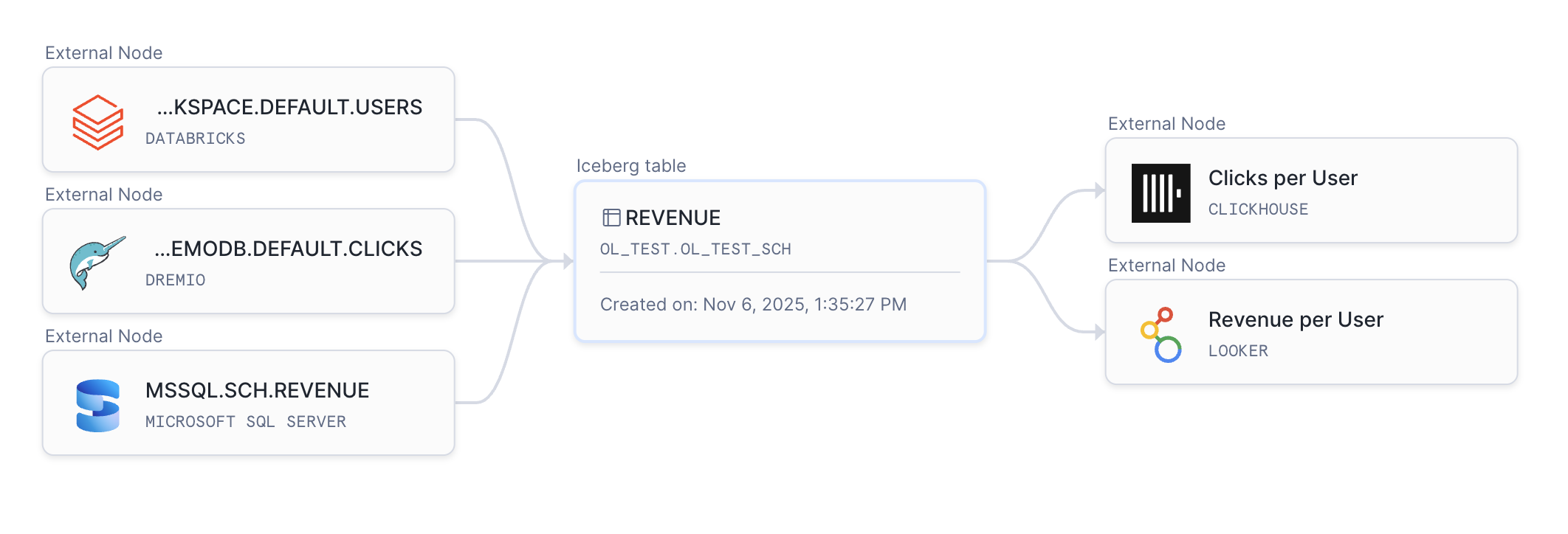
You can select an external object or the line connecting objects to obtain additional information just like you can with native lineage.
You can also query external lineage with SQL. External objects appear in the output of the GET_LINEAGE function, and you can retrieve the lineage of an external object by anchoring the query on it. For more information, see Lineage for objects outside Snowflake.
If you would rather retrieve lineage without using SQL, the external lineage endpoint returns the same edges. For more information, see Send requests to retrieve lineage.
Lineage persistence when you recreate a Snowflake object
Whether an external lineage edge survives a Snowflake object being dropped and recreated (for example, with CREATE OR REPLACE TABLE, or
DROP TABLE followed by CREATE TABLE) depends on the direction of the edge, because recreating an object gives it a new internal
identifier even though its name doesn’t change:
-
A Snowflake object that is the source of an edge to an external target (for example, a table that a BI tool reads) is tracked by its fully qualified name rather than its internal identifier. Most external systems reference Snowflake objects only by name; they have no way to reference Snowflake’s internal identifiers. Because Snowflake tracks the object by name in this direction, recreating it doesn’t break the lineage edge to the external object.
-
A Snowflake object that is the target of an edge from an external source (for example, a table populated by a pipeline that sends lineage events) is tracked by its internal identifier. Recreating this object breaks the existing lineage edge, even though the object’s name is unchanged. The producing tool must send a new lineage event that references the recreated object to reestablish the edge.
-
An edge between two Snowflake objects that was captured through external lineage (for example, from a data pipeline tool that emits OpenLineage events for a step that moves data between two Snowflake tables) is also tracked by internal identifier on both ends, and breaks the same way if either object is recreated.
Lineage for externally managed Apache Iceberg™ tables
If an OpenLineage event describes a dataset in a storage namespace (for example, s3://...) whose catalog and symlinks facets identify
a Snowflake Apache Iceberg™ table, Snowflake resolves that dataset to the Snowflake table’s identity instead of recording it as a generic
external node. This applies to externally managed Iceberg tables backed by an external Iceberg REST catalog, not to tables that Snowflake
manages directly.
Resolution requires the catalog facet to specify type: rest and framework: iceberg. A facet naming a different catalog type, such as
AWS Glue, isn’t resolved, and the dataset remains an external node.
If the named table doesn’t resolve, for example because it doesn’t exist or the role sending the request can’t see it, Snowflake records that one dataset as an external node instead of resolving it. The rest of the event, including any other datasets, is still recorded.
Example: an OpenLineage event with catalog facets
The following payload sends lineage for a job that reads from one externally managed Iceberg table and writes to another. Both datasets
are in s3:// namespaces, but their catalog and symlinks facets identify the Snowflake Iceberg tables backing them, so Snowflake
resolves both to their Snowflake identity instead of recording either as an external node:
The catalog facet’s name and the symlinks identifier’s name together form the Snowflake table identity that must match:
<catalog name>.<symlink name>, which is SALES_CATALOG_DB.PUBLIC.SRC_EVENTS for the input above. SALES_CATALOG_DB is the name of the
catalog-linked database (or, for a table registered directly with CATALOG_TABLE_NAME, the database that registration uses). If that
qualified name doesn’t match a Snowflake Iceberg table registered through the same external catalog, the dataset stays an external node.
Effect on removing lineage
Resolving a dataset to Snowflake identity changes how you remove its lineage. Before resolution, an edge to or from the dataset is stored
and matched by its storage namespace and name. After resolution, the edge is stored and matched by the Snowflake table’s identity
instead.
A DELETE request that specifies the original storage namespace and name for a resolved endpoint doesn’t match the edge, and doesn’t
return an error. To remove lineage for a resolved endpoint, specify the Snowflake object’s database, schema, and table name instead. See
Send requests to remove lineage.
This change applies only to edges recorded after resolution succeeds. An edge recorded before resolution, or one whose dataset never resolved, continues to match on its original storage namespace and name.
Grant Snowflake privileges
After a REST request is authenticated, Snowflake checks whether the user associated with the request is authorized to use external lineage. The user associated with the request must have a role that is granted the INGEST LINEAGE privilege on the account.
For example, suppose you want requests sent by the service user dbt_integration_user to show up in Snowsight lineage. As an
administrator, run the following commands to create a dedicated role, grant it the necessary privilege, and then grant the role to the user:
Access to referenced Snowflake objects
The INGEST LINEAGE privilege authorizes a role to use external lineage, but it doesn’t grant access to the objects named in a lineage
event. The role sending the request must also be able to resolve every Snowflake object referenced in the inputs and outputs properties
of the payload. Snowflake resolves these objects when it receives the request, so the role needs the privileges required to see each object:
typically USAGE on the database and schema that contain it, along with a privilege such as SELECT on the object itself.
Snowflake resolves the objects using the role that is in effect for the request, which is the default role of the user associated with the request. Granting the required privileges to a role that the user is granted, but that isn’t in effect for the request, isn’t sufficient. If the user has no default role, or its default role isn’t the role you granted the privileges to, set the default role explicitly.
If any Snowflake object in the payload can’t be resolved, either because the object doesn’t exist or because the role can’t see it, Snowflake rejects the whole event with a 400 HTTP status code and error code 394919, and stores no lineage from that event. Because a single unresolvable object rejects the entire event, the other objects in the same event don’t produce lineage either.
Building on the previous example, the following commands make dbt_lineage_role the default role of the user and let it resolve the
objects in the my_db.my_schema schema:
Note
CREATE OR REPLACE TABLE replaces the object, and privileges granted directly on the previous object aren’t carried over to the new one
unless the statement includes COPY GRANTS. If a pipeline recreates the tables that it reports lineage for, grant the privileges at the
schema level using GRANT SELECT ON FUTURE TABLES IN SCHEMA as in the previous example, or include COPY GRANTS in the
CREATE OR REPLACE TABLE statement. Otherwise the role loses access each time a table is replaced, and subsequent lineage events for that
table are rejected.
Configure your data tool
Note
Any data tool with an OpenLineage integration can be configured to send lineage data to Snowflake. For a full list of tools that have an integration, see OpenLineage Integrations.
The following sections provide basic instructions for using external lineage with dbt and Apache Airflow.
Configure dbt to send lineage data to Snowflake
Note
Configuring dbt to emit OpenLineage events isn’t unique to Snowflake; the only thing specific to Snowflake is the endpoint and base URL of external lineage.
The following steps provide the minimum configuration you need to set up your dbt environment. Consult the OpenLineage dbt documentation and the OpenLineage specification to configure your OpenLineage-dbt integration.
-
Install the OpenLineage-dbt integration:
-
Set your transport variables to specify the base URL, endpoint, and security token for external lineage.
For example, if the account identifier of your account is
MYORG-DEV_ACCOUNT, define the following code in your YAML configuration file: -
Replace
dbtcommands withdbt-ol. For example, change thedbt runcommand todbt-ol run.These
dbt-olcommands are required by the OpenLineage-dbt integration, and aren’t unique to Snowflake.
For more information about OpenLineage-dbt integrations, including other methods of setting variables, see the OpenLineage dbt documentation.
Configure Airflow to send lineage data to Snowflake
Note
Configuring Apache Airflow to emit OpenLineage events isn’t unique to Snowflake; the only thing specific to Snowflake is the endpoint and base URL of external lineage.
The following steps provide the minimum configuration you need to set up your Airflow environment for Airflow version 2.7+, which is the preferred version for OpenLineage. Consult the OpenLineage Airflow documentation and the OpenLineage specification to configure your OpenLineage-Airflow integration.
-
Install the OpenLineage Airflow integration for version 2.7+:
If you use an older version of Airflow, install
openlineage-airflowinstead. -
Set your transport variables to specify the base URL, endpoint, and security token for external lineage.
For example, if the account identifier of your account is
MYORG-DEV_ACCOUNT, define the following code in your YAML configuration file:
For more information about OpenLineage-Airflow integrations, including other methods of setting variables, see the OpenLineage Airflow documentation.
Choose an authentication method
Snowflake provides multiple ways to authenticate requests to a Snowflake REST endpoint like the one used by external lineage. For a complete list of authentication methods, see Authenticating Snowflake REST APIs with Snowflake.
After you select your preferred authentication method, you must generate a security token for a specific user. The token is used to associate a user with the REST request so that Snowflake can authenticate the user and verify that the user is authorized to use external lineage.
After successfully associating a user with a security token in Snowflake, you need to configure your data tool to authenticate its requests with this token. For example, if you use a YAML configuration file to set OpenLineage transport variables, use the following code to specify the security token that is sent in the header of the request:
For other methods of specifying a security token, see the OpenLineage documentation for your data tool.
Send manual requests to establish lineage
External lineage works by accepting JSON payloads that conform to the OpenLineage specification for COMPLETE events. When integrated with a data tool, the tool emits these COMPLETE events. But you can also construct a COMPLETE event, then send it to the endpoint by using any tool or language that can send POST requests to an endpoint.
A valid request consists of the following method, base URL, and endpoint:
Where account_identifier is the account identifier of your Snowflake account.
The following example shows how to use curl to send lineage information to external lineage:
Where request_body.json conforms to the OpenLineage specification for COMPLETE events. For more information about this JSON payload, see Payload requirements.
Authentication and authorization of a manual request
The authentication and authorization of a manual request sent to the external lineage endpoint are the same as those in a request sent from a data tool.
- The header of the request must include a security token from one of the forms of authentication supported by Snowflake REST endpoints.
- The user associated with the security token must have the proper privileges.
Payload requirements
When you send the JSON payload in a manual request to the external lineage endpoint, the payload must meet the following requirements:
-
Must conform to the OpenLineage specification.
-
Must be a COMPLETE event. That is, the
eventTypeproperty must beCOMPLETE. Events with any othereventTypeare rejected with a 400 HTTP status code. -
The
inputsproperty andoutputsproperty can reference Snowflake objects, external objects, or both. Lineage between two external objects is supported; an event is no longer required to include at least one Snowflake object. -
Every Snowflake object referenced in the
inputsandoutputsproperties must exist and must be visible to the role sending the request. See Access to referenced Snowflake objects. -
Must contain the following properties:
inputsoutputseventTypeeventTimejob
You can optionally include the
runproperty, which is useful in identifying the job. The payload can contain additional properties, but Snowflake ignores them.
Minimal payload example
The following example shows a minimal payload that you can send to the external lineage endpoint:
Lineage between two external objects
Neither the input nor the output has to be a Snowflake object. The following example establishes lineage between two external systems, so a pipeline that moves data between them is represented even though no Snowflake object is involved:
Specifying object types
Within the outputs array of the payload, you can use the facets field to specify the type of the object, which can be any
user-defined string. For example, the following snippet of the payload specifies that the object is of type VIEW:
If you don’t specify a facets field, the type of object defaults to External Node.
Specifying multiple inputs
If a payload includes more than one input, the resulting lineage shows the output as a downstream object of both inputs. For example, if a payload has input A and B along with an output C, then the lineage shows both A-C and B-C.
Specifying column lineage
External lineage captures lineage between individual columns as well as between objects. To establish column lineage, use the
columnLineage facet of an output dataset. The facet maps each output column to the input columns that it is derived from:
Each key in the fields object is the name of a column in the output dataset, and each entry in its inputFields array identifies a source
column by the namespace and name of its dataset plus the field name of the column.
Keep the following in mind when you specify column lineage:
- The
namespaceandnameof eachinputFieldsentry must match a dataset that is also listed in theinputsproperty of the same event. An entry that refers to a dataset outside the event’sinputsis ignored. - Column mappings are captured on a best-effort basis. If a column can’t be resolved, Snowflake skips that mapping and continues. A column might not resolve because it was dropped or renamed, or because the role sending the request can’t see it. The event isn’t rejected, and the object-level lineage is still recorded.
Send requests to retrieve lineage
You can retrieve lineage from the external lineage endpoint instead of querying it with SQL. The endpoint is backed by the same engine as
the GET_LINEAGE function, so it reports the same edges that GET_LINEAGE reports for
the same object, including edges between two Snowflake objects.
A valid request to retrieve lineage consists of the following method, base URL, and endpoint:
Note
Retrieving lineage uses the POST method and an endpoint that ends in :get, not the GET method. The request identifies the object to
retrieve lineage for in a JSON body, which a GET request can’t carry.
Access control for retrieving lineage
The user sending a request to retrieve lineage must have the VIEW LINEAGE privilege on the account. If the request anchors on a Snowflake
object, the role must also be able to resolve that object, as described in
Access to referenced Snowflake objects.
Request body
The body identifies the object to retrieve lineage for, called the anchor, and supports the following properties:
| Property | Description |
|---|---|
anchor | Required. The object whose edges are returned. See Anchor properties. |
filter | Optional. Narrows the results to edges that connect the anchor to one specific object on the other side. Specify both namespace and name, and optionally datasetType. Specifying only one of them is rejected. |
maxDistance | Optional. The number of hops from the anchor to return edges for. Only 1, the default, is supported; any other value is rejected. |
Anchor properties
Identify the anchor by namespace and name, which are required together:
| Property | Description |
|---|---|
side | Required. Whether the anchor is the source or the target of the edges to return. SOURCE returns the objects downstream of the anchor; TARGET returns the objects upstream of it. |
namespace | Namespace of the anchor. Required together with name. |
name | Name of the anchor. For a Snowflake object, use the fully qualified name. Required together with namespace. |
datasetType | Optional type of the anchor, for example TABLE or VIEW. |
columnName | Retrieves the lineage of a column of the anchor rather than of the anchor itself. Supported for objects that aren’t in Snowflake; to retrieve the lineage of a Snowflake column, use GET_LINEAGE with the COLUMN domain. Rejected if more than one column of the anchor has this name. |
Response
The response contains an edges array. Each edge has a source object and a target object, which use the following properties, plus a
process object that describes how the lineage was established:
| Property | Description |
|---|---|
name | Name of the object. For a column-level edge, this is the column’s parent object, and the column is in columnName. |
database | Database that contains the object. Absent for objects that aren’t in Snowflake. |
schema | Schema that contains the object. Absent for objects that aren’t in Snowflake. |
namespace | Namespace of the object. |
datasetType | Granular type of the object, for example TABLE or VIEW. |
domain | Domain of the object. For an object that isn’t in Snowflake, this is EXTERNAL, or EXTERNAL_COLUMN for one of its columns. |
columnName | Name of the column. Present only on column-level edges. |
status | Status of the object, for example ACTIVE or DELETED. |
version | Version of the object. Present only for models and datasets. |
origin | Where the object’s lineage came from: NATIVE for a Snowflake object, SNOWFLAKE_CONNECTOR for one ingested by a connector, or OPEN_LINEAGE for one you ingested. |
externalId | Identifier of an object that isn’t in Snowflake. Absent for Snowflake objects. |
The values of these properties match the corresponding SOURCE_* and TARGET_* columns that GET_LINEAGE returns for the same edge. For
descriptions of those columns, see GET_LINEAGE.
Example: Retrieve the lineage of a Snowflake table
The following example retrieves the objects immediately downstream of a Snowflake table, including objects that aren’t in Snowflake:
The response is similar to the following:
Example: Retrieve the lineage of an object outside Snowflake
To continue from an object that isn’t in Snowflake, anchor on it by passing its namespace along with its name. The following example
uses the target returned by the previous example to retrieve what that object feeds:
Repeat this pattern to follow a chain of objects outside Snowflake one step at a time.
Retrieving lineage considerations
Keep the following in mind when you retrieve lineage:
- The endpoint returns only the edges immediately connected to the anchor. To follow a longer chain, anchor a new request on an object from the previous response.
- If the anchor is a Snowflake object whose name no longer resolves to an existing object, the response contains an empty
edgesarray rather than an error. Recreating an object can also break its existing edges. For more information, see Lineage persistence when you recreate a Snowflake object. - A request that specifies a
maxDistanceother than1, an anchor that is missingside,namespace, orname, or a partially specifiedfilteris rejected with a 400 HTTP status code.
Send requests to remove lineage
You can send a DELETE request to the external lineage endpoint to remove lineage that was established between a Snowflake object and an external object.
- To break lineage between the source object and target object, use URL query parameters to specify details about the two objects.
- To break lineage between an object and all of its downstream objects, specify the source object without specifying a target object.
- To remove a target object from the lineage graph regardless of how many objects are upstream of it, specify the target object without specifying a source object.
A valid request to remove lineage consists of the following method, base URL, and endpoint:
| Query parameter | Description |
|---|---|
sourceNamespace={namespace} | Namespace of the source dataset. |
sourceName={FQN} | Fully qualified name of the source dataset. |
sourceDatasetType={dataset type} | Type of the source dataset (for example, TABLE, VIEW, DATASET). By default, the value should be External Node. If you provided a value in the facets field of the payload when you sent a request to establish lineage, then specify the value that you sent in the payload, not External Node. |
targetNamespace={namespace} | Namespace of the target dataset. |
targetName={FQN} | Fully qualified name of the target dataset. |
targetDatasetType={dataset type} | Type of the target dataset (for example, TABLE, VIEW, DATASET). By default, the value should be External Node (External%20Node). If you provided a value in the facets field of the payload when you sent a request to establish lineage, then specify the value that you sent in the payload, not External Node. |
Note
The values of the query parameters are case sensitive.
Important
These query parameters match an edge by its original storage namespace and name. If the dataset has since resolved to Snowflake
identity, for example an externally managed Iceberg table resolved through catalog facets, these parameters no longer match it. Specify
the Snowflake object’s database, schema, and table name instead. See
Lineage for externally managed Apache Iceberg™ tables.
Access control for removing lineage
The user sending a request to remove lineage between objects must have the DELETE LINEAGE privilege on the account.
Limitations and considerations
- Snowflake doesn’t support OpenLineage version 2.
- The retention period for external lineage events is one year.
- Snowflake only accepts COMPLETE lineage events. Events with a different
eventType, for example START or FAIL, are rejected with a 400 HTTP status code. Data tools that emit a full event lifecycle therefore receive 400 responses for their non-COMPLETE events. This is expected and doesn’t indicate a problem with the COMPLETE events that the same tool sends. - Every Snowflake object referenced in an event must exist and be visible to the role sending the request, or the event is rejected. See Access to referenced Snowflake objects.
- Dropping and recreating a Snowflake object can break its external lineage edges, depending on the direction of the edge. See Lineage persistence when you recreate a Snowflake object.
- Resolving an externally managed Iceberg table to Snowflake identity changes how you remove its lineage. See Lineage for externally managed Apache Iceberg™ tables.
- A request to retrieve lineage returns only the edges immediately connected to the anchor object. See Send requests to retrieve lineage.
- The fully qualified name of a dataset — that is, the input or output — can’t exceed 1000 characters.
- A single event can’t produce more than 15,000 lineage edges. An event produces one edge for each combination of input and output, so an event with 100 inputs and 200 outputs produces 20,000 edges and is rejected.
- You can’t store more than 20,000 external lineage edges in the same account. If you reach this limit, you must delete edges before adding new ones.