Snowpark Migration Accelerator: Snowflake로 출력 공유하기
Snowpark Migration Accelerator(SMA)는 Snowflake에서 생성한 독립형 도구입니다. 이 도구는 기본 Snowflake 서비스와 독립적으로 작업하지만, 도구 사용 방식에 대한 기본적인 사용 통계를 수집합니다. SMA 는 소스 코드에 대한 세부 정보를 수집하거나 전송하지 않으니 안심하십시오.
보고서 공유
로컬에서 생성한 코드나 보고서를 SMA 팀과 공유(문제 해결, 제품 개선 또는 자세한 분석을 위해)하려면 다음 방법을 사용할 수 있습니다.
In the tool - Use the Report an Issue feature to notify the SMA support team. You can select specific information to share, attach files, and provide a description of your issue or inquiry.
명시적(이메일로) - 파일과 정보를 직접 이메일로 보냅니다. 가장 간단한 방법입니다.
Before sharing any report, you must complete some initial steps. Let’s demonstrate this process using the PandasUsagesInventory.csv report as an example.
Run the SMA Assessment or Conversion - If you need help with code conversion or want to analyze your code, visit the getting started guide to learn how to set up and use the Snowpark Migration Accelerator (SMA).
파일 위치 찾기 - 공유할 파일을 찾습니다. 일반적으로 평가 결과의 경우 보고서 디렉터리, 변환된 코드의 경우 출력 디렉터리에 위치합니다.
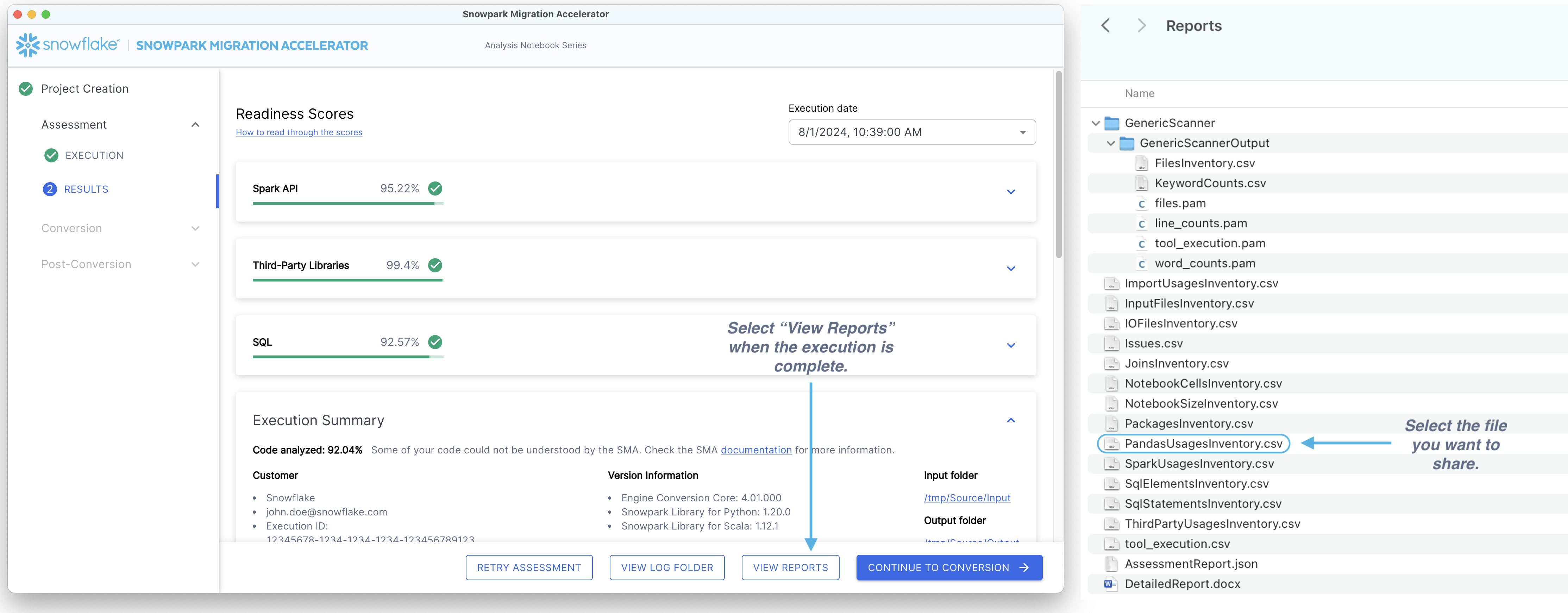
공유하려는 파일 선택 - 여러 개의 파일을 공유할 때는 개별 파일을 따로 공유하는 대신 1개의 zip 파일을 생성하는 것이 좋습니다.
Share the file(s) - You can share files in two ways: 1. Using the tool: Access the Report an Issue option from the help menu. Add a brief description explaining the shared content and attach your file(s).
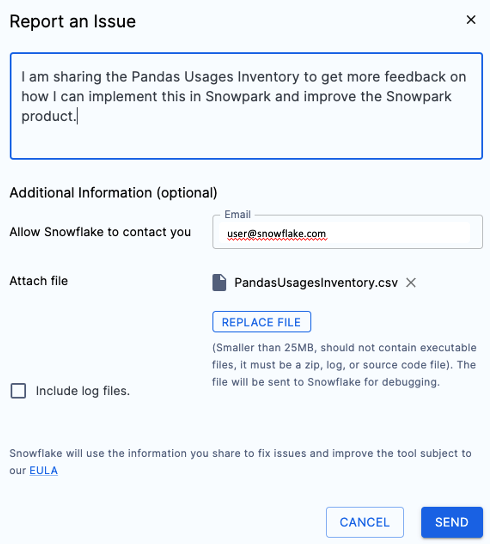
Via Email: Send your file(s) to sma-info@snowflake.com along with an explanation of why you’re sharing them.
이 방법은 컴퓨터의 폴더를 탐색하는 것만큼이나 간단합니다.