Snowpark Migration Accelerator: SMA CLI 워크스루
The Snowpark Migration Accelerator (SMA) helps developers migrate their Python or Scala Spark code to Snowpark. It analyzes your code and:
Snowpark와의 호환성 평가
호환되는 Spark API 호출을 Snowpark API 로 자동 변환합니다
자동으로 변환할 수 없는 코드를 식별합니다
스크립트 및 노트북에서 서드 파티 라이브러리 가져오기 인벤토리를 만듭니다
Spark와 Snowpark 코드를 비교하는 편집 가능한 호환성 보고서를 생성합니다
Snowflake는 Snowpark Migration Accelerator(SMA)를 위한 명령줄 인터페이스(CLI)를 릴리스했습니다. 이 가이드에서는 CLI 를 독립형 도구로 사용하는 방법과 스크립트 내에서 사용하는 방법을 설명합니다.
CLI 사용하기
You can download the Command Line Interface (CLI) from the Download and Access section. Select the version that matches your operating system. You can store the CLI in any accessible location on your machine or container.
참고
참고: 이 안내에서는 Mac 컴퓨터의 스크린샷을 사용하지만, Windows 및 Linux 사용자도 프로세스는 유사합니다.
패키지 파일(.zip 또는 .tar 형식)을 다운로드한 후 해당 내용을 압축 해제합니다. 명령줄 인터페이스(CLI) 도구는 압축을 푼 파일 내의 “orchestrator” 폴더에 위치합니다.
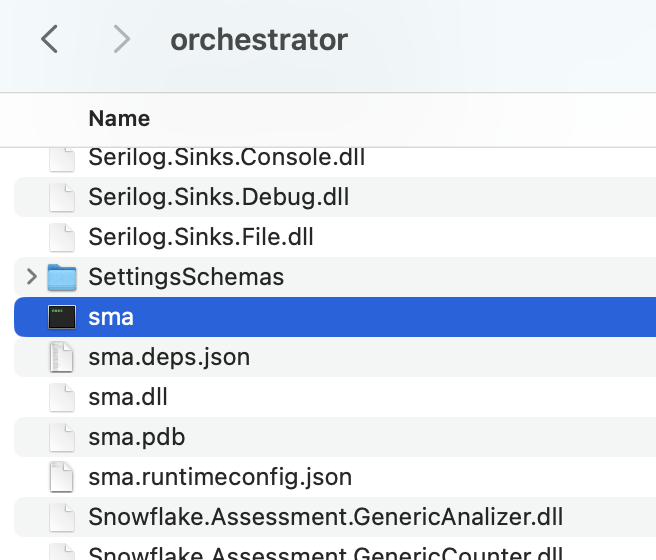
설치 폴더에서 터미널 또는 명령 프롬프트를 열고 다음 명령을 실행하여 CLI 설치를 확인하여 버전을 확인합니다.
./sma –version
다음과 같은 결과가 표시됩니다.

The SMA Command Line Interface (CLI) is a local application that runs on your computer, similar to the SMA desktop application. To analyze your code files using the SMA CLI, these files must be stored on your local machine where the CLI can access them. The CLI supports the same file types as the regular SMA application. For a complete list of supported file types, refer to the supported filetypes in the SMA documentation.
참고
NOTE: To test the CLI functionality, you can use the sample codebase provided in the Assessment section or refer to the Conversion walkthroughs in the SMA documentation.
CLI 인자의 전체 목록은 SMA 설명서에 포함되어 있습니다. 이 섹션에서 가장 중요한 내용을 살펴 보겠습니다.
The SMA CLI runs in Conversion mode by default, rather than Assessment mode. To run the CLI in assessment mode, use the -a argument. For conversion operations, you’ll need a valid access code. To verify if you have a valid access code, use the following command:
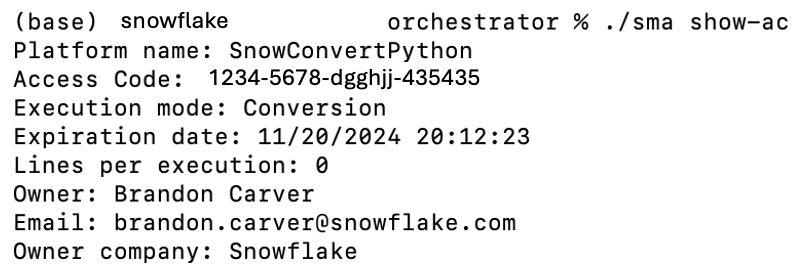
변환을 실행하려면 공급자가 제공해야 합니다.
입력 디렉터리(필수)
출력 디렉터리(필수)
이전에 프로젝트 파일을 생성하지 않았다면 이 파일도 제공해야 합니다.
사용자 이메일
조직 이름
프로젝트 이름
이러한 매개 변수를 처음 설정한 후에는 향후 변환을 위해 입력 및 출력 디렉터리만 지정하면 됩니다.
이 화면에는 실행 설정 요약이 표시되고 계속할지 여부를 확인하는 메시지가 표시됩니다.
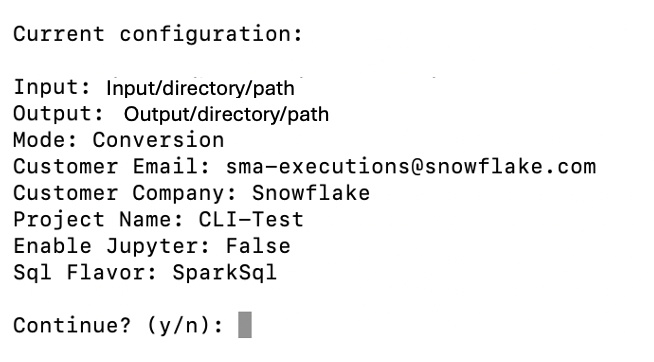
확인 메시지를 건너뛰려면 –yes 또는 -y 매개 변수를 추가합니다. 이는 자동화된 스크립트에서 CLI 를 실행할 때 특히 중요합니다.
이 도구는 실행 중 자세한 진행 정보를 제공합니다.
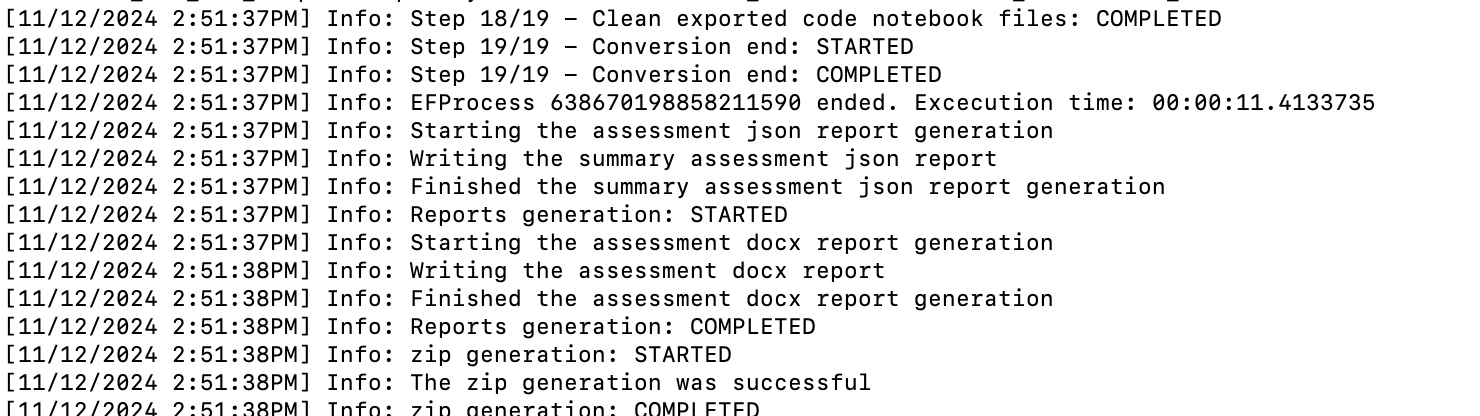
While the tool is running, it will continuously print output to the screen. When the process is complete, you will see the prompt again. The tool generates detailed output that includes all processes, issues, and completed or failed steps. You don’t need to read through all of this information while it’s running, as you can review it later in the Logs output folder.
출력 보기
SMA CLI 는 SMA 애플리케이션과 동일한 출력을 생성합니다. 도구를 실행하면 지정된 출력 디렉터리에 3개의 폴더가 생성됩니다.
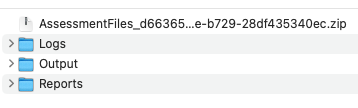
For detailed guidance on working with code that has been converted by the Snowpark Migration Accelerator (SMA), refer to the conversion walkthrough.
Using the Workspace Estimator
The SMA CLI includes a Workspace Estimator verb (we or workspace-estimator) that connects to a Databricks workspace, extracts metadata such as clusters, jobs, and runs, and optionally uploads the results to Snowflake for analysis.
Command hierarchy
The Workspace Estimator currently supports Databricks workspaces through the dbx subcommand. Running sma we dbx without a subcommand displays help listing the available subcommands:
sma we dbx run– Runs both extraction and upload in a single invocation.sma we dbx extract– Extracts workspace metadata to a local.zipfile only.sma we dbx upload– Uploads a previously extracted.zipfile to Snowflake.
Authentication
A Databricks Personal Access Token (PAT) is required for extraction. You can supply it in one of two ways:
Pass it directly with
-t/--token.Set the
SMA_DBX_TOKENenvironment variable. If--tokenis omitted, the CLI defaults to this variable.
Running extraction and upload together
When you provide all required options to sma we dbx run, the CLI extracts workspace metadata and uploads the resulting .zip file in a single step.
The following table lists the available options for sma we dbx run:
Option |
Short |
Required |
Default |
Description |
|---|---|---|---|---|
|
|
Yes |
– |
Databricks workspace URL (e.g. |
|
|
No |
|
Databricks Personal Access Token (PAT). |
|
|
No |
Current directory |
Directory where the extraction |
|
|
Yes |
– |
Logical name for the workspace. Cannot be empty or whitespace. |
|
|
No |
30 |
Number of days to look back for cluster events (15, 30, or 60). |
|
– |
No |
Information |
Minimum log level for diagnostic output (Trace, Debug, Information, Warning, Error, Critical). |
|
|
Yes |
– |
Company name for this estimation. Cannot be empty or whitespace. |
|
|
Yes |
– |
Email of the person performing the estimation. Must be a valid email address. |
Running extraction only
To extract workspace metadata without uploading, use the extract subcommand. This produces a .zip file in the specified output directory.
The extract subcommand accepts the same options listed in the run table above except --company-name and --email, which are only required for upload.
Uploading a previously extracted file
If you have already extracted workspace metadata to a .zip file, you can upload it separately using the upload subcommand.
The following table lists the available options for sma we dbx upload:
Option |
Short |
Required |
Default |
Description |
|---|---|---|---|---|
|
|
Yes |
– |
Path to an existing |
|
|
Yes |
– |
Company name for this estimation. Cannot be empty or whitespace. |
|
|
Yes |
– |
Email of the person performing the estimation. Must be a valid email address. |
|
|
Yes |
– |
Logical name for the workspace. Cannot be empty or whitespace. |
|
– |
No |
Information |
Minimum log level for diagnostic output (Trace, Debug, Information, Warning, Error, Critical). |
프로그래밍 방식으로 CLI 실행
곧 출시됩니다! SMA 팀에서 SMA 명령줄 인터페이스(CLI)를 여러 디렉터리에서 자동으로 실행할 수 있는 스크립트를 제공합니다.
Try out the Command Line Interface (CLI) today. If you need help or have questions, contact the Snowpark Migration Accelerator team at sma-support@snowflake.com.