Snowflake DCM Projects — Extended capabilities (early access)
Introduction
This document describes a rolling set of new DCM Project capabilities that are available in private preview to selected customers. These features extend the core DCM Projects functionality with additional object types and deployment capabilities.
Over time, this document will be extended with new capabilities as they become available for early testing. Once a capability is sufficiently tested and stable, it will progress into the Public Preview release of DCM Projects and be removed from this document.
Early access for the following DCM capabilities are currently available in private preview:
Nota
For the main DCM documentation of all publicly available functionality see: https://docs.snowflake.com/en/user-guide/dcm-projects/dcm-projects-overview
DDL Hooks
DDL Hooks are intended as an interim solution for defining a broader range of object types - until these are supported natively in DCM using DEFINE statements. DDL Hooks do not offer full functional parity to regular DCM definitions.
Capabilities of DDL Hooks
Each DCM Project can contain only 1 pre-hook and 1 post-hook
Each hook can contain multiple DDL statements
DDL statements inside a hook will be executed in the order they are defined by the user
Hooks can contain only 2 types of commands:
CREATE IF NOT EXISTS (recommended)
for one-time execution to create the object
Will be skipped any time an object with this fully-qualified name already exists
CREATE OR REPLACE
Will be executed at every DCM deployment
To be used if the definition of an existing object has changed and should be replaced completely
Only DDL statements are supported (no USE, no SET, no COPY INTO…)
Key Advantages of DDL Hooks compared to custom SQL pre- and post-scripts
DCM Hooks are plannable. You can plan dependencies on objects defined in pre-hooks and objects defined in post-hooks can depend on DCM definitions or pre-hooks.
Example:
Notification Integration defined in DCM pre-hook
Schema defined in DCM definitions
Alert defined in DCM post-hook (created inside Schema, using Notification Integration)
DCM Hooks support templating configurations
Leverage the same DCM jinja templating in hook DDLs
⚠️ Functional limitations:
Create statements from DCM-Hooks show as operations in the PLAN changeset and the deployment history, but do not include granular details about their individual properties
Errors from executing DCM Hooks don’t show the exact error line and in some cases not the full stack-trace
Removing a DDL statement from a DCM Hook does NOT drop the object
Hooks cannot be defined inside Jinja loops, as it would create multiple pre-/post-hooks. However, Jinja code including loops can be executed inside a hook.
Importante
Do not use DCM Hooks for object definitions that contain sensitive information or credentials. The rendered SQL definitions will not redact any values inserted by environment variables!
Comparison between DCM definitions, DDL Hooks, custom SQL pre-/post-scripts
Functionality |
DCM Definitions |
DDL Hooks |
Custom SQL scripts |
|---|---|---|---|
Uses DCM Jinja templating values |
✅ |
✅ |
🚫 |
Plannable dependencies |
✅ |
✅ |
🚫 |
DDL operations visible in PLAN output |
✅ |
✅ |
🚫 |
DDL operations stored in DCM deployment artifacts |
✅ |
✅ |
🚫 |
Removing definition -> drops object |
✅ |
🚫 |
🚫 |
Changed definition -> alters object |
✅ |
✅ (when using CREATE OR REPLACE) |
🚫 |
Automatically executed in the correct order based on dependencies |
✅ |
🚫 |
🚫 |
Supported object types for DDL Hooks
Stream
External Stage
Git Repository
File Format
Alert
Semantic View
Share
Network Policy
Network Rule
API Integration
Notification Integration
External Access Integration
Catalog Integration
Security Integration
Storage Integration
Once any of these object types are supported natively with DCM DEFINE statements, the hook support will be deprecated.
Examples:
DEFINE TASK with Target State
DEFINE TASK now supports a new target state property. You can specify in your DCM definitions for each individual Task if it should be STARTED or SUSPENDED after the deployment.
This removes the need to execute additional post-scripts to resume new Tasks. This property is independent of other changes to the Task definition. If you define a Task as STARTED and then suspend it outside of DCM, then a new deployment of that same definition will start the Task again.
DCM Projects handle the dependency resolution between root-task and child-task states.
Example:
Functional Limitations
All Tasks of a Task graph have to be defined within the same DCM Project.
DEFINE DBT PROJECT
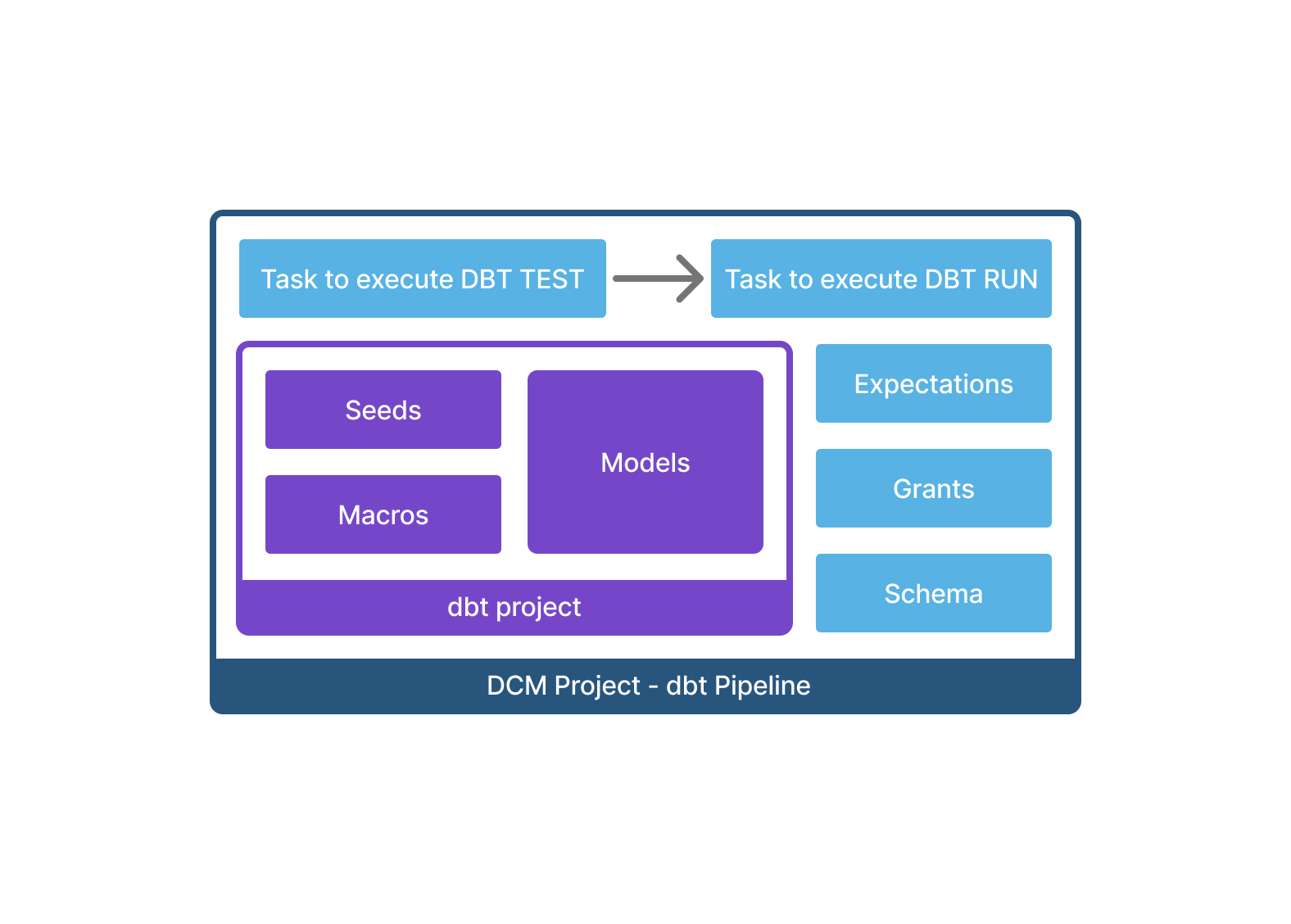
DCM Projects now support dbt. You can define a dbt project, its orchestration, infrastructure, and access control together in a single DCM project folder - then deploy everything to any environment with one command.
Most commonly used is the combination of dbt projects + Tasks to execute dbt test and dbt run on a defined schedule. You can define a DAG of Tasks to orchestrate runs of different dbt projects or individual models.
Create a DCM project for dbt
You can take your existing dbt project folder, which includes
models
dbt_project.yml
packages.yml
Profiles.yml
Etc.
and move it inside a DCM Project structure.
Then add the DEFINE DBT PROJECT statement to your DCM definitions with:
The relative path from the manifest to the dbt folder
A default target (which can use jinja templating to match the DCM deployment target)
In addition you can add Tasks to execute dbt commands after the deployment as well as grants on the dbt project object or future tables and views.
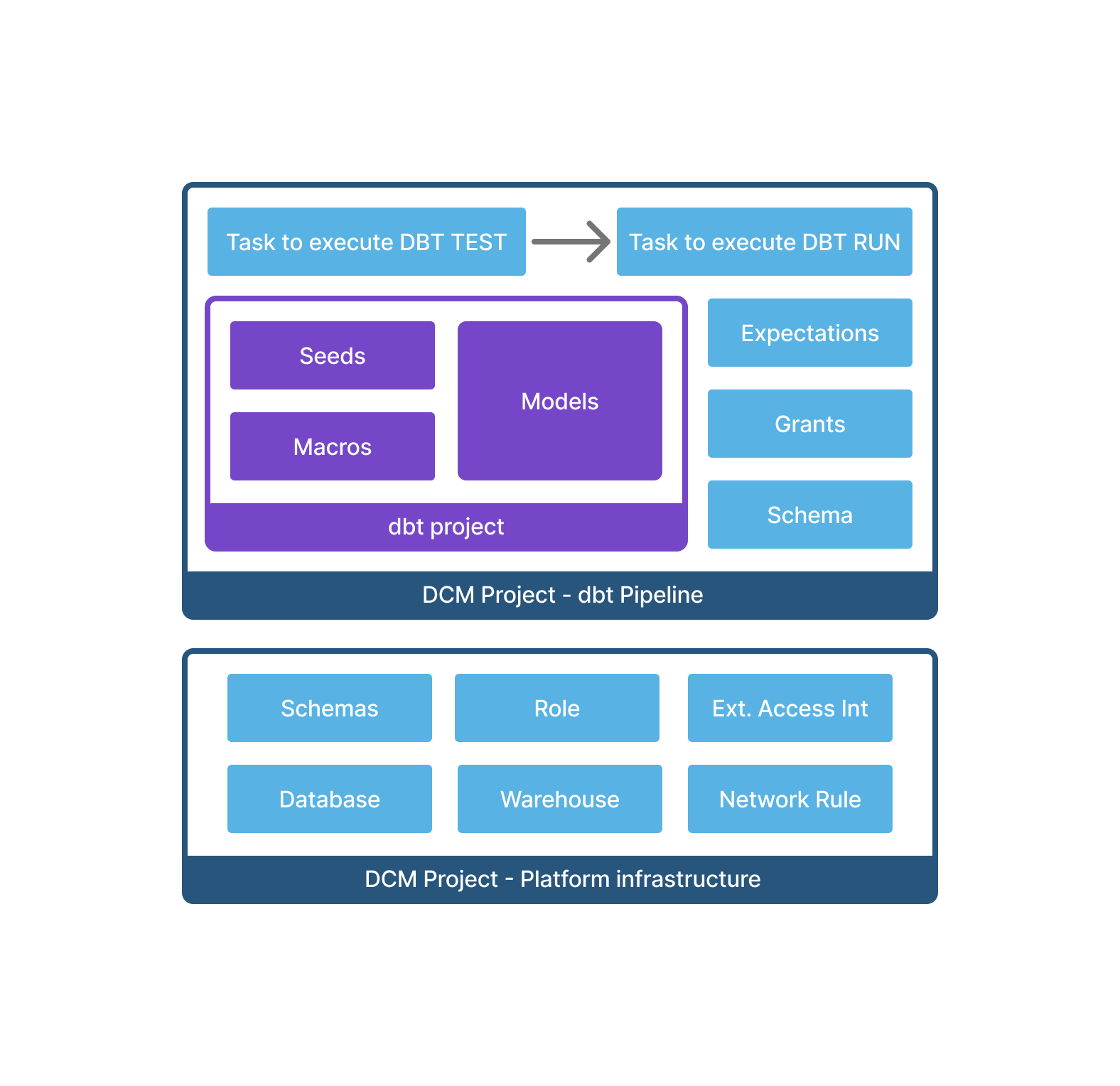
If you need to run dbt deps to get external packages, you can run CREATE NETWORK RULE IF NOT EXISTS and CREATE EXTERNAL ACCESS INTEGRATION IF NOT EXISTS in a DCM pre-hook (DCM Hooks are also part of this private preview).
Plan & deploy a DCM project for dbt
Run your regular DCM plan and deploy commands. If the DEFINE DBT PROJECT statement in your definitions has changed since the last successful deployment, then PLAN will:
Render the jinja templating
Compile the entire DCM project
Compile the dbt project
Show the dbt project as part of the plan output
Note that tables that are created by dbt will not show as «DCM managed entities» as they are not defined directly in the DCM definitions. Removing the DEFINE DBT statement will drop the dbt project object on the next deployment. But it will not drop the tables created by dbt.
You can also consider creating a new DCM Project for dbt on top of an existing «platform» project.
Functional Limitations
dbt templating variables and configuration values are completely isolated from DCM jinja templating. (there is no variable pass-through from the DCM manifest)
PLAN and DEPLOY output only shows the operation for a dbt project (CREATE / ALTER / DROP) but it does not show more granular changes in the dbt project configuration or models.
When running DCM PLAN for projects that include dbt projects, then dbt compile is executed for these dbt projects. In order for compile to succeed and therefore the DCM plan to succeed, the parent schema and all source tables for the dbt models have to be deployed already. If needed you can deploy the DCM project first without the dbt part and then test and deploy the dbt project.
Dependencies: dbt models can refer to other objects defined in DCM but other DCM objects can not reference tables created by dbt, meaning dbt projects can not have downstream dependencies.
For now only relative paths to dbt project files are supported. You can not specify a path to another repo or folder outside of the DCM project.
DEFINE PROCEDURE (SQL)
DCM Projects now support defining SQL stored procedures using the DEFINE PROCEDURE statement. This works the same as a standard Snowflake CREATE OR ALTER PROCEDURE statement, but uses the DEFINE keyword to deploy it via DCM Projects.
Example:
Functional Limitations
Only SQL-language procedures (
LANGUAGE SQL) are supported. Other languages (Python, Java, Scala, JavaScript) are not yet supported in DCM definitions.