Cortex AI Functions: Multimodal
Note
Audio and video processing using AI_COMPLETE is in public preview. All other multimodal capabilities described on this page are generally available.
Cortex AI Functions support multimodal analysis across documents, images, audio, and video, enabling end-to-end media understanding and processing pipelines directly inside Snowflake.
These functions process files stored on internal or external stages, extracting insights from textual, visual, and audio signals. They can be combined to build advanced workflows for summarization, classification, transcription, structured extraction, and analysis.
Cortex AI Functions give you instant access to industry-leading multimodal models to understand content across modalities, allowing you to integrate unstructured media with structured data for downstream analytics and applications.
Cortex AI Functions support a wide range of use cases, including:
- Content understanding: Summarize, classify, and describe documents, images, audio, and video.
- Data extraction: Extract structured information such as entities, objects, sentiment, and metadata.
- Document intelligence: Analyze charts, tables, and layouts within complex documents.
- Transcription and conversation analysis: Convert speech to text with timestamps and speaker identification.
- Multimodal analytics: Combine visual, audio, and textual signals for deeper insights.
- Knowledge base creation: Enrich datasets with media-derived context for search and discovery.
- Compliance and moderation: Detect harmful, unsafe, or policy-violating content.
Multimodal capabilities are available through existing Cortex AI Functions, including AI_COMPLETE,
AI_TRANSCRIBE, AI_CLASSIFY, AI_EMBED, and AI_SIMILARITY.
Supported media types and functions
Cortex AI Functions support extraction of specific information in structured format from documents, images, audio, and video files. You can define the exact schema you want the model to return, such as detected objects, colors, labels, or other domain-specific attributes.
| Media type | Primary functions | Common tasks |
|---|---|---|
| Documents | AI_COMPLETE, AI_PARSE_DOCUMENT, AI_EXTRACT | Q&A, summarization, extraction, comparison, chart understanding |
| Images | AI_COMPLETE, AI_CLASSIFY, AI_EMBED, AI_EXTRACT, AI_SIMILARITY, AI_FILTER | Caption, compare, classify, extract entities, image search |
| Audio | AI_COMPLETE, AI_TRANSCRIBE | Caption, compare, classify, extract entities, transcribe, identify speakers |
| Video | AI_COMPLETE, AI_TRANSCRIBE | Summarize, classify, extract metadata, search scenes, transcribe video or audio tracks |
| Video | AI_MULTI_EMBED (twelvelabs-marengo-embed-3-0 only) | Video semantic search such as scene search, quotes, visual similarity, sports events, and brand and product search |
Multimodal functions can process single or multiple files stored in internal or external stages. For information about creating a suitable stage, see Create stage for media files. In addition, you can dive deeper into Cortex AI for Document Intelligence in our dedicated documentation.
Examples
Video metadata extraction
The following example shows how to extract structured metadata from a library of social media videos using AI_COMPLETE. The query processes video files stored in a stage and returns a JSON object for each video, including sentiment, summary, detected brands and products, content safety classification, visual attributes, and music metadata.
In this example, a table is first created from staged video files using the FILE data type. The query then calls AI_COMPLETE with a multimodal model to analyze each video and return structured results. A filter is applied to show output for a single video file.
Response:
Video transcript analysis
The following example transcribes a video file stored in the
podcast_videos_S3 stage.
Response:
Once you have the transcript, you can use AI_COMPLETE to perform additional analysis. This example identifies retail brands mentioned in the conversation for use in advertising or sponsorship analytics.
Response:
Video search
Cortex AI Functions let you perform semantic video searches. To do this, you generate multimodal embeddings for the
video content using AI_MULTI_EMBED and store them in a table, where they can be searched using a SQL query.
The Twelve Labs Marengo 3 embedding model converts each video into one or more 512-dimensional vectors, capturing visual, audio, and text-based semantics across scenes or segments. These vectors can then be searched to find similar scenes, detect objects or actions, or retrieve relevant moments in large video libraries.
This example uses a small library of short-form videos (such as TikTok clips) stored in a Snowflake stage. The goal is to perform semantic search across this collection — for example, finding videos of a man riding a skateboard.
Note
This example is extensive and contains multiple steps that must be performed in sequence.
Create a media table to hold video metadata and embeddings
First, register the video library in a Snowflake table. Each row represents a video file stored in the stage.
Use the stage’s directory table to create FILE objects for each video, then store these in the table.
Inspect the table to verify that the table contains the video files from the stage:
Response:
Generate video embeddings
Next, use the AI_MULTI_EMBED function to generate embeddings for each video in the table. The following example
generates embeddings using the Twelve Labs Marengo 3 model.
The model returns a multimodal fingerprint of each video, with one or more embeddings for each modality (visual,
audio, transcription) and timestamps indicating the segment range (start_sec, end_sec). For example:
Create table of embeddings
To facilitate searching, create a new table that stores the video file along with its generated embeddings. Flatten
the embeddings arrays from the AI_MULTI_EMBED output so that each row of the new table contains a single embedding
vector for a segment of a video, along with its modality and timestamps. This structure is essentially a catalog of
scenes.
The result contains one row per embedding segment per video, with the following columns:
video_file: The FILE object representing the video.embedding_vec: The embedding vector for a segment in the video file.embedding_option: The modality of the embedding (visual, audio, or transcription).start_sec: The starting timestamp of the segment in seconds.end_sec: The ending timestamp of the segment in seconds.
Create text embedding from query and search
To search for relevant video segments, generate an embedding vector for the text query using the same embedding model used to generate the video clip embeddings. Then, compare the query embedding to the video embeddings stored in the table using a vector similarity function. Order the result by similarity to find the most relevant video segments. The result includes the video file, the timestamps, and the similarity score for each similar segment.
The top results show high similarity scores for two specific segments in a single video:
By checking the first video segment (from 5.5 to 11.5 seconds), you can confirm that it indeed contains a skateboarder.

Audio-based sentiment analytics
This example shows how to analyze a call center audio recording using AI_COMPLETE to extract structured sentiment insights based on both spoken content and vocal delivery. The model evaluates agent and customer behavior, including tone, professionalism, anger, and escalation signals, and returns a JSON object summarizing overall sentiment, participant dynamics, escalation events, and interaction outcome.
Response:
Vision Q&A example
The following example uses Anthropic’s Claude Sonnet 4.6 model to summarize a pie chart
science-employment-slide.jpeg stored in the @myimages stage.
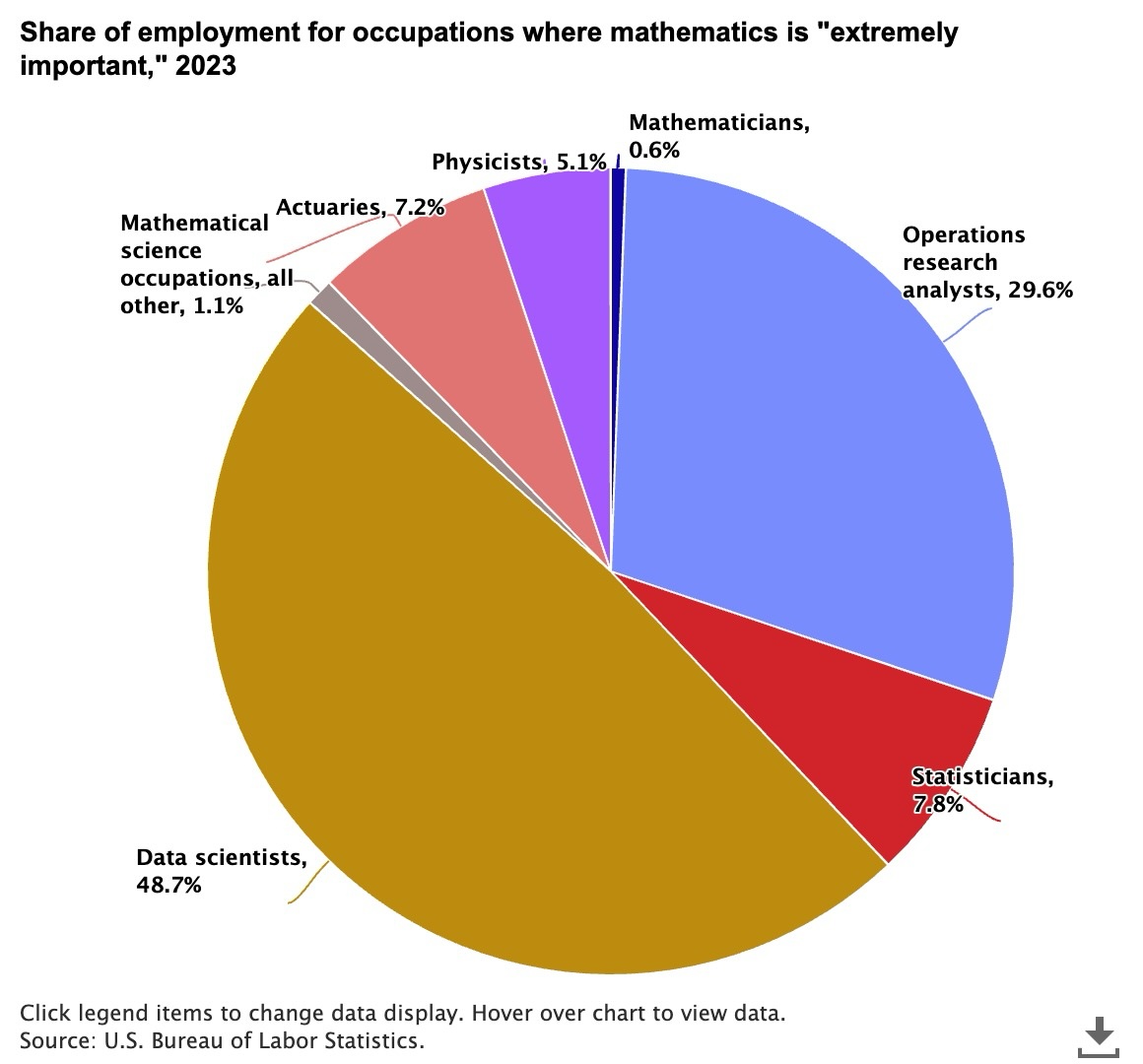
The distribution of occupations where mathematics is considered “extremely important” in 2023
Response:
Compare images example
Use the PROMPT helper function to process multiple images in a single
AI_COMPLETE call. The following example uses Anthropic’s Claude Sonnet 4.6 model to compare two different ad
creatives from the @myimages stage.

Image of two ads for electric cars
Response:
Create stage for media files
Cortex AI Functions that process media files (documents, images, audio, or video) require the files to be stored on
an internal or external stage. Most of these functions require the stage to use server-side encryption;
AI_MULTI_EMBED supports all stage encryption types, including server-side encryption (SSE) and
customer-side encryption (CSE). If you want to be able to query the stage or programmatically process all the
files stored there, the stage must have a directory table.
The SQL below creates a suitable internal stage:
To process files from external object storage (for example, Amazon S3), create a storage integration, then create an external stage that uses the storage integration. To learn how to configure a Snowflake storage integration, see our detailed guides:
Create an external stage that references the integration and points to your cloud storage container. This example points to an Amazon S3 bucket:
With an internal or external stage created, and files stored there, you can use Cortex AI Functions to process media files stored in the stage. For document parsing, see Parsing documents with AI_PARSE_DOCUMENT.
Note
Cortex AI Functions that process media files are currently incompatible with custom
network policies, except for AI_MULTI_EMBED, which supports network
policy protected stages.
Cortex AI Functions storage best practices
You may find the following best practices helpful when working with media files in stages with Cortex AI Functions:
-
Establish a scheme for organizing media files in stages. For example, create a separate stage for each team or project, and store the different types of media files in subdirectories.
-
Enable directory listings on stages to allow querying and programmatic access to its files.
Tip
To automatically refresh the directory table for the external stage when new or updated files are available, set AUTO_REFRESH = TRUE when creating the stage.
-
For external stages, use fine-grained policies on the cloud provider side (for example, AWS IAM policies) to restrict the storage integration’s access to only what is necessary.
-
Always use encryption, such as AWS_SSE or SNOWFLAKE_SSE, to protect your data at rest.
Model limitations
All models available to Snowflake Cortex have limitations on the total number of input and output tokens, known as the model’s context window. The context window size is measured in tokens. Inputs exceeding the context window limit result in an error. Output which would exceed the context window limit is truncated.
For text models, tokens generally represent approximately four characters of text, so the word count corresponding to a limit is less than the token count.
For multimodal models, the token count per image and video depends on the model’s architecture. Tokens within a prompt (for example, “what animal is this?”) also contribute to the model’s context window.
| Model | Context window (tokens) | File types | File size | Files per prompt |
|---|---|---|---|---|
openai-gpt-4.1 | 1,047,576 | .jpg, .jpeg, .png, .webp, .gif | 10MB | 5 |
claude-4-opus | 200,000 | .jpg, .jpeg, .png, .webp, .gif | 3.75 MB [L1] | 20 |
claude-4-sonnet | 200,000 | .jpg, .jpeg, .png, .webp, .gif | 3.75 MB [L1] | 20 |
claude-3-7-sonnet | 200,000 | .jpg, .jpeg, .png, .webp, .gif | 3.75 MB [L1] | 20 |
claude-sonnet-4-6 | 1,000,000 | .jpg, .jpeg, .png, .webp, .gif | 3.75 MB [L1] | 20 |
llama4-maverick | 128,000 | .jpg, .jpeg, .png, .webp, .gif, .bmp | 10 MB | 10 |
llama-4-scout | 128,000 | .jpg, .jpeg, .png, .webp, .gif, .bmp | 10 MB | 10 |
pixtral-large | 128,000 | .jpg, .jpeg, .png, .webp, .gif, .bmp | 10 MB | 8 |
voyage-multimodal-3 | 32,768 | .jpg, .png, .pg, .gif, .bmp | 10 MB | 5 |
gemini-3.1-pro | 1,000,000 | Images: .jpg, .jpeg, .png, .webp, .gif Audio: .wav, .mp3, .aiff, .aac, .ogg, .flac, .m4a, .mp4, .pcm, .webm Video: .mp4, .mpeg, .mov, .avi, .flv, .mpg, .webm, .wmv, .3gpp | 100 MB combined [P1] | 20 images + 10 audio + 10 video [P1] |
gemini-3.1-flash-lite | 1,048,576 | Images: .jpg, .jpeg, .png, .webp, .gif Audio: .wav, .mp3, .aiff, .aac, .ogg, .flac, .m4a, .mp4, .pcm, .webm Video: .mp4, .mpeg, .mov, .avi, .flv, .mpg, .webm, .wmv, .3gpp | 100 MB combined [P1] | 20 images + 10 audio + 10 video [P1] |
gemini-3.5-flash | 1,000,000 | Images: .jpg, .jpeg, .png, .webp, .gif Audio: .wav, .mp3, .aiff, .aac, .ogg, .flac, .m4a, .mp4, .pcm, .webm Video: .mp4, .mpeg, .mov, .avi, .flv, .mpg, .webm, .wmv, .3gpp | 100 MB combined [P1] | 20 images + 10 audio + 10 video [P1] |
twelvelabs-marengo-embed-3-0 [M1] | 4 hours (duration) [M2] | Video: .mp4, .mov, .avi, .mkv, .wmv, .webm | 6 GB (video or audio) [M3] | N/A (embedding model) |
Note
For per-model regional availability, see Regional availability on the Cortex AI Functions page.
Error conditions
| Message | Explanation |
|---|---|
| Request failed for external function SYSTEM$COMPLETE_WITH_IMAGE_INTERNAL with remote service error: 400 ‘”invalid image path” | Either the file extension or the file itself is not accepted by the model. The message might also mean that the file path is incorrect; that is, the file does not exist at the specified location. Filenames are case-sensitive. |
| Error in secure object | May indicate that the stage does not exist. Check the stage name and ensure that the stage exists and is accessible. Be sure to use the at (@) sign at the beginning of the stage path, such as @myimages. |
| Request failed for external function _COMPLETE_WITH_PROMPT with remote service error: 400 ‘”invalid request parameters: unsupported image format: image/** | Unsupported image format given to claude-sonnet-4-6, that is, other than .jpeg, .png, .webp, or .gif. |
| Request failed for external function _COMPLETE_WITH_PROMPT with remote service error: 400 ‘”invalid request parameters: Image data exceeds the limit of 5.00 MB” | The provided image given to claude-sonnet-4-6 exceeds 5 MB. |
Legal
The data classification of inputs and outputs are as set forth in the following table.
| Input data classification | Output data classification | Designation |
|---|---|---|
| Usage Data | Customer Data | Generally available functions are Covered AI Features. Preview functions are Preview AI Features. [1] |
For additional information, refer to Snowflake AI and ML.