Snowflake Code Bundles
Code Bundles let you package and execute non-SQL jobs, like Python, directly on Snowflake compute. Instead of building containers, wrapping logic in stored procedures, or porting your scripts into notebooks, you can upload your project code and run it with a single command. Snowflake automatically injects a Snowpark session at runtime, giving your code direct access to your data without managing connection credentials. You can orchestrate Code Bundles natively with Snowflake Tasks, or externally using the Snowflake CLI or REST APIs (coming soon).
You can also use Code Bundles to run Spark jobs (Scala, Java, or Python) on Snowflake warehouse compute. See Submit Spark jobs on Snowflake for details.
Code Bundles support two compute targets:
- Warehouse: Run Python scripts on Snowflake warehouse compute. Best for data processing jobs, ETL scripts, and workloads where the majority of the processing occurs in the warehouse as pushed-down SQL or UDFs.
- Compute pool (Snowpark Container Services): Run on Snowpark Container Services. Best for workloads where more processing occurs in the Python process, jobs requiring GPU, or custom container runtimes.
Key concepts
| Concept | Description |
|---|---|
| Code Bundle | A named object containing your project source files, created from a stage, workspace, or local directory. |
| Specification | A YAML configuration (code_bundle.yml) defining compute type, runtime version, dependencies, secrets, environment variables, and other settings. |
| Entrypoint | The file within the bundle that Snowflake executes (for example, main.py). |
| Source | Where the bundle files come from: a stage path (@my_stage/path), workspace path (snow://workspace/...), or local directory. |
| Version | An immutable snapshot of bundle files. New versions are added with ALTER CODE BUNDLE ... ADD VERSION. |
Access control
Code Bundles use Snowflake’s standard role-based access control model. There are two privileges relevant to Code Bundles:
- CREATE CODE BUNDLE on a schema: Allows a role to create new Code Bundles in that schema.
- OWNERSHIP or USAGE on a Code Bundle: Allows a role to execute the Code Bundle.
Grant permission to create Code Bundles
An administrator must grant the CREATE CODE BUNDLE privilege to the roles that need to create bundles.
You can grant this at the schema level or omit ON SCHEMA to grant it at the account level:
Grant permission to execute Code Bundles
Once a Code Bundle exists, any role with OWNERSHIP or USAGE on it can execute it:
Quickstart (Snowsight)
This minimal example creates and executes a Code Bundle using SQL.
-
Create a new private workspace.
Go to Projects » Workspaces » + » Private Workspace and create a new private workspace named
my_private_workspace.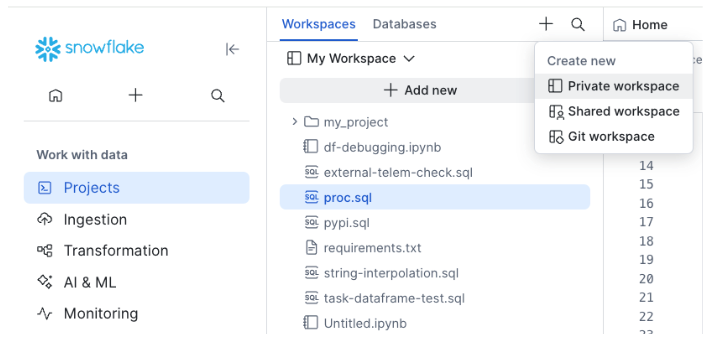
-
Write a Python script (
main.py).Select Add new » Python file.
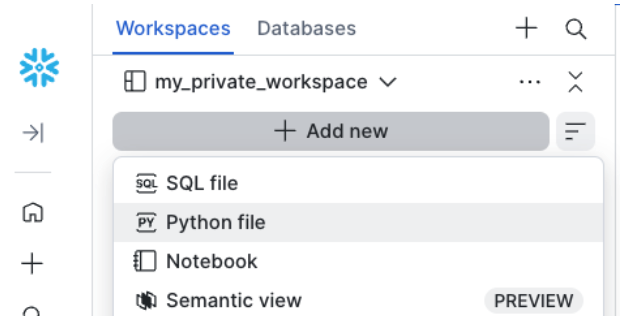
Name it
main.pyand paste in the following contents. -
Add a bundle definition file.
Create a file named
code_bundle.ymland paste in the following contents.You can also configure your Code Bundle to run on compute pools, as shown in Compute pool (Snowpark Container Services) compute.
-
Create the Code Bundle.
Open a SQL file, paste the contents below, and replace the
<placeholder>strings with the database and schema to create the Code Bundle in. -
Execute the bundle.
Next steps
Now that you have created and executed your first Code Bundle, here are some common scenarios you might encounter:
Quickstart (Snowflake CLI)
This guide walks you through setting up your environment, creating your first Code Bundle, and executing it using the Snowflake CLI.
Prerequisites
- Ensure you have Python installed (3.10 through 3.12) to run the Snowflake CLI locally. This is separate from the runtime version your Code Bundle uses on Snowflake compute, which you set in
code_bundle.yml. - You need to install the development version of the Snowflake CLI to access Code Bundle features.
-
Install the development version of the CLI using
uvorpip.Verify the installation by checking the version. Confirm that the output version ends with
.dev0. The major, minor, and patch versions might be different. -
Prepare your project.
Clone the sample repository to your local machine:
This sample project contains two key files:
main.py: The Python job that runs on Snowflake.code_bundle.yml: The bundle configuration, which is set up to run the Python project on warehouses.
Create a Code Bundle from your local directory. Use the
--excludeflag with a glob pattern to ignore unnecessary files like virtual environments or bytecode. To exclude a directory and its contents, match the contents with a pattern likevenv/**. -
Execute the Code Bundle.
Run your Code Bundle by specifying the entrypoint file. This command executes your Python script on Snowflake compute:
Next steps
Now that you have created and executed your first Code Bundle, here are some common scenarios you might encounter:
Configuration overview (code_bundle.yml)
The code_bundle.yml file defines how your Code Bundle runs. Place it in the root of your project directory. The following examples show how to run your Code Bundle on virtual warehouses and compute pools. For a full reference of the configuration options, see code_bundle.yml reference.
Warehouse compute
To run your Code Bundle on a Snowflake warehouse, set the compute_type to warehouse. When EXECUTE CODE BUNDLE runs, the Code Bundle runs on the virtual warehouse set in the current session (for example, set by USE WAREHOUSE ...).
Compute pool (Snowpark Container Services) compute
To run your Code Bundle on a compute pool, set the compute_type to compute_pool. The Code Bundle runs on the compute pool specified in compute_options.compute_pool. For a full list of Container Runtime options, see Snowflake Container Runtime releases.
Other configurations
The code_bundle.yml file also lets you configure many additional settings like external access integrations, artifact repositories, Snowflake secrets, and more. See the code_bundle.yml reference for more information.
Examples
Passing arguments
Pass arguments to your code with the ARGUMENTS clause in SQL or after the -- option in the CLI. Your application code can get these input arguments using standard library methods like sys.argv or argparse.
SQL:
CLI:
Python example that gets the input arguments:
Attaching secrets and external access
To call external APIs, create a secret, network rule, and external access integration, then attach them to your bundle.
-
Create the Snowflake objects:
-
Attach the objects to the Code Bundle.
To attach the secret and external access integration objects to the Code Bundle, add the object names to the
code_bundle.ymlfile under thesecretsandexternal_access_integrationsproperties respectively. -
Read the secret in Python.
In your Python script or notebook file, you can get the secret value as shown below.
The string you pass to
get_generic_secret_string()("MY_DB.PUBLIC.MY_API_KEY") must match the name of a secret listed undersecretsincode_bundle.yml.
Define environment variables
You can define environment variables in code_bundle.yml. From your application code, you can access them with standard libraries like os.environ (for Python).
code_bundle.yml:
Python:
Mounting stages (Snowpark Container Services)
When running on a compute pool, you can mount Snowflake stages as local file system paths.
code_bundle.yml:
Python:
Async execution
Run a bundle asynchronously to avoid blocking. Use status to poll and cancel to abort.
CLI:
Inline specification override
Override the stored code_bundle.yml at execution time using WITH SPECIFICATION. This is useful for testing different configurations without modifying the bundle.
Scheduling with tasks
Wrap EXECUTE CODE BUNDLE in a Snowflake task to run on a schedule.
Local development
If you choose to do your development in an external environment, like VS Code or Cortex Code on your laptop, you can create a Snowpark session to connect to your Snowflake account and iterate on your scripts locally for development. To allow the same code to run on the Snowflake server without code changes, the session configuration is overridden when you run it as a Code Bundle on Snowflake.
Let’s look at an example.
The example script below connects to Snowflake using a connection defined in the connections.toml file.
You can run this from your laptop using python main.py (or, if using uv, uv run main.py). The Snowpark client connects to the given Snowflake account, and you can develop from your laptop.
When you’re ready to deploy to Snowflake, you can use the Snowflake CLI:
Now when this Code Bundle executes on Snowflake, getOrCreate() returns the Snowpark session that Snowflake injects at runtime. The runtime overrides the local session configuration, so the same code runs on Snowflake without changes.
code_bundle.yml reference
| Field | Warehouse | Compute pool (Snowpark Container Services) |
|---|---|---|
compute_type | warehouse | compute_pool |
compute_options.runtime_version | Python version (for example, 3.11) | Container image version (for example, V2.5-CPU-PY3.12) |
compute_options.compute_pool | N/A | Required |
compute_options.query_warehouse | N/A | Optional (for SQL queries inside your script) |
properties.requirements_file | Optional | Optional |
env_vars | Optional | Optional |
secrets | Optional | Optional |
external_access_integrations | Optional | Optional |
stage_mounts | N/A | Optional |
artifact_repositories | Optional | Optional |
bundle.type
The type property instructs Snowflake how to execute the bundle. The currently supported values are custom and spark. See Submit Spark jobs on Snowflake for more details about type: spark.
bundle.compute_
The compute_type property designates where the Code Bundle runs. The currently supported values are warehouse and compute_pool.
bundle.language
The language property specifies the runtime language for the Code Bundle.
For custom Code Bundles running on the warehouse, the currently supported option is python. For custom Code Bundles running on compute pools, the currently supported option is python.
To run Spark workloads in Python, Scala, or Java using the spark bundle type, see Submit Spark jobs on Snowflake.
bundle.compute_
The compute_options object specifies the options of your compute_type, for example the compute pool and Python version to run on.
If your Code Bundle is configured to run on the warehouse (with bundle.compute_type: warehouse), the bundle is executed on the current warehouse for the session.
bundle.compute_
The runtime_version property specifies the version of the runtime language to use. Always quote the value. In YAML, an unquoted version like 3.10 is parsed as the number 3.1, which can select the wrong runtime.
- The currently supported versions of Python on the warehouse are:
'3.10','3.11','3.12','3.13' - The currently supported versions of Python on compute pools follow the pattern
<runtime-version>-<accelerator>-PY<python-version>. The supported versions are documented in Snowflake Container Runtime releases. For example:V2.5-CPU-PY3.11.
bundle.compute_
(Only applicable to Code Bundles with compute_type: compute_pool)
The compute_pool property specifies the compute pool to execute the Code Bundle on. For example: MY_DB.MY_SCHEMA.MY_COMPUTE_POOL.
bundle.compute_
(Only applicable to Code Bundles with compute_type: compute_pool)
The query_warehouse property specifies the Snowflake virtual warehouse used for executing SQL and Snowpark queries from the Code Bundle. For example: MY_DB.MY_SCHEMA.MY_WAREHOUSE.
bundle.properties
The properties object specifies type-specific properties for the Code Bundle. For example, specifying your requirements.txt or pyproject.toml file for Snowflake.
bundle.properties.requirements_
The requirements_file parameter specifies your requirements.txt or pyproject.toml file when using type: custom and language: python.
By default, packages are installed from the snowflake.snowpark.pypi_shared_repository artifact repository. You can specify an alternate artifact repository under the artifact_repositories list.
For example:
bundle.artifact_
The artifact_repositories list specifies the artifact repository or repositories to use to install Python packages from.
On the warehouse (compute_type: warehouse), only one artifact repository can be specified (a list of one entry).
On compute pools (compute_type: compute_pool), the Anaconda repository (snowflake.snowpark.anaconda_shared_repository) can’t be used.
For example:
bundle.external_
The external_access_integrations list specifies one or more external access integrations to attach to the Code Bundle.
For example:
bundle.secrets
The secrets list specifies one or more Snowflake secrets to attach to the Code Bundle.
For example:
bundle.env_
The env_vars property is a list of environment variable key/value pairs to set in the runtime environment. You can use this to configure application code or third-party libraries that fetch configuration settings from environment variables.
For example:
stage_
The stage_mounts list specifies one or more Snowflake stages to mount to the runtime environment. Each stage mount is a named YAML object that specifies the stage to mount and the location in the runtime environment to mount to.
For example:
stage_
The stage_url property specifies the stage path to mount to the corresponding mount_path. This can specify an entire stage, a subdirectory of a stage, or a single file.
stage_
The target directory path inside the Code Bundle runtime to mount the stage to.
SQL reference
CREATE CODE BUNDLE
Creates a new Code Bundle from source files.
Parameters:
| Parameter | Description |
|---|---|
<name> | Identifier for the code bundle. |
FROM <source> | Source location: a stage path (@stage/path) or a workspace path (snow://workspace/...). |
COMMENT | Optional description. |
Examples:
Access control requirements
To execute CREATE CODE BUNDLE, a role must have sufficient privileges to create objects in the target database and schema. Required privileges include:
- USAGE or OWNERSHIP on the database.
- USAGE or OWNERSHIP on the schema.
- CREATE CODE BUNDLE on the schema that allows creating objects within that schema.
For instructions on creating a custom role with a specified set of privileges, see Creating custom roles.
For general information about roles and privilege grants for performing SQL actions on securable objects, see Overview of Access Control.
EXECUTE CODE BUNDLE
Runs a Code Bundle at the specified entrypoint.
Parameters:
| Parameter | Description |
|---|---|
ENTRYPOINT | File path within the bundle to execute. |
ARGUMENTS | List of command-line argument strings passed to the script. |
WITH SPECIFICATION | Inline YAML specification that overrides the stored code_bundle.yml. |
Examples:
Access control requirements
To execute EXECUTE CODE BUNDLE, a role must have either OWNERSHIP or USAGE privileges on the Code Bundle object.
If the Code Bundle is configured to run on Compute Pools (compute_type: compute_pool) then the executing role must have USAGE and MONITOR on the query warehouse, and USAGE or OWNERSHIP on the compute pool and the database and schema containing the Code Bundle.
In addition, the executing role must have USAGE or OWNERSHIP on the External access integrations, secrets, artifact repositories, and other objects referenced in the configuration file.
For instructions on creating a custom role with a specified set of privileges, see Creating custom roles.
For general information about roles and privilege grants for performing SQL actions on securable objects, see Overview of Access Control.
ALTER CODE BUNDLE
Adds a new version to an existing Code Bundle.
Example:
DESCRIBE CODE BUNDLE
Returns metadata about a Code Bundle.
SHOW CODE BUNDLES
Lists all Code Bundles in the current schema.
DROP CODE BUNDLE
Removes a Code Bundle.
CODE_
Returns the execution history for a Code Bundle. All parameters are optional and act as filters.
Parameters:
| Parameter | Type | Description |
|---|---|---|
BUNDLE_NAME | STRING | Name of the Code Bundle to filter by. You can supply a fully qualified name (DATABASE.SCHEMA.BUNDLE) or a bare identifier combined with the DATABASE and SCHEMA parameters. |
DATABASE | STRING | Database to use when resolving a bare BUNDLE_NAME. Ignored when BUNDLE_NAME is fully qualified. |
SCHEMA | STRING | Schema to use when resolving a bare BUNDLE_NAME. Ignored when BUNDLE_NAME is fully qualified. |
ENTRYPOINT | STRING | Exact match on the path of the entrypoint file that was executed (for example, main.py). |
START_TIME_RANGE_START | TIMESTAMP_LTZ | Start of the time window (inclusive). Returns only executions whose start time is on or after this timestamp. |
START_TIME_RANGE_END | TIMESTAMP_LTZ | End of the time window (inclusive). Returns only executions whose start time is on or before this timestamp. |
BUNDLE_TYPES | STRING | Comma-separated list of bundle types to include. Case-insensitive. Allowed values: custom and spark. |
COMPUTE_TYPES | STRING | Comma-separated list of compute types to include. Case-insensitive. Allowed values: warehouse and compute_pool. |
LANGUAGE_TYPES | STRING | Comma-separated list of language runtimes to include. Case-insensitive. Allowed values: python, java, scala. |
STATUS | STRING | Single status value to filter by. Allowed values: pending, running, done (succeeded), failed, cancelled (or canceled), deleted. |
EXECUTION_NAME | STRING | Exact match on the EXECUTION_NAME property that was set in EXECUTE CODE BUNDLE. |
RESULT_LIMIT | INTEGER | Maximum number of rows to return. Defaults to 100. |
Example:
CLI reference
Install the CLI with Code Bundle support:
snow bundle create
Creates a Code Bundle from a local directory, stage, or workspace.
| Option | Description |
|---|---|
--source, -s (required) | Source location. Supports stage (@stage/path), workspace (snow://workspace/...), or local path (./my_project/). |
--comment | Comment for the object. |
--overwrite | Replace if it already exists (CREATE OR REPLACE). |
--skip-if-exists | Skip creation if it already exists (IF NOT EXISTS). |
--exclude | Glob pattern to exclude from local source (repeatable). Ignored for stage and workspace sources. |
Examples:
snow bundle execute
Executes a Code Bundle. Arguments after -- are passed to the script.
| Option | Description |
|---|---|
--entrypoint (required) | File path within the bundle to execute. |
--async | Run asynchronously and return the query ID immediately. |
Examples:
snow bundle list
Lists Code Bundles.
| Option | Description |
|---|---|
--like | Filter bundles by pattern (for example, "MY_%"). |
--in-account | List all bundles across the account. |
--in-database | Scope to a specific database. |
Examples:
snow bundle alter
Alters a Code Bundle by adding a new version.
| Option | Description |
|---|---|
--add-version | Source path for the new version. |
Example:
snow bundle delete
Drops a Code Bundle.
| Option | Description |
|---|---|
--if-exists | Don’t error if the bundle doesn’t exist. |
Examples:
snow bundle status
Returns the execution status of an async Code Bundle execution.
Example:
snow bundle history
Returns the execution history of a Code Bundle.
| Option | Description |
|---|---|
--result-limit | Maximum number of history records to return. |
Example:
snow bundle cancel
Cancels an async Code Bundle execution.
Example: