Instruction files
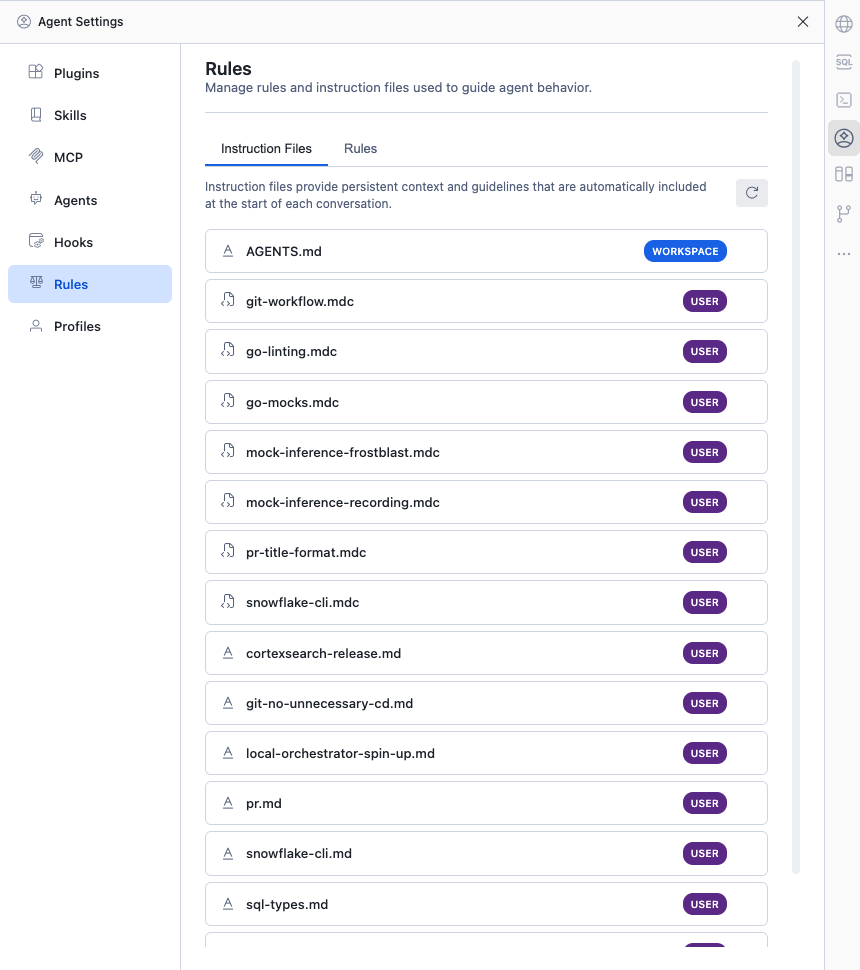
Instruction files provide persistent context and guidelines that are automatically included at the start of each conversation. Use them to tell the agent about your project’s conventions, preferred tools, coding style, or anything it should always keep in mind.
Supported file names
Cortex Code Desktop automatically discovers instruction files by name. The following file names are recognized:
| File name | Description |
|---|---|
AGENTS.md | Primary instruction file for the project |
CLAUDE.md | Claude-compatible instruction file |
CORTEX.md | Cortex-specific instruction file |
SNOWFLAKE.md | Snowflake-specific instruction file |
RULES.md | General rules file |
.cursorrules | Cursor-compatible rules file |
.cursor/rules/*.mdc | Cursor MDC rule files |
.claude/rules/*.md | Claude rule files |
File names are matched case-insensitively. You can customize which patterns are discovered
via the chat.instructionFilePatterns setting.
File locations
Workspace scope (project-level)
Workspace-scoped instruction files live in your project and are shared with your team via source control. They are searched in these locations:
- Workspace root — for example,
/my-project/AGENTS.md - Every directory from workspace root up to git root — supports monorepos where the workspace is a subdirectory
.cursor/rules/*.mdc— relative to git root.claude/rules/*.md— relative to git root
Tip
In a monorepo, place a root-level AGENTS.md with shared conventions, and per-package
AGENTS.md files with package-specific instructions. Both are discovered automatically
when you open a package as your workspace.
User scope (global)
User-scoped instruction files apply to all your projects. They are searched in:
~/.snowflake/cortex/— primary location for user instruction files~/— home directory (for example,~/CLAUDE.md)~/.claude/— Claude-compatible location
User-level .mdc files go in ~/.cursor/rules/.
User-level .md rule files go in ~/.claude/rules/.
File format
Markdown (.md)
Plain markdown. Write your instructions in any format — the full content is included as context for the agent.
MDC files (.mdc)
MDC files support an optional YAML frontmatter header that is stripped before injection. The body is plain markdown:
Instruction files with applyTo (.instructions.md)
Files ending in .instructions.md (placed in .github/instructions/) support
a YAML header with an applyTo glob pattern. The instruction is automatically
attached only when files matching the pattern are in the conversation context:
How instruction files are applied
Instruction file contents are automatically included at the start of each conversation. They are injected as context in the first message of the session — you do not need to reference them manually.
- All discovered instruction files are concatenated and included as context.
- Workspace files are included before user files.
- If two files have the same name at different scopes, the workspace version takes precedence.
- The total combined size is capped at approximately 100,000 characters. Files that would exceed this limit are skipped.
Precedence
When files from multiple sources are discovered, they are merged in this order:
- Workspace instruction files — project-specific, highest priority
- User-level instruction files — global personal rules
- Profile instruction files — from the active profile (if any)
Files are deduplicated by path. If a workspace file and a user file have the same name, the workspace version is used and the user version is skipped.
Viewing instruction files
Open Agent Settings and select Rules from the sidebar, then click the Instruction Files tab. This panel shows all discovered instruction files with their scope (Workspace or User). Click any file to open it in the editor.
Best practices
- Keep instructions focused. Include only information the agent needs for every conversation — coding style, project structure, key commands.
- Use workspace scope for team conventions. Put project-level rules in
AGENTS.mdat the project root and commit it to source control. - Use user scope for personal preferences. Put personal style preferences or global tool instructions in
~/.snowflake/cortex/. - Stay under the size limit. The combined instruction content is capped at ~100k characters. Keep files concise to leave room for conversation context.
- Use MDC or .instructions.md for conditional rules. Rules that only apply to certain file types benefit from glob-based scoping so they don’t clutter unrelated conversations.