Using Duo as a multi-factor authentication (MFA) method
This topic provides general information about using Duo in conjunction with multi-factor authentication (MFA), including administrative tasks that must be completed before users can use Duo as an MFA method. If you are a user who wants to set up Duo as your second factor of authentication, see Configuring a second factor of authentication.
Note
Users in trial accounts and Snowflake Open Catalog accounts cannot use Duo as their second factor of authentication. For other options, see Configuring a second factor of authentication.
Users don’t need to separately sign up with Duo or perform any tasks, other than installing the Duo Mobile application, which is supported on multiple smartphone platforms. For more information about supported platforms/devices and how Duo multi-factor authentication works, see the Duo User Guide .
Prerequisite
The Duo application service communicates through TCP port 443.
To ensure consistent behavior, update your firewall settings to include the Duo application service on TCP port 443.
For more information, see the Duo documentation.
MFA login flow
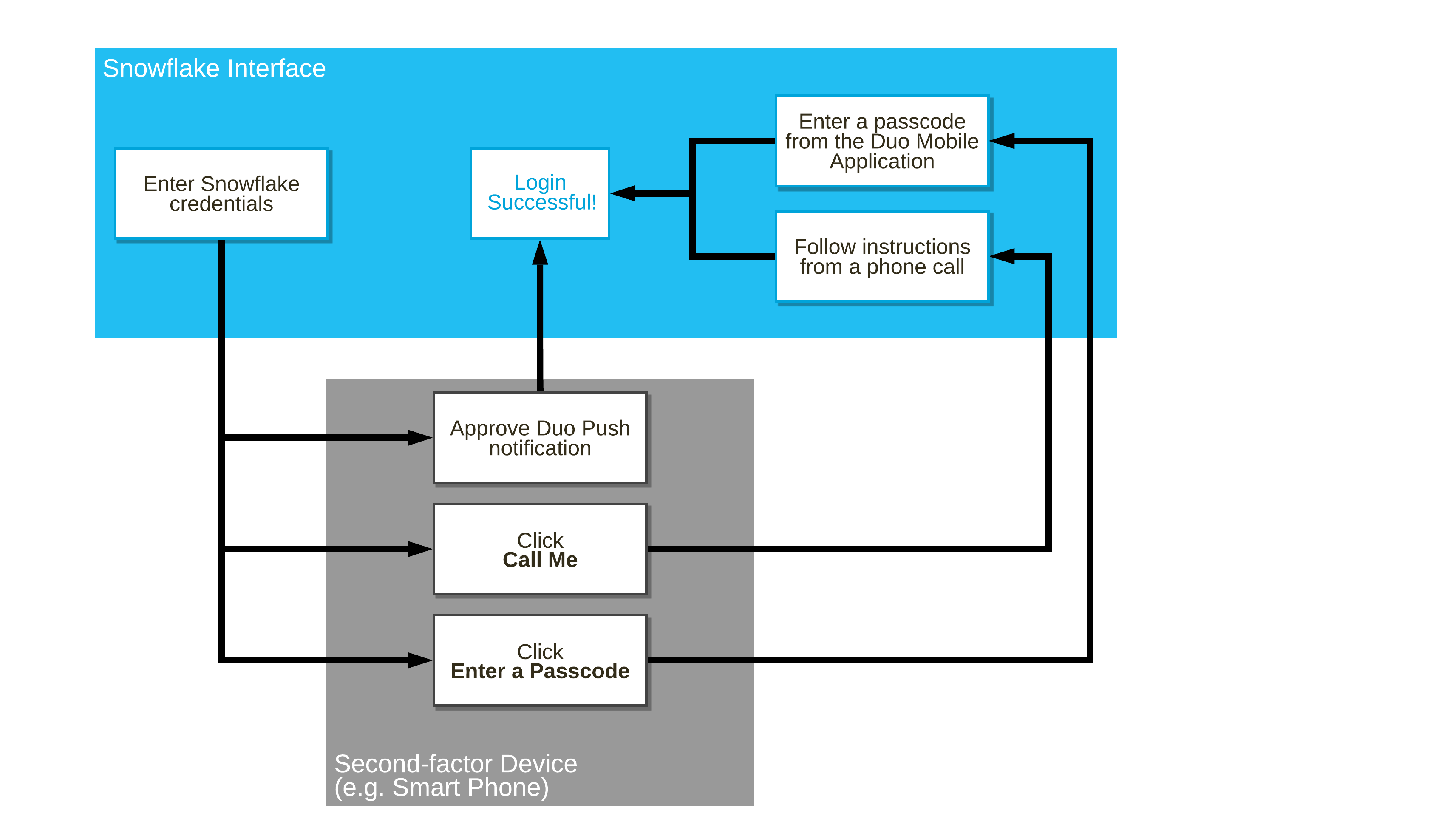
The following diagram illustrates the overall login flow for a user enrolled in MFA, regardless of the interface used to connect:
Switching phones used for MFA
Instant Restore is a Duo feature that allows a user to back up the Duo app before switching to a new phone. As long as a Snowflake user backs up their old phone first, they can use Instant Restore to enable authentication on the new phone without interrupting MFA for Snowflake.
If a user does not back up the old phone or loses the old phone, the Snowflake account administrator must help set up a new MFA method. For information, see Recovering a user who is locked out.
MFA error codes related to Duo
The following are error codes associated with MFA that can be returned during the authentication flow when the user is using Duo as their second factor of authentication.
The errors are displayed with each failed login attempt. Historical data is also available in Snowflake Information Schema and Account Usage:
- Information Schema provides data from within the past seven days and can be queried using the LOGIN_HISTORY , LOGIN_HISTORY_BY_USER table functions.
- The Account Usage LOGIN_HISTORY view provides data from within the past year.
| Error Code | Error | Description |
|---|---|---|
| 390120 | EXT_AUTHN_DENIED | Duo Security authentication is denied. |
| 390121 | EXT_AUTHN_PENDING | Duo Security authentication is pending. |
| 390122 | EXT_AUTHN_NOT_ENROLLED | User is not enrolled in Duo Security. Contact your local system administrator. |
| 390123 | EXT_AUTHN_LOCKED | User is locked from Duo Security. Contact your local system administrator. |
| 390124 | EXT_AUTHN_REQUESTED | Duo Security authentication is required. |
| 390125 | EXT_AUTHN_SMS_SENT | Duo Security temporary passcode is sent via SMS. Please authenticate using the passcode. |
| 390126 | EXT_AUTHN_TIMEOUT | Timed out waiting for your login request approval via Duo Mobile. If your mobile device has no data service, generate a Duo passcode and enter it in the connect string. |
| 390127 | EXT_AUTHN_INVALID | Incorrect passcode was specified. |
| 390128 | EXT_AUTHN_SUCCEEDED | Duo Security authentication is successful. |
| 390129 | EXT_AUTHN_EXCEPTION | Request could not be completed due to a communication problem with the external service provider. Try again later. |
| 390132 | EXT_AUTHN_DUO_PUSH_DISABLED | Duo Push is not enabled for your MFA. Provide a passcode as part of the connection string. |