Using change data capture with interactive tables
This topic explains how to use change data capture (CDC) with interactive tables. For general information about interactive tables and interactive warehouses, see Snowflake interactive analytics.
Key benefits over the standard MERGE INTO pattern
- Realtime updates
- Much less ingestion cost compared to standard MERGE INTO pattern for lower volume updates
- Query level option to control deduplication behavior
When to use
Scenarios where you want to capture changes from a source system (E.g. a transactional database such as MySQL and Postgres). For example, user profiles, product catalogs, latest pricing snapshots, etc.
When NOT to use
When your main workload is transactional processes, such as processing payments, inventory updates, etc. This should NOT be your primary transactional store. Specifically, we do not support multi-table transactions. Instead, you should use Hybrid Tables or Postgres tables for your transactional store. Use an interactive table with CDC as a mirror of your transactional store to accelerate your analytical queries.
Prerequisites
- Your account must be enabled for CDC, otherwise you’ll see an error that “VERSION BY” expression is not supported. Please contact Snowflake Support to enable CDC for your account.
- You must use Snowpipe High-Performance Architecture for ingestion
- You can only stream data into CDC-enabled interactive tables, batch loading and DMLs are not supported.
How CDC works for interactive tables
The interactive table with CDC support works as follows:
- Ingestion appends change events as new rows. The new row needs to contain all the values for all the columns, including the columns that are not changing.
- A deferred primary key defines the logical identity of each record.
- The VERSION BY expression determines which version wins when multiple rows share the same key. When multiple rows have the same VERSION BY value, Snowflake picks one at random because they represent the same data state.
- At query time, you can use the DEDUP_OPTION parameter to control whether Snowflake returns the latest deduplicated state, all versions, or the last merged state.
- Background deferred merge process merges multiple versions of the same logical record into a single row, where the highest VERSION BY valued record is kept. When there are conflicting rows, the system will pick one row at random (since they are equivalent).
Creating a CDC-enabled interactive table
Every CDC-enabled interactive table requires these elements:
- A deferred PRIMARY KEY constraint that identifies the logical record. (e.g., order_id)
- A VERSION BY expression that establishes which change is the latest version. (e.g. updated_at timestamp)
- A CLUSTER BY clause that aligns with your query patterns. (e.g., customer_id)
- A VOLATILE clause for columns that change across versions. (e.g., status, amount)
The general syntax is:
The following example creates a CDC-enabled interactive table named orders:
The preceding example declares order_id as the logical key, uses updated_at to decide which row is current, and marks status and amount and updated_at as changing columns.
Choosing CDC metadata
- PRIMARY KEY … INITIALLY DEFERRED
Identifies the columns that define a logical record for deduplication. This is not a traditional uniqueness constraint. Snowflake does not reject duplicate keys at write time. INITIALLY DEFERRED is to indicate that the constraint is only enforced during the deferred merge process.
- VERSION BY
Determines which row wins when multiple rows share the same primary key. Snowflake keeps the row with the highest VERSION BY value. Good choices include a source commit timestamp, monotonically increasing sequence number, or log sequence number.
- VOLATILE
Mark columns whose values change across versions. You MUST include column(s) in the VERSION BY clause. Use this for columns such as
statusoraccount_balancewhen queries often filter on those columns. For more information, see When to use VOLATILE.
For guidance on choosing clustering expressions, see Clustering Keys & Clustered Tables.
Choosing a scan option at query time
When you query a CDC-enabled interactive table, use DEDUP_OPTION to control whether
Snowflake returns the latest deduplicated state, all versions, or the last merged state.
Use these options as follows:
LATEST_DEDUPreturns the newest row per key by merging the latest ingested data at query time.LATEST_ALLreturns all versions without deduplication/merging.LAST_DEDUPreturns the latest deduplicated state as of the last merge point. This is typically the fastest option, but it can be slightly stale.
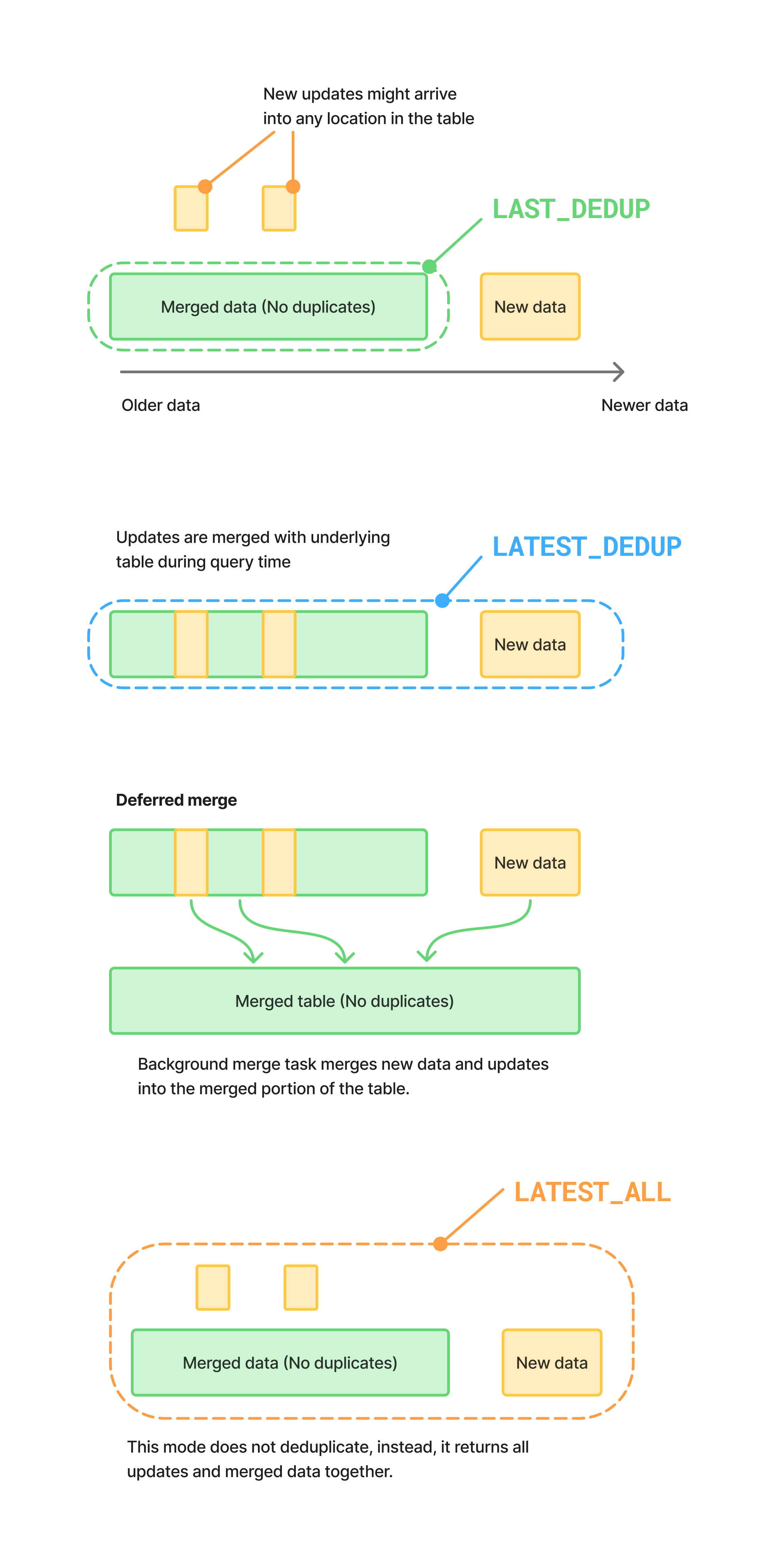
| Deduplication Option | Duplicates allowed | Query performance | Data freshness |
|---|---|---|---|
| LAST_DEDUPED (Default) | No | Fastest | A few minutes |
| LATEST_DEDUP | No | Slowest | Upon ingest |
| LATEST_ALL | Yes | Slightly slower than LAST_DEDUPED | Upon ingest |
Example: basic deduplication
The following example shows a simple pattern where three change events arrive for the same logical row:
Assume the following three versions were ingested for order_id = 9001:
PENDINGat2026-02-27 07:00:00SHIPPEDat2026-02-27 07:00:20DELIVEREDat2026-02-27 07:00:30
Querying the table without specifying DEDUP_OPTION:
Would return the latest record that’s been merged into the table (this is same as querying with DEDUP_OPTION = LAST_DEDUP).
To return the latest record, including those that have not been merged into the table yet, query the table with DEDUP_OPTION = LATEST_DEDUP:
Note LATEST_DEDUP is relatively more expensive as it needs to merge the latest ingested data at query time.
We also offer a mode to return all versions, including those that have not been merged into the table yet, without deduplication/merging.
This might be useful for debugging and for cases where you are ok with seeing some duplicate records but want to optimize query performance and reduce ingestion latency.
Setting a default scan option
You can set the default scan behavior at the table, schema, database, or account level. In practice, you should set the default at the table level or at the query level.
For example, to set the default for one table:
When Snowflake decides which scan behavior to use, it applies this priority order:
- A query-level
DEDUP_OPTIONvalue. - A default value set through
DEFAULT_INTERACTIVE_TABLE_SCAN_VERSION. - The fallback default of
LAST_DEDUP.
Example: using a composite primary key
Sometimes you might need more than one column to uniquely identify a logical row.
For example, an order line might require both order_id and line_id:
If two events arrive for (101, 1) and one event arrives for (101, 2), the following
query returns one latest row for each composite key:
In this case, (101, 1) resolves to the latest status for line 1, while (101, 2)
remains a separate row. If you defined the primary key only as (order_id), Snowflake
would incorrectly collapse both lines into one logical record.
When to use VOLATILE
This applies ONLY when using the LATEST_DEDUP deduplication option.
A column should be VOLATILE if all are true:
- It is not the PK
- It can change across versions for the same PK
Note: WHERE filtering on VOLATILE columns is not as efficient as filtering on non-VOLATILE columns. This is why you should only use VOLATILE if you meet the above criteria.
For example, if the table is created WITHOUT the VOLATILE clause on status, assume the following two versions were ingested for order_id = 9001:
SHIPPEDat2026-02-27 07:00:20PENDINGat2026-02-27 07:00:00
(Note: the second version is a late arrival / correction)
The following query would return results (Incorrectly):
If the table is created WITH the VOLATILE clause on status, the query would return no results.
This is happening because the query is effectively filtering on status=’PENDING’ before dedup, which kept the older version. The VOLATILE hint helps to avoid this issue.
Design guidelines
Use the following guidelines when you design CDC-enabled interactive tables:
- Choose a primary key that matches the logical identity of the source record.
- Choose a VERSION BY expression that increases reliably as each record changes.
- Avoid VERSION BY expressions that can produce ambiguous ordering for the same key.
- Mark columns that can be updated across versions as
VOLATILE. - Use
LATEST_ALLwhen you need to validate event delivery, ordering, or duplicate ingestion. - Use
LATEST_DEDUPwhen the query must reflect the newest state. - Use
LAST_DEDUPfor broad reporting queries that can tolerate slight staleness.
Performance tip
Regular clustering key design principles also apply to CDC-enabled interactive tables. In particular, you should cluster on columns that are frequently used in WHERE clauses. For more information, see Clustering Keys & Clustered Tables.
Your clustering key DOES NOT have to match your primary key and it can work on VOLATILE columns as well.
Troubleshooting
If queries filtered on a updated column return unexpected results, consider whether
that column should be listed in VOLATILE.
If the latest record is not selected as expected, verify that the VERSION BY expression
correctly orders all changes for each key.
Setting up streaming ingestion for a CDC-enabled interactive table
CDC-enabled interactive tables ingest data exclusively through Snowpipe Streaming high-performance architecture . Batch loads and DMLs aren’t supported. The procedure below shows an end-to-end setup that can be run in an account that has the Interactive CDC Preview enabled.
For general streaming patterns (the Kafka connector, Openflow, and default-pipe behavior), see Creating an interactive table using streaming ingestion.
Install prerequisites
Create and activate a Python virtual environment, then install the Snowpipe Streaming SDK and
the Snowflake connector. Do not install packages system-wide with --break-system-packages.
Create the table
Create the CDC-enabled interactive table. No pipe is needed up front — when the first
open_channel call targets this table, Snowflake automatically creates and manages a
default pipe named ORDERS-STREAMING:
Note
Optional: create a named pipe instead. If you need column-mapping transformations, or
want to grant, monitor, or replicate the pipe independently of the table, you can create an
explicit pipe and pass its name to StreamingIngestClient as pipe_name:
For most CDC setups the default pipe is sufficient.
Produce CDC events
Use the Snowpipe Streaming SDK to open a channel against the orders table and append change
events. Pass the table name as ORDERS-STREAMING (without a schema prefix) to use the default pipe.
A single Python script can exercise the common CDC patterns — an insert, an update, and a
soft-delete — for one logical row:
Each event includes a full row (all columns), because ingestion appends new versions rather
than mutating existing rows. Snowflake uses the VERSION BY expression (updated_at) to
pick the winning version per primary key.
Verify deduplication
After the producer runs, allow a few seconds for the events to land, then query the table with
DEDUP_OPTION = LATEST_DEDUP and confirm that a single row remains for order_id = 9001
with STATUS = 'DELETED':
The snowflake.connector.connect() call shown here uses programmatic access token (PAT) authentication. For
key-pair and other auth options, see Key-pair authentication and key-pair rotation.