Snowflake Code Bundles
Availability
Notebook Project Objects have been renamed to Code Bundles. Scheduling notebooks on compute pools (Snowpark Container Services), the capability previously delivered as Notebook Projects, is generally available. Running on warehouses, submitting Spark jobs, running ML Jobs (type: ml), inline specification overrides, and the REST API, Python API, and Snowflake CLI clients are in Public Preview. For background on the rename, see the behavior change announcement. To schedule notebooks as Code Bundles, see Run and schedule Notebooks in Workspaces.
Code Bundles let you package and execute non-SQL jobs, like Python, directly on Snowflake compute. Instead of building containers, wrapping logic in stored procedures, or porting your scripts into notebooks, you can upload your project code and run it with a single command. Snowflake automatically injects a Snowpark session at runtime, giving your code direct access to your data without managing connection credentials. You can orchestrate Code Bundles natively with Snowflake Tasks, or externally with the Snowflake CLI, the Snowflake Python API, or the Snowflake REST API.
Code Bundles support three bundle types, which you set with type in your code_bundle.yml file:
custom: Run Python scripts on warehouse or compute pool compute. This is the type described on this page.spark: Run Spark jobs (Scala, Java, or Python) on Snowflake warehouse compute. See Submit Spark jobs on Snowflake for details.ml: Run a workload as a Snowflake ML Job on compute pool compute, in the Snowflake Container Runtime. See Run ML Jobs with Code Bundles for details.
For the fields each type accepts, see the code_bundle.yml reference.
Code Bundles support two compute targets:
- Warehouse: Run Python scripts on Snowflake warehouse compute. Best for data processing jobs, ETL scripts, and workloads where the majority of the processing occurs in the warehouse as pushed-down SQL or UDFs.
- Compute pool (Snowpark Container Services): Run on Snowpark Container Services. Best for workloads where more processing occurs in the Python process, jobs requiring GPU, or custom container runtimes.
Key concepts
| Concept | Description |
|---|---|
| Code Bundle | A named object containing your project source files, created from a stage, workspace, or local directory. |
| Specification | A YAML configuration (code_bundle.yml) defining compute type, runtime version, dependencies, secrets, environment variables, and other settings. |
| Entrypoint | The file within the bundle that Snowflake executes (for example, main.py). |
| Source | Where the bundle files come from: a stage path (@my_stage/path), workspace path (snow://workspace/...), or local directory. |
| Version | An immutable snapshot of bundle files. New versions are added with ALTER CODE BUNDLE ... ADD VERSION. |
Access control
Code Bundles use Snowflake’s standard role-based access control model. There are two privileges relevant to Code Bundles:
- CREATE CODE BUNDLE on a schema: Allows a role to create new Code Bundles in that schema.
- OWNERSHIP or USAGE on a Code Bundle: Allows a role to execute the Code Bundle.
Grant permission to create Code Bundles
An administrator must grant the CREATE CODE BUNDLE privilege to the roles that need to create bundles.
You can grant this at the schema level or omit ON SCHEMA to grant it at the account level:
Grant permission to execute Code Bundles
Once a Code Bundle exists, any role with OWNERSHIP or USAGE on it can execute it:
Quickstart (Snowsight)
This minimal example creates and executes a Code Bundle using SQL.
-
Create a new private workspace.
Go to Projects » Workspaces » + » Private Workspace and create a new private workspace named
my_private_workspace.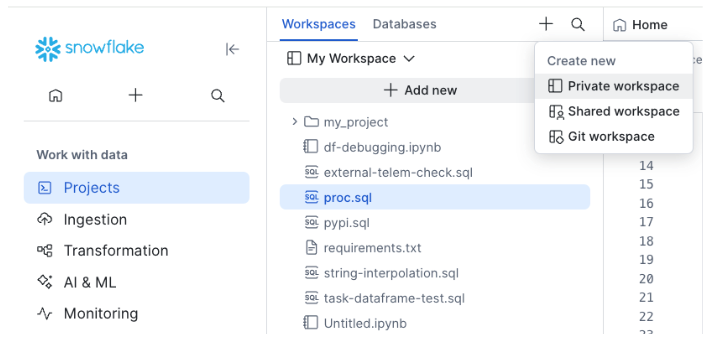
-
Write a Python script (
main.py).Select Add new » Python file.
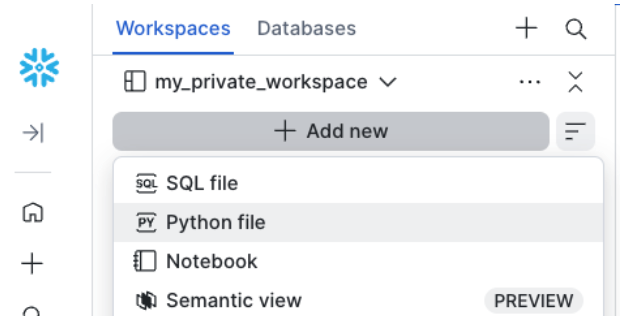
Name it
main.pyand paste in the following contents. -
Add a bundle definition file.
Create a file named
code_bundle.ymland paste in the following contents.You can also configure your Code Bundle to run on compute pools, as shown in Compute pool (Snowpark Container Services) compute.
-
Create the Code Bundle.
Open a SQL file, paste the contents below, and replace the
<placeholder>strings with the database and schema to create the Code Bundle in. -
Execute the bundle.
Next steps
Now that you have created and executed your first Code Bundle, here are some common scenarios you might encounter:
Quickstart (Snowflake CLI)
This guide walks you through setting up your environment, creating your first Code Bundle, and executing it using the Snowflake CLI.
Prerequisites
- Ensure you have Python installed (3.10 through 3.12) to run the Snowflake CLI locally. This is separate from the runtime version your Code Bundle uses on Snowflake compute, which you set in
code_bundle.yml. - You need to install the development version of the Snowflake CLI to access Code Bundle features.
-
Install the development version of the CLI using
uvorpip.Verify the installation by checking the version. Confirm that the output version ends with
.dev0. The major, minor, and patch versions might be different. -
Prepare your project.
Clone the sample repository to your local machine:
This sample project contains two key files:
main.py: The Python job that runs on Snowflake.code_bundle.yml: The bundle configuration, which is set up to run the Python project on warehouses.
Create a Code Bundle from your local directory. Use the
--excludeflag with a glob pattern to ignore unnecessary files like virtual environments or bytecode. To exclude a directory and its contents, match the contents with a pattern likevenv/**. -
Execute the Code Bundle.
Run your Code Bundle by specifying the entrypoint file. This command executes your Python script on Snowflake compute:
Next steps
Now that you have created and executed your first Code Bundle, here are some common scenarios you might encounter:
Configuration overview (code_bundle.yml)
The code_bundle.yml file defines how your Code Bundle runs. Place it in the root of your project directory. The following examples show how to run your Code Bundle on virtual warehouses and compute pools. For a full reference of the configuration options, see code_bundle.yml reference.
Warehouse compute
Note
Running Code Bundles on warehouse compute is in Public Preview. Running on compute pools (Snowpark Container Services) is generally available.
To run your Code Bundle on a Snowflake warehouse, set the compute_type to warehouse. When EXECUTE CODE BUNDLE runs, the Code Bundle runs on the virtual warehouse set in the current session (for example, set by USE WAREHOUSE ...).
Compute pool (Snowpark Container Services) compute
To run your Code Bundle on a compute pool, set the compute_type to compute_pool. The Code Bundle runs on the compute pool specified in compute_options.compute_pool. For a full list of Container Runtime options, see Snowflake Container Runtime releases.
ML compute (Container Runtime)
To run the bundle as a Snowflake ML Job, set type: ml and compute_type: compute_pool. ML bundles run on Snowflake Container Runtime, mount their files and a result stage into the container, and can run on multiple nodes. See Run ML Jobs with Code Bundles.
Other configurations
The code_bundle.yml file also lets you configure many additional settings like external access integrations, artifact repositories, Snowflake secrets, and more. See the code_bundle.yml reference for more information.
Examples
Passing arguments
Pass arguments to your code with the ARGUMENTS clause in SQL or after the -- option in the CLI. Your application code can get these input arguments using standard library methods like sys.argv or argparse.
SQL:
CLI:
Python example that gets the input arguments:
Attaching secrets and external access
To call external APIs, create a secret, network rule, and external access integration, then attach them to your bundle.
-
Create the Snowflake objects:
-
Attach the objects to the Code Bundle.
To attach the secret and external access integration objects to the Code Bundle, add the object names to the
code_bundle.ymlfile under thesecretsandexternal_access_integrationsproperties respectively. -
Read the secret in Python.
In your Python script or notebook file, you can get the secret value as shown below.
The string you pass to
get_generic_secret_string()("MY_DB.PUBLIC.MY_API_KEY") must match the name of a secret listed undersecretsincode_bundle.yml.
Define environment variables
You can define environment variables in code_bundle.yml. From your application code, you can access them with standard libraries like os.environ (for Python).
code_bundle.yml:
Python:
Mounting stages
You can mount Snowflake stages as local file system paths. On compute pools, mounted stages are readable and writable. On warehouses, mounted stages are read-only.
code_bundle.yml:
Python:
Async execution
Run a bundle asynchronously to avoid blocking. Use status to poll and cancel to abort.
CLI:
Inline specification override
Note
Inline specification override is in Public Preview.
Override the stored code_bundle.yml at execution time using WITH SPECIFICATION. This is useful for testing different configurations without modifying the bundle.
Scheduling with tasks
Wrap EXECUTE CODE BUNDLE in a Snowflake task to run on a schedule.
Local development
If you choose to do your development in an external environment, like VS Code or Cortex Code on your laptop, you can create a Snowpark session to connect to your Snowflake account and iterate on your scripts locally for development. To allow the same code to run on the Snowflake server without code changes, the session configuration is overridden when you run it as a Code Bundle on Snowflake.
Let’s look at an example.
The example script below connects to Snowflake using a connection defined in the connections.toml file.
You can run this from your laptop using python main.py (or, if using uv, uv run main.py). The Snowpark client connects to the given Snowflake account, and you can develop from your laptop.
When you’re ready to deploy to Snowflake, you can use the Snowflake CLI:
Now when this Code Bundle executes on Snowflake, getOrCreate() returns the Snowpark session that Snowflake injects at runtime. The runtime overrides the local session configuration, so the same code runs on Snowflake without changes.
code_bundle.yml reference
The code_bundle.yml file defines how your Code Bundle runs, including the bundle type, compute type, runtime version, dependencies, secrets, environment variables, and stage mounts. For the full field-by-field reference, see code_bundle.yml reference.
SQL reference
CREATE CODE BUNDLE
Creates a new Code Bundle from source files.
Parameters:
| Parameter | Description |
|---|---|
<name> | Identifier for the code bundle. |
FROM <source> | Source location: a stage path (@stage/path) or a workspace path (snow://workspace/...). |
COMMENT | Optional description. |
Examples:
Access control requirements
To execute CREATE CODE BUNDLE, a role must have sufficient privileges to create objects in the target database and schema. Required privileges include:
- USAGE or OWNERSHIP on the database.
- USAGE or OWNERSHIP on the schema.
- CREATE CODE BUNDLE on the schema that allows creating objects within that schema.
For instructions on creating a custom role with a specified set of privileges, see Creating custom roles.
For general information about roles and privilege grants for performing SQL actions on securable objects, see Overview of Access Control.
EXECUTE CODE BUNDLE
Runs a Code Bundle at the specified entrypoint. You can run this command from a SQL worksheet, a task, or a caller’s rights stored procedure. For the full list, see Supported invocation contexts.
Parameters:
| Parameter | Description |
|---|---|
ENTRYPOINT | File path within the bundle to execute. |
ARGUMENTS | List of command-line argument strings passed to the script. Each value must be a string literal or a SQL variable reference such as :my_var; function calls aren’t supported. For details, see EXECUTE CODE BUNDLE. |
WITH SPECIFICATION | Inline YAML specification that overrides the stored code_bundle.yml. |
Examples:
Access control requirements
To execute EXECUTE CODE BUNDLE, a role must have either OWNERSHIP or USAGE privileges on the Code Bundle object.
If the Code Bundle is configured to run on Compute Pools (compute_type: compute_pool) then the executing role must have USAGE and MONITOR on the query warehouse, and USAGE or OWNERSHIP on the compute pool and the database and schema containing the Code Bundle.
In addition, the executing role must have READ or OWNERSHIP on any secrets referenced in the configuration file, and USAGE or OWNERSHIP on the external access integrations, artifact repositories, and other objects it references. USAGE on a secret is not sufficient.
For instructions on creating a custom role with a specified set of privileges, see Creating custom roles.
For general information about roles and privilege grants for performing SQL actions on securable objects, see Overview of Access Control.
ALTER CODE BUNDLE
Adds a new version to an existing Code Bundle.
Example:
DESCRIBE CODE BUNDLE
Returns metadata about a Code Bundle.
SHOW CODE BUNDLES
Lists all Code Bundles in the current schema.
DROP CODE BUNDLE
Removes a Code Bundle.
CODE_
Returns the execution history for a Code Bundle. All parameters are optional and act as filters.
Qualify the function with the SNOWFLAKE database, as shown in the following examples. If you call it unqualified and your session has no current database set, the query fails.
Parameters:
| Parameter | Type | Description |
|---|---|---|
BUNDLE_NAME | STRING | Name of the Code Bundle to filter by. You can supply a fully qualified name (DATABASE.SCHEMA.BUNDLE) or a bare identifier combined with the DATABASE and SCHEMA parameters. |
DATABASE | STRING | Database to use when resolving a bare BUNDLE_NAME. Ignored when BUNDLE_NAME is fully qualified. |
SCHEMA | STRING | Schema to use when resolving a bare BUNDLE_NAME. Ignored when BUNDLE_NAME is fully qualified. |
ENTRYPOINT | STRING | Exact match on the path of the entrypoint file that was executed (for example, main.py). |
START_TIME_RANGE_START | TIMESTAMP_LTZ | Start of the time window (inclusive). Returns only executions whose start time is on or after this timestamp. |
START_TIME_RANGE_END | TIMESTAMP_LTZ | End of the time window (inclusive). Returns only executions whose start time is on or before this timestamp. |
BUNDLE_TYPES | STRING | Comma-separated list of bundle types to include. Case-insensitive. Allowed values: custom, spark, and ml. |
COMPUTE_TYPES | STRING | Comma-separated list of compute types to include. Case-insensitive. Allowed values: warehouse and compute_pool. |
LANGUAGE_TYPES | STRING | Comma-separated list of language runtimes to include. Case-insensitive. Allowed values: python, java, scala. |
STATUS | STRING | Single status value to filter by. Allowed values: pending, running, done (succeeded), failed, cancelled (or canceled), deleted. |
EXECUTION_NAME | STRING | Exact match on the EXECUTION_NAME property that was set in EXECUTE CODE BUNDLE. |
RESULT_LIMIT | INTEGER | Maximum number of rows to return. Defaults to 100. |
Example:
CLI reference
Install the CLI with Code Bundle support:
snow bundle create
Creates a Code Bundle from a local directory, stage, or workspace.
| Option | Description |
|---|---|
--source, -s (required) | Source location. Supports stage (@stage/path), workspace (snow://workspace/...), or local path (./my_project/). |
--comment | Comment for the object. |
--overwrite | Replace if it already exists (CREATE OR REPLACE). |
--skip-if-exists | Skip creation if it already exists (IF NOT EXISTS). |
--exclude | Glob pattern to exclude from local source (repeatable). Ignored for stage and workspace sources. |
Examples:
snow bundle execute
Executes a Code Bundle. Arguments after -- are passed to the script.
| Option | Description |
|---|---|
--entrypoint (required) | File path within the bundle to execute. |
--async | Run asynchronously and return the query ID immediately. |
Examples:
snow bundle list
Lists Code Bundles.
| Option | Description |
|---|---|
--like | Filter bundles by pattern (for example, "MY_%"). |
--in-account | List all bundles across the account. |
--in-database | Scope to a specific database. |
Examples:
snow bundle alter
Alters a Code Bundle by adding a new version.
| Option | Description |
|---|---|
--add-version | Source path for the new version. |
Example:
snow bundle delete
Drops a Code Bundle.
| Option | Description |
|---|---|
--if-exists | Don’t error if the bundle doesn’t exist. |
Examples:
snow bundle status
Returns the execution status of an async Code Bundle execution.
Example:
snow bundle history
Returns the execution history of a Code Bundle.
| Option | Description |
|---|---|
--result-limit | Maximum number of history records to return. |
Example:
snow bundle cancel
Cancels an async Code Bundle execution.
Example: