Using auto-fulfillment with open table formats
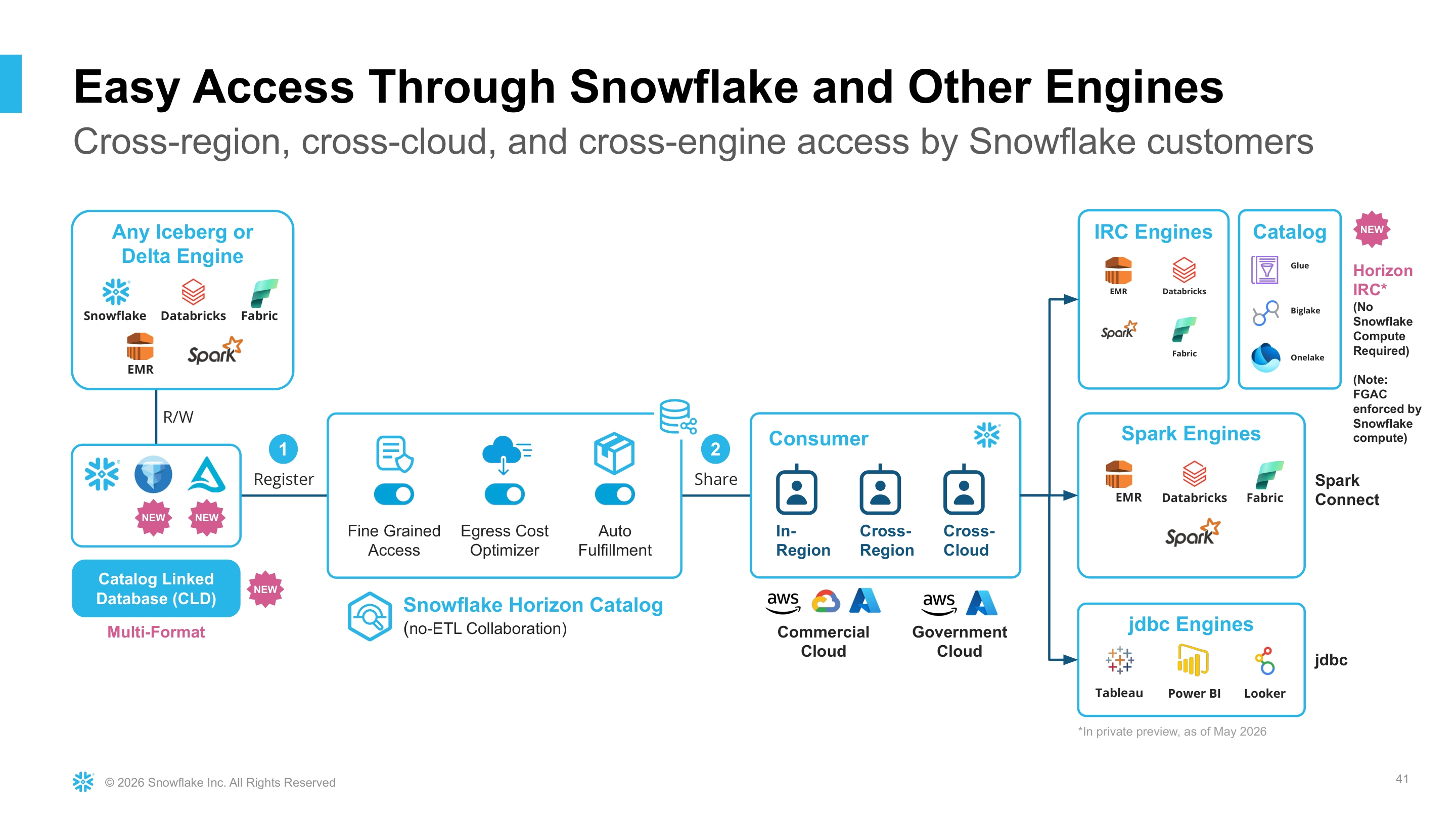
Cross-Cloud Auto-Fulfillment for listings enables you to share open table formats — including Apache Iceberg™ tables and Delta Lake tables — with internal and external consumers across cloud providers and regions. The tables can be managed by Snowflake or any other catalog provider. Cross-Cloud Auto-Fulfillment optimizes data transfer costs and ensures data availability across all regions, without requiring you to maintain extract, transform, and load (ETL) jobs.
Cross-Cloud Auto-Fulfillment reads data directly from the external volume and replicates all data as a Snowflake-managed Iceberg table within the target regions. For this process, providers are charged for the consumption of the Snowflake-managed data, including egress, storage, and compute. Virtual Private Snowflake (VPS) rates for compute will only apply if you or your consumers are using VPS. Data transfer is charged at the same replication rate listed in the serverless feature table in the Snowflake Service Consumption Table.
Note
This feature is supported for private listings, public listings in the Snowflake Marketplace, and listings on the Internal Marketplace.
Tutorials
Snowflake provides the following tutorial for creating an Iceberg table using SQL: Tutorial: Create your first Apache Iceberg™ table
Getting started with Cross-Cloud Auto-Fulfillment for Iceberg tables
Tutorial: Create your first Apache Iceberg™ table describes how to create an Iceberg table. After the table is created, you can create a Snowflake listing that includes this table and then provide it to consumers across any region or cloud. Consumers can access the listing, and Snowflake will manage the data egress, replication, and storage. For more information on how to create a listing, see Create a new listing.
Accessing Iceberg tables as a consumer
As a consumer, you can access and query shared Iceberg tables. For more information, see Access and install listings as a consumer. New changes to the Iceberg table will be synched from the provider account to your account based on your configured auto-fulfillment refresh frequency. For more information, see How auto-fulfillment works.
Shared Iceberg tables are available to consumers in the same region, in other regions, and on other clouds. Consumers can query them in Snowflake, or through the consumer account’s Horizon Iceberg REST Catalog API by using any Iceberg REST catalog (IRC)-compatible engine, such as Apache Spark™ or Trino. For more information, see Access Apache Iceberg™ tables with an external engine through Snowflake Horizon Catalog.
Catalog-linked database sharing
You can share Iceberg tables that are managed by an external Iceberg REST catalog — such as Apache Polaris™, Databricks Unity Catalog, or AWS Glue — with Snowflake consumers in any region or cloud, without building or maintaining ETL pipelines.
To do this, first bring the remote tables into Snowflake as a catalog-linked database (CLD). Snowflake syncs with your external catalog to discover namespaces and Iceberg tables and registers them in the CLD. You can then add the tables in the CLD to a listing, just as you would add any other Iceberg table.
When a consumer in another region or cloud gets the listing, Cross-Cloud Auto-Fulfillment reads the data from your external storage and replicates it to the consumer’s region as a Snowflake-managed Iceberg table. Consumers query the table like any other shared table, and changes in the source catalog are synced to consumers based on your auto-fulfillment refresh frequency. Consumers don’t need access to your catalog or storage.
To share the tables in a catalog-linked database with consumers in other regions or clouds:
- Create a catalog-linked database that uses an Apache Iceberg™ REST catalog integration. For more information, see Create a catalog-linked database.
- Query each table in the catalog-linked database at least once to make sure it’s initialized before you share it.
- Create a listing that includes the tables, and configure Cross-Cloud Auto-Fulfillment for the regions where your consumers are located. For more information, see Create a new listing and Optimizing data transfer costs with Egress Cost Optimizer.
As with other auto-fulfilled Iceberg tables, you’re charged for the replicated Snowflake-managed data in consumer regions, including egress, storage, and compute. For more information, see Auto-fulfillment costs.
Note
Only catalog-linked databases that use Apache Iceberg™ REST catalog integrations can be shared with Cross-Cloud Auto-Fulfillment. For more information, see Limitations.
Limitations
Cross-Cloud Auto-Fulfillment for listings is subject to the following limitations:
- You cannot replicate CATALOG or any CATALOG-related information.
- Catalog integrations and external volumes that use private connectivity are not supported.
- Iceberg tables in a catalog-linked database (CLD) are supported only when the CLD uses an Apache Iceberg™ REST catalog integration. Tables in CLDs that use other catalog integrations aren’t supported.
- You share the tables in a CLD, not the CLD itself. Add the CLD’s tables to your listing’s data product, as described in Catalog-linked database sharing.
- Tables in a CLD must be queried at least once before being shared. Otherwise, they might not be replicated correctly.
- You cannot access the secure share area created in consumer regions by Cross-Cloud Auto-Fulfillment.
- Iceberg tables have the following considerations:
- Streams and dynamic tables on shared Iceberg v2 tables is not supported. Streams and dynamic tables on shared Iceberg v3 tables is supported.
- Streams and dynamic tables on views with a shared Iceberg v2 table base is not supported. Streams and dynamic tables on views with a shared Iceberg v3 table base is supported.
- Streams and dynamic tables on shared views with Iceberg v2 base tables is not supported. Streams and dynamic tables on shared views with Iceberg v3 base tables is supported.