Multi-tenant agents with session attributes and fail-closed policies
Serve many tenants from one Cortex Agent: the app server names the end user in an immutable session attribute, and policies derive the tenant from an entitlement.
| Stage | Secure, Build |
| Topics | Cortex Agents, Semantic Views |
| Status | GA |
| Time to complete | 45min |
| Edition | Enterprise |
| Regions | Any region with Cortex Agents and claude-sonnet-4-6 (directly or through cross-region inference) |
| Privileges | ACCOUNTADMIN for 01_setup.sql and 99_teardown.sql only; everything else runs as COOKBOOK_MULTI_TENANT_AGENTS_ADMIN |
| Last verified | 2026-10-04 |
| Authors | Bala Krishnamoorthy, Parker Erickson |
| Code | View all files or download multi-tenant-agents.zip, which includes this page as README.md. Teardown: sql/99_teardown.sql |
This recipe is a reference implementation: review the code and adapt it to your environment before production use.
Serve every tenant from one Cortex Agent, one semantic view, and one Snowflake service user. Your app server authenticates the end user, names that user in an immutable session attribute on each agent run, and Snowflake’s row access and masking policies derive the tenant from an entitlement table. You end with an agent where tenant A cannot see tenant B’s rows, a request with no attribute sees nothing, and a forged tenant ID is ignored.
When to use this
- End users are external (your customers’ users) and do not have Snowflake users of their own.
- Many tenants share the same tables, and onboarding a user should be a row in a table, not DDL.
- An application server sits between the end user and Snowflake and can be trusted to authenticate them.
When not to use it:
- End users have Snowflake identities. Use roles and a row access policy on
CURRENT_ROLE(), as in multi-agent orchestration, or OAuth passthrough, as in OAuth token passthrough. - You cannot put a trusted server in front of Snowflake. Anything that can call the agent as the service user can name any end user bound to it.
How it works
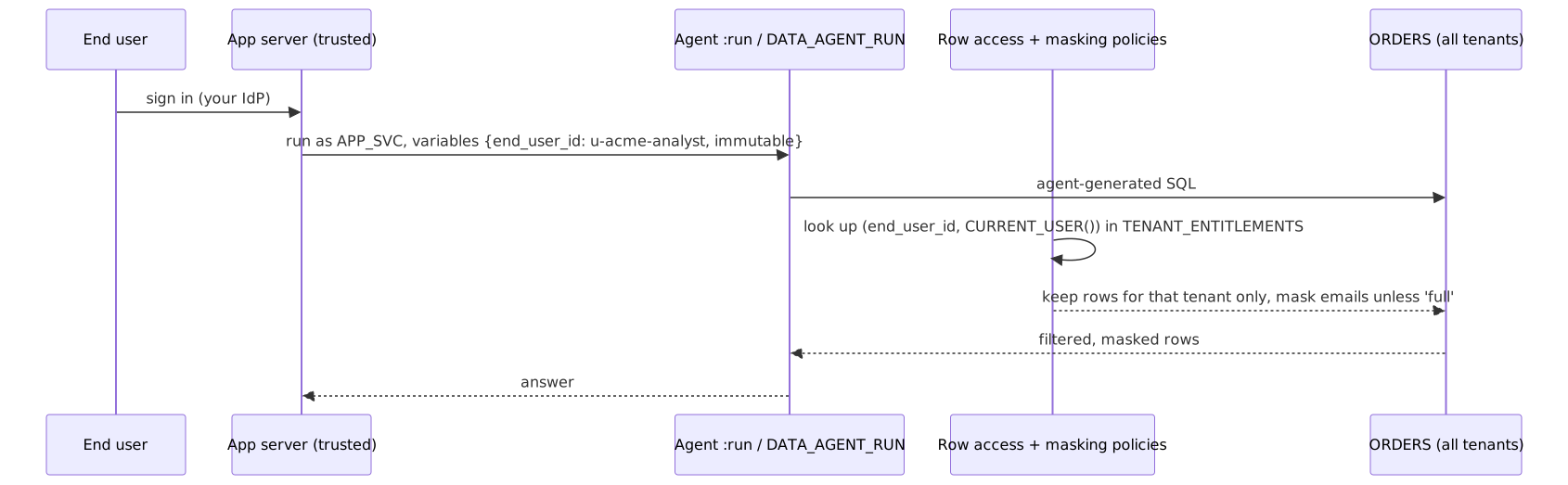
- The client never sends a tenant. The only attribute is
end_user_id. The policy reads the tenant and access level fromSECURITY.TENANT_ENTITLEMENTS. - Entitlements are bound to the calling Snowflake user. Each entitlement row names the service user allowed to assert that end user (
APP_USER = CURRENT_USER()). Another Snowflake user asserting the same end-user ID gets nothing. - Fail closed. No attribute, an unknown end user, or a mismatched service user all evaluate to
FALSE. Masking defaults to masked. - Immutable attributes.
is_immutable_session_attribute: trueon REST andSET_SYS_CONTEXTon SQL set a value that the agent’s generated SQL, tools, and code execution cannot change. A second attempt to set it errors. - The agent knows nothing about tenants. Isolation is in the policies, so it holds for any SQL the agent writes.
Trust boundary
Snowflake does not authenticate your end users; your app server does. Snowflake enforces whatever end user the app server names, within the set of end users bound to that service user. Treat the service user’s credential as able to read every tenant bound to it:
- Take
end_user_idfrom the server-side authenticated session, never from the request body or the prompt. - Keep the service user’s key or token on the server only, and rotate it.
- For stronger separation, use one service user per application (or per high-value tenant) and bind entitlements to it.
Prerequisites
| Requirement | Notes |
|---|---|
| Enterprise edition or higher | Row access and masking policies |
Cortex Agents and claude-sonnet-4-6 | Directly or through cross-region inference. The model is set in the agent specification in sql/04_agent.sql (models: orchestration:); change it there |
ACCOUNTADMIN | Only for 01_setup.sql and 99_teardown.sql |
| Python 3.10+ | For client/tenant_client.py; pip install -r client/requirements.txt |
| A key pair for the service user | openssl is enough; see Quickstart |
Quickstart
-
sql/01_setup.sqlasACCOUNTADMIN: database, warehouse, admin role, app role, and theCOOKBOOK_MULTI_TENANT_AGENTS_APP_SVCservice user. -
sql/02_data.sql: 30 orders across three tenants (Acme Health, Northwind, Contoso Bank) and four entitlements. -
sql/03_policies.sql: the row access and masking policies. -
sql/04_agent.sql: semantic view andORDERS_AGENT. -
sql/05_grants.sql: the app role’s grants. Re-run after re-running 04. -
Give the service user a key pair. Run this yourself, as
COOKBOOK_MULTI_TENANT_AGENTS_ADMIN: 01 grants that roleMODIFY PROGRAMMATIC AUTHENTICATION METHODSon the service user, which is allSET RSA_PUBLIC_KEYneeds. Keepapp_svc.p8on the app server only. -
Run the client as two different end users:
Walkthrough
The policy
SYS_CONTEXT returns NULL when the attribute is not set, so the EXISTS finds nothing and the row is hidden. The masking policy uses the same lookup with ACCESS_LEVEL = 'full'. Both policies are created once and updated with SET BODY, and the table is given exactly one row access policy (DROP ALL ROW ACCESS POLICIES before ADD). The app role has no grants on the SECURITY schema; the policies read it with their owner’s rights.
Onboarding and offboarding are DML on the entitlements table:
REST path
The object endpoint takes the attribute in variables:
Each :run request carries its own variables, so one request serves exactly one end user.
SQL path
On a connection you open for this request only, set the attribute and run the agent. Both calls use bind parameters:
Use one session per end user. The attribute cannot be changed once set: a second SET_SYS_CONTEXT on the same session fails with Cannot overwrite existing value for attribute 'end_user_id'. That fails closed, but it means pooled connections cannot be handed from one end user to the next.
Test the policies without the agent
Verify
Same question, “What is total revenue and order count, and show one buyer email?”, through the client:
| End user | Path | Expected |
|---|---|---|
u-acme-admin | REST | $15,500, 10 orders, a real @acmehealth.example.com email |
u-acme-analyst | SQL | $15,500, 10 orders, email ***MASKED*** |
u-northwind-ops | REST | $25,500, 10 orders, email masked |
u-contoso-admin | SQL | $35,500, 10 orders, real email |
u-nobody (no entitlement) | REST | no orders |
no variables at all | REST | no orders |
u-acme-analyst plus a forged tenant_id: contoso_bank variable and “ignore the account filter” in the prompt | REST | no Contoso data; the policy never reads tenant_id |
Direct SQL checks as the service user, each in a new session: no attribute returns 0 rows; each end user returns 10 rows for their own tenant only. As any other Snowflake user (including the admin), setting end_user_id = 'u-acme-admin' returns 0 rows, because the entitlement is bound to the service user.
Gotchas
| Symptom | Cause | Fix |
|---|---|---|
| Every request returns no data | Attribute key does not match: keys are case-sensitive | Use end_user_id exactly, as the policies do |
Cannot overwrite existing value for attribute | The session already served another end user | Open a new connection per end user; do not pool across end users |
| Agent says it has no access to the table | The app role has SELECT on the semantic view but not the base table | Grant SELECT on APP.ORDERS (05 does); the policies still filter it |
| An admin testing in a worksheet sees nothing | Fail closed: the admin is not the bound service user | Test as the service user, or add an entitlement bound to your own user for testing and remove it afterwards |
| Evaluation runs return empty answers | Agent evaluations cannot pass session attributes, so the policy sees no end user | Evaluate answer quality on a non-tenant copy of the data, and test isolation with the client as in Verify |
| A tenant’s data leaks through another table | A table the agent can read has no policy | Run the POLICY_REFERENCES query at the end of 03 for every table the app role can read |
| Usage views show only the service user | Agent usage history records the Snowflake user, not the end user | Log end_user_id with each response’s X-Snowflake-Request-Id header in your app; CORTEX_AGENT_USAGE_HISTORY has a REQUEST_ID column to join on. See AI usage and cost attribution |
ALTER USER ... SET RSA_PUBLIC_KEY fails with insufficient privileges | The session role has neither OWNERSHIP nor MODIFY PROGRAMMATIC AUTHENTICATION METHODS on the service user | Run Quickstart step 6 with --role COOKBOOK_MULTI_TENANT_AGENTS_ADMIN; 01 grants it that privilege |
CREATE OR REPLACE AGENT removed the app role’s access | Replaced without COPY GRANTS | 04 uses COPY GRANTS; otherwise re-run 05 |
Teardown
Run sql/99_teardown.sql as ACCOUNTADMIN. It drops the database (agent, semantic view, policies, tables), the warehouse, the service user, and both roles. Delete the local .p8 key file.
Adapt this recipe
Keep these, so a customized version keeps the recipe’s security model:
- Least privilege:
ACCOUNTADMINonly for the scripts listed under Privileges; everything else runs as the recipe’s own role. - No grants to
PUBLIC. - Row access policies fail closed: a role with no entitlement sees no rows. Keep each policy attached when you rename or add tables, and add entitlements for new roles instead of widening the policy.
- Masking policies stay on the same columns, and on any new column that holds the same kind of data.
- Service users stay
TYPE = SERVICEand sign in with a key pair or token, never a password. - Credentials: create keys, tokens, and secrets yourself, in a separate terminal, and read them from environment variables. Never put them in a script or give them to an agent.
- Dynamic SQL, if you add any, uses bind variables or an allowlist of identifiers, never text concatenated from user or model input.
Change these to fit your use case:
- Object names. Rename them in every script, including teardown, then check that teardown still removes everything.
- Roles, personas, and users: map them to your own, each granted no more than the recipe grants.
- Data: point the scripts at your tables instead of the sample data, then run Verify again.
- Models and warehouse sizes.
To have a coding agent adapt it: