OAuth token passthrough to a Cortex Agent
Relay each signed-in user’s Entra ID token to a Cortex Agent so the agent runs as that person, with per-user results from a row access policy on CURRENT_USER().
| Stage | Secure |
| Topics | Cortex Agents |
| Status | GA |
| Time to complete | 60min |
| Edition | Enterprise |
| Regions | Any region with Cortex Agents and claude-sonnet-4-6 (directly or through cross-region inference) |
| Privileges | ACCOUNTADMIN for 01, 02 (security integration), and 99; an Entra ID tenant where you can register applications |
| Related skills | rbac (Snowflake-Labs/coco-skills) |
| Last verified | 2026-10-04 |
| Authors | Parker Erickson |
| Code | View all files or download oauth-token-passthrough.zip, which includes this page as README.md. Teardown: sql/99_teardown.sql |
This recipe is a reference implementation: review the code and adapt it to your environment before production use.
Let a bot, orchestrator, or web backend call a Cortex Agent with the signed-in user’s own Microsoft Entra ID token instead of a shared service credential. Snowflake validates the token, maps it to that person’s Snowflake user, and runs the agent as them, so grants, policies, and usage history all reflect the real person. You end with an External OAuth integration, one agent, one role shared by every user, and a row access policy that gives each person a different answer to the same question.
When to use this
- Your users already sign in with Entra ID, and each has (or can be provisioned) a Snowflake user.
- The data boundary is per person: “my tickets”, “my accounts”, “my region”.
- You want agent usage attributed to people, not to a service account.
When not to use it:
- End users are external and should not become Snowflake users. Use multi-tenant agents with one service user and session attributes.
- The relay cannot obtain a user-delegated token (only an app-only token). Then every call is the app, not the person.
How it works
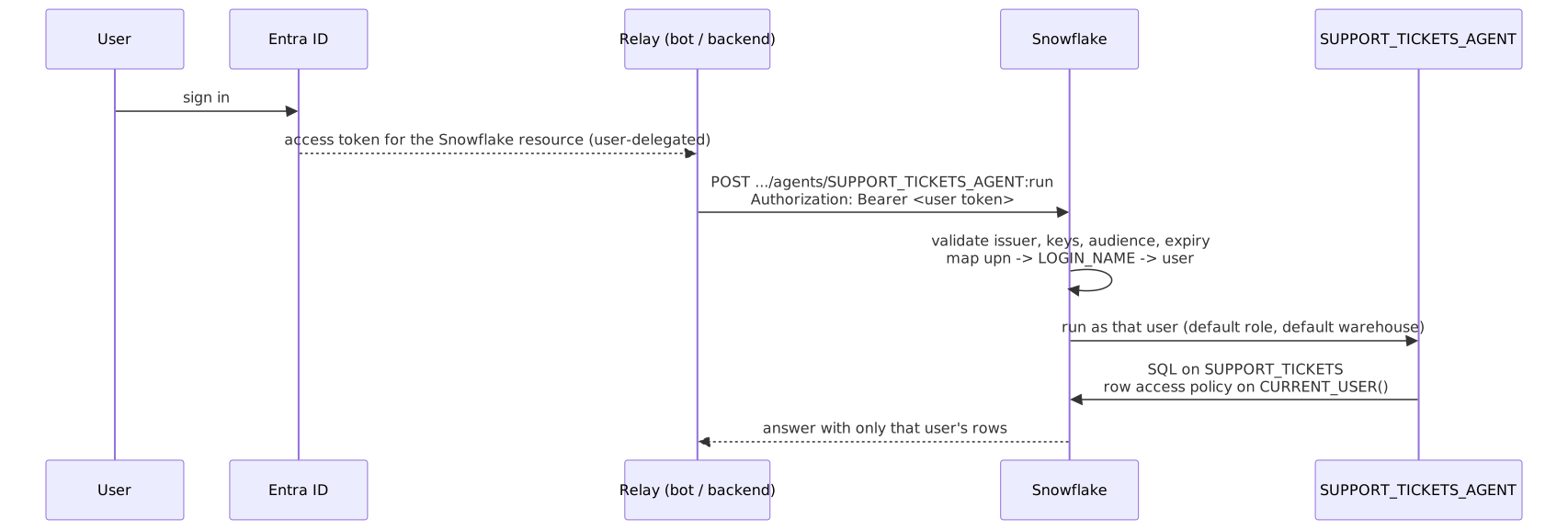
- External OAuth integration.
02_security_integration.sqltells Snowflake how to validate Entra ID tokens and to map theupnclaim to a user’sLOGIN_NAME. The relay holds no Snowflake secret. - One Snowflake user per person, one shared role. Every user gets
COOKBOOK_OAUTH_TOKEN_PASSTHROUGH_ANALYSTas default role. The role decides what anyone can reach; identity decides which rows each person sees. - Fail-closed row access policy on
CURRENT_USER(). Analysts see tickets assigned to them, leads see all, anyone else sees none. - Object endpoint. The relay calls
POST /api/v2/databases/{db}/schemas/{schema}/agents/{name}:runand reads the answer from the response’scontent[]blocks of typetext.
Prerequisites
| Requirement | Notes |
|---|---|
| Enterprise edition or higher | Row access policies |
Cortex Agents and claude-sonnet-4-6 | Directly or through cross-region inference. The model is set in the agent specification in sql/04_agent.sql (models: orchestration:); change it there |
ACCOUNTADMIN | For 01_setup.sql, 02_security_integration.sql, and 99_teardown.sql |
| Entra ID app registrations | A resource app for Snowflake (Application ID URI, a scope for the analyst role) and a client app for the relay, as in Configure Microsoft Entra ID for External OAuth. You need the tenant ID, issuer, keys URL, and Application ID URI |
| Python 3.10+ | For client/passthrough_client.py; pip install -r client/requirements.txt |
Quickstart
-
In
sql/01_setup.sql, replace the threeupn_*values with real Entra ID UPNs, then run it asACCOUNTADMIN. -
In
sql/02_security_integration.sql, replace<entra_tenant_id>(twice) and<snowflake_application_id_uri>, then run it asACCOUNTADMIN. This creates an account-level object; coordinate with your account admin. Snowflake rejects the statement while the keys URL still holds the tenant placeholder, so an unedited script creates nothing. The last query should return no rows; a row is a placeholder you missed. If you only want the key-pair test in Verify for now, skip this step and come back to it. -
sql/03_data_and_policy.sql: tickets and the row access policy. -
sql/04_agent.sql: semantic view, agent, and grants to the analyst role. -
Get a user-delegated access token for the Snowflake resource from Entra ID in your relay (for example with the Microsoft Authentication Library), and run:
You can prove the Snowflake side (mapping by login name, per-user results) before Entra ID is set up; see Verify.
Walkthrough
The integration
Values are case-sensitive, including the trailing slash on the issuer. They are literals because these properties do not accept session variables ($keys_url is rejected as an invalid value). The script uses CREATE OR REPLACE so that correcting a value and running 02 again applies the change; IF NOT EXISTS would keep the first values for good. After the DESCRIBE, a query over its result lists any property that still holds a <...> placeholder. EXTERNAL_OAUTH_ANY_ROLE_MODE stays at its default (DISABLE), so the session uses the role from the token’s scope and cannot switch roles.
Users
Each person needs a Snowflake user whose LOGIN_NAME equals their upn, with a default role and default warehouse:
At scale, provision users and group-to-role membership with Entra ID SCIM instead of by hand. Check which Entra ID attribute your SCIM attribute mapping writes to the Snowflake login name, and map the same claim in the integration; a mismatch means valid tokens that map to no user.
Per-user results
CURRENT_USER() is the Snowflake user name (not the login name). Nothing is granted to PUBLIC: all three users share one role that has USAGE on the agent and SELECT on the semantic view and its base table.
The relay
The relay forwards the token unchanged:
Take the token from the signed-in session, never from the message body, and do not log it. To add tenant context on top of identity, include a variables block with immutable session attributes, as in multi-tenant agents.
Verify
Same question, “How many tickets can I see, and which ticket numbers are open or in progress?”, as each user:
| User | Expected |
|---|---|
| Analyst A | 4 tickets; open: #5003 |
| Analyst B | 3 tickets; in progress: #5006 |
| Support lead | 8 tickets; open or in progress: #5003, #5006, #5008 |
| The admin role, in a worksheet | SELECT COUNT(*) on the table returns 0 (fail closed) |
To test the Snowflake side before Entra ID is configured, give each user a key pair and use the client’s test mode. Key-pair tokens identify the user by LOGIN_NAME, so this also confirms the login names you set. Run these yourself; 01 grants COOKBOOK_OAUTH_TOKEN_PASSTHROUGH_ADMIN MODIFY PROGRAMMATIC AUTHENTICATION METHODS on the three users, so ACCOUNTADMIN is not needed:
Use the login names you set in 01 if you replaced the defaults. The client stops with missing SNOWFLAKE_ACCOUNT_URL (or the account, key file, or token) when a setting is not given.
After Entra ID is configured, repeat with USER_ACCESS_TOKEN. Audit who called the agent (the view can lag by up to an hour):
USER_NAME shows each person’s Snowflake user, not a service account.
Gotchas
| Symptom | Cause | Fix |
|---|---|---|
401 with 390303 Invalid OAuth access token | Token not issued for the integration’s audience, wrong issuer, expired, or not a valid JWT | Compare the token’s aud and iss claims with DESCRIBE SECURITY INTEGRATION; request the token for the Snowflake resource’s Application ID URI |
| Authentication fails for a token that validates | No Snowflake user has a LOGIN_NAME equal to the mapped claim | Set LOGIN_NAME to the UPN, or fix the SCIM attribute mapping |
| Agent call fails even though the token maps | The user has no default role or default warehouse, or the default role lacks USAGE on them | Set DEFAULT_ROLE and DEFAULT_WAREHOUSE (01 does) |
| Every user gets the same answer | The relay is sending an app-only token or a shared credential | Use a user-delegated flow so the token’s upn is the person |
| Agent reports a permissions error on the table | The role has SELECT on the semantic view but not on the base table | Grant SELECT on SUPPORT_TICKETS (04 does); the policy still filters it |
Key-pair test returns 390144 JWT token is invalid | The JWT names the user by user name, but key-pair tokens use LOGIN_NAME | Put the login name (the UPN) in the token’s iss and sub |
| Admin sees no rows | Fail closed: the admin is neither an assignee nor a lead | Expected. Test as the mapped users |
02 fails with invalid value [...<entra_tenant_id>...] for parameter 'EXTERNAL_OAUTH_JWS_KEYS_URL' | The tenant placeholder is still in the keys URL | Replace both <entra_tenant_id> occurrences and run 02 again. Nothing was created |
| 02’s last query returns a row | A placeholder is still set, usually the audience. No token can validate until it is fixed | Replace it and run 02 again: CREATE OR REPLACE applies the corrected values |
Teardown
Run sql/99_teardown.sql as ACCOUNTADMIN. It drops the security integration, the database, the warehouse, the three users, and both roles. Remove the Snowflake app registrations in Entra ID if you created them only for this recipe, and delete any local key files.
Adapt this recipe
Keep these, so a customized version keeps the recipe’s security model:
- Least privilege:
ACCOUNTADMINonly for the scripts listed under Privileges; everything else runs as the recipe’s own role. - No grants to
PUBLIC. - Row access policies fail closed: a role with no entitlement sees no rows. Keep each policy attached when you rename or add tables, and add entitlements for new roles instead of widening the policy.
- Credentials: create keys, tokens, and secrets yourself, in a separate terminal, and read them from environment variables. Never put them in a script or give them to an agent.
- Dynamic SQL, if you add any, uses bind variables or an allowlist of identifiers, never text concatenated from user or model input.
Change these to fit your use case:
- Object names. Rename them in every script, including teardown, then check that teardown still removes everything.
- Roles, personas, and users: map them to your own, each granted no more than the recipe grants.
- Data: point the scripts at your tables instead of the sample data, then run Verify again.
- Models and warehouse sizes.
To have a coding agent adapt it:
Run it with a coding agent
Related skills
rbac(coco-skills): design the roles that passthrough users receive, and audit role grants, instead of hand-writing grant checks.