snow sql
Executes Snowflake query. Use either query, filename or input option. Query to execute can be specified using query option, filename option (all queries from file will be executed) or via stdin by piping output from other command. For example cat my.sql | snow sql -i. The command supports variable substitution that happens on client-side.
Syntax
Arguments
None
Options
--query, -q TEXTQuery to execute.
--filename, -f FILEFile to execute. Default: [].
--stdin, -iRead the query from standard input. Use it when piping input to this command. Default: False.
--variable, -D TEXTString in format of key=value. If provided the SQL content will be treated as template and rendered using provided data.
--retain-commentsRetains comments in queries passed to Snowflake. Default: False.
--single-transaction / --no-single-transactionConnects with autocommit disabled. Wraps BEGIN/COMMIT around statements to execute them as a single transaction, ensuring all commands complete successfully or no change is applied. Default: False.
--enable-templating [LEGACY|STANDARD|JINJA|ALL|NONE]Syntax used to resolve variables before passing queries to Snowflake. Default: [<_EnabledTemplating.LEGACY: ‘LEGACY’>, <_EnabledTemplating.STANDARD: ‘STANDARD’>].
-p, --project TEXTPath where the Snowflake project is stored. Defaults to the current working directory.
--env TEXTString in the format key=value. Overrides variables from the env section used for templates. Default: [].
--connection, -c, --environment TEXTName of the connection, as defined in your
config.tomlfile. Default:default.--host TEXTHost address for the connection. Overrides the value specified for the connection.
--port INTEGERPort for the connection. Overrides the value specified for the connection.
--account, --accountname TEXTName assigned to your Snowflake account. Overrides the value specified for the connection.
--user, --username TEXTUsername to connect to Snowflake. Overrides the value specified for the connection.
--password TEXTSnowflake password. Overrides the value specified for the connection.
--authenticator TEXTSnowflake authenticator. Overrides the value specified for the connection.
--workload-identity-provider TEXTWorkload identity provider (AWS, AZURE, GCP, OIDC). Overrides the value specified for the connection.
--private-key-file, --private-key-path TEXTSnowflake private key file path. Overrides the value specified for the connection.
--token TEXTOAuth token to use when connecting to Snowflake.
--token-file-path TEXTPath to file with an OAuth token to use when connecting to Snowflake.
--database, --dbname TEXTDatabase to use. Overrides the value specified for the connection.
--schema, --schemaname TEXTDatabase schema to use. Overrides the value specified for the connection.
--role, --rolename TEXTRole to use. Overrides the value specified for the connection.
--warehouse TEXTWarehouse to use. Overrides the value specified for the connection.
--temporary-connection, -xUses a connection defined with command-line parameters, instead of one defined in config. Default: False.
--mfa-passcode TEXTToken to use for multi-factor authentication (MFA).
--enable-diagWhether to generate a connection diagnostic report. Default: False.
--diag-log-path TEXTPath for the generated report. Defaults to system temporary directory. Default: <system_temporary_directory>.
--diag-allowlist-path TEXTPath to a JSON file that contains allowlist parameters.
--oauth-client-id TEXTValue of client id provided by the Identity Provider for Snowflake integration.
--oauth-client-secret TEXTValue of the client secret provided by the Identity Provider for Snowflake integration.
--oauth-authorization-url TEXTIdentity Provider endpoint supplying the authorization code to the driver.
--oauth-token-request-url TEXTIdentity Provider endpoint supplying the access tokens to the driver.
--oauth-redirect-uri TEXTURI to use for authorization code redirection.
--oauth-scope TEXTScope requested in the Identity Provider authorization request.
--oauth-disable-pkceDisables Proof Key for Code Exchange (PKCE). Default:
False.--oauth-enable-refresh-tokensEnables a silent re-authentication when the actual access token becomes outdated. Default:
False.--oauth-enable-single-use-refresh-tokensWhether to opt-in to single-use refresh token semantics. Default:
False.--client-store-temporary-credentialStore the temporary credential.
--format [TABLE|JSON|JSON_EXT|CSV]Specifies the output format. Default: TABLE.
--verbose, -vDisplays log entries for log levels
infoand higher. Default: False.--debugDisplays log entries for log levels
debugand higher; debug logs contain additional information. Default: False.--silentTurns off intermediate output to console. Default: False.
--enhanced-exit-codesDifferentiate exit error codes based on failure type. Default: False.
--decimal-precision INTEGERNumber of decimal places to display for decimal values. Uses Python’s default precision if not specified. [env var: SNOWFLAKE_DECIMAL_PRECISION].
--helpDisplays the help text for this command.
Usage notes
You can specify the SQL query to execute using one of the following options:
Specify the query string using the
--queryoption.Use the
--filenameoption to execute one or more files containing a SQL query or queries. When you specify multiple files, all files are executed sequentially on a single connection. For example:snow sql -f myfile.sqlsnow sql -f file1.sql -f file2.sql -f file3.sql
Specify the query as
stdinand pipe it to thesnow sqlcommand, such ascat my.sql | snow sql.If your query contains special characters, such as the dollar sign in SYSTEM functions, that you do not want the shell to interpret, you can do either of the following:
Enclose the query in single quotes instead of double quotes, as in:
snow sql -q 'SELECT SYSTEM$CLIENT_VERSION_INFO()'Escape the special character, as in:
snow sql -q "SELECT SYSTEM\$CLIENT_VERSION_INFO()"
Use variables for templating SQL queries with a combination of a
<% variable_name %>placeholder in your SQL queries and a-Dcommand-line option, in the form:Note
You can currently use the SnowSQL
&variable_nameand<% variable_name %>syntax for templates. However, Snowflake recommends using the<% variable_name %>syntax.Specify a scripting block in queries. For example:
Note
When specifying the scripting block directly on the Snowflake CLI command line, the
$$delimiters might not work for some shells because they interpret that delimiter as something else. For example, the bash and zsh shells interpret it as the process ID (PID). To address this limitation, you can use the following alternatives:If you still want to specify the scripting block on the command line, you can escape the
$$delimiters, as in\$\$.You can also put the scripting block with the default
$$delimiters into a separate file and call it with thesnow sql -f <filename>command.
Formatting JSON output
The --format option provides two ways to display JSON:
JSON: Returns JSON as quoted strings, similar to the following:JSON_EXT: Returns JSON as JSON objects, similar to the following:
Enhanced error codes
The --enhanced-exit-codes option provides information that helps identify whether problems result from query execution or from invalid command options. With this option, the snow sql command provides the following return codes:
0: Successful execution2: Command parameter issues5: Query execution issues1: Other types of issues
After the command executes, you can use the echo $? shell command to see the return code.
In this example, the command contains both a query parameter (-q 'select 1') and a query file parameter (-f my.query), which is an invalid parameter combination:
The following examples show the effect of the --enhanced-exit-codes option when the command contains an invalid query (slect is misspelled):
With the
--enhanced-exit-codesoption, the command returns a5exit code to indicate a query error:Without the
--enhanced-exit-codesoption, the command returns a1exit code to indicate a generic (other) error:
Alternatively, you can set the SNOWFLAKE_ENHANCED_EXIT_CODES environment variable to 1 to send the enhanced return codes for all snow sql commands.
Interactive mode
The snow sql command supports an interactive mode that lets you enter SQL commands one at a time. Interactive mode provides the following features:
Syntax highlighting
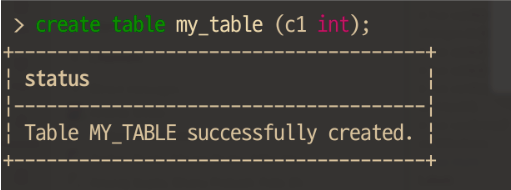
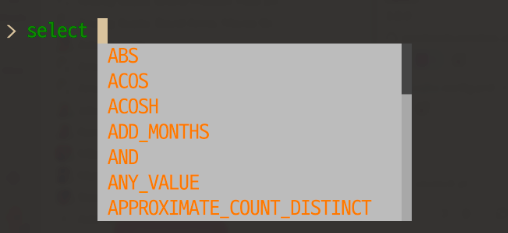
Code completion while typing
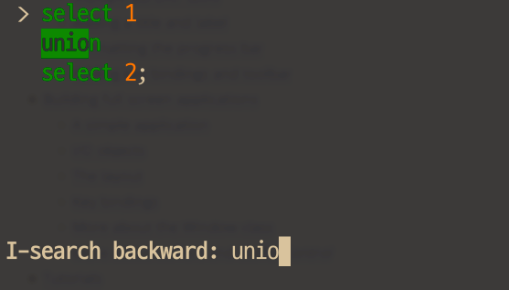
Searchable history
To search your command history, press CTRL-R:
Multi-line input
Pressing ENTER on a line that does not end with a semicolon (
;) moves the cursor to the next line for more commands until a statement ends with a semi-colon.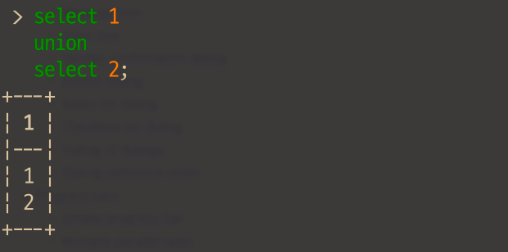
To use interactive mode, enter the snow sql command followed by ENTER, as shown:
The command opens a sub-shell with a > prompt where you can enter SQL commands interactively:
You can then enter SQL commands, as shown:
Note
You must end each SQL statement with a semicolon (;).
To exit interactive mode, enter exit, quit, or CTRL-D.
Multiple commands in a single transaction
The --single-transaction option lets you enter multiple SQL commands to execute as an all-or-nothing set of commands.
By executing commands in a single transaction, you can ensure that all of the commands complete successfully before committing any of the changes.
If any of the commands fail, none of the changes from the successful commands persist.
The following examples show successful and unsuccessful transactions:
Successful command execution
You can then verify that the commands were committed to the database:
Unsuccessful single transaction
You can then verify that the commands were not committed to the database:
Examples
The following example uses the SQL SYSTEM$CLIENT_VERSION_INFO system function to return version information about the clients and drivers.
The following example shows how you can specify a database using a client-side variable:
When executed, the command substitutes the value
devin the<% database %>variable to create thedev.logsidentifier and then sends theselect * from dev.logsSQL query to Snowflake for processing.Note
You can currently use the SnowSQL
&variable_nameand &``{ variable_name }`` syntax for templates. However, Snowflake recommends using the<% variable_name %>syntax.This example shows how to pass in environment variables using the
--envoption:By default, Snowflake CLI removes comments in SQL query from the output. The following example uses the
--retain-commentsoption to include the comments in the query results.Assume the
example.sqlfile contains the following statements and comment:When you execute the following command,
-- My commentappears in the query results.