Long-running Cortex Agent runs over managed MCP
Split one long MCP tool call into a fast submit and a bounded fetch over background agent runs, so no call nears a client’s timeout and caller’s rights still apply.
| Stage | Build, Operate |
| Topics | Snowflake MCP, Cortex Agents |
| Status | GA |
| Time to complete | 45min |
| Edition | Enterprise |
| Regions | AWS or Azure (background agent runs are GA there); Cortex Agents available in the region or through cross-region inference |
| Privileges | ACCOUNTADMIN to create the recipe roles, warehouse, and database; everything else runs as COOKBOOK_LONG_RUNNING_AGENTS_OVER_MCP_ADMIN |
| Related skills | check-agent-access (Snowflake-Labs/coco-skills) |
| Last verified | 2026-10-04 |
| Authors | Bala Krishnamoorthy |
| Code | View all files or download long-running-agents-over-mcp.zip, which includes this page as README.md. Teardown: sql/99_teardown.sql |
This recipe is a reference implementation: review the code and adapt it to your environment before production use.
Some MCP clients cap how long a single tool call may take, and some agent questions take longer than that cap. This recipe replaces one long tools/call with two short ones: a submit tool that starts a background agent run and returns a run_id in seconds, and a fetch tool that waits server-side for up to 60 seconds and returns the answer when it is ready. In the verified run over SQL, 184 seconds of agent work came back in four calls, the longest of which took 65 seconds. Both tools run with caller’s rights, so the agent still queries data as the requesting user.
When to use this
- An MCP client you do not control enforces a per-call time limit, and your agent’s runs can exceed it.
- The runs need to stay governed per user: row access and masking policies keyed on the caller must still apply.
- You are on AWS or Azure, where background agent runs are generally available.
When not to use this:
- Your runs already finish inside the client’s limit. One
CORTEX_AGENT_RUNtool is simpler and better. This pattern changes how a slow run is delivered; it does not make the run faster. - You own the front end. Call the agent REST API with
background: trueand reconnect with the Stream Agent Run endpoint instead of polling through MCP. - Your account is on GCP, or your latency is only slightly over the limit. Reducing latency (verified queries, a narrower semantic view, fewer tools, a right-sized warehouse) is cheaper.
How it works
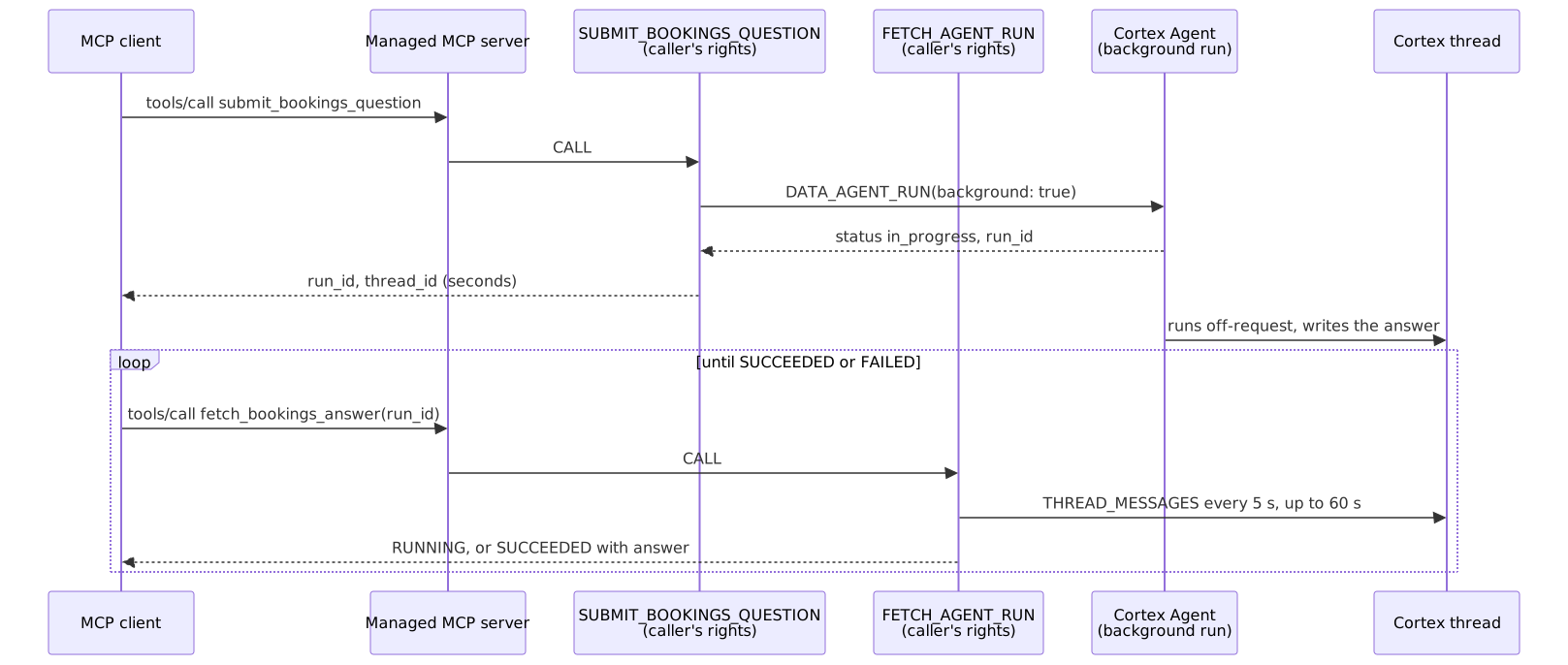
Key concepts:
- Background runs do the off-request work.
DATA_AGENT_RUNwith"background": truereturnsstatus: in_progressand arun_idimmediately, and the run continues for up to six hours (synchronous runs time out at 15 minutes). You read the result withTHREAD_MESSAGESon the run’s thread. No task, stream, or state table is needed, which is what keeps both proceduresEXECUTE AS CALLER. The run’s tool queries execute in the session that submitted it, under that session’s role, which matters when you test over SQL (see Verify). - Fetch blocks server-side. The polling loop is driven by the client’s language model, and every poll is a separate decision by that model to call the tool again. A fetch that returns instantly would need dozens of those decisions for a three-minute run; waiting up to 60 seconds per call brings it down to two or three.
- One handle. Submit returns
run_idas<thread_id>-<user_message_id>plus thethread_iditself. Fetch matches the assistant message whoseparent_idis the user message, so it never relies on message ordering. On success it returnsthread_idandassistant_message_id, which are what you pass asthread_idandparent_message_idto continue the conversation. - The tool descriptions are the contract. They are the only way to tell the client’s model that submit does not return the answer and that fetch must be called again on
RUNNING. Each response also carries anext_stepstring for the same reason. - Least-privilege caller. The MCP user role gets USAGE on the server, the procedures, and the agent, and SELECT on the semantic view and its base table.
USAGEon the server only lets the role list tools; invoking them needs the rest.
Prerequisites
| Requirement | Notes |
|---|---|
| Account on AWS or Azure | Background agent runs are GA on AWS and Azure. |
| Cortex Agents | Available in your region, or cross-region inference enabled. The agents use orchestration: auto. |
| ACCOUNTADMIN for setup | Only to create the two recipe roles, the warehouse, and the database in 01_setup.sql and to drop them in teardown. |
| A SQL session that stays open for a whole run | Only for the SQL checks in Verify, where submit and fetch must share one session that keeps the user role until fetch returns: a Snowsight worksheet, or one snow sql -f file. Separate snow sql -q calls do not work. The setup scripts can each run in their own session. |
| Python 3.9+ (optional) | For client/submit_fetch_client.py, standard library only. |
| An OAuth access token or programmatic access token (optional) | For the sample client. Restrict a PAT to COOKBOOK_LONG_RUNNING_AGENTS_OVER_MCP_USER. A person user can generate a PAT without a network policy but can sign in with it only while subject to one, at account or user level (programmatic access tokens). |
Quickstart
sql/01_setup.sql: roles, warehouse, database, synthetic Northwind bookings, and a semantic view.sql/02_agent.sql: the bookings agent.sql/03_run_procs.sql:START_AGENT_RUN,FETCH_AGENT_RUN, and theSUBMIT_BOOKINGS_QUESTIONwrapper.sql/04_slow_test_agent.sql: test only. An agent that must call a 70-second checkpoint twice, so its runs last over two minutes.sql/05_mcp_server.sql: the MCP server with the submit and fetch tools, and the USAGE grant.- Run the Verify queries.
- Optional: point an MCP client or the sample client at the server.
Walkthrough
Start a background run
START_AGENT_RUN passes the agent name and request body to DATA_AGENT_RUN as bind parameters. The third argument asks Snowflake to create a thread when none is given:
The docs state that a background run needs a thread_id. Passing create_thread_if_not_present = TRUE instead also works: the response is {"status":"in_progress","metadata":{"run_id":"<thread_id>-<user_message_id>","user_message_id":...}}. That background response did not include a thread_id field, so the procedure uses one if present and otherwise reads it from the run_id prefix. To continue a conversation, pass the thread_id and the previous assistant_message_id as THREAD_ID and PARENT_MESSAGE_ID.
DATA_AGENT_RUN reports errors in its payload rather than raising, so the procedure turns a payload without run_id into {"status": "FAILED", "code": ...}. Code 399513 means the calling role cannot use the agent.
Fetch with a bounded wait
FETCH_AGENT_RUN reads the thread every 5 seconds for up to BLOCK_SECONDS = 60:
The assistant message’s message_payload is a JSON string with status (completed when done) and content[]. Fetch returns SUCCEEDED with the joined text blocks, FAILED with the error, RUNNING after the wait, or NOT_FOUND for a malformed run_id or an unreadable thread. A fetch call lasts a little longer than BLOCK_SECONDS because each pass issues a query; 60 seconds measured at about 65. Keep BLOCK_SECONDS well under your client’s limit and the fetch tool’s query_timeout (110) above it.
Expose the two tools
There is no ALTER for an MCP server’s specification, so 05_mcp_server.sql uses CREATE OR REPLACE MCP SERVER, which drops every grant on the server. The script reapplies GRANT USAGE ON MCP SERVER every time it runs.
Connect a client
The server URL is https://<account_url>/api/v2/databases/COOKBOOK_LONG_RUNNING_AGENTS_OVER_MCP/schemas/APP/mcp-servers/BOOKINGS_ASYNC_MCP. For hosted assistants, use OAuth: Snowflake OAuth is the default for managed MCP servers, and the session runs as the user’s DEFAULT_ROLE, so set that to the user role and set a DEFAULT_WAREHOUSE. The security integration and client registration are covered in MCP or the Agents REST API.
Send Accept: application/json, text/event-stream. The managed MCP server answers tools/call as a Server-Sent Events stream; this is on by default for every account since August 20, 2026, and cannot be turned off (MCP: Streaming responses for tool calls has Python and Node.js client code). In testing, the stream carried a keep-alive comment every 5 seconds and then a single data: event holding the whole JSON-RPC result, and it closed without the data: [DONE] event the docs show. The sample client therefore takes the last JSON data: event and ends on stream close. Keep-alives stop idle proxies from dropping the connection, but the answer does not arrive any earlier, which is why this recipe splits submit and fetch. A request that carries _meta.progressToken also receives a notifications/progress event every 5 seconds; a client that resets its per-request timeout on progress can wait longer, but whether yours does depends on the client, and a fixed limit still ends the call. To measure keep-alives, progress events, and the longest silence on your own network path, run the stream check in MCP or the Agents REST API.
Add a client-side instruction as well, since hosted assistants have no polling setting: “When a Snowflake tool returns a run_id, the answer is not ready. Call the matching fetch tool with that run_id until it returns SUCCEEDED or FAILED.”
Verify
Submit and fetch must run in one session that stays open, with the user role active, until fetch returns. A background run keeps going after submit returns, but its tool queries execute in the submitting session under that session’s role at the time. If the session closes first (separate snow sql -q calls) or switches role, those queries fail, the agent answers with the error, and fetch reports that answer as SUCCEEDED. Calls through the MCP endpoint are not affected: in testing, separate tools/call requests completed a run of more than three minutes.
In a Snowsight worksheet, run these one at a time:
The long-run proof uses the slow test agent. Submit returns in about four seconds, the first two fetches return RUNNING after about 65 seconds each, and the third returns SUCCEEDED with total FY26-Q4 new bookings of $95.5M. In a worksheet:
From the CLI, save the following as one file and run it with snow sql -f, so submit and every fetch share a session. It returns each call’s duration and the final fetch result:
A malformed handle returns NOT_FOUND:
Confirm the server grant survived the last run of 05_mcp_server.sql:
Gotchas
| Symptom | Cause | Fix |
|---|---|---|
| The MCP client lists no tools after you edit the server | CREATE OR REPLACE MCP SERVER dropped the USAGE grant | Rerun all of 05_mcp_server.sql, which reapplies the grant. |
| Tools are listed but a call fails | USAGE on the server only allows listing; the role lacks a privilege on a procedure, the agent, or the data | Grant USAGE on the wrapper and every procedure it calls, USAGE on the agent, and SELECT on the semantic view and its table. |
Answer says the role has no privilege on BOOKINGS | The agent’s Analyst tool can generate SQL against the base table, and the agent runs as the caller | Grant SELECT on the base table as well as the semantic view (done in 01_setup.sql). |
Submit returns FAILED with code 399513 | The calling role cannot use the agent | GRANT USAGE ON AGENT ... TO ROLE <caller role>. |
Fetch returns SUCCEEDED, but the answer says the session expired or the role lacks a privilege | Over SQL, the run’s tool queries execute in the submitting session under its role at the time; that session closed, or switched role, before the run finished | Submit and fetch in one session that keeps the user role until fetch returns: a worksheet, or one snow sql -f file as in Verify. MCP clients do not need this. |
CREATE OR REPLACE AGENT ... COPY GRANTS COMMENT = ... fails with unexpected 'COMMENT' | Clause order. This differs from the published CREATE AGENT syntax, which lists COPY GRANTS before COMMENT; that order fails to parse | Put COMMENT before COPY GRANTS, as 02_agent.sql does. The grants are still copied. |
| HTTP 401 from the MCP endpoint | No valid token on the request; the response’s WWW-Authenticate header points OAuth clients to the protected resource metadata | Sign in again, or create a new PAT. A person user’s PAT signs in only while the user is subject to a network policy, so check that before reissuing it. A 401 is authentication, not a missing grant. |
| The client times out on fetch | BLOCK_SECONDS plus query overhead is too close to the client’s limit | Lower BLOCK_SECONDS, keeping the fetch tool’s query_timeout above it. |
The client stops after the first RUNNING | The client’s model chose not to call fetch again | Strengthen the tool descriptions and add the client-side instruction. Test with your client before rollout; this is model behavior. |
| Hostname connection failure | Underscores in the account hostname | Use hyphens. |
Teardown
sql/99_teardown.sql drops the database (schema, table, semantic view, agents, procedures, MCP server), the warehouse, and both roles. No account-level setting is changed. If you created a PAT for the sample client, remove it with ALTER USER <user> REMOVE PROGRAMMATIC ACCESS TOKEN <name>.
Adapt this recipe
Keep these, so a customized version keeps the recipe’s security model:
- Least privilege:
ACCOUNTADMINonly for the scripts listed under Privileges; everything else runs as the recipe’s own role. - No grants to
PUBLIC. - Caller’s rights: procedures run as
EXECUTE AS CALLER, so each user’s own grants apply. - Credentials: create keys, tokens, and secrets yourself, in a separate terminal, and read them from environment variables. Never put them in a script or give them to an agent.
- Dynamic SQL, if you add any, uses bind variables or an allowlist of identifiers, never text concatenated from user or model input.
Change these to fit your use case:
- Object names. Rename them in every script, including teardown, then check that teardown still removes everything.
- Roles, personas, and users: map them to your own, each granted no more than the recipe grants.
- Data: point the scripts at your tables instead of the sample data, then run Verify again.
- Models and warehouse sizes.
To have a coding agent adapt it:
Run it with a coding agent
Related skills
check-agent-access(coco-skills): audits every grant a role needs to run an agent and its tools. Use it when a caller gets399513or a tool fails for a missing privilege.