Snowflake-managed MCP or the Cortex Agents REST API
Decide how people reach a Cortex Agent, with identity and policies in each lane, then best practices for managed MCP servers and the Agents REST API.
| Stage | Scope, Secure, Build |
| Topics | Snowflake MCP, Cortex Agents |
| Status | GA |
| Time to complete | 45min |
| Edition | Enterprise |
| Regions | Any commercial region with Cortex Agents; managed MCP servers are not available in government regions |
| Privileges | ACCOUNTADMIN to create the recipe roles, warehouse, database, and the OAuth security integration; the rest runs as COOKBOOK_MCP_OR_AGENT_REST_API_ADMIN |
| Related skills | check-agent-access (Snowflake-Labs/coco-skills), rbac (Snowflake-Labs/coco-skills) |
| Last verified | 2026-10-04 |
| Authors | Bala Krishnamoorthy |
| Code | View all files or download mcp-or-agent-rest-api.zip, which includes this page as README.md. Teardown: sql/99_teardown.sql |
This recipe is a reference implementation: review the code and adapt it to your environment before production use.
Both options call the same Cortex Agent object, over the same semantic views and search services, under the same row access and masking policies. A Snowflake-managed MCP server makes an agent available to MCP clients such as ChatGPT, Claude, Cursor, and Copilot; it is not a different product, a different governance model, or a prerequisite for using the agent, and agent:run and DATA_AGENT_RUN work without it. So the choice is not about what the agent can do. It is about who is asking, and in which application. This recipe gives the three questions that decide it, compares identity and policy enforcement in each lane, and covers which surface to put in front of people and who should build agents. It ends with best practices for each lane. The sql/ folder deploys the MCP lane: an agent behind a managed MCP server with a fail-closed row access policy, so you can see per-user governance apply through it.
When to use this
- You have, or are about to build, a Cortex Agent and need to decide how people will reach it.
- A security reviewer asks whether exposing an agent through MCP creates a governance gap.
- You are putting an agent behind a managed MCP server and want the identity, grant, topology, and rollout practices.
- You are deciding whether each analyst should build their own agent.
When not to use this:
- You have already chosen the REST API for users without Snowflake accounts and need the implementation: see multi-tenant agents.
- Agent runs regularly exceed your MCP client’s per-call time limit. See long-running agents over MCP.
How it works
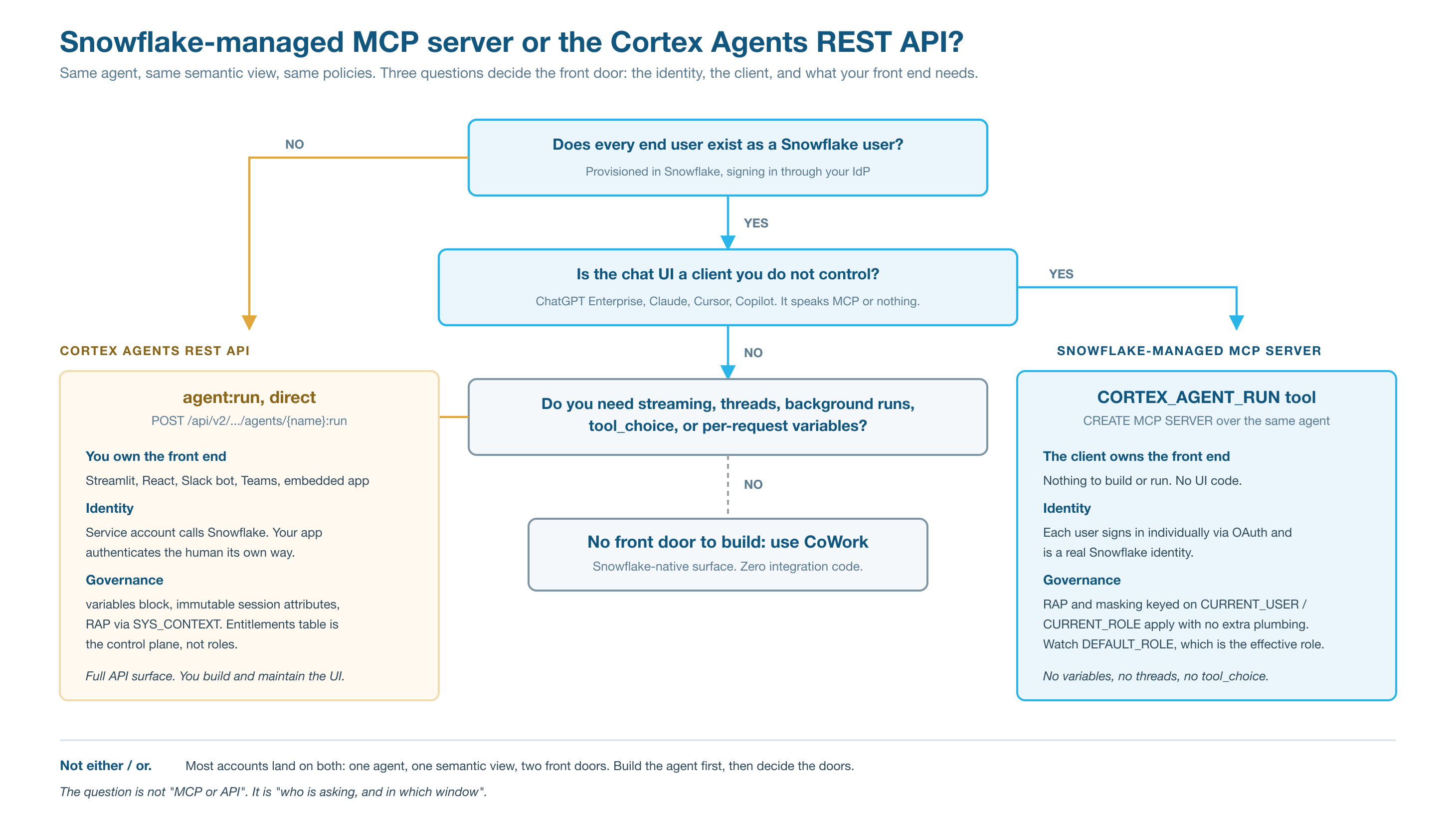
Three questions settle most cases, in the order the diagram asks them.
1. Does every end user exist as a Snowflake user? If not, managed MCP does not fit. The MCP agent tool takes the user’s message; the MCP docs describe no way to pass per-request variables, which is how the REST API carries an end user’s identity when that person has no Snowflake account. Serving those users requires the REST API’s variables block with immutable session attributes.
2. Is the chat interface a client you do not control? If the answer is ChatGPT, Claude, Cursor, or Copilot, MCP is how those clients reach tools, through their connector settings. If you own the front end, go to the third question.
3. Does your front end need what only the REST API provides? Streaming events, server-side threads, background runs, tool_choice, or per-request variables mean calling agent:run directly. If it needs none of them and people only need to ask questions of governed data, Snowflake CoWork needs no front door at all.
Key concepts:
- Same agent, two front doors. Most accounts end up with both: MCP for the assistant the organization has standardized on, REST for anything it builds. Build the agent first and prove it in Snowsight or Snowflake CoWork; the semantic view, not the front door, determines answer quality.
- Sometimes neither. If people only need to ask questions of governed data and there is no mandate to stay in a particular external assistant, Snowflake CoWork is the shortest path: no MCP server, OAuth integration, or application to maintain.
- Neither lane bypasses privileges. Both run as the calling identity, and every object the agent uses is granted separately.
- Results leave Snowflake in both lanes. The answer, any data it contains, generated SQL, and citations go back to the caller, and in the MCP lane to the client’s LLM provider, under that party’s terms. Nothing is returned that the calling role could not already read, so decide what an agent may return before you expose it.
| Snowflake-managed MCP server | Cortex Agents REST API | |
|---|---|---|
| Use it when | The client is already chosen and supports MCP | You build or own the front end |
| Who the caller is | The end user, as a Snowflake identity | Your application’s service identity; the application authenticates the person |
| End users without Snowflake accounts | Not supported | Supported with variables and session attributes |
| Authentication | OAuth 2.0: Snowflake OAuth by default, or External OAuth bound to your identity provider | OAuth, key-pair JWT, or programmatic access token for the service identity |
| Effective role | The user’s DEFAULT_ROLE | The service user’s default role, or another role selected with X-Snowflake-Role |
| What policies key on | CURRENT_USER(), CURRENT_ROLE() | SYS_CONTEXT('SNOWFLAKE$SESSION_ATTRIBUTES', ...) set by the application |
| Response transport | tools/call returns a Server-Sent Events stream, on by default for every account since 2026-08-20 (BCR-2405); see operational limits and Check the stream | Streams typed agent events by default (text deltas, thinking, tool use and results, then a final response event); stream: false returns one JSON object |
| Conversation memory | Held by the client; the tool receives a message | Server-side threads with thread_id and parent_message_id |
| Long-running work | The agent runs for the duration of one tool call, so any per-call limit in the client applies; see long-running agents over MCP | Synchronous runs time out at 15 minutes; background: true runs up to 6 hours, and you reconnect with the Stream Agent Run endpoint |
| Forcing or restricting tools | Not exposed; the client routes by tool name and description | tool_choice |
| Changing the front door | CREATE OR REPLACE MCP SERVER drops all grants on the server; reapply them in the same script | Your application’s own release process |
| Engineering cost | One MCP server and one OAuth integration | An application you build, run, and maintain |
Prerequisites
These cover the MCP lane example in sql/. The REST lane is implemented in multi-tenant agents.
| Requirement | Notes |
|---|---|
| Enterprise edition, commercial region | Managed MCP servers are not supported in government regions. |
| Cortex Agents | In your region or through cross-region inference. The example agent uses orchestration: auto. |
| ACCOUNTADMIN | For the roles, warehouse, and database in 01_setup.sql, and for the OAuth security integration in 03_oauth_integration.sql. |
| An MCP client that supports OAuth | Its connector setup shows the redirect URI you need. Snowflake-managed MCP servers do not support dynamic client registration. |
| Network policy access | If your account uses network policies, allow the client provider’s outbound IP addresses. |
Quickstart
sql/01_setup.sql: admin and MCP access roles, warehouse, database, synthetic Northwind revenue, a fail-closed row access policy, a semantic view, and one agent.sql/02_mcp_server.sql: the MCP server and every grant the access role needs. Rerun it after01_setup.sqlor after any change to the server.- Run the Verify queries.
sql/03_oauth_integration.sql: account-level. Replace the redirect URI with your client’s and run it. Then, for each of your own users who will connect, record their currentDEFAULT_ROLEandDEFAULT_WAREHOUSEand apply the template at the end of the script. No script in the recipe changes an existing user’s defaults, and teardown does not restore them for you.- Register the server URL, client ID, and client secret in your MCP client, sign in, and ask a question.
Walkthrough
Identity, row access policies, and masking in each lane
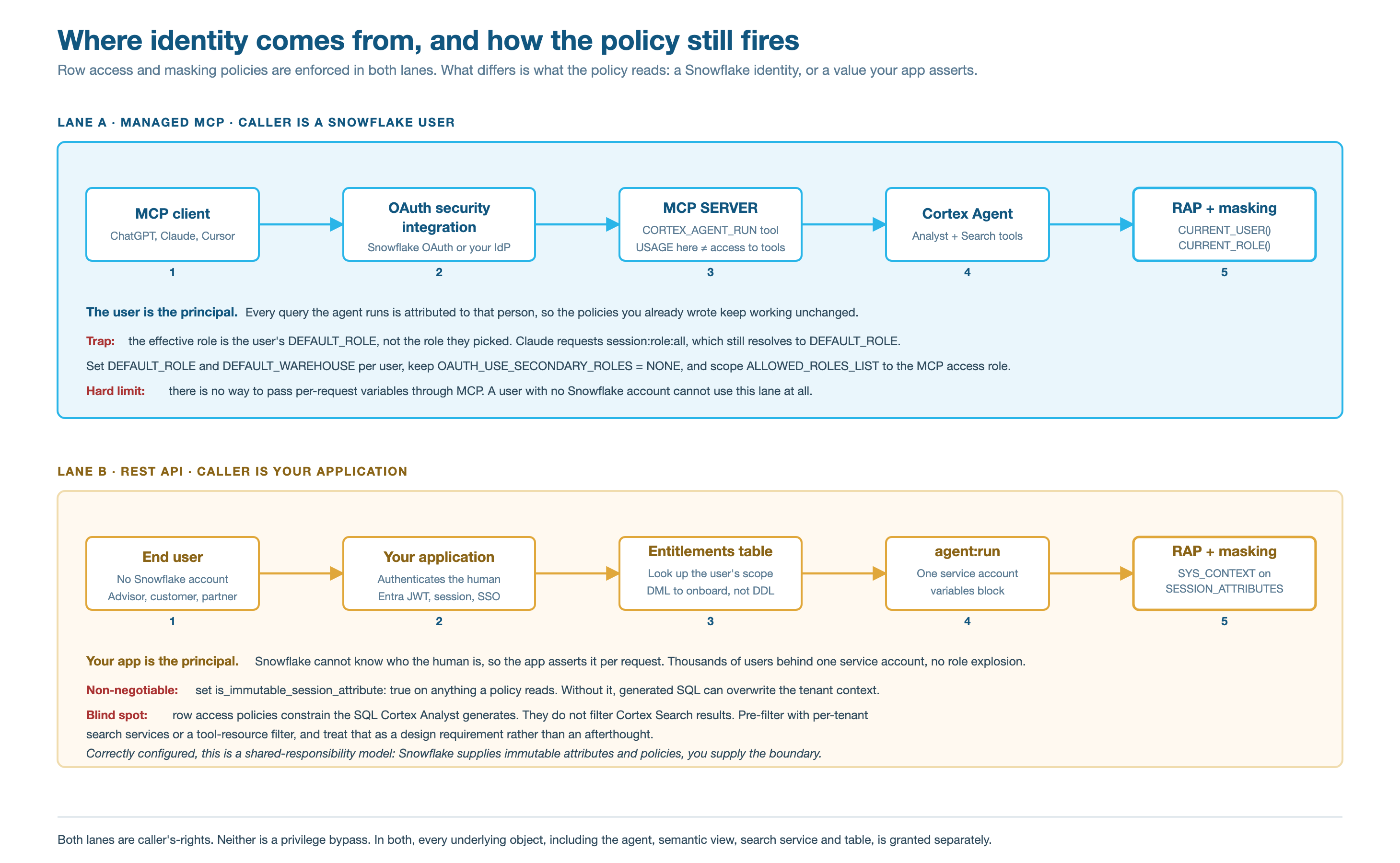
Managed MCP: existing policies keep working. Each user signs in through OAuth, so every query the agent runs is attributed to that person, under the user’s DEFAULT_ROLE. Row access and masking policies keyed on CURRENT_USER() or CURRENT_ROLE() apply with no extra configuration. The settings that make this hold are in MCP best practices.
REST API: the application states who is asking, immutably. When end users have no Snowflake account, one service identity fronts all of them and the application passes each person’s scope on every request as an immutable session attribute, which policies read with SYS_CONTEXT. The settings that make this hold are in Agents REST API best practices.
In both lanes, row access policies do not filter Cortex Search. Search services query with owner’s rights, so any role that can query a service sees everything it indexed. Separate populations with separate services or filters, and design for this from the start.
Choosing the surface
| Snowflake CoWork | ChatGPT or Claude through MCP | Your own front end | |
|---|---|---|---|
| Build cost | None | One MCP server and one OAuth integration | An application to build and own |
| Governance | Native, caller’s rights | Native, caller’s rights, per-user OAuth | Yours to implement on top of the agent |
| Users without Snowflake accounts | No | No | Yes |
| Control over the experience | None | None; the vendor owns the client | Full |
| Where the question is asked | A surface people adopt | The window they already work in | Inside an existing workflow |
| Feedback and observability | Built in | Agent usage and traces; client-side context is not captured | Whatever you instrument |
| Main risk | Adoption | The client decides routing, and the vendor can change it | Cost and drift, because it becomes a product |
CoWork and MCP are configurations; a custom front end is a product. Choose a custom front end when the agent must live inside a workflow people already use, when end users have no Snowflake account, or when you need streaming events, threads, or tool_choice. Between CoWork and MCP, adoption usually decides, because MCP puts the answer where people already work.
Who builds agents, and who uses them
Anyone who works in Snowflake directly can be given a role that creates agents. That does not mean each of them should own one. One agent serving three hundred people is better than three hundred agents, and not mainly for cost: a semantic view, its verified queries, and its evaluation set improve only when many people’s questions land on the same artifact. Three hundred private agents means three hundred untested semantic layers and three hundred definitions of revenue.
- A platform or analytics engineering team owns the shared assets: semantic views, verified queries, search services, production agents, and their evaluation sets, under change control.
- Domain data teams own their domain’s semantic view and agent, built to the shared standard, so the platform team does not become a ticket queue.
- Analysts are the source of requirements and evaluation cases, not owners of production agents. They use Cortex Code for exploration and one-off questions against the shared semantic views; when a question recurs, its logic is promoted into the semantic view as a metric or verified query, and the agent and its evaluation set inherit it.
- People who never work in Snowflake directly reach agents through CoWork, an MCP client, or your application, and need no role beyond what the agent path requires. External users are the population that requires the REST API.
Consolidate on the semantic layer, not necessarily on one agent. One agent per domain with clean, non-overlapping tool descriptions routes more accurately than one agent carrying every tool, and keeps ownership clear.
MCP best practices
Build in two phases
Phase 1 is one agent with one Cortex Analyst tool over one semantic view. Prove answer quality in Snowsight or CoWork before any MCP server exists: answer quality comes from the semantic view, and the front door should not hold that up. Phase 2 adds Cortex Search as a second tool on the same agent. Keeping them apart means that when an answer is wrong in phase 1, there is one place to look.
Create the server, then grant it
There is no ALTER for the specification, so every change is a CREATE OR REPLACE, and a replace drops every grant on the server. Keep the grant in the same script as the CREATE and always run the whole script, as 02_mcp_server.sql does.
The client chooses a tool by its name and description, so the description is the routing contract. Make each one domain-specific and mutually exclusive with the others on the server. Expose the agent rather than its parts: the agent carries the instructions, tool descriptions, and verified queries, while a directly exposed CORTEX_ANALYST_MESSAGE tool returns the generated SQL rather than results.
Grant the access role only what the agent needs
USAGE on the server allows tools/list only; calling a tool needs USAGE on the agent and privileges on everything the agent’s tools read. A semantic view needs SELECT only. The agent’s Cortex Analyst tool can also query the view’s base tables under the caller’s role, so grant SELECT on those tables as well; the row access policy still filters every row. SNOWFLAKE.CORTEX_AGENT_USER grants access to Cortex Agents only; SNOWFLAKE.CORTEX_USER also works but is broader. Do not grant the access role to PUBLIC, and do not grant broad future privileges just to support an MCP client. The check-agent-access skill audits these grants for a role.
Identity: Snowflake OAuth by default
Managed MCP servers use Snowflake OAuth unless you bind them to an External OAuth integration. One security integration, meaning one client ID and secret, can serve every user and every MCP server in the account; each user still signs in with their own credentials.
- The session role is the user’s
DEFAULT_ROLE, not a role chosen in the client. OAuth scopes control only the primary role, and by default MCP servers advertisesession:role:all, which usesDEFAULT_ROLE. Some clients, Claude among them, always request that scope. SetDEFAULT_ROLEto the access role for each user. - Set a
DEFAULT_WAREHOUSEthe default role can use. Without one, the session fails to initialize. - Keep
OAUTH_USE_SECONDARY_ROLES = NONEand restrictALLOWED_ROLES_LISTto the access role. This is the documented recommendation for MCP. A client may display “secondary roles = ALL”; the integration setting is what Snowflake enforces. - To use your own identity provider, create an External OAuth integration and set
OAUTH_AUTHORIZATION_SERVERon the account, database, or schema that holds the servers. Tokens from any other issuer are then rejected for those servers. - PrivateLink with a SaaS client: give the client the public server URL and set
USE_PRIVATELINK_FOR_AUTHORIZATION_ENDPOINT = TRUEon the integration. - If you use a PAT for a custom client instead of OAuth, restrict it to the least-privileged role that works. A person user can sign in with a PAT only while subject to a network policy, at account or user level, and a service user cannot generate or use one without it (programmatic access tokens).
Server topology
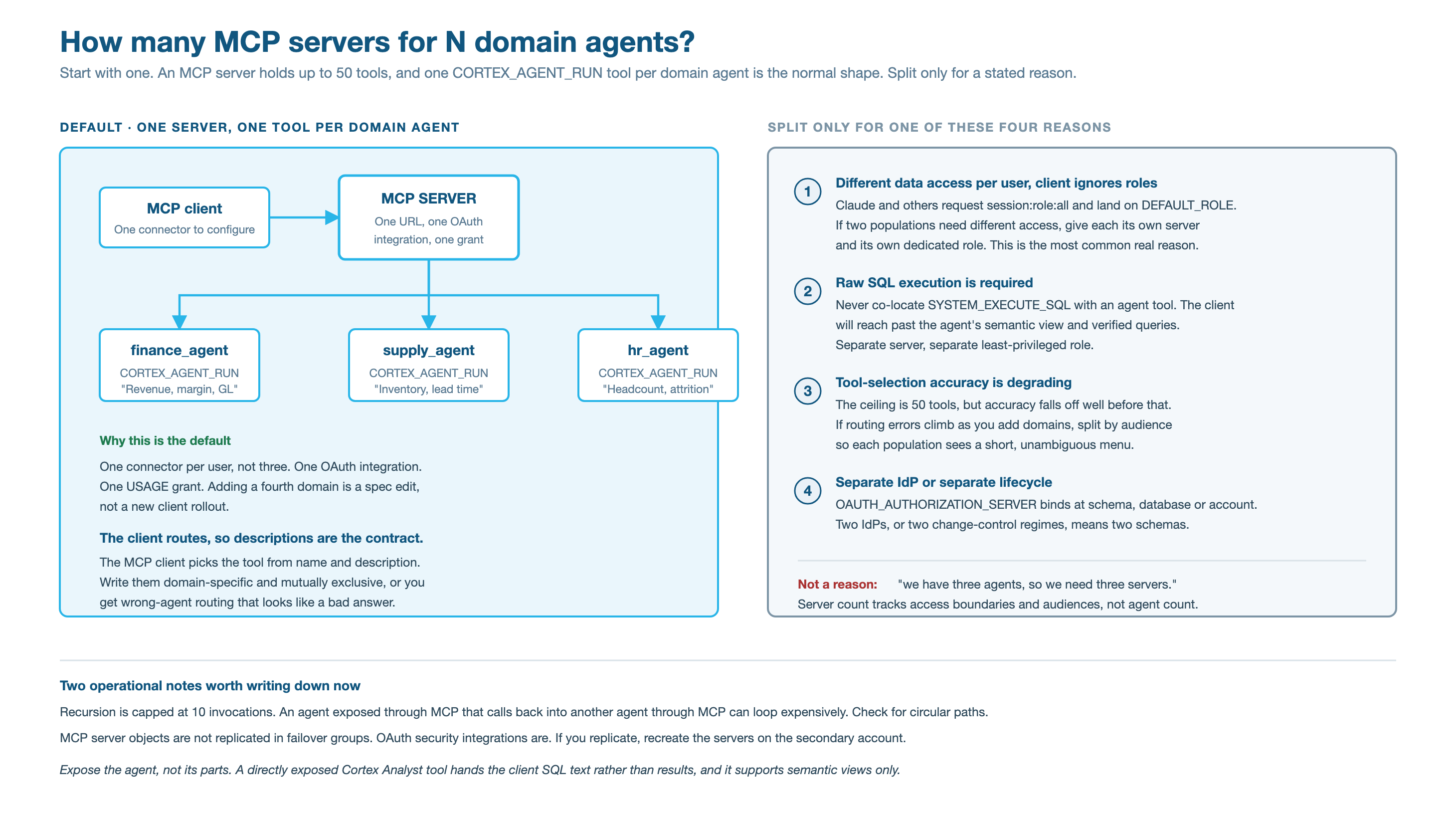
Start with one server that exposes one CORTEX_AGENT_RUN tool per domain agent. Server count follows access boundaries and audiences, not agent count. Split into more servers when:
- two populations need different data access and the client does not let them pick a role;
- one audience needs
SYSTEM_EXECUTE_SQL, which should never sit on the same server as an agent tool, because it lets the client go around the agent’s semantic view and verified queries; - tool-selection accuracy drops as you add tools, which happens before the limit of 50 tools per server;
- a separate identity provider or change-control process applies.
Keep business logic server-side
Snowflake sees the message the client sends to the agent and everything the agent does. It does not see the client’s own system prompt, custom instructions, or skills, or any turn the client answered without calling a Snowflake tool. Logic encoded on the client side is invisible to Snowflake, unversioned, and unavailable to every other surface. Put it in the agent’s orchestration and response instructions and in the semantic view, so every client inherits it and every change is reviewable. For turning agent traffic into semantic view improvements, see refinement loop from agent logs.
Deploy changes through version control
Semantic views round-trip, which makes them reviewable in a pull request:
Deploy with CREATE OR ALTER SEMANTIC VIEW, which keeps grants; CREATE OR REPLACE does not. Keep MCP server specifications in the same repository and deploy them with a script that reapplies the grants.
A Snowflake GIT REPOSITORY object clones a remote repository into the account so scripts can read versioned files there. Its API integration authenticates to the Git provider in one of three ways: no authentication for a public repository; a token, such as a personal access token, stored in a SECRET of TYPE = password and listed in ALLOWED_AUTHENTICATION_SECRETS; or OAuth2 through API_USER_AUTHENTICATION, where TYPE = SNOWFLAKE_GITHUB_APP uses the preconfigured Snowflake GitHub App for github.com and TYPE = OAUTH2 works with any provider’s OAuth application. Creating the integration needs a privileged role. Without it, keep the repository where it is and have CI apply changes with snow sql -f as a deployment service account; the review still happens in the pull request.
Operational limits
- The server URL is
https://<account_url>/api/v2/databases/<db>/schemas/<schema>/mcp-servers/<name>. Use hyphens, not underscores, in the account hostname. tools/callresponses stream as Server-Sent Events. Streaming is on by default for every account since August 20, 2026, and cannot be turned off, so there is nothing to enable. MCP: Streaming responses for tool calls has Python and Node.js client code. SendAccept: application/json, text/event-streamon every request; clients that follow MCP revision 2025-11-25 already do.tools/liststill returns one JSON body.- In testing, a
tools/callstream sent a: keep-alivecomment every 5 seconds, then onedata:event with the whole result, and closed without thedata: [DONE]event the docs show, so end on stream close. When the request carried_meta.progressToken, anotifications/progressevent (a counter and “Tool call in progress”) came with each keep-alive. - Keep-alives stop proxies and load balancers from dropping an idle connection (HTTP 504s). They do not deliver the answer sooner, so a client’s per-request limit still applies unless the client resets it when progress arrives. To measure both on your own network path, see Check the stream.
- Generic tool and SQL tool responses are truncated at 250 KB. Agent tool responses include reasoning, tool calls, and citations and can exceed 200 KB; set
max_resultson the agent’s search tool to limit them. - Snowflake enforces a maximum recursion depth of 10 invocations. Avoid an agent reachable through MCP that calls another MCP server that calls back into an agent.
- The server supports tools only: not resources, prompts, roots, or sampling. The docs also list notifications as unsupported; the only one observed in testing is
notifications/progressinside atools/callstream, described above. - MCP server objects are not replicated in failover groups; OAuth security integrations are. Recreate servers on the secondary account.
- A
CORTEX_ANALYST_MESSAGEtool on the managed MCP server supports semantic views only, not semantic models. If you plan to expose Cortex Analyst directly, migrate semantic models to semantic views first.
Rollout order
- Build the semantic view and prove answer quality in Snowsight or CoWork, with no MCP server.
- Create the agent with the Cortex Analyst tool only. Add Cortex Search later.
- Build an evaluation set from the questions collected in step 1, before external traffic arrives.
- Create the MCP server and OAuth integration, set each pilot user’s
DEFAULT_ROLEandDEFAULT_WAREHOUSE, and connect one pilot client. - Settle observability access (who may read agent traces and question text) before the pilot, so the first weeks of traffic are usable.
- Widen the audience once the pilot’s failures are understood.
Agents REST API best practices
The full pattern, with runnable code, is in multi-tenant agents.
What only the REST API provides
POST /api/v2/databases/{db}/schemas/{schema}/agents/{name}:run, or DATA_AGENT_RUN in SQL:
variableswith immutable session attributes, for users without Snowflake accounts.- Server-side threads: create one with
POST /api/v2/cortex/threads, then passthread_idand the previous assistant message asparent_message_id, so the client does not resend history. background: true, for runs up to 6 hours instead of 15 minutes.- Streaming of typed events for token-by-token display.
tool_choice, to require or restrict tools.X-Snowflake-Role, to run a request under a role other than the service user’s default.- The
:feedbackendpoint, to record end-user feedback against a request.
Carry the end user as an immutable session attribute
When end users have no Snowflake account, one service identity fronts all of them, and the application passes each person’s scope on every request:
- Set
is_immutable_session_attribute: trueon every variable a policy reads, so generated SQL or a tool call cannot change it during the interaction. - Make every policy fail closed: a missing attribute returns no rows, not all rows.
- Keep entitlements in a table, not in roles. Onboarding a user is a row, not DDL, which avoids role sprawl at thousands of users.
- Masking works the same way: a masking policy reads the session attribute, or calls a secure function that looks up the user’s access level.
- This is shared responsibility. Snowflake provides immutable session attributes and policies; configuring them to enforce the boundary you intend is yours. Test each policy with
SETstatements outside the agent before wiring it in.
Authenticate the service identity, not the person
The application authenticates the end user itself, then calls the agent as a Snowflake service user with OAuth, key-pair JWT, or a programmatic access token. Give that service user a default role that carries only what the agent path needs, and use X-Snowflake-Role only to narrow a request to another role it already holds. Keep credentials in your application’s secret store, never in a prompt or a variables value.
Verify
After 01_setup.sql and 02_mcp_server.sql, run these in one session. Start as the admin role, which can read policy references, and check the server grant survived the replace:
Check that the policy is attached and filters the access role to EMEA:
Ask the agent the same way the MCP tool will, as the access role:
Deleting the access role’s row from REGION_ENTITLEMENTS makes the same queries return no rows: the policy fails closed. Rerun 01_setup.sql and then 02_mcp_server.sql to restore it.
Once the OAuth integration exists and a user’s defaults are set, the MCP client should list one tool, revenue_agent, and give the same EMEA-only answer.
Check the stream
client/mcp_stream_check.py makes one tools/call the way a spec-compliant client does and timestamps every frame as it arrives. It reports the transport headers, the keep-alive interval, progress notifications, the result event, whether [DONE] appeared, the request id (it joins CORTEX_AGENT_USAGE_HISTORY.REQUEST_ID), and the longest silence on the wire against your proxy’s idle timeout. It uses the Python standard library only. Run it from the same network as the client you are troubleshooting, with an OAuth access token or a programmatic access token restricted to the access role (a PAT signs in only while its user is subject to a network policy):
On the sample agent:
With --compare-json, the same call sent with Accept: application/json returns one body after the whole run (16.4 seconds on the sample), so its longest silence is the full call. That silence is what an idle timeout on a proxy cuts off. The script exits 1 when the response is not a stream, when a silence reaches --idle-timeout, or when the call reaches --client-deadline, so it can run as a scheduled check.
Gotchas
| Symptom | Cause | Fix |
|---|---|---|
| OAuth consent or connection fails | OAUTH_REDIRECT_URI does not match the client | Set it to the exact callback URI the client shows. |
| Session fails to initialize | The user has no default warehouse | Set DEFAULT_WAREHOUSE and grant the default role USAGE on it. |
| An MCP user sees data for the wrong population | The session used the user’s DEFAULT_ROLE, not the role picked in the client | Set and verify DEFAULT_ROLE per user; use separate servers and roles if populations differ. |
| Tools are not visible, or disappear after a server change | The default role lacks USAGE on the server, often because a CREATE OR REPLACE dropped it | Rerun the whole 02_mcp_server.sql, which reapplies the grant. |
| A visible tool cannot be invoked | The default role lacks a privilege on the agent, semantic view, table, search service, function, or procedure | Grant the missing privilege; USAGE on the server only covers discovery. |
| The agent says a region “had no revenue” | The row access policy hid those rows, and the agent cannot tell hidden from absent | Say in the agent’s response instructions that results cover only data the user can see. |
| A REST tenant sees another tenant’s rows | The variable was not immutable, or the policy does not fail closed | Set is_immutable_session_attribute: true and return FALSE when the attribute is missing. |
| Documents leak across populations in either lane | Cortex Search queries with owner’s rights; row access policies do not filter it | Use separate search services or filters per population. |
| An agent reachable through MCP loops through other servers | Circular invocation paths | Snowflake caps recursion at 10 invocations; remove the cycle. |
| MCP servers are missing after failover | MCP server objects are not replicated in failover groups | Recreate servers on the secondary account; OAuth integrations are replicated. |
| Hostname connection failure | Underscores in the account hostname | Use hyphens. |
| A SaaS client cannot reach a PrivateLink account | The client is using the private endpoint | Use the public server URL and USE_PRIVATELINK_FOR_AUTHORIZATION_ENDPOINT = TRUE. |
| The client is blocked by a network policy | The provider’s outbound IP addresses are not allowed | Add them to the account network policy. |
The client parses tools/call as one JSON body and gets nothing | Responses are SSE streams since 2026-08-20 | Send Accept: application/json, text/event-stream, read data: events, and end on stream close rather than waiting for [DONE]. |
A client that sends the SSE Accept header still gets one JSON body | Something on the path (a client library, gateway, or proxy) rewrote or dropped the header; streaming is on by default and needs no account change | Run client/mcp_stream_check.py from the client’s network and compare with a run from outside it. |
| Calls fail with HTTP 504 after a fixed idle time | A proxy buffers the response, so keep-alives never reach it | Disable response buffering for the MCP path; the stream check’s longest silence shows whether keep-alives get through. |
| Calls fail at the same duration however the stream behaves | The client’s own per-request limit | Reset the limit on progress if the client supports it, make the agent faster, or split the work into submit and fetch calls: long-running agents over MCP. |
Teardown
sql/99_teardown.sql drops the security integration, the database (server, agent, semantic view, tables, policy), the warehouse, and both roles. No script in the recipe changes an existing user’s DEFAULT_ROLE or DEFAULT_WAREHOUSE, so teardown restores none. If you applied the template in 03_oauth_integration.sql to your own users, restore the values you recorded before you run teardown, because teardown drops the role and warehouse those settings point at.
Adapt this recipe
Keep these, so a customized version keeps the recipe’s security model:
- Least privilege:
ACCOUNTADMINonly for the scripts listed under Privileges; everything else runs as the recipe’s own role. - No grants to
PUBLIC. - Row access policies fail closed: a role with no entitlement sees no rows. Keep each policy attached when you rename or add tables, and add entitlements for new roles instead of widening the policy.
- Credentials: create keys, tokens, and secrets yourself, in a separate terminal, and read them from environment variables. Never put them in a script or give them to an agent.
- Dynamic SQL, if you add any, uses bind variables or an allowlist of identifiers, never text concatenated from user or model input.
Change these to fit your use case:
- Object names. Rename them in every script, including teardown, then check that teardown still removes everything.
- Roles, personas, and users: map them to your own, each granted no more than the recipe grants.
- Data: point the scripts at your tables instead of the sample data, then run Verify again.
- Models and warehouse sizes.
To have a coding agent adapt it:
Run it with a coding agent
Related skills
check-agent-access(coco-skills): audits every grant a role needs to run an agent and its tools, whichever front door it uses, and generates the missing grants.rbac(coco-skills): designing persona and access roles, including the MCP access role.
References
- Snowflake-managed MCP server
- CREATE MCP SERVER
- MCP: Streaming responses for tool calls (August 2026)
- Cortex Agents Run API
- Cortex Agents threads
- Multi-tenancy for Cortex Agents
- Access control and authentication for Cortex Agents
- DATA_AGENT_RUN (SNOWFLAKE.CORTEX)
- CREATE SECURITY INTEGRATION (Snowflake OAuth)
- Query a Cortex Search service
- Semantic views: SQL commands
- Setting up Snowflake to use Git