DCM Test Branches
Warning
While DCM Test Branches is in preview, use it only in non-production environments.
Introduction
If you already manage your account infrastructure with DCM projects, you can now write test scripts for your projects to validate that the business logic of your pipelines works correctly. A test script exercises the transformation procedures, functions, and views that your project defines, using test cases such as the following:
- Select from output tables and views to validate the shape and structure of the data.
- Insert test data, then run procedures or functions and validate their output.
Because a test can modify the tables it reads from, you aren’t limited to running your transformations over the full dataset. If a dataset is too large, and transforming it would take too long or cost too much, you can truncate the tables and insert a small number of rows for the test run.
Run TEST between PLAN and DEPLOY
Running EXECUTE DCM PROJECT ... TEST is completely separate from running PLAN or DEPLOY, and neither of those commands runs your tests. We recommend the following flow after you make changes to your definitions:
- Run
PLANto validate the syntax and the changes made to your object definitions. - Run
TESTto validate the data processing logic and its output. - When both
PLANandTESTsucceed, runDEPLOY.
Tests run on isolated clones before you deploy
DCM Test Branches differs from running test queries against your account in two ways.
Tests run against cloned objects on an isolated branch: Tests are executed against a cloned set of objects on a fully isolated branch, which leaves the actual objects in your account untouched. You can therefore run potentially destructive statements in a test, because they’re only applied to the cloned objects. Other users aren’t affected by your tests, aren’t aware of them, and can continue to work with the original objects while your tests run.
Tests run before deployment: Because tests run on the branch, you can run them before you deploy your changes. If a test fails, you can still modify your definitions based on the test results before anything is deployed to your account.
When to use DCM Test Branches
Use DCM Test Branches in the following situations:
- Inner-loop development: Validate definition changes while you iterate on them during your development cycle, before you commit or deploy anything.
- Integration and regression testing in CI/CD: Run your tests as a step in your CI/CD pipeline to ensure that changes to the project don’t break existing logic and contracts.
How a test run works
A test run requires that the DCM project has at least one previous successful deployment.
When you run EXECUTE DCM PROJECT ... TEST, Snowflake runs the following steps automatically for each test file:
- Creates a test branch.
- Clones all managed objects that were modified through the definition changes.
- Deploys the definition changes to the cloned objects, so that they represent the newly defined state on the branch.
- Executes the test file against the objects on the isolated branch.
- Returns the test results.
- Drops the branch and all cloned objects.
No objects, whether managed by the project or external to it, are impacted by this process. Each test run is a complete, fully managed workflow: you don’t have to create a branch, clone objects, or deploy your changes manually. You also can’t see the test branch or interact with it manually. You write your test scripts, run the test, and evaluate the test results.
Each test file runs on its own branch, and all test files run in parallel. Each file runs from top to bottom. Because each file has its own branch, test files are isolated from each other and don’t interfere with each other. For example, rows that one test file inserts into a table aren’t visible to any other test file.
Run DCM Tests
By default, EXECUTE DCM PROJECT ... TEST runs all SQL files in the sources/tests/ folder of your project. Optionally, you can pass a list of individual test files to run.
A test file passes when all of its statements run without an error. When a statement raises an error, the test file fails, and the test results include the error message.
Note
Requires Snowflake CLI version 3.29.0 or later.
Use snow dcm test with --all-scripts to run all test files, or with --script to run individual test files. Without either option, snow dcm test checks the data quality expectations of the already-deployed objects instead of running your test files.
--all-scriptsRuns all test files in
sources/tests/. You can’t combine this option with--script.--script script_nameRuns the specified test file. Specify the path of the test file under
sources/tests/, without the.sqlextension. Names are case-sensitive. Repeat the option to run multiple test files.--expectationsAlso checks the data quality expectations of the already-deployed objects in the same run.
--save-outputSaves the test results to
out/test/test_result.json.
-
Run all test files for the default target:
-
Run all test files for a specific target and save the results:
-
Run two specific test files:
The CLI reports the result of each test file, including the error message of each failed file, followed by a summary:
When at least one test file fails, the command exits with exit code 1, so you can use it to block the deployment step in a CI/CD pipeline.
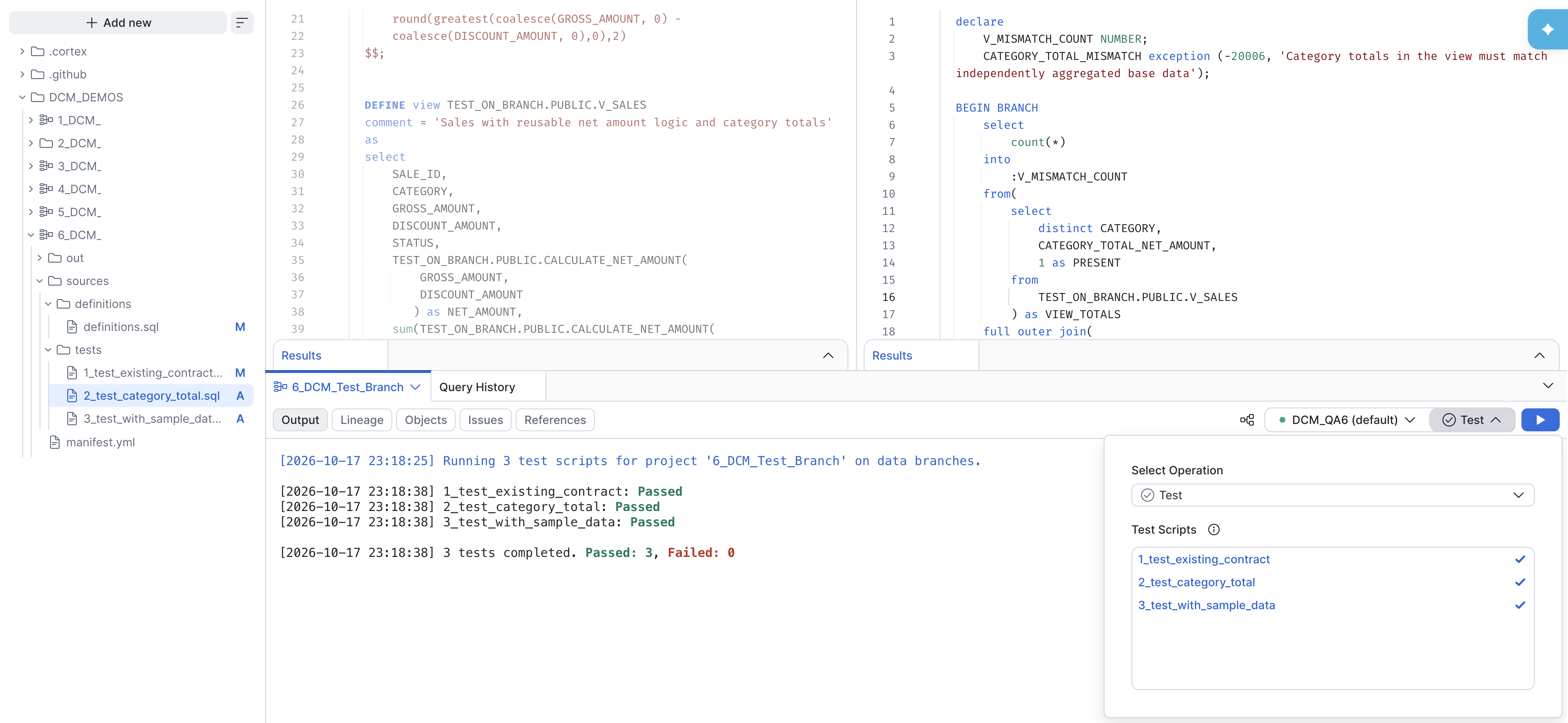
To run tests from Workspaces, select Show project controls on your project folder in the file explorer. Then, at the top of the DCM project pane:
- Select your project from the project switcher in the pane tab.
- Select your target (if you have multiple targets).
- In the operations list, select Test.
- (Optional) Select the test files to run. If you don’t select any files, all test files in
sources/tests/run. - Click the run button to start the test run.
Where:
FROM 'source_files_path'Specifies the directory that contains the source files for the DCM project, including the manifest file and the
sources/tests/folder.SCRIPTS ( "script_name" [ , ... ] )Specifies the test files to run. Each name is the path of a test file under
sources/tests/, without the.sqlextension, in double quotes. Names are case-sensitive. If you omitSCRIPTS, all test files insources/tests/run.
For descriptions of the other parameters, see EXECUTE DCM PROJECT.
Run all test files of a project from a workspace path:
Run two specific test files:
Required access privileges
Only the project owner role can run EXECUTE DCM PROJECT ... TEST. The project owner role holds ownership of all objects that the DCM project manages, so the role that runs a test also holds ownership of all branched objects.
Warning
A test run only applies its statements to the cloned objects on the branch. However, there’s no additional access restriction on the original objects: the project owner role keeps full ownership of them. Statements from a test file that you run manually outside a test run therefore apply to the original objects. For more information, see Write a test file.
Write a test file
Put your test files in the sources/tests/ folder of your DCM project. Test files in any other path can’t be executed.
Each test file follows a procedure-like structure:
- (Optional) A
DECLAREsection, where you declare any variables and exceptions that the test uses. - A block that starts with
BEGIN BRANCHand ends withEND BRANCH, which contains the statements of the test.
The BEGIN BRANCH and END BRANCH syntax helps prevent accidental manual execution of a test file outside of a branch, because Snowflake only accepts this syntax in the context of a test branch.
Warning
The BEGIN BRANCH syntax only protects the test file as a whole. If you copy individual statements from a test file and run them manually, they run against the actual objects in your account. Take care not to manually run destructive statements, such as TRUNCATE or UPDATE, that are meant for a test branch.
To make a test fail when the data doesn’t meet a condition, declare an exception in the DECLARE section and raise it in the BEGIN BRANCH block.
Test files support the same Jinja templating as definition files. You can reference the variables defined in the templating section of the manifest file, such as {{db}}, in your test files. For more information, see Object definition templating.
Supported object types and statements
Your DCM project can define any object type, but you can currently only test the following object types on a test branch:
- Tables
- Views
- Procedures with SQL or Python handlers
- Functions with SQL or Python handlers
Support for more object types like Dynamic Tables and Data Metric Functions is planned.
A test file can execute the following statements:
SELECTstatementsTRUNCATE TABLEstatementsINSERTstatementsUPDATEstatementsCALLstatements for procedures, andSELECTstatements that call functions
Examples
The following examples use a DCM project that manages a table TEST_ON_BRANCH.PUBLIC.SALES and a view TEST_ON_BRANCH.PUBLIC.V_SALES. The deployed version of the view calculates a NET_AMOUNT column directly in its query.
The pending definition change, which hasn’t been deployed yet, extracts the net amount calculation into a reusable function and adds a CATEGORY_TOTAL_NET_AMOUNT column to the view:
Each of the following tests runs on its own branch, against the pending function and view.
Check that a refactoring preserves an existing contract
This regression test compares the view with the base table. It fails if the view doesn’t preserve the row count of the table or the number of rows for each SALE_ID, or if the view produces null net amounts. If this test passes, extracting the calculation into the function didn’t change the grain of the view:
Validate a new column against an independent aggregation
This test compares the category totals from the pending view with an independent aggregation and net amount calculation over the SALES table. It fails if any category is missing on either side or if any total doesn’t match:
Replace the table data with a small set of sample rows
To avoid running the transformation over the full table, this test truncates the SALES table, inserts three rows with known values, and validates the expected NET_AMOUNT and CATEGORY_TOTAL_NET_AMOUNT of every row. Because SALES is managed by the DCM project, the TRUNCATE and INSERT statements only affect the clone on the branch of this test. The deployed table and the branches of the other tests keep their original data:
Limitations
DCM Test Branches has the following limitations during the preview:
- Procedures and functions that declare integrations can’t run on a branch: A procedure or function that declares an integration, such as an external access integration, can’t run in a test branch, because Snowflake can’t control what the external call does.
- Only managed objects can be modified: You can only test objects that are already managed by the DCM project, or that are being added to the project definitions. A test can reference objects of any type outside of the project, but these unmanaged objects are read-only. A test can’t modify or write to unmanaged tables or other unmanaged objects in any way.
- The warehouse can’t be specified: You can’t specify the warehouse that a test run uses. Test runs always use the default warehouse of the DCM project owner.
- Environment variables and secrets aren’t supported yet:
Test branches don’t yet work with a project that declares environment variables (
env_vars) or secrets (env_secrets) inmanifest.yml. - Runtime variable overwrites aren’t supported:
The test command doesn’t accept overwrites of templating variable values for the run, such as
USING (<expr>), the--variableoption, or Override Variables in Workspaces.