Snowflake DCM Projects
Snowflake DCM Projects (Database Change Management) enable a declarative approach to managing Snowflake objects as code. You define the desired target state of your databases, schemas, tables, and other objects in definition files, and Snowflake determines and applies the necessary changes to reach that state. This enables version-controlled, repeatable deployments across environments, such as dev, staging, and production, using a plan-then-deploy workflow common among infrastructure-as-code tools.
You can author, debug, and deploy DCM Projects by hand in Snowflake Workspaces or your local IDE, use Cortex Code to do it via natural-language prompts, or automate deployments through CI/CD pipelines. See Interfaces and How to get started for details.
If your definitions contain repetitive patterns, you can parameterize your code by using Jinja templating, including dictionaries, loops, conditions, and macros.
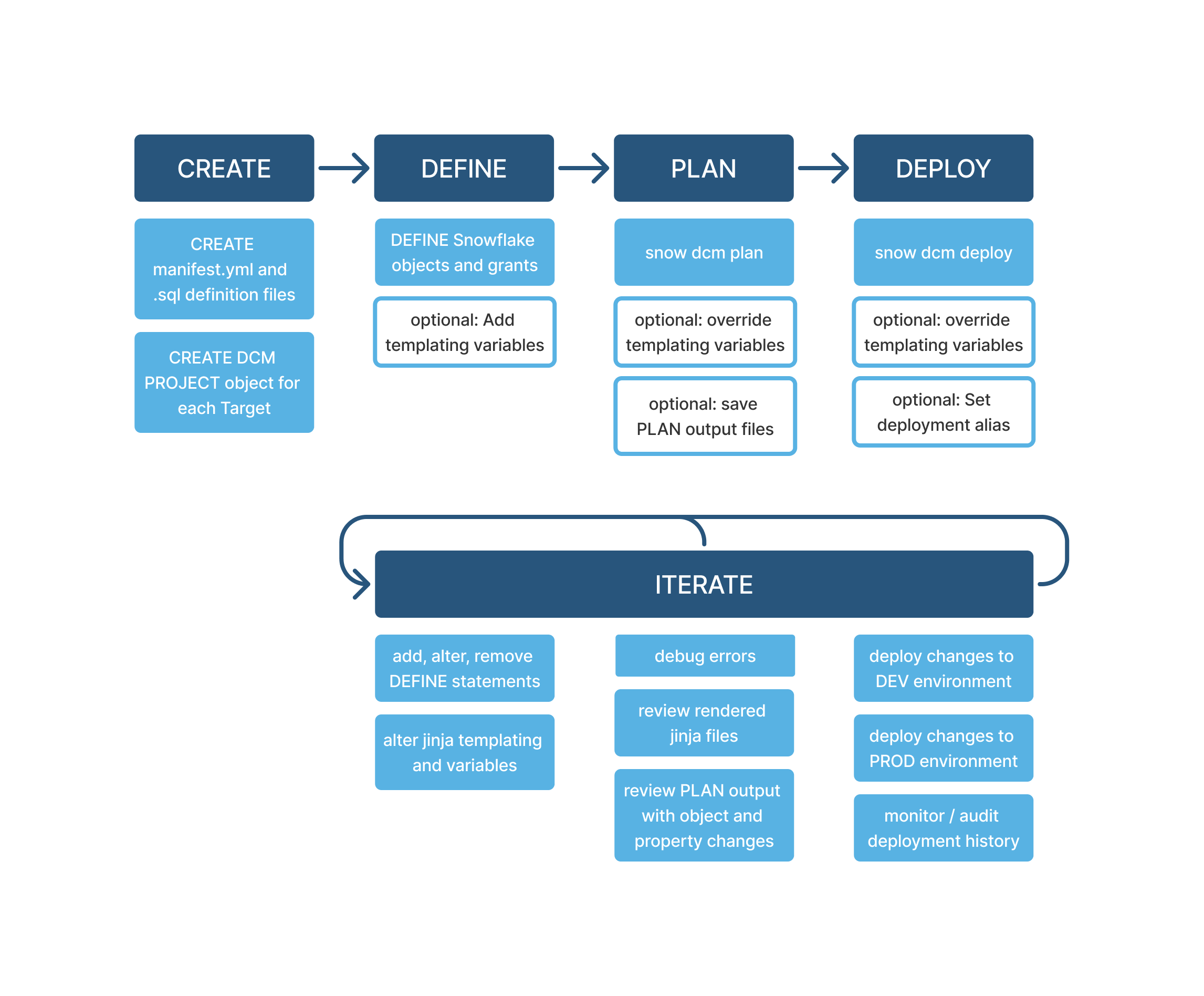
The high-level workflow for managing a DCM project is as follows:
-
Create DCM project files (
manifest.ymland SQL definition files) in a Snowflake Workspace, remote Git repository, or local directory. -
Create a new DCM project for each target environment.
-
Define Snowflake objects in the DCM project files.
Convert your existing SQL deployment scripts by using the DEFINE keyword (for supported object types).
-
(Optional) Add shared or alternative templating variables and macros.
-
Execute a DCM PLAN command to mimic a deployment and preview the changes.
-
Deploy the project version to apply changes in Snowflake.
-
Monitor project executions.
-
Iterate on your DCM project. Update the project files, review the plan output, and deploy new versions as needed.
This lifecycle helps you build, test, deploy, and monitor database changes in a controlled, versioned, and auditable way.
The following diagram illustrates the DCM Projects lifecycle outlined above.
Interfaces
You can work with DCM Projects using Snowsight Workspaces, Snowflake CLI in your local IDE, natural-language prompts with Cortex Code, SQL commands, or an automated CI/CD pipeline. For a comparison of these interfaces, setup instructions, and a diagram of how they fit into a typical development-to-production workflow, see Interface tools in Deploy and manage DCM Projects.
How to get started
You can get started with a DCM project in one of the following ways. Cortex Code can assist you with any of these paths:
- Try the quickstart: Clone a demo project from the Snowflake Labs repository and let a guided quickstart walk you through the steps.
- Start a new project: Create a new, empty DCM project in a Snowsight Workspace.
- Bring an existing project: Clone a Git repository containing an existing DCM project into a Workspace or local environment to modify, test, and deploy it.
- Migrate existing infrastructure: Convert your existing account infrastructure or custom SQL scripts into a DCM project using the migration stored procedure or Cortex Code skill. See Migrating existing objects to DCM Projects below.
For setup instructions and interface-specific steps, see Deploy and manage DCM Projects.
Try the quickstart
The Get Started with Snowflake DCM Projects quickstart walks through a sample food truck analytics pipeline and covers:
- Creating a Snowflake Workspace linked to the Snowflake Labs DCM repository
- Setting up a dedicated role and a DCM project object
- Exploring a project’s manifest file, definition files, and Jinja macros
- Running PLAN and DEPLOY to create the pipeline
- Attaching data quality expectations with data metric functions
Migrating existing objects to DCM Projects
If you already have Snowflake objects that you want to bring under DCM Projects management, use the migration tools in the
migration-tools folder of the Snowflake
Labs DCM repository. Both tools generate DEFINE statements for your existing objects by running GET_DDL against a database or
schema you select:
- Cortex Code skill: Guides you through the full migration workflow. It runs the stored procedure to generate DEFINE files, runs PLAN to compare them against the live objects, helps you refine the DEFINE statements based on the diff, runs DEPLOY with zero changes to adopt the objects into DCM Projects, and can optionally identify Jinja templating opportunities for multi-environment setups. Cortex Code pauses at key checkpoints for your review and approval.
- Stored procedure: A fallback for when Cortex Code isn’t available. It only covers the file generation step; you set up the DCM project, and run PLAN and DEPLOY manually afterward.
Note
The migration skill and stored procedure are provided as experimental tools. Test them thoroughly and use them at your own risk.
Key terms
The following are the key terms you should know when working with DCM Projects.
- Declarative definitions
In DCM Projects, you define the desired state of your Snowflake environment, such as which tables, schemas, or roles should exist, independent of the current state of the objects. You do not specify each step to create or modify them. You describe what you want, and Snowflake figures out how to make it happen.
Specifically, DCM Projects leverage DEFINE statements with templating features. This makes project files reusable and customizable for different environments. The order and location of DEFINE statements within a project don’t affect the results. Snowflake collects and sorts all statements before applying changes, so you don’t need to manually handle sequencing or dependencies.
- DCM project files
A DCM project is based on a set of SQL and YAML source files, usually managed in a Git repository or your local workspace. You define Snowflake objects, their attributes, relationships, and constraints for a DCM project in your project definition files (SQL files). You update your project files in a development workspace. Changes only take effect in Snowflake after you deploy them through a DCM project object.
- DCM project object
A DCM project is a schema-level object in Snowflake that you use to deploy and manage the objects defined in DCM project files. You need a DCM project object for each target environment.
The DCM project object is used to execute DCM commands and stores the immutable artifacts and definition files of all executed deployments.
Though a DCM project is a schema-level object, you can use it to create and manage objects in other databases. You can also execute a DCM project to perform a dry run of changes to your workflow so that you can preview changes before deploying them.
Requirements
- Use Snowsight, Snowflake CLI, SQL, or Cortex CLI to manage DCM Projects.
- You need a database and a schema where you can create your DCM project objects.
- Store your DCM project definitions locally or in Snowflake Workspace.
- Use Git for collaboration, versioning, and for synchronizing changes.
- If you want to execute local definitions using Snowflake CLI, you also need privileges to create a temporary stage in the schema of your target DCM project object.
Cost
DCM Projects are available for all Snowflake editions. There are no DCM Projects-specific costs beyond the compute cost incurred by DCM Projects operations.
DCM Projects operations such as PLAN and DEPLOY are primarily metadata operations and incur Cloud Services compute cost, similar to running DDL scripts with ALTER or CREATE statements. Warehouse compute cost can also apply, for example when rendering Jinja templates or when querying DCM Projects deployment history in Information Schema.
In Snowsight Workspaces, the DCM ANALYZE command only runs in the background while you’re actively editing a project’s
definition files.
Considerations and limitations
Project size and performance
The execution time for DCM Projects operations like PLAN and DEPLOY depends heavily on the size and shape of the project definitions. Complex dependency graphs, such as grants on dynamic tables calling functions to read from views that join external source tables, affect performance more than simply having a large number of independent tables. For large projects with 1,000+ entities, PLAN or DEPLOY can take 10 minutes or more. Consolidating definitions into fewer files generally shows faster execution times for PLAN and DEPLOY commands.
Currently, DCM Projects supports up to 10,000 defined entities, grants, or attachments per project, with a maximum total size of 10 MB. This 10 MB limit applies to both the sum of all source files and the rendered definition files. In some cases, exceeding these limits can cause executions to fail due to timeouts.
DCM Projects also supports up to 10,000 files under /sources in a project.
If a large project contains segments with no interdependencies, such as separate business units or applications, consider splitting it into multiple smaller projects along those boundaries. This can improve PLAN and DEPLOY execution times.
To validate definition changes faster during active development, use PLAN DELTA to evaluate only the definitions you changed instead of the entire project.
Changeset
Both PLAN and DEPLOY commands list all DDL changes inside the plan_result.json file. The changeset lists the operations
performed or planned (CREATE, ALTER, DROP) and the individual attributes affected, such as comment, schedule, and timeout.
Note
For object types still in preview, it’s not guaranteed that the changeset captures every granular change across all properties of that object.
Templating
- Because definition files are Jinja2 templates, all of the limitations for Jinja2 templates apply.
- DCM templating variables are not intended for sensitive information like credentials. The rendered SQL definitions don’t redact any values inserted by environment variables.
Key use cases for DCM Projects
This section describes key use cases for DCM Projects and how they help address challenges that data businesses face at scale. These use cases fall into two general categories based on a team’s responsibility:
- Platform teams that manage infrastructure and governance
- Feature teams that manage individual data products and pipelines
DCM Projects for managing infrastructure
DCM Projects help address the following challenges that platform teams often encounter:
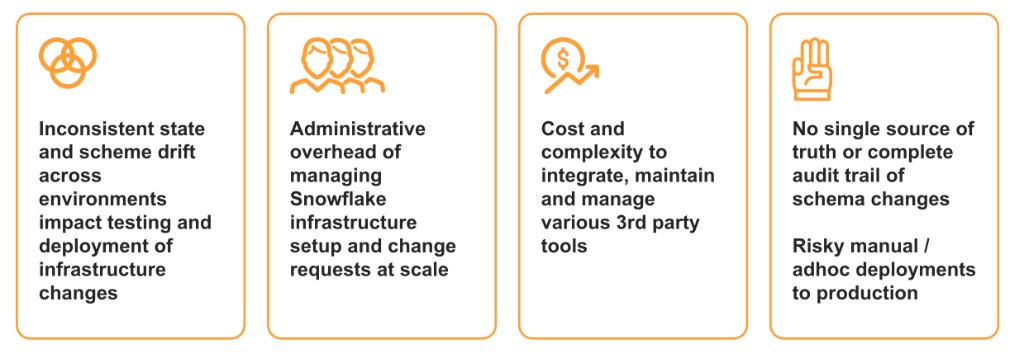
When platform teams want to deploy and maintain standardized infrastructure for multiple business units, they can use DCM Projects to define a standard set of objects in code as SQL files. And with Jinja, this template can be parameterized, for example, by team name, and deployed multiple times.
Example: Create a dedicated DCM project for each business unit
One approach is to create a dedicated DCM project for each business unit, with all projects referencing the same parameterized definition
files, as shown in the following definitions.sql example:
Execute the DCM project with the following command:
Example: Create a single DCM project for multiple business units
In this approach, you manage infrastructure for multiple business units in one DCM project by using loops in your Jinja template, as shown in the
following definitions.sql example:
Execute the DCM project with the following command:
This makes it easy for platform teams and admins to make changes such as:
- Add a new team to the list to deploy the existing infrastructure template for that team.
- Remove a team from the list to drop the infrastructure of that team.
- Add a new READ_ONLY role for all teams.
- Change specific configurations such as grants or warehouse size across all teams or for a specific team.
- Run PLAN to compare the current state against expected standards and re-deploy to reinstate standards.
DCM Projects for data pipelines
DCM Projects help address the following challenges that feature teams often encounter:
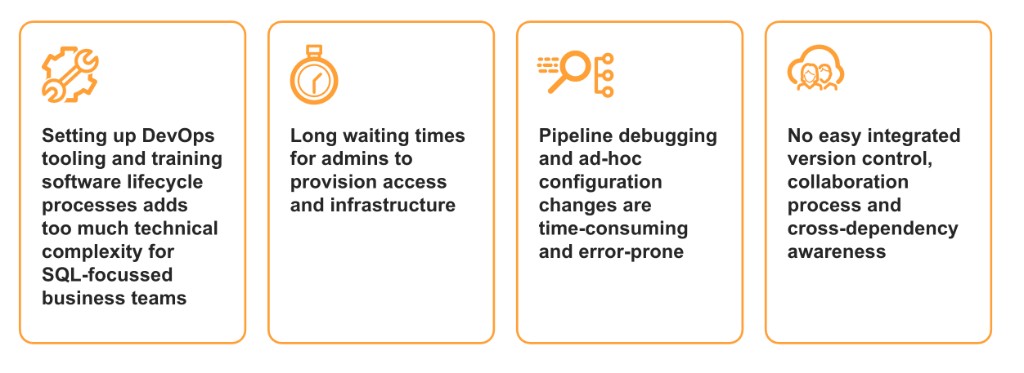
Business units that want to easily author and manage their data pipelines can use DCM Projects to define, test, deploy, and iterate over their business logic.
You can:
- Manage Snowflake object types like tables, dynamic tables, views, warehouses, roles, grants, data metric functions, and expectations all in one project.
- Test and deploy incremental changes to pipelines. You can change configurations, implement transformation logic, and add columns and views.
- Preview data samples to validate transformation logic before deploying objects.
- Deploy the same pipeline definition to multiple environments.
- Test data quality expectations on pre-prod environments before deploying changes to production.
DCM Projects provide additional functionality for authoring and managing data pipelines. See DCM Projects for data pipelines for details.