Business Ontology
Business Ontology is the governed meaning layer in Horizon Catalog. It lets business data stewards declare one approved definition for a term, metric, or entity, model how those concepts relate, and point each definition at the tables, views, columns, and Semantic Views that implement it. People and AI then work from the same canonical meaning instead of inferring competing definitions from individual models.
Business Ontology complements Semantic Views and Cortex Sense. It doesn’t replace either of them. Semantic Views remain the executable metric layer for a domain. Cortex Sense remains the AI-derived context layer for data that isn’t fully modeled. Business Ontology is the steward-approved layer that spans domains and survives when an individual model changes.
Overview
Schema comments, tags, and Semantic Views capture meaning close to a table or a model. That isn’t enough when the same business idea shows up in more than one place:
- A metric such as revenue can have one business meaning and several valid Semantic View implementations. Nothing at the account level says which definition is canonical for a given question.
- An agent that queries one Semantic View at a time has no governed map of the same concept across models, so cross-domain questions can misroute or return conflicting numbers.
- Fiscal calendars, eligibility rules, and similar process knowledge often live outside the warehouse. Without a home for that context, an agent can’t explain why two sources both look right.
Business Ontology closes those gaps for the steward who owns meaning. In industry terms it’s a business glossary with a pragmatic ontology underneath: you author ordinary definitions, and the structured model (typed concepts, relationships, and asset bindings) comes along so search and Cortex can use it. It isn’t a formal OWL inference engine, a standalone knowledge graph database, or an operational action layer.
The two surfaces of the same model are:
- Glossary: the human-facing definitions, ownership, approval status, synonyms, and context.
- Ontology: the typed concepts (term, metric, entity), the relationships among them, and the links to the assets that implement them.
How Business Ontology works
You organize meaning in a glossary, usually grouped by domain (for example Finance or Purchasing). Each node is a governed business concept:
| Kind | What it represents |
|---|---|
| Term | A general business concept in plain language. This is the default. |
| Metric | A concept whose meaning is a calculation or KPI. |
| Entity | A business object with typed relationships. |
Nodes connect in two ways:
- Relationships link nodes to each other (for example Order has part Line Item).
- Representations bind a node to a real asset that implements it. The asset can be a table, a view, a column of either, or a Semantic View. Table bindings include standard tables and other table kinds, such as dynamic tables, Iceberg tables, and interactive tables. View bindings include standard views and materialized views. A Semantic View binding can name the view itself or one part of it: an entity, dimension, fact, metric, derived metric, variable, or Semantic View relationship. The representation is the approved mapping from business meaning to execution. The asset itself stays owned by its existing object lifecycle. The glossary definition can persist even if a particular Semantic View is rebuilt.
Nodes and mappings follow a steward lifecycle. Draft nodes can be created by a person or imported from a file. Only approved nodes are treated as canonical and served to Cortex. Deprecated nodes remain for history and aren’t served.
In this preview, CoCo can flag duplicate or conflicting definitions when you create a new node. Cortex Sense drift detection that reviews and re-syncs a bound Semantic View expression after it changes isn’t available yet.
The following table summarizes how the three context layers differ:
| Layer | Purpose | Typical owner | Unit of work |
|---|---|---|---|
| Business Ontology | Govern what a concept means across models and assets | Business data steward | Term, metric, entity, relationship, representation |
| Semantic View | Compose and execute metrics for a domain | Technical data steward | Logical table, dimension, fact, metric, verified query |
| Cortex Sense | Ground agents with auto-generated context for unmodeled data | Snowflake-managed, with user feedback | Signal, suggestion, inferred mapping |
Business Ontology in Snowsight
In this preview, Snowsight covers the list view and node detail. You can browse domains, create a node, and review its definition. All other steward operations, including binding representations, approving suggested relationships, and importing a glossary, are available in Snowflake CoCo.
- Sign in to Snowsight.
- In the navigation menu, select Catalog » Business Ontology.
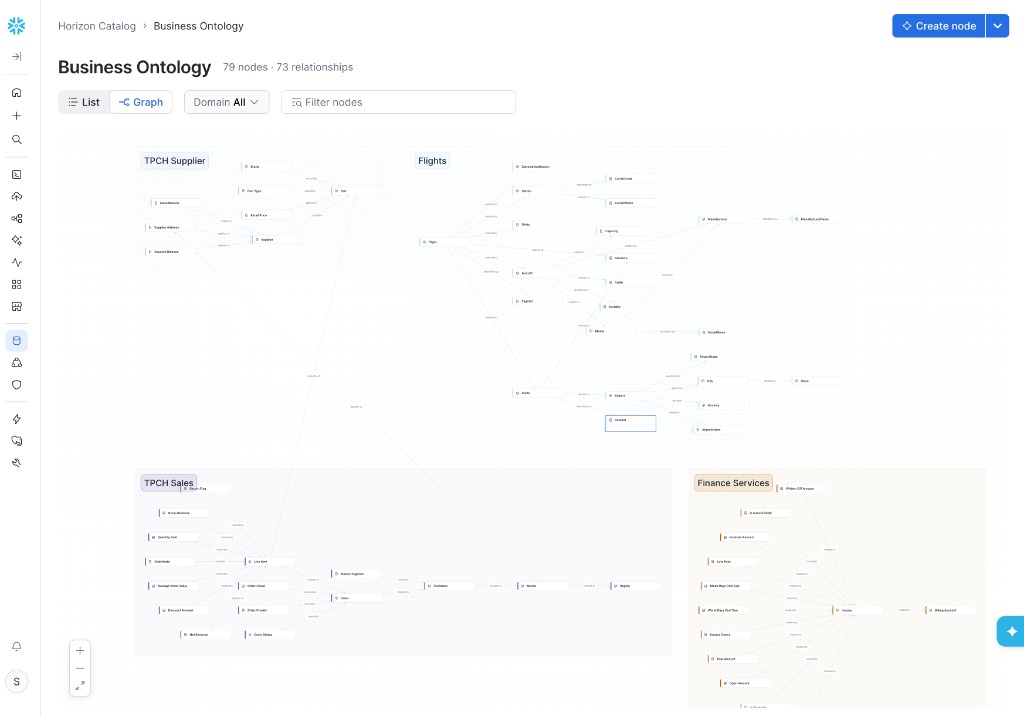
The list view shows domains, nodes, and descriptions. Switch to Graph to see how those nodes relate across the glossary.
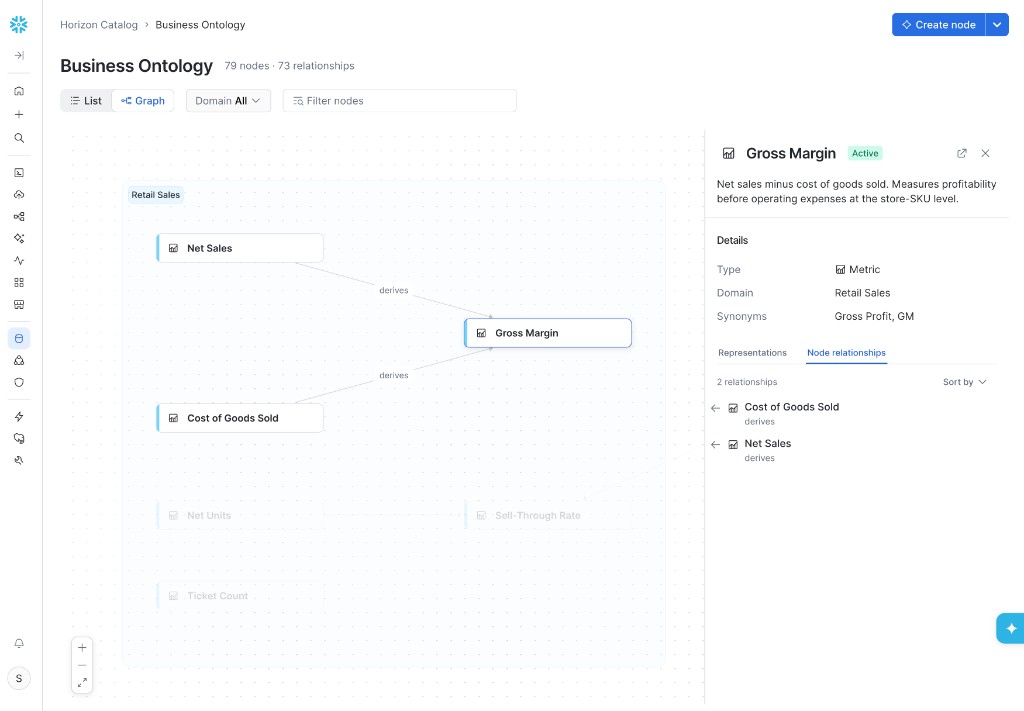
Open a node to review its definition, the ontology neighborhood with labeled relationship edges, synonyms, representations, and related assets. You can create a term, metric, or entity from the node page, and you can add synonyms there. Assigning contacts and viewing history aren’t available in Snowsight in this preview.
Typical steward work in Snowsight includes the following:
- Create a term, metric, or entity in a domain and write the canonical definition.
- Add synonyms so people and AI resolve informal names to the approved node.
Business Ontology in Snowflake CoCo
In this preview, CoCo is the complete authoring surface. Use the business-ontology skill in
Snowflake CoCo to create nodes, bind representations, approve or reject
suggested relationships, and import an existing glossary. The skill is bundled with CoCo for accounts enabled for this preview:
- CoCo CLI: invoke with
$business-ontology. - CoCo Desktop: type
/in chat and select business-ontology.
If your definitions already live in a spreadsheet or an external catalog, you can bring them into Snowflake instead of retyping every term.
A typical import flow is:
- Export the current glossary to a file (for example CSV).
- In CoCo, invoke the
business-ontologyskill, import the file, and ask Cortex to extract candidate domains, terms, relationships, and asset associations. - Review the proposals. Accept high-confidence nodes in bulk, and edit or reject the rest.
- Promote accepted nodes from draft to approved so they become searchable and available as preferred context for Cortex.
You can also start from an existing Semantic View: create the canonical metric in Business Ontology, then bind the Semantic View metric as a representation so other models reuse the same governed definition.
Access control
Access is granted per ontology domain. Grant READ to roles that consume published content, SUGGEST to roles that
propose changes for review, and MODIFY to roles that review and approve changes. To drop a domain, a role needs
OWNERSHIP.
For privileges, grant examples, and preview limitations, see Business Ontology access control.
Considerations
- Business Ontology is available in private preview to selected accounts. It isn’t listed in the public documentation navigation.
- Approved nodes are the preferred definitions for Cortex. Draft and deprecated nodes aren’t served.
- Semantic Views still define how a metric is computed for a query. Bind a representation when you want the node to point at that implementation.
- Cortex Sense can still infer context for ungoverned data. Steward-approved nodes override competing inferences when both exist.
- You can’t rename a domain after you create it. Domain comments can be changed with
MODIFY. Subdomains aren’t supported in this preview. - A representation isn’t revalidated when its target is dropped or renamed. The binding persists and continues to read as valid, so stewards should check representations after catalog changes.
- The graph view is bounded, so a large imported glossary might not display every relationship. For the limits and other graph behavior, see Business Ontology relationships.
- This preview doesn’t provide a standalone graph database, SPARQL or OWL reasoning, or an operational ontology with actions.