CoCo in Snowsight¶
Overview¶
Snowflake CoCo provides an agentic experience across several functional areas within Snowsight. It is designed to assist data analysts, engineers, and administrators with tasks such as SQL development, data exploration, and account management by deeply integrating into the Snowsight interface and offering capabilities such as diff views.
CoCo uses intelligent orchestration to plan and execute multi-step tasks based on your request. In addition, it selects internal tools and relevant context from your Snowflake environment to complete the task, ensuring that each response is accurate.
The assistant follows an agentic workflow and interprets your intent, creates a plan of action, and executes the steps while maintaining context across the session.
CoCo understands roles, privileges, schemas, and SQL syntax, and applies Snowflake best practices when it is generating or modifying code.
To use CoCo in Snowsight, follow these steps:
-
Select the CoCo icon
 in the lower-right corner. The CoCo panel opens on the right side of Snowsight.
 -
In the message box, type in your question and then select the send icon or press
Enterto submit it. CoCo provides a response in the panel.If the response from CoCo includes SQL statements, you can execute the statements or copy them to your clipboard.
Provide feedback on responses¶
You can rate a CoCo response with thumbs-up or thumbs-down and optionally add a comment. That rating is product feedback to Snowflake. Prompt traces for CoCo are stored in SNOWFLAKE.LOCAL.AI_OBSERVABILITY_EVENTS; the rating isn’t, because it goes to Snowflake rather than into account monitoring data. For how this differs from Cortex Agent feedback, see Product feedback.
Restrict a chat¶
Use a Restricted Session Scope (RSS) to reduce what CoCo can do in the current chat. You can apply read-only access or restrict the chat to selected roles. An RSS only narrows the privileges available through your roles and any administrator-enforced scope.
To restrict the current chat:
- In the CoCo panel, select +, then Restrict this chat.
- Select read-only access or restrict the chat to selected roles.
- Review and apply the restriction. The chat displays the active restriction.
After an RSS is active, you can switch to another RSS, but you can’t remove or relax the restriction in the current chat. Start a new chat to run without the user-managed RSS.
For RSS behavior, role inheritance details, and instructions for other CoCo clients, see Restrict a CoCo chat.
Access control requirements¶
A role used to access CoCo must have the following database roles granted:
| Database Role | Notes |
|---|---|
| SNOWFLAKE.COPILOT_USER | Required for all users to access CoCo. |
| SNOWFLAKE.CORTEX_USER or SNOWFLAKE.CORTEX_AGENT_USER | At least one of these database roles is required. SNOWFLAKE.CORTEX_AGENT_USER is a least-privilege alternative to SNOWFLAKE.CORTEX_USER that enables CoCo’s agentic workflows by granting access to the Cortex Agents API, without granting access to other Cortex features. |
For instructions on granting database roles, see GRANT DATABASE ROLE.
For general information about roles and access control, see Overview of Access Control.
Note
If your account previously opted out of (or disabled) Snowflake Copilot (legacy), CoCo will also be disabled. Contact your account team to enable this feature for your account.
Note
On self-service trial accounts, AI features are disabled by default. To enable them, an account administrator must add a credit card to the account. Adding a credit card doesn’t upgrade the trial to a paid account or end the trial period.
Manage availability¶
Access to CoCo in Snowsight requires both a qualifying database role and a non-zero daily credit limit. Administrators can restrict access through either mechanism.
To remove access for specific roles, revoke the database roles that CoCo requires:
Because SNOWFLAKE.COPILOT_USER is required for all users, revoking it removes access to CoCo.
SNOWFLAKE.CORTEX_USER is granted to the PUBLIC role by default, so every user in the account has
it. To narrow that, revoke it from PUBLIC and grant either SNOWFLAKE.CORTEX_USER or
SNOWFLAKE.CORTEX_AGENT_USER only to the roles that need it.
To turn CoCo in Snowsight off for the entire account, set the account-level daily credit limit
to 0:
A user-level value takes precedence over the account-level value, so you can block the account and then allow individual users:
For more information about the credit limit parameters and further examples, see Daily credit usage limits for CoCo. For other ways to control spend, see Cost controls for CoCo.
Use cases and benefits¶
CoCo in Snowsight acts as an intelligent agent, helping you work more efficiently by translating natural language instructions into executable actions. By maintaining awareness of your workspace context and Snowflake account configuration, it assists with development, exploration, and administration tasks without requiring you to leave Snowsight.
CoCo supports the following key functional areas within Snowsight:
Agentic coding in Workspaces¶
CoCo operates as a conversational coding assistant integrated within Workspaces. It supports interactive code generation, modification, review, and explanation.
- Code generation and development: Generate SQL queries, create new files, and construct logic for data pipelines and analytics workflows.
- Code modification and optimization: Refine SQL directly in a workspace, identify logic or syntax errors, and suggest optimizations for performance, readability, or cost.
- Change review: Preview AI-suggested changes using a diff view before applying them. The diff view highlights insertions and deletions, allowing users to maintain control over their code.
- Code explanation: Request an explanation of existing SQL to assist with understanding or collaboration.
- Ask follow-up questions: Continue the conversation by asking clarifying questions or requesting further analysis on generated code or results.
- Inline catalog context: Type
@in the message box to trigger a real-time search for catalog objects (such as tables, schemas, and views) and add them as context for your prompt. - Quick actions from highlighted SQL: In a SQL file, highlight text to open quick actions such as Quick Edit, Format, Add to Chat, and Explain.
- Fix SQL errors: If a SQL statement fails, use the Fix button in the results grid to get suggested fixes for the error.
- AI-powered code suggestions: As you type in a SQL file or a Notebook SQL cell, Cortex Code displays context-aware inline suggestions to improve development speed and accuracy.
AI code suggestions¶
CoCo provides intelligent, context-aware inline code suggestions for SQL in Snowflake. As you type in a SQL file or a Notebook SQL cell, CoCo predicts and suggests the next portion of your SQL statement, displayed as gray text at your cursor position.
CoCo uses your query history, the content of the current workspace, table schemas, and the last few executed queries from the current workspace to match your working pattern and generate suggestions.
Suggestions are triggered automatically after you briefly pause while typing, or immediately after you accept a previous suggestion.
When interacting with a suggestion, you can perform the following actions:
- To accept a suggestion, press
Tab. - To dismiss a suggestion, press
Esc,Delete, orBackspace, or continue typing.
When catalog suggestions appear alongside an inline suggestion, press Tab to accept the inline suggestion, or press the
down arrow and then Enter to select a catalog option instead.
Note
AI code suggestions can occasionally be incorrect or not match your intent. If a suggestion is not relevant, dismiss it and continue typing to provide more context.
To configure AI code suggestions, follow these steps:
- Sign in to Snowsight.
- In the navigation menu, select Projects » Workspaces.
- From a SQL file, select the Settings icon in the upper-right corner.
- Select User preferences.
- To disable AI code suggestions, turn off the AI code suggestions toggle.
- To switch the acceptance keybinding between
TabandShift+Enter, turn on or off the Use Tab for AI code suggestions toggle. - Select Close.
Intelligent product and documentation discovery¶
CoCo uses context from Snowflake Horizon Catalog and official Snowflake documentation to help you discover data products and reference information without leaving your workspace.
- Natural language schema search: Locate database objects, such as tables and columns, using plain language queries without needing to know exact object names.
- Integrated Q&A: Retrieve answers about Snowflake features, SQL syntax, or best practices based on official documentation.
- Snowflake Marketplace discovery: Search the public Snowflake Marketplace to find third-party data products, Native Apps, and AI services published by external providers. Use this when you want to evaluate or acquire data and applications from outside your organization.
- Internal Marketplace discovery: Discover organizational listings that are shared privately between accounts within your organization through the Internal Marketplace. Use this to find internal data products, Native Apps, and analytics assets curated by teams in your own company.
When available, responses can include relevant context such as tags, masking policies, and lineage to help you validate the data assets you discover.
Simplified account administration¶
CoCo supports account administration by providing contextual information about governance, security, and cost management.
- Governance and security: Retrieve information about user and role access, data ownership, and tables containing personally identifiable information (PII).
- Cost management: Query account usage and credit consumption, and identify high-cost warehouses or queries. For information about managing CoCo usage and setting credit limits, see Cost controls for CoCo.
Supported models and regions¶
CoCo can use the Cortex large language models your role has access to, including Claude, OpenAI GPT, Gemini, and Grok models. New models are added as they’re released, so instead of a fixed list, CoCo shows you the models that are currently available to you. That in-product list is authoritative.
You can pick a specific model, or one of these Auto options that choose a model for you:
- Auto: Snowflake selects the model.
- Auto Intelligent: Favors the most capable models. Highest quality, highest cost.
- Auto Efficient: Optimizes for cost. Lowest cost, and might reduce quality on hard tasks.
Two things determine which models you can choose:
- Model access: the models granted to your active role. Snowflake Cortex controls model access
with role-based access control (RBAC). A user with the
ACCOUNTADMINrole grants a per-model application role, orCORTEX-MODEL-ROLE-ALLfor all current and future models, to each role that needs it. By default, users inherit access to all models through theSNOWFLAKE.PUBLICbootstrap grant. To list the models your active role can use, runSHOW CORTEX BASE MODELS IN SCHEMA SNOWFLAKE.MODELS. For more information, see SHOW CORTEX BASE MODELS. For how to restrict model access, see Control model access. - Regional availability: whether the model runs in your account’s region, or is reachable
through cross-region inference. For per-model regions, see
Regional availability. If a
model isn’t available in your region, a user with the
ACCOUNTADMINrole must enable cross-region inference.
View or change the active model¶
The model selector is at the lower right of the message box, next to the send button. It shows the name of the active model and, for models that support it, the active effort level.
To see which model CoCo is using or to switch models, open the model selector. The menu lists the Auto options (Auto, Auto Intelligent, and Auto Efficient) first, each with a short description, followed by one entry for each model family. Older versions of each family are under Other models.
Select an option from the menu to change the model.
Account administrators can configure a default model for all users in the account. For instructions, see Configure default model settings.
For the database roles a user needs to access CoCo, see Access control requirements.
Change the effort level¶
For some models, such as Claude Opus 5, you can choose how much reasoning the model does before it responds. Higher effort can produce better results on complex tasks, but responses take longer.
To change the effort level:
- Open the model selector.
- Select Effort.
- Select Low, Medium, or High.
The selector shows the active effort level next to the model name. If you don’t choose a level, CoCo uses the model’s default.
Not every option lets you choose a level:
- For Auto options, the Effort row shows Automatically set.
- For models where the provider sets the effort level, the Effort row shows Set by the provider for this model.
CoCo saves your effort level for each chat, along with the selected model. You can also choose an effort level from the message box on the Snowsight home page. That choice applies to the chat that opens in the CoCo panel.
Web search¶
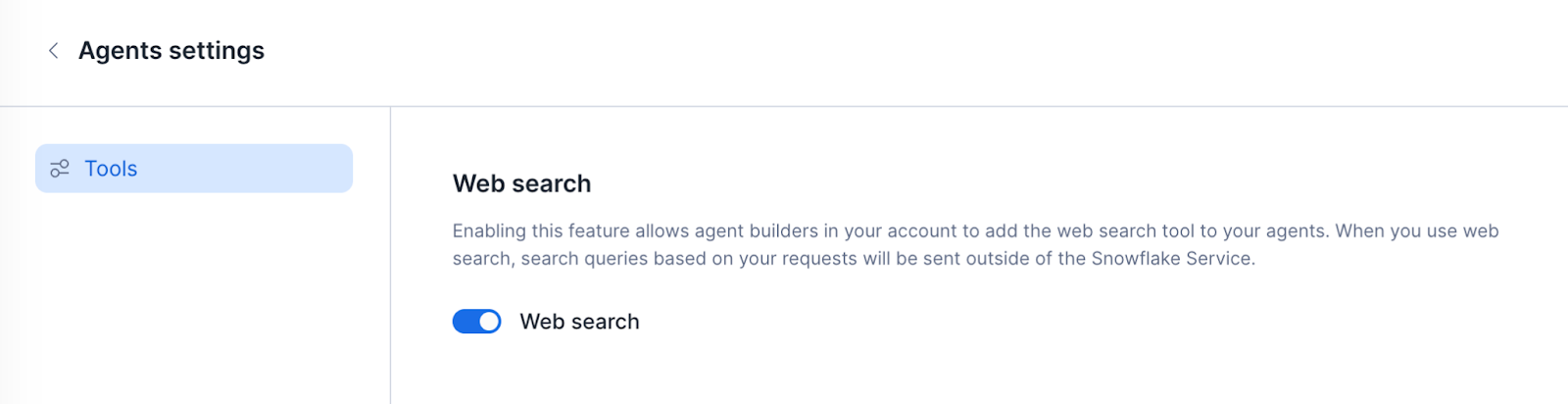
An ACCOUNTADMIN must enable web search at the account level before CoCo can use it. This setting also enables web search for Cortex Agents and Snowflake CoWork. To enable it:
- Navigate to AI/ML > Agents.
- Select Settings.
- Select the toggle next to Web search to enable the feature, as shown below.
Snowflake will process your inputs according to the Snowflake Privacy Notice (§2). Web search may not be used for the purpose of redistributing or creating a competing web search service.
Example prompts¶
You can interact with CoCo using natural language prompts. In your prompts, provide the context needed to generate accurate results (for example, the database, schema, and the objects you want to work with). For the most reliable results across environments, use fully qualified object names.
The following examples show typical ways to request code generation, optimization, and administrative insights.
Access and permissions
| Use case | Example prompt |
|---|---|
| Access discovery | “What databases do I have access to?” |
| Security auditing | “Find all tables that have PII in them.” |
Data discovery
| Use case | Example prompt |
|---|---|
| Tag discovery | “List every table tagged PII = TRUE in ANALYTICS_DB.” |
| Lineage and tagging | “Show the lineage from RAW_DB.ORDERS to downstream dashboards.” |
| Metadata search | “Where can I find tables related to customer churn and subscription status?” |
| Snowflake Marketplace discovery | “Find listings on Snowflake Marketplace that provide weather data for North America.” |
| Internal Marketplace discovery | “Show me organizational listings from the Internal Marketplace that contain customer sales data.” |
SQL development and optimization
| Use case | Example prompt |
|---|---|
| Logic explanation | “What does this SQL script do?” |
| Generation | “Write a query for top 10 customers by revenue and a 7-day moving average.” |
| Query refinement | “Update the top performers query to show the top 100.” |
| Performance optimization | “Explain why this query is slow and optimize it.” |
| Data synthesis | “Generate synthetic data for 30 days of sales for an e-commerce site in the SAMPLESDATA.SALES table.” |
Infrastructure and cost management
| Use case | Example prompt |
|---|---|
| Resource monitoring | “Which 5 service types are using the most credits? Show me a visualization and how to reduce costs.” |
Machine learning and engineering pipelines
| Use case | Example prompt |
|---|---|
| Notebooks (EDA and machine learning) | “Build me a notebook for a customer churn prediction use case using pandas for data handling, matplotlib and seaborn for EDA and visualization, and scikit-learn for preprocessing, model training (logistic regression and a tree-based model), evaluation, and interpretation, with clear markdown explaining business impact and results.” |
| Deep learning | “Create a new notebook and build a CNN for the MNIST dataset.” |
| Pipeline engineering | “Create a dbt project to transform raw sales data.” |
Semantic model integration (Cortex Analyst)
| Use case | Example prompt |
|---|---|
| Semantic queries | “Use the @models/revenue.yaml semantic model to answer ‘What was revenue last month?’” |
| Model debugging | “Identify errors in my semantic model at @models/revenue.yaml” |
Security and access¶
CoCo operates within your Snowflake account’s existing authentication and role-based access controls (RBAC). It does not store or modify your credentials and only performs actions permitted by the active role.
CoCo starts a session using your active role in Snowsight, the role you select in the user menu in the lower-left corner. If you need to perform actions that require a different role, you can ask CoCo to change roles during the session (for example, “switch to the SYSADMIN role”).
Note
If CoCo returns a permissions error, verify that your active role has the required privileges. Switch to a role that has those privileges in the user menu, or ask CoCo to use a specific role for the current session.
CoCo in Workspaces¶
You can access CoCo through the assistant panel integrated into Snowsight. CoCo processes requests in the context of the active code or environment, or general Snowflake knowledge.
To use the CoCo agent in Workspaces:
- Sign in to Snowsight.
- In the navigation menu, select Projects » Workspaces.
- Open a workspace containing the relevant file (for example, an existing SQL file).
- Select the CoCo icon at the bottom-right of the workspace.
- Enter a prompt or ask a question using natural language. Type
@to search for and add catalog objects (such as tables, schemas, or views) as inline context. See Example prompts for ideas. - Review the output. CoCo provides an answer, suggested code, or a modified query.
- For coding tasks, CoCo may display a comparison view highlighting insertions and deletions. Review the suggested changes and apply them directly to the script.
- Use subsequent prompts to refine the code, convert the file to a different object type (like a notebook or semantic view), or integrate advanced functions like AI SQL.
Customize CoCo in Workspaces with AGENTS.md and Agent Skills¶
AGENTS.md is a simple, open format for guiding coding agents.
Create an AGENTS.md file to provide persistent instructions that CoCo will automatically include in every conversation. Copy it to the root directory of your workspace for personalized instructions that apply to conversations with CoCo about your project.
Skills¶
Skills extend CoCo with specialized capabilities that can be invoked by typing / in the message box.
Built-in skills¶
Snowflake provides built-in skills that are available from any page in Snowsight. Type / to see and select from the available skills. The list of built-in skills evolves as feature teams add new skills to Snowsight.
Personal skills¶
You can create your own skills in a workspace to tailor CoCo to your specific workflows.
To add a personal skill, use any of the following options in the workspace:
- Upload Skill File(s)
- Upload Skill Folder(s)
- + Create Skill
Personal skills are stored in the .snowflake/cortex/skills directory of the workspace and can be invoked by typing / in the message box.
Note
Personal skills can only be accessed from the workspace where they were created. They are not available when using a different workspace or when outside of a workspace.
To learn more, including how to share skills, see Skills and Plugins.
CoCo in Notebooks¶
Leveraging CoCo helps you explore data, write and edit queries and code, visualize insights, and explain results seamlessly in Notebooks in Workspaces, accelerating end-to-end data science and machine learning development.
CoCo in Notebooks can:
- Create and manage notebooks in the Workspaces directory
- Add, remove, and reorder SQL, Python, and Markdown cells
- Edit code using up-to-date pre-installed packages and proper notebook syntax (for example, cell referencing)
- Generate code for visualizing data using matplotlib, seaborn, plotly, and altair
- Run an entire notebook or specific cells
Try out these example prompts.
CoCo agent for dbt Projects on Snowflake¶
CoCo supports transformation workflows that span the full dbt lifecycle:
- Explore raw source data and infer relationships
- Scaffold staging and intermediate models
- Build multi-model DAGs and metrics
- Add data quality tests and incremental logic
- Run dbt commands
- Generate and maintain project documentation
- Inspect the files of deployed dbt project objects for exploration and debugging
Using natural language prompts, the CoCo agent helps you explore data, author dbt models, add tests, optimize performance, and generate documentation through iterative feedback.
It reduces day-to-day data engineering work by automating boilerplate SQL, dependency management, testing, and documentation, while preserving control over project structure and logic.
Example prompts for dbt Projects¶
The CoCo agent supports both new and experienced dbt users. New users can explore newly onboarded Bronze-layer data, infer schemas, and scaffold staging models to establish a clean foundation. Experienced users can build complex data marts with incremental fact models, robust testing, and auto-generated documentation, while iterating quickly through validation cycles.
The following scenarios illustrate common ways to use CoCo with dbt Projects.
| Use case | Context | Example prompt |
|---|---|---|
| Explore sources | Understand raw data schemas and relationships before modeling. | “List all source tables in the bronze layer and summarize key columns, data types, and likely primary keys. Propose staging models for each source.” |
| Prototyping | Creating multi-model logic and DAGs. | “Create models to compute daily profitability by truck and location. Generate the DAG and propose dependencies.” |
| Data Quality | Adding tests to schema.yml. | “Add not_null and accepted_values tests to key dimensions. Suggest uniqueness tests for IDs based on inferred keys.” |
| Incremental Logic | Optimizing model performance. | “Convert the main fact model to an incremental model partitioned by order_date, with merge behavior for late-arriving data.” |
| Documentation | Reducing maintenance overhead. | “Generate docs for the project and draft descriptions for new models and key columns based on source context.” |
CoCo, Snowflake CoWork, and legacy Copilot¶
While CoCo supports a broad range of coding and administrative tasks, it is distinct from standalone coding agents and other specialized AI systems within Snowflake.
The following table summarizes key differences between CoCo, Snowflake CoWork, and the legacy Copilot experience.
| Feature | CoCo | Snowflake CoWork | Snowflake Copilot (legacy) |
|---|---|---|---|
| Use case | Supports development and operational workflows in Snowflake, including authoring SQL, exploring data assets, and performing administrative tasks. | Provides a natural language interface for asking complex questions about data and receiving analysis-focused responses. | Previous iteration of CoCo for documentation help and basic SQL assistance. |
| Primary integration | Integrated directly into Snowsight and Workspaces. Provides context-aware assistance within the active workspace. | Accessed through the Snowflake CoWork UI and Cortex Agents API, enabling natural language interaction for insights and recommendations. | Separate copilot for SQL and UI assistance. |
| Scope of tasks | Supports SQL authoring, data exploration, documentation search, and account administration. | Focuses on question answering, data insights, and analysis-driven responses. | Limited SQL and UI assistance. |
| Key capabilities | Generates and modifies SQL code, reviews changes using a diff view, and explains existing code. | Analyzes data, generates summaries, and assists with natural language interactions. | Contextual SQL suggestions and limited help features. |
| Design focus | Provides a unified AI interface across coding, documentation, and administrative workflows. | Delivers conversational insights and query assistance for data understanding. | Deprecated in favor of CoCo. |
Legal notices¶
Where your configuration of Cortex Code uses a model provided on the Model and Service Pass-Through Terms, your use of that model is further subject to the terms for that model on that page.
The data classification of inputs and outputs are as set forth in the following table.
| Input data classification | Output data classification | Designation |
|---|---|---|
| Usage Data | Customer Data | Covered AI Features [1] |
For additional information, refer to Snowflake AI and ML.