Ingress policies
What is an ingress policy?
An ingress policy determines whether a request from a user is admitted to your Snowflake account. It evaluates request context such as the source network, authentication method, client application, geolocation, PrivateLink ID, and endpoint path. You can combine these signals in a single policy and apply it to the account or to individual users.
Ingress policies are context-aware because they evaluate the request as it is made. The policy can use the request’s network origin, authentication method, client or application, geolocation, PrivateLink connection, and endpoint path together in one admission decision.
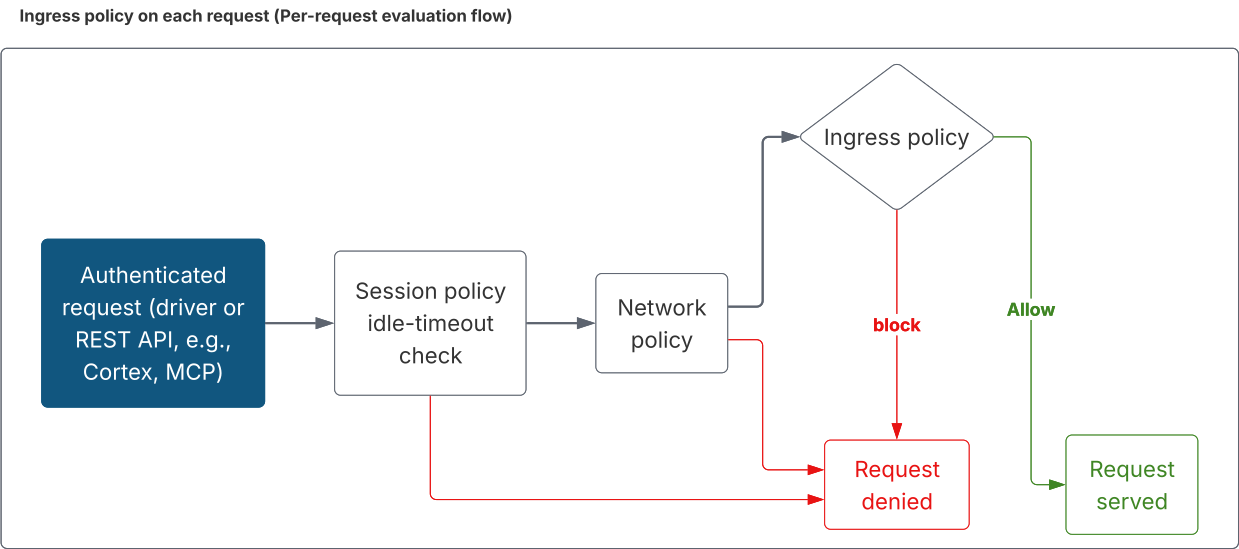
Snowflake evaluates the effective ingress policy when a user logs in and on every subsequent authenticated request. This lets the policy protect both login and subsequent access through drivers and APIs, including Cortex and MCP endpoints.
Why ingress policies are needed
Snowflake already provides several account admission controls, such as network policies and authentication policies. Each of these governs a single part of account access, but many access requirements depend on several signals at once:
- “Allow drivers from the corporate network, but block a specific AI agent everywhere” mixes network origin with client identity.
- “Only allow SSO logins, and only from approved countries” mixes authentication method with geolocation.
- “Block access to Cortex REST endpoints unless the caller is on an approved network” mixes the endpoint path with network origin.
An ingress policy lets you express these requirements as one admission decision by combining
named conditions with AND, OR, and NOT, and then allowing or blocking matching requests.
Benefits
Ingress policies help you:
- Make decisions from combined context. Evaluate network, authentication, client, geolocation, PrivateLink, and endpoint information in one policy.
- Express precise, conditional logic. Use boolean expressions over request context, rather than flat allow/block lists, to encode rules such as “allow the corporate network except for programmatic drivers.”
- Govern by client and application. Allow drivers but block a specific agent or CLI with the
CLIENTcontext key. - Protect specific endpoints. Apply guardrails to REST endpoints (for example, Cortex or MCP paths) by matching on the request’s endpoint path.
- Protect authentication and subsequent access. Apply admission controls when a user authenticates and when the user makes authenticated requests.
- Scope broadly or narrowly. Attach at the account level as a baseline, or at the user level for exceptions. A user-level policy overrides the account-level policy for that user instead of supplementing it.
How ingress policies differ from network and authentication policies
Ingress policies work alongside network policies and authentication policies. You can use all three together.
| Policy | Use it to | Examples |
|---|---|---|
| Network policy | Control access from network locations and private connectivity identifiers. | Allow corporate CIDR ranges; block known IP addresses; require an approved private endpoint. |
| Authentication policy | Control how users authenticate and which clients or security integrations they can use. | Allow SAML and key-pair authentication; require MFA; restrict security integrations. |
| Ingress policy | Make an allow-or-block decision from multiple request signals, including signals not available to the other policies. | Combine client and network conditions; restrict countries; protect specific Cortex or MCP endpoints. |
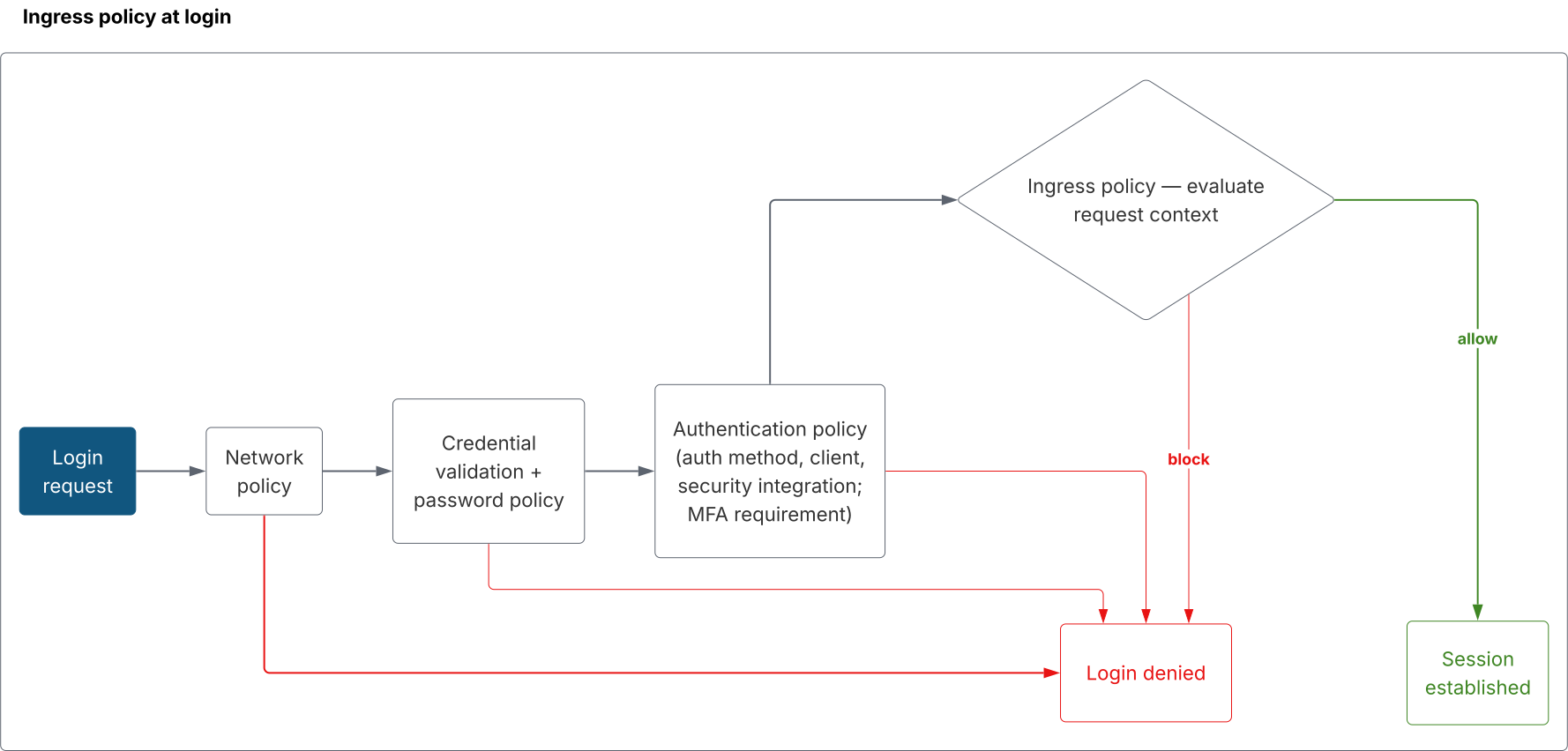
Snowflake evaluates each applicable policy independently. A request is admitted only if every
applicable policy allows it, so the effective result is the most restrictive outcome across the
network policy, authentication policy, and ingress policy. An allow request decision from an
ingress policy does not override a denial from a network policy or authentication policy.
When to use each
- Use a network policy for straightforward IP allowlisting/blocklisting and private connectivity restrictions.
- Use an authentication policy to govern authentication methods, clients, security integrations, and MFA requirements.
- Use an ingress policy when a single admission decision must span more than one context key, when you need context keys the other policies do not offer (geolocation, client application, endpoint path), or when you need per-request enforcement on REST API endpoints such as Cortex and MCP.
Where ingress policies fit in request processing
Snowflake evaluates the ingress policy during authentication. This happens after the network policy and the credential, password, and authentication-policy checks, and before the session is established.
Snowflake evaluates the policy again on every subsequent authenticated request, alongside the network policy and the session policy’s idle-timeout check. This per-request enforcement lets an ingress policy protect not only login but also drivers and REST API endpoints such as Cortex and MCP endpoints.
How ingress policies work
Policy object
An ingress policy is a schema-level object with a YAML body. There is no separate “rule” object: conditions and actions are defined inline.
conditionsis a list of named boolean expressions. A policy must define at least one.actionsis a list of admission decisions; each action fires if any of its referenced conditions (when_any) is true. A policy must define at least one admission action.
Context keys
Reference a context key with $KEY. The following sections describe keys that need more detail.
| Context key | Description | Supported operators | Example condition |
|---|---|---|---|
CLIENT | Client type or client application that sent the request. A client application takes precedence over the client type. | =, !=, IN, NOT IN | $CLIENT IN ('DRIVERS', 'CORTEX_CODE_CLI') |
CLIENT_IP | Client IP address of the request. | =, !=, IN, NOT IN, LIKE, NOT LIKE, IS NULL, IS NOT NULL | $CLIENT_IP IN ('203.0.113.0/24') |
AUTHENTICATION_METHOD | Authentication method associated with the request, for example PASSWORD, KEYPAIR, OAUTH, or SAML. | =, !=, IN, NOT IN, IS NULL, IS NOT NULL | $AUTHENTICATION_METHOD = 'SAML' |
SECURITY_INTEGRATION | Name of the security integration used to authenticate. | =, !=, IN, NOT IN, IS NULL, IS NOT NULL | $SECURITY_INTEGRATION = 'CORP_OKTA' |
PRIVATELINK_ID | PrivateLink identifier of the connection. | =, !=, IN, NOT IN, IS NULL, IS NOT NULL | $PRIVATELINK_ID = '<privatelink_id>' |
GEOLOCATION | Country from which the request originates. Requires GeoIP. | =, !=, IN, NOT IN, IS NULL, IS NOT NULL | $GEOLOCATION IN ('US', 'CA') |
ENDPOINT_PATH | Request path. Each value must start with api/. | =, !=, IN, NOT IN, LIKE, NOT LIKE, IS NULL, IS NOT NULL | $ENDPOINT_PATH LIKE 'api/v2/cortex/%' |
CLIENT
$CLIENT compares the client that sent the request. Matching is case-insensitive.
- Client values. Client types are
SNOWFLAKE_UI,DRIVERS,SNOWSQL, andSNOWFLAKE_CLI. Client applications areCORTEX_CODE_CLI,CORTEX_CODE_SNOWSIGHT,CORTEX_CODE_DESKTOP, andSNOWFLAKE_COWORK. Snowflake rejects a value outside this list when you create or alter the policy. - Type and application. If a request reports both a client type and a client application,
$CLIENTmatches the application. A Cortex Code CLI request matchesCORTEX_CODE_CLI. - No reported client. A request that does not report a client does not match any listed value.
- Client-supplied values. The client supplies these values, and Snowflake does not independently verify them. For details, see Limitations.
- Operators.
CLIENTsupports=,!=,IN, andNOT IN. It does not supportLIKE,IS NULL, orIS NOT NULL.
Cortex Code in Visual Studio Code
Cortex Code (CoCo) in the Snowflake extension for Visual Studio Code
is evaluated as CORTEX_CODE_CLI, the same client as CoCo CLI. A block request condition on
CORTEX_CODE_CLI also blocks CoCo in that extension.
Snowflake CLI
By default, Snowflake CLI requests are evaluated as DRIVERS. $CLIENT = 'SNOWFLAKE_CLI'
does not match Snowflake CLI until the client is configured to identify as SNOWFLAKE_CLI. Until
then, match Snowflake CLI with $CLIENT = 'DRIVERS'.
To have Snowflake CLI report SNOWFLAKE_CLI, enable separate authentication policy ID with an
environment variable:
Or add the following to config.toml:
After this setting is enabled, $CLIENT = 'SNOWFLAKE_CLI' matches Snowflake CLI. SnowSQL is
evaluated as SNOWSQL.
CLIENT_
IN and NOT IN accept literal values or the fully qualified name of a
network rule (<database>.<schema>.<network_rule>). A network rule
name is an object reference, not a string literal: Snowflake resolves the rule when you create or
alter the policy, and the rule must use MODE = INGRESS.
| Context key | Literal values | Network rule types |
|---|---|---|
CLIENT_IP | IP address or CIDR range | IPV4, IPV6 |
PRIVATELINK_ID | PrivateLink identifier | AWSVPCEID, AZURELINKID, GCPPSCID |
- You can mix literals and network rule names in the same list.
=and!=accept only a literal value, not a network rule name.- If a PrivateLink network rule pairs an identifier with an IP address or CIDR range, the request matches only when both the PrivateLink ID and the client IP match.
For example:
- Match an IP address against a CIDR range:
$CLIENT_IP IN ('203.0.113.0/24') - Match the client IP against an
IPV4orIPV6network rule:$CLIENT_IP IN ('<db_name>.<schema_name>.corp_ingress') - Match one PrivateLink identifier:
$PRIVATELINK_ID = '<privatelink_id>' - Match the connection against an
AWSVPCEID,AZURELINKID, orGCPPSCIDnetwork rule:$PRIVATELINK_ID IN ('<db_name>.<schema_name>.corp_privatelink')
ENDPOINT_
$ENDPOINT_PATH is the request path.
- When you create or alter the policy, each
ENDPOINT_PATHvalue must start withapi/. - During admission, Snowflake applies an
ENDPOINT_PATHcomparison only when the request path starts withapi/. Login and other requests skip that comparison. Anallow requestaction treats it as matching, and ablock requestaction treats it as not matching.
For example:
- Match Snowflake-hosted MCP endpoints:
$ENDPOINT_PATH LIKE 'api/v2/cortex/v1/mcp%' - Match custom MCP server endpoints:
$ENDPOINT_PATH LIKE 'api/v2/databases/%/mcp-servers/%'
Other examples
- Match a country:
$GEOLOCATION IN ('US', 'CA') - Match Cortex Code CLI and desktop requests:
$CLIENT IN ('CORTEX_CODE_CLI', 'CORTEX_CODE_DESKTOP')
Matcher functions
A matcher function is an alternative to a context key comparison. For example,
is_ip_matched('203.0.113.0/24') compares the client IP the same way that
$CLIENT_IP IN ('203.0.113.0/24') does.
The difference is that Snowflake skips a matcher in the cases listed in the following table. When
Snowflake skips a matcher, an allow request action treats the matcher as matching, and a
block request action treats it as not matching. The equivalent context key comparison is never
skipped.
Use a context key unless you want Snowflake to skip the comparison in one of these cases.
| Matcher | Compares the same values as | When Snowflake skips the matcher |
|---|---|---|
is_ip_matched(...) | $CLIENT_IP IN (...) for an IP address or CIDR range | The security integration has its own network policy. This matcher does not accept a network rule name. |
is_geolocation_matched(...) | $GEOLOCATION IN (...) | The security integration has its own network policy. |
is_privatelink_id_matched(...) | $PRIVATELINK_ID IN (...) for a PrivateLink ID | The security integration has its own network policy. This matcher does not accept a network rule name. |
is_network_rule_matched('<db_name>.<schema_name>.<rule>') | $CLIENT_IP IN ('<db_name>.<schema_name>.<rule>') or $PRIVATELINK_ID IN ('<db_name>.<schema_name>.<rule>') | The security integration has its own network policy. |
is_authn_method_matched(...) | $AUTHENTICATION_METHOD IN (...) | The request is not a login or a token exchange. $AUTHENTICATION_METHOD still compares the session’s authentication method. |
Do not combine a matcher with another clause in the same condition using OR. For example,
is_authn_method_matched('SAML') OR $CLIENT_IP = '192.0.2.10' can behave one way during login
and another way on a subsequent request.
Operators
- Comparison:
=,!=,IN,NOT IN,LIKE,NOT LIKE,IS NULL,IS NOT NULL. - Boolean:
AND,OR,NOT. Precedence isNOT>AND>OR; parenthesize to override. There is no implicitAND. - Right-hand-side values are single-quoted string literals.
LIKE/NOT LIKEuse SQL wildcard semantics (%,_) and are supported only onCLIENT_IPandENDPOINT_PATH.- Each context key supports a subset of these operators. See Context keys.
- If a context key is not available for a request, its value is
NULL. UseIS NULLorIS NOT NULLto test whether a value is present.
Actions and the admission decision
Admission is driven by two action types: block request (deny when a referenced condition
matches) and allow request (admit when a referenced condition matches). Snowflake
evaluates a policy in a fixed order:
- Block first. If any
block requestaction’s conditions match, the request is denied. - Then allow. If the policy has at least one
allow requestaction and none match, the request is denied. - Implicit allow. A policy with only
block requestactions admits every request that does not match a block. Blocking$CLIENT = 'SNOWSQL'admits every other client, and any value of a context key the policy does not mention, such as$CLIENT_IP.
Within an action, when_any conditions are OR-combined; across actions of the same type, matches
are also OR-combined. A matching block request always wins over a matching allow request.
If a policy denies a request, Snowflake returns an ingress policy error. When a condition references a context key that the request does not provide, Snowflake still denies the request, but the client might receive an evaluation error instead of that denial error.
Attachment and precedence
Attach a policy to your account (a baseline for all users) or to individual users:
- Account level:
ALTER ACCOUNT SET INGRESS POLICY ... - User level:
ALTER USER <user> SET INGRESS POLICY ...
When both apply, the user-level policy overrides the account-level policy for that user. The two policies are not combined, so only one ingress policy is in effect for that user.
Self-lockout protection
As a protective guardrail against misconfiguration and accidental lockouts, Snowflake evaluates a policy against your current request before it lets you:
- Attach the policy to your own user.
- Attach the policy to the account when it would govern you.
- Update a policy that currently governs you.
If the change would block your current request, Snowflake declines the change. This check uses only the current request. It does not verify other users, clients, authentication methods, or emergency access paths.
Access control
| Privilege | Object type | Description |
|---|---|---|
CREATE INGRESS POLICY | Schema | Required to create an ingress policy in a schema. |
APPLY INGRESS POLICY | Account or user | Required on the target account or user to attach or detach an ingress policy. |
APPLY | Ingress policy | Lets a role attach the specific policy when the role does not own it. |
OWNERSHIP | Ingress policy | Required to alter or drop the policy object. |
Attaching a policy requires APPLY INGRESS POLICY on the target account or user and either
APPLY or OWNERSHIP on the policy. APPLY INGRESS POLICY does not grant the ability to alter
or drop the policy object; those operations require OWNERSHIP.
Configure ingress policies
Set context
The examples use the ACCOUNTADMIN role for simplicity. In production, use a role with the
minimum required privileges described in Access control.
Create a policy
Replace placeholders such as <approved_cidr> with values for your environment before running
these examples.
Allowlist policy — admit only approved corporate IP ranges (any non-matching request is denied
because an allow request action is present):
Combined block + allow: block selected Cortex Code clients, otherwise allow corporate IPs. Block precedence means a matching Cortex Code client from a corporate IP is still denied:
Block-only policy (implicit allow) — deny requests from a selected country, admit everything
else. This example uses Antarctica (AQ) only to demonstrate the syntax:
MCP guardrail: block access to Snowflake-hosted or custom MCP endpoints unless the request comes from an approved network. Replace the CIDR placeholder with a value for your environment:
More example policies
Authentication + geography allowlist: admit requests authenticated with SAML only from approved
countries. This example uses a direct comparison on AUTHENTICATION_METHOD so the condition keeps
the same meaning when the request is re-evaluated.
PrivateLink-only baseline: admit only requests that arrive over an approved PrivateLink connection.
Test a policy on a user
Before attaching a policy to the account, attach it to a test user whose access you can recover. Exercise each client, authentication method, integration, and endpoint that the policy is expected to allow or block. A user-level policy overrides any account-level ingress policy for that user during the test.
Attach a policy to the account
An account-level policy applies to every user who does not have a user-level ingress policy. Before attaching it, verify an emergency administrator path and keep a separate session available for rollback. The policy can affect the next authenticated request from an existing session, not only new login attempts.
Validate configuration
Modify or remove a policy
Use ALTER INGRESS POLICY to replace the policy definition or update its comment:
Before dropping a policy, detach it from every account or user to which it is attached:
Operational best practices
- Start permissive, then tighten. Validate a policy against known-good requests before attaching a broad block or an allow-only policy at the account level.
- Guard against self-lockout. Keep an out-of-band administrative path available; rely on the built-in self-block check, but do not treat it as your only safeguard.
- Test representative access paths. Verify expected behavior for each client, authentication method, security integration, network location, and endpoint used in your environment.
- Prefer context keys over matchers. A matcher compares the same values as the context key, and Snowflake can skip the matcher. See Matcher functions.
- Reuse network rules. Reference an existing
INGRESSnetwork rule by its fully qualified name in$CLIENT_IP IN (...)or$PRIVATELINK_ID IN (...)instead of copying its values into the policy. - Compose with other controls. Use ingress policies alongside network, authentication, and data governance policies for defense in depth.
Referenced objects
An ingress policy can reference security integrations (by name) and network rules (by fully
qualified name in $CLIENT_IP or $PRIVATELINK_ID). These references must resolve when you
create or alter the policy.
Snowflake blocks dropping or disabling a referenced security integration, and blocks dropping a referenced network rule. A policy creates these dependencies even when it is not attached to an account or user. The error names the referencing policies that you can see.
Replication and failover
Ingress policies can be replicated with their assignments so that the policy is present and enforceable on a secondary account after refresh and failover.
Ingress policy replication must be enabled on both the primary and secondary accounts.
To replicate ingress policies successfully:
- Include the database containing the policy in the replication or failover group.
- If you use user-level ingress policies, include
USERSin the replication or failover group as well.
If either the policy database or the required user objects are not replicated, a dangling reference can occur in the target account. In that case, Snowflake cannot resolve the referenced policy in the target account, so the ingress policy is not enforced there.
For background on replication groups and failover groups, see Introduction to replication and failover across multiple accounts.
Limitations
-
During public preview, some deployments do not support geolocation for requests from Snowsight. Contact Snowflake Support for details.
-
Client type and client application are supplied by the client.
$CLIENTcompares those reported values, and Snowflake does not independently verify them. A client can report a different client type or client application, so these conditions can discourage use of a client, but they cannot securely enforce which client connects by themselves. Do not use client identity as the sole control to establish a security boundary. Authentication method and security integration are properties Snowflake verifies as part of the request. -
Some request paths do not provide every context key. When a condition references a context key that is not available on the current request, policy evaluation fails closed and access is denied.
For example, to allow only requests that carry a specific PrivateLink ID, explicitly check that the context key is present before comparing its value:
Usage notes
- You can attach an ingress policy to an account or a user.
- Only one ingress policy is in effect for a user. A user-level policy overrides the account-level policy for that user.
- You cannot rename an ingress policy. To use a different name, create a new policy and update the applicable attachments.
Monitor ingress policies
Query Account Usage to list ingress policies and to see where each policy is attached. These views can lag the live objects by up to 120 minutes.
SNOWFLAKE.ACCOUNT_USAGE.INGRESS_POLICIES returns one row for each ingress policy in the account,
including the policy body:
The POLICY_REFERENCES view returns one row for
each attachment. For an ingress policy, POLICY_KIND is INGRESS_POLICY, and
REF_ENTITY_DOMAIN is ACCOUNT or USER:
You can also call the POLICY_REFERENCES Information Schema table function.
Reference: SQL commands
- CREATE INGRESS POLICY
- ALTER INGRESS POLICY
- DROP INGRESS POLICY
- SHOW INGRESS POLICIES
- DESCRIBE INGRESS POLICY
- ALTER ACCOUNT SET INGRESS POLICY
- ALTER USER SET INGRESS POLICY
| Command | Description |
|---|---|
CREATE [ OR REPLACE ] INGRESS POLICY [ IF NOT EXISTS ] <name> [ COMMENT = '...' ] AS $$<yaml>$$ | Create an ingress policy. |
ALTER INGRESS POLICY [ IF EXISTS ] <name> AS $$<yaml>$$ | Replace the policy body. |
ALTER INGRESS POLICY [ IF EXISTS ] <name> SET COMMENT = '...' / UNSET COMMENT | Update or clear the comment. |
DROP INGRESS POLICY [ IF EXISTS ] <name> | Remove an ingress policy. |
SHOW INGRESS POLICIES [ LIKE '...' ] [ IN { ACCOUNT | DATABASE | SCHEMA ... } ] [ ON { ACCOUNT | USER <name> } ] | List ingress policies. |
DESCRIBE INGRESS POLICY <name> | Show a policy’s definition. |
ALTER ACCOUNT SET INGRESS POLICY <name> [ FORCE ] / ALTER ACCOUNT UNSET INGRESS POLICY | Attach or detach an account-level policy. |
ALTER USER <user> SET INGRESS POLICY <name> [ FORCE ] / ALTER USER <user> UNSET INGRESS POLICY | Attach or detach a user-level policy. |
DESCRIBE INGRESS POLICY returns CREATED_ON, NAME, OWNER, OWNER_ROLE_TYPE, COMMENT, and
POLICY_DEFINITION (the YAML body). SHOW INGRESS POLICIES returns created_on, name,
database_name, schema_name, kind, owner, comment, owner_role_type, and options;
listing with ON ACCOUNT / ON USER adds a set_on column indicating the attachment level.