Google Private Service Connect endpoints for internal stages
This topic provides concepts as well as detailed instructions for connecting to Snowflake internal stages using Google Private Service Connect endpoints.
Google Private Service Connect endpoints: Overview
You can configure Google Private Service Connect (PSC) endpoints to provide secure, private connectivity to Snowflake internal stages. This setup ensures that data loading and unloading operations to Snowflake internal stages use the Google PSC network and not the public internet. The following diagram summarizes this new support:
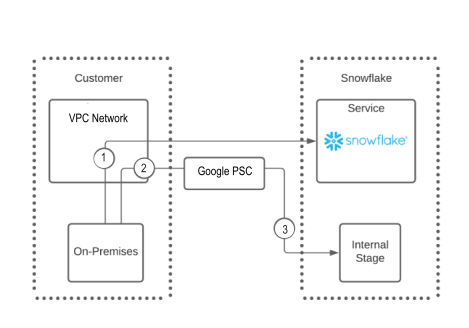
The following list provides information about the numbers in the diagram:
- The diagram shows a single PSC endpoint from one Google VPC network that points to a single Snowflake internal stage (2 and 3).
Note
You can configure multiple private endpoints within the same VPC network that access the same Snowflake internal stage.
- An on-premises user can connect to Snowflake directly, as shown in number 1.
- To connect to a Snowflake internal stage, an on-premises user must route their request through the VPC Network, 2, and then through the Google PSC network, 3, to connect to the Snowflake internal stage.
Benefits
Implementing private endpoints to access Snowflake internal stages provides the following benefits:
- Internal stage data doesn’t traverse the public internet.
- On-premises client and SaaS applications can securely access a Snowflake internal stage bucket by using the Google PSC network.
- Administrators aren’t required to modify firewall settings to access internal stage data.
- Administrators can implement consistent security and monitoring to restrict access to their internal stages.
Limitations
- A maximum of 10 VPC networks can be allowlisted for a Snowflake account.
Configure private endpoints to access Snowflake internal stages
To configure private endpoints to access Snowflake internal stages, you must use the following three roles:
- The Snowflake ACCOUNTADMIN system role.
- The Google Cloud administrator.
- The network administrator.
You might need to coordinate your configuration efforts with more than one person or team, depending on the role hierarchy in your organization.
To configure and implement secure access to Snowflake internal stages through Google PSC endpoints, complete the following steps:
-
As a Google Cloud administrator, use the Google Cloud console to get the fully qualified path value that Snowflake uses to limit network access.
-
In https://console.cloud.google.com, go to Quick Access » VPC Network, and then select your project in » VPC Networks » Name.
-
In VPC network details, select Equivalent REST.
-
In Equivalent REST Response, copy the value of
"selfLink".This value should look something like
projects/vpc_network_name/global/networks/network_name.You will provide this value as the ‘google_cloud_vpc_network_name’ argument for the system function in the next step.
-
-
In Snowflake, use the ACCOUNTADMIN role to authorize access to the internal stage by calling the SYSTEM$AUTHORIZE_STAGE_PRIVATELINK_ACCESS function. For example:
To verify which VPC networks are authorized for the internal stage of your account, call the SYSTEM$GET_STAGE_PRIVATELINK_AUTHORIZED_ENDPOINTS function.
-
Visit https://console.cloud.google.com/ as a Google Cloud administrator, create a Google PSC endpoint, and then attach it to the VPC network that Snowflake will access:
-
Create a new endpoint: in Network services » Private Service Connect, select Connect endpoint.
-
In Target, select
All Google APIsas the target, and then fill in the required fields.Note
All Google APIsis appropriate for global endpoints. Currently, only global endpoints are supported. -
Select ADD ENDPOINT.
-
-
Record the newly created Google PSC endpoint IP address and the VPC Network ID to which the Google PSC endpoint connects.
-
As the network administrator, configure the DNS settings to resolve the URLs:
-
In Network services, navigate to Cloud DNS.
-
Create a new DNS zone with the following settings:
- Zone type:
private - DNS Name:
storage.googleapis.com - Options:
Default (private) - Networks:
prod
- Zone type:
-
Select CREATE.
-
-
In the new, private DNS zone, create a new record with the following values:
- Use the bucket name for your internal stage.
- Resource record type:
A - IPv4 address:
10.10.80.55— Use the IP address of the Google PSC endpoint that you created earlier. - Select CREATE.
-
From a client in the same VPC, confirm that the internal stage URL resolves the IP address of the endpoint by using the
nslookupordigcommand.For example, use the following
digcommand to confirm the resolution:A properly configured global endpoint should return a result like the following:
Block public access to the internal stage — Recommended
Snowflake recommends that you deny all access to your Google PSC endpoints except through the VPC Network that you authorize. This includes denying public internet access to the internal stages.
To block public access to the internal stage, call the SYSTEM$BLOCK_INTERNAL_STAGES_PUBLIC_ACCESS function.
Controlling public access to a Google internal stage is different from controlling public access to the Snowflake service. You use the SYSTEM$BLOCK_INTERNAL_STAGES_PUBLIC_ACCESS function, not a network policy, to block requests to an internal stage. Unlike network policies, this function can’t block some public IP addresses while allowing others. This function blocks all public IP addresses. The SYSTEM$BLOCK_INTERNAL_STAGES_PUBLIC_ACCESS function can take a few minutes to complete.
Ensure that public access is blocked
Determine whether public IP addresses can access an internal stage by running the SYSTEM$INTERNAL_STAGES_PUBLIC_ACCESS_STATUS function.
If the Google Cloud settings currently block all public traffic, this function returns Public Access to internal stages is blocked.
This message indicates that the settings weren’t changed after the SYSTEM$BLOCK_INTERNAL_STAGES_PUBLIC_ACCESS function was executed.
Unblock public access
To allow public access to an internal stage that was previously blocked, you can execute the SYSTEM$UNBLOCK_INTERNAL_STAGES_PUBLIC_ACCESS function.
Executing this function removes all restrictions from the internal stage.
Revoke access to Snowflake internal stages
To revoke access to Snowflake internal stages through Google PSC private endpoints, complete the following steps:
-
As a Snowflake administrator, confirm that the ENABLE_INTERNAL_STAGES_PRIVATELINK parameter is set to
TRUE. For example: -
As a Snowflake administrator, revoke access to the private endpoint by calling the SYSTEM$REVOKE_STAGE_PRIVATELINK_ACCESS function, and using the same
google_cloud_vpc_network_namevalue that was used to originally authorize access to the private endpoint. For example: -
As a Google Cloud administrator, delete the private endpoint through the Google Cloud portal.
-
As a network administrator, remove the DNS and alias records that were used to resolve the storage account URLs.
Completing these steps revokes access to the VPC network.