Supported entities in DCM Projects
DCM Projects definition files support three types of statements:
- Objects —
DEFINEstatements that create and manage Snowflake objects - Grants —
GRANTstatements that assign privileges and roles - Attachments —
ATTACHstatements that associate objects with other objects
You can also reference additional files that your definitions need as project assets by specifying paths relative to the folder that contains manifest.yml.
Note
For object types, grants, and attachments still in preview, the completeness of the changeset in plan_result.json and
deploy_result.json isn’t guaranteed yet, and the changeset format can still change.
Objects:
- Alert
- Code Bundle
- Database
- Dynamic table
- File format
- Functions
- Network rule
- Pipe
- Policies
- Procedures
- Roles
- Schema
- Semantic view
- Sequence
- Share
- Stages
- Stream
- Streamlit
- Table
- Tag
- Task
- View
- Warehouse
Assets:
Grants:
Attachments:
Objects
DCM Projects uses DEFINE statements to create and manage Snowflake objects. A DEFINE statement runs as a
CREATE OR ALTER command for the corresponding object type, so all CREATE OR ALTER usage
notes and limitations for that object type apply, even where not called out again below. Each object can be defined only once
across all definition files in a project; defining the same object more than once causes the run to fail. The following object
types are supported.
Alert
DCM Projects supports defining alerts that run a SQL statement on a schedule and notify you when a condition is met. For more information, see Setting up alerts based on data in Snowflake. For syntax, see DEFINE ALERT.
Newly deployed alerts are suspended by default.
Target state:
You can specify a target state of STARTED or SUSPENDED for each alert in your definitions. Place the target state keyword
immediately before the IF keyword in the DEFINE ALERT statement. If you define an alert as STARTED, Snowflake resumes the
alert after deployment. This property is independent of other changes to the alert definition. If you define an alert as
STARTED and then suspend it outside of DCM Projects, the next deployment of that same definition starts the alert again.
Note
The target state is a DCM Projects-specific property. It won’t be visible in the DDL of the deployed alert.
Limitations:
PLANonly validates that the alert can be created successfully. It doesn’t check whether the alert will run successfully, as alert logic is compiled at runtime.
Code Bundle
You can define Code Bundles directly in DCM Projects. Code Bundles package and run
non-SQL jobs, such as Python, on Snowflake compute. DCM Projects manages the bundle lifecycle (CREATE, ALTER, and DROP) across
environments using Jinja templating. For syntax and examples, see
DEFINE CODE BUNDLE.
Import Code Bundle files as a project asset
Place the bundle source files inside the DCM project root folder but outside sources/. A bundle folder contains the
code_bundle.yml specification, the notebook that serves as the entry point, and any Python helper modules that the notebook
imports:
Declare the source files as a project asset, then reference the asset name in the
DEFINE CODE BUNDLE statement:
During deployment, DCM Projects uses the imported files to create or update the Code Bundle.
The contents of the asset become the root of the bundle version, so code_bundle.yml and the entry point must be at the top of
the asset. Point the pattern at the bundle folder itself ('code_bundles/my_job/**/*'), not its parent
('code_bundles/**/*'). DCM Projects doesn’t validate this layout. A bundle assembled with the wrong pattern deploys successfully but
fails when you execute it.
Execute a Code Bundle
The entry point is specified when you execute the bundle, for example from a task:
PLAN and PLAN DELTA detect changes to the DEFINE CODE BUNDLE statement and its referenced assets.
Limitations:
- A Code Bundle’s source must be a project asset. A relative path in the
FROMclause fails at compile time. - DCM Projects can’t adopt a Code Bundle that already exists outside the project because a bundle can be deployed only from the stage
where it was created. Drop the existing bundle and let the project create it, or remove the
DEFINEstatement. - A Code Bundle can’t be detached from the project that manages it. Drop the bundle, or remove its
DEFINEstatement and let the project drop it on the next deployment. - Removing the
DEFINE CODE BUNDLEstatement drops the bundle and all its versions on the next deployment. - A DCM project that manages a Code Bundle can’t be dropped or replaced. Run
EXECUTE DCM PROJECT <name> PURGEto drop the managed objects, then drop the project. PLANvalidates that the Code Bundle object can be created, but doesn’t check whether the bundled code runs successfully.
Database
DCM Projects supports defining databases. For syntax, see DEFINE DATABASE.
When you define a database, Snowflake automatically creates a PUBLIC schema inside it. This schema doesn’t appear in your definitions
or in the changeset. To manage the PUBLIC schema with DCM Projects, add DEFINE SCHEMA <database_name>.PUBLIC; to your definitions. If you
later remove that definition and deploy, the PUBLIC schema is removed. Otherwise, the PUBLIC schema exists as an unmanaged object
outside of DCM Projects.
Dynamic table
DCM Projects supports defining dynamic tables. For syntax, see DEFINE DYNAMIC TABLE.
Supported changes:
Without a full refresh:
- Warehouse
- Target lag
With re-initialization or a full refresh:
- Refresh mode
- Any changes to the body, including:
- Dropping columns
- Adding columns at the end
Immutable attributes:
INITIALIZE
Limitations:
- Adding comments to dynamic table columns isn’t supported.
- Reordering columns of existing dynamic tables is not supported.
- The
PREVIEWcommand doesn’t support custom incremental dynamic tables.
File format
DCM Projects supports defining file formats. For syntax, see DEFINE FILE FORMAT.
Functions
DCM Projects supports defining functions in every handler language:
- SQL
- Java
- JavaScript
- Python
- Scala
For syntax, see DEFINE FUNCTION.
Limitations:
PLANonly validates that the function can be created or altered successfully. It doesn’t check whether it will run successfully, as function logic is compiled at runtime.- For non-SQL handlers,
PLANtreats a changed handler body as a full replace, the same way it handles SQL handlers. There’s no diff of the handler source code in thePLANoutput. - Inline handler bodies (
AS $$...$$), staged imports (IMPORTS), and Artifactory references (ARTIFACT_REPOSITORY) are supported for Python and Java handlers. - Staged files referenced in
IMPORTSmust be uploaded to that stage outside of DCM Projects. DCM Projects doesn’t support uploading files into user stages.
Data metric functions
DCM Projects supports defining user-defined data metric functions (UDMFs) using DEFINE DATA METRIC FUNCTION. For more information, see
Use SQL to set up data metric functions.
To attach a UDMF (or a system DMF) to a table, view, or dynamic table, see ATTACH Data Metric Function.
For syntax, see DEFINE DATA METRIC FUNCTION.
Network rule
DCM Projects supports defining network rules, which control network traffic for network policies, external access integrations, and other network-aware objects. For more information, see Network rules. For syntax, see DEFINE NETWORK RULE.
Limitations:
- The
TYPEandMODEproperties can’t be changed after creation. To change either property, remove theDEFINEstatement, deploy, then redefine the network rule with the new value. - Setting or unsetting a tag on a network rule isn’t supported.
Pipe
DCM Projects supports defining Snowflake pipes. DCM Projects manages the pipe lifecycle (CREATE, ALTER, DROP) across environments using Jinja
templating. All pipe properties supported by CREATE PIPE are available in DEFINE PIPE. For syntax, see
DEFINE PIPE.
Limitations:
- Only the pipe
COMMENTcan be changed after creation. TheCOPY INTObody and all other pipe properties are immutable. AUTO_INGEST = TRUErequires an S3/Azure/GCS event notification to be configured outside of DCM Projects. DCM Projects creates the pipe but doesn’t configure the cloud-side notification.
Policies
DCM Projects supports defining the following types of policies:
- Authentication policy
- Masking policy (Public Preview)
- Network policy
- Row access policy (Public Preview)
Limitations:
DEFINE MASKING POLICYandDEFINE ROW ACCESS POLICYare still in Public Preview.- Masking policy:
DEFINE MASKING POLICYdoesn’t support attaching a masking policy inline as part of an object definition. Use ATTACH Masking Policy to manage the attachment separately. - Network policy: For more information, see Controlling network traffic with network policies.
- You can’t replace an existing network policy while it’s assigned to an account, security integration, or user. Unassign the policy before redeploying a replacement.
- Assigning the policy to an account, user, or integration must be done outside of DCM Projects, using
ALTER ACCOUNT,ALTER USER, orALTER SECURITY INTEGRATION.
- Row access policy: Attaching a row access policy to a table or view as part of a DCM project definition isn’t yet supported; see Attachments.
Procedures
DCM Projects supports defining stored procedures in every handler language:
- SQL (Snowflake Scripting)
- Java
- JavaScript
- Python
- Scala
For syntax, see DEFINE PROCEDURE.
Limitations:
PLANonly validates that the procedure can be created or altered successfully. It doesn’t check whether it will run successfully, as procedure logic is compiled at runtime.- For non-SQL handlers,
PLANtreats a changed handler body as a full replace, the same way it handles SQL handlers. There’s no diff of the handler source code in thePLANoutput. - Inline handler bodies (
AS $$...$$) and staged imports (IMPORTS) are supported for Python and Java handlers. - Staged files referenced in
IMPORTSmust be uploaded to that stage outside of DCM Projects. DCM Projects doesn’t support uploading files into user stages.
Roles
DCM Projects supports defining roles and database roles. For syntax, see DEFINE ROLE.
Unsupported types:
- Application Role
Database role
Database roles are scoped to a specific database and can be granted to account roles or other database roles within the same database. For syntax, see DEFINE DATABASE ROLE.
Schema
DCM Projects supports defining schemas. For syntax, see DEFINE SCHEMA.
Semantic view
DCM Projects supports defining semantic views. Every deployment of a definition change reconciles the full semantic view definition: tables, relationships, facts, dimensions, metrics, AI instructions, and verified queries. For syntax, see DEFINE SEMANTIC VIEW.
Limitations:
- All defined constraints and relationships must be named.
- All CREATE OR ALTER SEMANTIC VIEW usage notes apply, including that tags on the semantic view or its members can’t be added or changed through the statement. Any existing tags are preserved.
Sequence
DCM Projects supports defining sequences that generate unique numbers across sessions and statements. For more information, see Using Sequences. For syntax, see DEFINE SEQUENCE.
Share
DCM Projects supports defining shares, which let you manage the share object and all GRANT statements on it declaratively,
controlling which objects are exposed to the share. All share properties supported by
CREATE SHARE are available in DEFINE SHARE. For more information, see
Create and configure shares. For syntax, see
DEFINE SHARE.
Limitations:
- Consumer account assignment (
ALTER SHARE ... ADD ACCOUNTS) must be done outside of DCM Projects, after database usage is granted to the share. DCM Projects creates and manages the share object and its grants, but doesn’t configure which accounts can access the share.
Stages
DCM Projects supports both external and internal stages. For syntax, see DEFINE STAGE.
Supported changes:
- Directory table
- Comment
Immutable attributes:
- Encryption type
External stage
An external stage references data files stored in a location outside of Snowflake, such as Amazon S3, Google Cloud Storage, or Microsoft Azure.
Warning
Don’t include sensitive information, such as API keys or credentials, in external stage definitions. DCM Projects doesn’t currently identify and obfuscate this data, so it would be stored in plain text in your rendered DCM project files and deployment history.
Internal stage
An internal stage stores data files within Snowflake.
Stream
DCM Projects supports defining streams. All stream variants supported by
CREATE OR ALTER STREAM are available in DEFINE STREAM,
including streams on tables, views, directory tables, and external tables. For syntax, see DEFINE STREAM.
Limitations:
- Streams are immutable after creation. Only the
COMMENTcan be changed. To change any other property (such as the source object orAPPEND_ONLY), you must drop and recreate the stream.
Streamlit
You can define one or more Streamlit apps, their infrastructure, underlying tables, and access control together in a single DCM project folder, then deploy everything to any environment with one command. For syntax and examples, see DEFINE STREAMLIT.
This approach is especially useful for dashboard and data app deployments that depend on objects such as tables, views, and dynamic tables that are also managed by DCM Projects. You can version and promote the data pipeline and the app that consumes it together across environments.
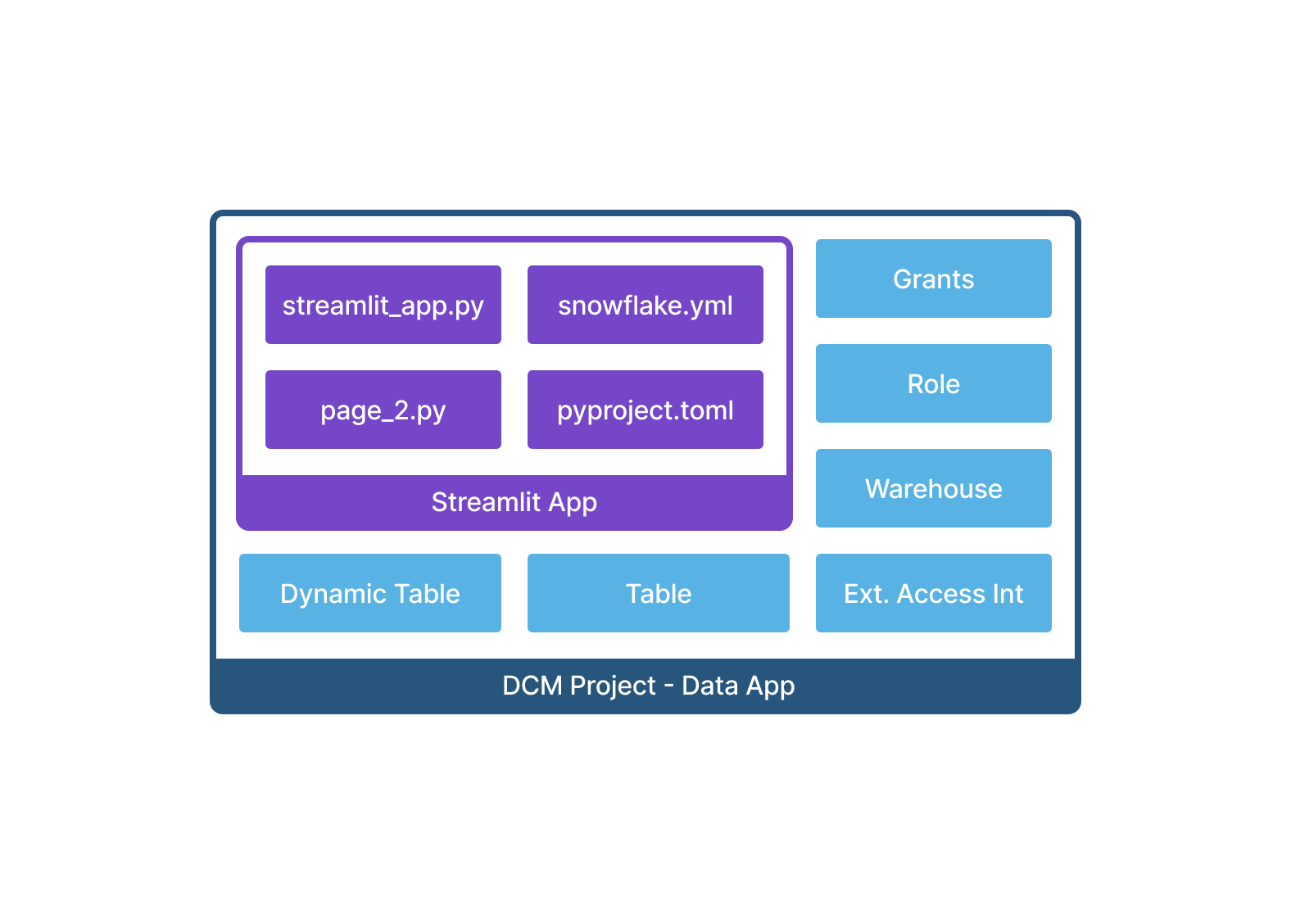
Create a DCM project for Streamlit
An existing Streamlit app folder can include:
streamlit_app.pyor another entrypoint fileenvironment.ymlfor warehouse runtime, orrequirements.txtorpyproject.tomlfor container runtime- Supporting Python modules, pages, or asset files
Place the app inside the DCM project root folder but outside sources/. Organize it in any sibling folder structure you
choose, for example, streamlit/my_dashboard/.
Add the DEFINE STREAMLIT statement to your DCM Projects definitions with:
- The fully qualified name for the Streamlit object
- The
asset://URI for the Streamlit asset - The entrypoint filename (
MAIN_FILE) - The warehouse to use for query execution (
QUERY_WAREHOUSE) - The compute pool and runtime (
COMPUTE_POOL,RUNTIME_NAME) for container-runtime apps - An optional display title (
TITLE) - Any external access integrations (
EXTERNAL_ACCESS_INTEGRATIONS) and stage imports (IMPORTS) that the app requires
Import Streamlit files as a project asset
Declare the Streamlit files as a project asset and reference the asset with an asset:// URI in the FROM clause. Asset files
must be inside the DCM project root folder but outside the sources/ folder. During deployment, DCM Projects uses the imported files
to create or update the Streamlit app.
In manifest.yml, define the Streamlit folder as an asset in a top-level assets section. For each asset, use path to
specify one path or paths to specify a list of paths. Each asset path must be a valid glob expression or file path and must
be enclosed in single quotation marks. A directory path by itself isn’t supported. To include the contents of a directory,
append a glob pattern such as /**/*. Glob expressions support only * and **:
If you have a pre-existing Streamlit project, you don’t need to move its files. Use the existing Streamlit project folder as
the DCM project root, and add manifest.yml and the sources/ folder to that root. Then import the existing project files
with **/*. DCM Projects automatically excludes DCM Projects-owned files and folders from the match:
Reference the asset in the FROM clause by using the asset://<asset_name>/ URI. The URI references the user-defined asset
name under assets, not the original path or directory name:
When DCM Projects renders the project, the imported asset files appear with the rendered definitions under
out/rendered/assets/. DCM Projects also includes them in the deployment artifacts.
Plan and deploy a DCM project with a Streamlit app
Run your regular DCM Projects PLAN and DEPLOY commands. If the DEFINE STREAMLIT statement, the referenced asset, or any of its
source paths or files have changed since the last successful deployment, PLAN and PLAN DELTA show the Streamlit object as
part of the changeset. DEPLOY replaces any modified files and creates a new version.
PLAN only validates that the Streamlit object can be created. It doesn’t test whether the app itself runs successfully
when started.
After the first successful deployment, the Streamlit app is immediately live. DCM Projects automatically initializes the live
version after creating the Streamlit object, so you don’t need to run ALTER STREAMLIT manually.
Removing the DEFINE STREAMLIT statement drops the Streamlit object on the next deployment.
Limitations:
- DCM Projects Jinja templating variables aren’t passed through to Streamlit Python files. You can use Jinja in the
DEFINE STREAMLITstatement itself, for example, to set the warehouse or compute pool name, but not inside your app code.- To reference environment-specific objects from inside your Streamlit app at runtime, query the active context using
CURRENT_DATABASE(),CURRENT_SCHEMA(), or similar functions to infer the environment.
- To reference environment-specific objects from inside your Streamlit app at runtime, query the active context using
- Asset paths must resolve within the DCM project. Assets can’t include files in the
sources/folder, and you can’t specify a path to another repository or folder outside of the DCM project.
Table
DCM Projects supports defining tables. For syntax, see DEFINE TABLE.
To define a table column with a default value and comment, specify the column name and data type, followed by the DEFAULT and COMMENT
clauses:
Note
You can set ENABLE_SCHEMA_EVOLUTION in a DEFINE TABLE statement. However, any
schema evolution that’s applied outside of DCM Projects shows up as drift during the next PLAN.
To match the new table state again, manually update the table definition.
Limitations:
- Reordering columns
- Changing column types to incompatible types
- Adding search optimization to a table or columns isn’t yet supported. Add it manually outside of DCM Projects using
ALTER TABLE ... ADD SEARCH OPTIMIZATION. - Adding tags and policies to a table or columns
- Virtual columns (
AS ( <expr> )column definitions) aren’t yet supported onDEFINE TABLE.
Tag
DCM Projects supports defining tags. For more information, see Introduction to object tagging. For syntax, see DEFINE TAG.
Limitations:
- All CREATE OR ALTER TAG limitations
apply to
DEFINE TAG.
Task
DCM Projects supports defining tasks. For syntax, see DEFINE TASK.
When definition changes are deployed for a task that is already started, Snowflake automatically suspends that task (or its root task) temporarily, applies the change, and then resumes it again.
Newly deployed tasks are suspended by default.
Target state:
You can specify a target state of STARTED or SUSPENDED for each task in your definitions. Place the target state keyword
immediately before the AS keyword in the DEFINE TASK statement. If you define a task as STARTED, Snowflake resumes the task
after deployment. This property is independent of other changes to the task definition. If you define a task as STARTED and then
suspend it outside of DCM Projects, the next deployment of that same definition starts the task again.
DCM Projects handles the dependency resolution between root-task and child-task states.
Note
The target state is a DCM Projects-specific property. It won’t be visible in the DDL of the deployed task.
Limitations:
- All tasks in a task graph must be defined within the same DCM project, then same schema and owned by the same role.
- After you configure the executor role and role hierarchy, transferring ownership of a task
graph requires multiple deployments:
- Define and deploy the tasks to create the task graph.
- Add a
GRANT OWNERSHIPstatement for every task in the graph, and deploy again to transfer ownership to the lower-level role. Ownership transfer removes predecessor relationships and detaches child tasks from the graph. - Deploy again to restore the predecessor relationships and target states from the task definitions.
PLANonly validates that the task can be created successfully. It doesn’t check whether the task will run successfully, as task logic is compiled at runtime.
View
DCM Projects supports defining views. For syntax, see DEFINE VIEW.
Note
To add comments to view columns, list every output column in parentheses immediately after the view name. Add COMMENT '<comment>' after
each column name that needs a comment. Don’t specify data types in the column list.
Limitations:
- Reordering columns
Warehouse
DCM Projects supports defining warehouses. For syntax, see DEFINE WAREHOUSE.
Immutable attributes:
- INITIALLY_SUSPENDED
Project assets
To create or update Streamlit apps (DEFINE STREAMLIT) and Code Bundles (DEFINE CODE BUNDLE) with DCM Projects, declare their
source files as named entries in the manifest’s assets section. Assets let you place manifest.yml alongside existing code
folders and use those files in DCM Projects without moving them into sources/.
Each entry under the top-level assets section has a name and either path for one glob pattern or paths for multiple
patterns. Paths are relative to the folder that contains manifest.yml. For example:
Reference an entry’s name in the object’s FROM clause, for example, FROM 'asset://my_dashboard'. DEFINE STREAMLIT and
DEFINE CODE BUNDLE can’t reference the original source folder or file path directly in FROM. Asset names are case-sensitive
and must match ^[a-zA-Z_][a-zA-Z0-9_]*$.
Path constraints:
- Paths must be relative to the folder that contains
manifest.ymland must stay within the DCM project. - A directory path by itself isn’t supported. Append a glob pattern, such as
/**/*, to include the directory’s contents. *matches within one path component.**matches across directories. A path can also name one file.?and brace expansion aren’t supported. Brackets are literal characters.**must be a whole path component followed by another component.- Paths can’t contain Jinja expressions. Enclose paths in single quotation marks in YAML.
- A pattern that matches no files causes the run to fail.
When you run PLAN or DEPLOY through Snowflake CLI, the CLI uploads the files that match the manifest paths. DCM Projects stores imported
files under assets/<asset_name>/ in the deployment history artifacts. The literal directory prefix before the first wildcard
is removed:
| Pattern | Matched file | Materialized as |
|---|---|---|
'app/**/*' | app/lib/util.py | assets/<name>/lib/util.py |
'**/*' | app/lib/util.py | assets/<name>/app/lib/util.py |
'app/static/**/*' | app/static/style.css | assets/<name>/style.css |
'app/main.py' | app/main.py | assets/<name>/main.py |
Entrypoints such as MAIN_FILE and ENTRYPOINT are relative to the imported root. Two files that resolve to the same
destination in one named asset cause an error. Different named assets can import the same source file.
Adding --save-output to snow dcm plan creates a local out/ folder that contains rendered definitions under
out/rendered/, including imported files under out/rendered/assets/.
Excluded files:
sources/is reserved for DCM Projects definitions, macros, and tests. Imported code files must be outside it.manifest.ymlandout/are also excluded, even when explicitly named in a path.- The CLI silently excludes dotfiles and dot-directories, including explicitly named files such as
.env. - Symlinks within the project are followed. Symlinks that point outside it are skipped.
Limits:
| Limit | Value |
|---|---|
| Size of a single asset file | 50 MB |
| Number of files per run | 5,000 |
| Total size of all assets | 512 MB |
| Length of an asset path | 1,024 |
| Length of an asset name | 255 |
Grants
DCM Projects uses GRANT statements to assign privileges and roles within a project.
GRANT
Just like each object can be defined only once in a project, each privilege-grantee relationship can only be defined once across all projects.
DCM Projects is only aware of grants that were defined and deployed through DCM Projects. Any grants that were added outside of DCM Projects coexist, and DCM Projects doesn’t remove them.
Support for a GRANT statement that references a user or integration doesn’t mean that DCM Projects can define or manage the lifecycle of that
user or integration. Object-definition support and grant-target support are separate.
Unsupported GRANT types:
- CALLER grants
GRANT ON FUTURE
DCM Projects supports GRANT ON FUTURE, which grants privileges on future objects of a specified type within a container.
Note
GRANT ON FUTURE is supported but isn’t recommended in DCM Projects and will be deprecated in a future behavior change release. Use inherited grants instead, which apply to current and future objects and offer better performance for DCM Projects executions. Replacing GRANT ON FUTURE with an inherited grant expands the grant to existing objects. Review the affected existing and future objects before migrating.
GRANT ON ALL
DCM Projects supports GRANT ON ALL, which grants privileges on all existing objects of a specified type within a container.
Note
GRANT ON ALL is supported but isn’t recommended in DCM Projects and will be deprecated in a future behavior change release. Use inherited grants instead, which apply to current and future objects and offer better performance for DCM Projects executions. Replacing GRANT ON ALL with an inherited grant expands the grant to future objects. Review the affected existing and future objects before migrating.
OWNERSHIP grants
The DCM project owner role automatically has OWNERSHIP on all roles it creates inside the project. However, if one of those roles is
then granted OWNERSHIP of other deployed objects, the project owner role no longer has direct OWNERSHIP of those objects. To avoid
being locked out on future deployments, explicitly grant the role to the project owner role in the same definition files:
When removing a GRANT OWNERSHIP statement that was previously deployed, DCM Projects attempts to grant
ownership back to the DCM project owner, using the object’s current owner role to perform the transfer.
If the project owner role doesn’t hold the object’s current owner role, you must transfer ownership back manually outside of DCM Projects.
Limitations:
-
The
COPY CURRENT GRANTSandREVOKE CURRENT GRANTSclauses aren’t available in DCM Projects. Define all other privilege grants on the target object within the same DCM project as theOWNERSHIPgrant. If the object has pre-existing grants,PLANorDEPLOYof theGRANT OWNERSHIPstatement fails.To work around this, do one of the following:
- Define all desired grants on the target object in the DCM project, including any pre-existing grants.
- Revoke the pre-existing grants manually outside of DCM Projects.
Run procedures and tasks with restricted privileges
You can use a dedicated executor role when a DCM project deploys and manages a procedure or task, but the object should run with restricted privileges. This pattern applies to owner’s rights procedures and tasks, which run with the privileges of their owner role.
In the same DCM project:
- Define the procedure or task.
- Define a dedicated executor role, such as
pipeline_runner, or reference an existing role. - Grant the privileges required to run the procedure or task to the executor role.
- Grant the executor role to the DCM project owner role. This role hierarchy prevents the project owner from losing the ability to manage the object after ownership is transferred.
- Grant
OWNERSHIPon the procedure or task to the executor role.
Keep the ownership transfer and the other privilege grants on the target object in the same DCM project. For more information, see OWNERSHIP grants.
INHERITED grants
DCM Projects supports inherited grants, which let you declaratively define a single grant on a
container (ACCOUNT, DATABASE, or SCHEMA) that automatically applies to every current and future object of a specified type
within that container.
Prerequisites:
Until the behavior change is fully rolled out, inherited grants still require a separate account-level opt-in that’s independent of DCM Projects. Before you can include them in your DCM Projects definitions, review inherited grants and run:
The role that creates an inherited grant must have MANAGE GRANTS on the selected container or on a higher container. OWNERSHIP of the
container alone isn’t sufficient.
Syntax:
Use the INHERITED keyword in a standard GRANT statement inside your DCM Projects definitions:
DCM Projects manages the lifecycle of these grants across deployments. Removing an inherited grant statement from your definitions revokes the grant on the next deployment.
Limitations:
- All inherited grant limitations apply, including
unsupported privilege types (for example,
OWNERSHIP) and unsupported object types (for example,SHARE,APPLICATION,INTEGRATION). - Inherited grants can’t be combined with
WITH GRANT OPTION,CASCADE, orRESTRICT. - Granting inherited privileges on imported (shared) databases or on objects owned by foreign accounts isn’t supported.
- Inherited grants on
APPLICATIONandAPPLICATION PACKAGEobjects aren’t supported.
Container-level MANAGE GRANTS
In conjunction with inherited grants, DCM Projects also supports
container-level MANAGE GRANTS, which lets you delegate grant administration for a
specific database or schema. A role granted MANAGE GRANTS on a container can manage supported grants on objects inside that container
without needing account-level SECURITYADMIN privileges. It can’t transfer object ownership.
Prerequisites:
Until the behavior change is fully rolled out, container-level MANAGE GRANTS requires the same account-level opt-in as inherited grants. Before you can include it in your
DCM Projects definitions, run:
Syntax:
DCM Projects manages the lifecycle of these grants across deployments. Removing a MANAGE GRANTS statement from your definitions
revokes the privilege on the next deployment.
Limitations:
- Container ownership alone doesn’t imply
MANAGE GRANTS. The deploying role must explicitly grant this privilege to the target role. - A role with container-level
MANAGE GRANTScan’t transfer object ownership. Account-levelMANAGE GRANTS(held bySECURITYADMIN) is still required for ownership transfers. WITH GRANT OPTIONisn’t yet supported for container-levelMANAGE GRANTSin DCM Projects definitions.- Cascading a revocation of
MANAGE GRANTSremoves only dependentMANAGE GRANTSgrants, not the other grants those roles created inside the container.
Attachments
DCM Projects uses ATTACH statements to associate objects — such as data quality functions, policies, and tags — with other Snowflake objects.
Limitations:
- Attaching row access policies to tables or views isn’t yet supported. You can attach a row access policy manually outside of DCM Projects. DCM Projects definitions for table objects ignore attached row access policies and don’t revoke them on redeploy, even when the definitions don’t contain the policies.
ATTACH Data Metric Function
Data metric functions (DMFs) let you define data quality expectations and attach those expectations to tables. You can select from existing system DMFs or write your own user-defined data metric functions (UDMFs). You can then attach them to tables, views, and dynamic tables with a many-to-many relationship. For more information, see Use SQL to set up data metric functions.
To attach data metric functions, you first need to add a DATA_METRIC_SCHEDULE to each table, dynamic table, or view definition. For
example: DATA_METRIC_SCHEDULE = TRIGGER_ON_CHANGES. The TRIGGER_ON_CHANGES schedule isn’t available for views.
The user-defined names of expectations must be unique per project and attachment.
Defining expectations is optional, but recommended, when attaching DMFs to table columns.
Attached DMFs without set expectations aren’t considered when running EXECUTE DCM PROJECT <my_project> TEST ALL.
Supported changes:
- Attaching system DMFs and UDMFs to tables, views, or dynamic tables inside and outside a DCM project
- Defining data expectations for table columns
- Specifying
EXECUTE AS ROLEto run the DMF with a role other than the deploying role
Examples:
An example of attaching a system DMF with an expectation:
An example of attaching a UDMF with an expectation:
An example of attaching a UDMF to a table that isn’t defined within the DCM project, using EXECUTE AS ROLE so the DMF runs
with a role that has the required privileges on the target table:
Use EXECUTE AS ROLE <role_name> to attach a DMF to a table or column that another DCM project or a process outside DCM Projects
manages, such as a data quality expectation on an upstream source table that you don’t own. The deploying role only needs USAGE
on the DMF; the DMF itself runs with the specified role, which must have the required privilege on the target table. For more
information about this property, see Required privilege on the table or view.
Limitations:
- Schema-level DMF attachments aren’t supported in DCM Projects.
- You can’t change the role specified by
EXECUTE AS ROLEfor an existing attachment by modifying just that property. To change the role, remove theATTACHstatement, deploy, then redefine it with the newEXECUTE AS ROLEvalue.
To see all available system DMFs, query SHOW DATA METRIC FUNCTIONS IN DATABASE SNOWFLAKE.
ATTACH Masking Policy
Use ATTACH MASKING POLICY to declaratively assign a masking policy to one or more columns in tables, Apache Iceberg™ tables, views, or dynamic tables. The masking policy and target columns don’t need to be defined in the same DCM project. You can reference masking policies and columns anywhere in the account if the deploying role has the required privileges. For more information, see Masking policy privileges.
Syntax:
To attach a masking policy to multiple table columns and use additional columns in the masking-policy conditions:
A column can have only one masking policy. DCM Projects always applies the declared masking policy with the FORCE option so that it can replace an existing policy. The result depends on the existing attachment:
- If a process outside DCM Projects attached the existing masking policy, DCM Projects replaces it during deployment.
- If another DCM project manages the existing masking policy attachment, the deployment fails before DCM Projects replaces it. This applies whether the projects declare the same policy or different policies in the attachment statement.
- If the current DCM project had managed the existing attachment, DCM Projects updates it in place.
Warning
When you remove an ATTACH MASKING POLICY statement from the definitions, DCM Projects removes the masking policy from the column during the next deployment. DCM Projects doesn’t restore a policy that was attached before the project managed the attachment.
ATTACH Tag
Use ATTACH TAG to declaratively assign Snowflake object tags to the supported target types listed in this section. DCM Projects reconciles the
declared tag assignments on every deployment, replacing manual ALTER <object> SET TAG calls.
The tag and the target object don’t need to be defined in the same DCM project. You can reference tags and objects anywhere in the account, as long as the deploying role has the required privileges.
Syntax:
You can group tag-to-target associations in different ways within a single statement. The following examples show the supported patterns.
Single tag, single target:
Multiple tags and multiple targets (N×M): a single ATTACH TAG statement can list multiple tag assignments and
multiple targets. DCM Projects expands them as a Cartesian product: every listed tag is attached to every listed target.
You can mix object-level and column-level targets in the same statement.
This single statement creates six tag-target pairs: both tags are attached to each of the three targets.
Supported objects:
| Object keyword | Column target supported |
|---|---|
DATABASE <db> | No |
SCHEMA <db>.<schema> | No |
TABLE <db>.<schema>.<name> | Yes |
VIEW <db>.<schema>.<name> | Yes |
DYNAMIC TABLE <db>.<schema>.<name> | Yes |
FUNCTION <db>.<schema>.<name>(<arg_types>) | No |
PROCEDURE <db>.<schema>.<name>(<arg_types>) | No |
STAGE <db>.<schema>.<name> | No |
TASK <db>.<schema>.<name> | No |
ROLE <name> | No |
DATABASE ROLE <db>.<name> | No |
WAREHOUSE <name> | No |
To attach a tag to a data metric function, use the FUNCTION keyword with TABLE(...) argument notation, not
DATA METRIC FUNCTION:
Lifecycle:
DCM Projects tracks individual tag-target pairs, not whole statements. On each deployment, DCM Projects executes:
- Attach: Any pair that is newly declared in the definitions is attached.
- Alter: If the value for a pair changes, DCM Projects updates it on the next deployment.
- Detach: If a pair is removed from the definitions, DCM Projects detaches the tag from that target on the next deployment.
Tag assignments made outside DCM Projects aren’t tracked by DCM Projects and won’t be affected by a deployment, regardless of whether DCM Projects manages the target object.
To assign a different value to the same tag on different targets, split them into separate statements:
Uniqueness constraint:
Each tag-target pair must appear at most once across all files in the project. Declaring the same pair in two
different statements is an error.
You can freely reorganize how pairs are grouped across statements without affecting deployed state. DCM Projects considers a single 2×2 statement, two 1×2 statements, and four 1×1 statements covering the same pairs to be equivalent.
Native tagging behaviors:
ATTACH TAG exercises the same engine path as ALTER <object> SET TAG, so all native Snowflake tagging behaviors
apply, including tag inheritance (from containers to child objects), tag propagation (from tables to columns), and
masking policy association (when a tag has a masking policy attached). See Object tagging
for the full description of these behaviors.
Limitations:
- The account-level
GRANT APPLY TAG ON ACCOUNTprivilege is enforced only when the grantee can also see the target object. If the grantee doesn’t hold a privilege that lets them see the target, the attachment isn’t applied. - All native Snowflake object tagging limitations and quotas apply.
- Masking policies and row access policies aren’t yet supported as
ATTACH TAGtargets.