Note

Mirroring is currently available only on Amazon Web Services (AWS) and Microsoft Azure.

Mirroring from Postgres to Snowflake

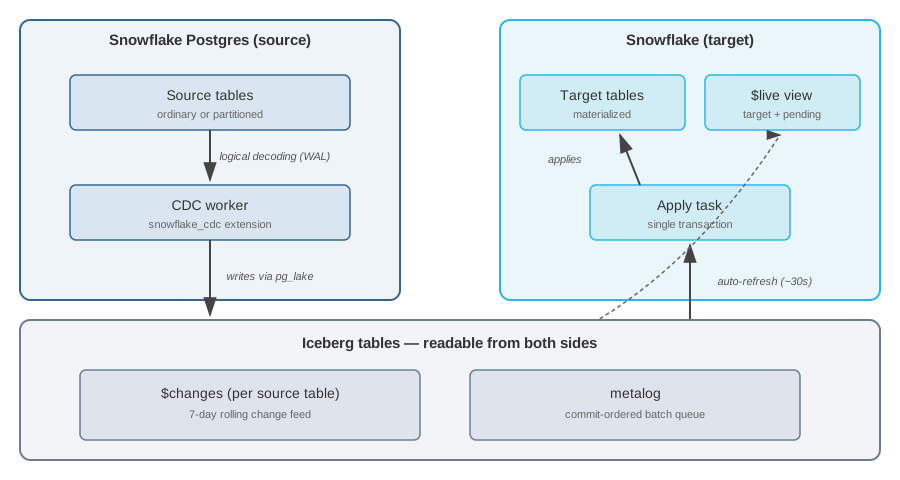
Snowflake Postgres can mirror data continuously into a Snowflake database. Once you create a mirror, Snowflake maintains target tables that reflect the current state of their source tables, including schema changes and changes to the set of mirrored tables.

Key capabilities

  • No separate infrastructure. Mirrors run inside Snowflake with no external CDC service to deploy or connector process to operate.
  • Transactional apply. Row changes from a source transaction become visible on the target together, so cross-table invariants (including foreign-key relationships) hold when joining mirrored tables. See Transactional guarantees.
  • Schema evolution. Schema changes and DDL like columns added to or removed from a mirrored schema on Postgres appear in Snowflake without reconfiguring the mirror.
  • Sub-minute lag regardless of refresh interval. The $live view combines the target table with not-yet-merged changes, so readers see every committed source change with an approximately 30-second lag, even when refresh_interval is set to an hour or a day.
  • Queryable 7-day change feed. Every mirrored table has a $changes companion that exposes inserts, updates, and deletes for the last 7 days, queryable from both Snowflake and Postgres.
  • Robust data type mapping. Most PostgreSQL types map directly to Snowflake types. Types without a direct equivalent such as jsonb, hstore, and ranges are automatically cast to VARCHAR or BINARY. Arrays and composite types are surfaced as Snowflake ARRAY and OBJECT. See Type mapping for the full mapping.
  • High throughput. Initial snapshots use parallel binary COPY streamed to compressed Parquet. Ongoing apply uses delete-then-append instead of MERGE, so insert-only batches skip the target-table scan that MERGE-based CDC tools pay on every run.

Prerequisites

  • A Snowflake account with Snowflake Postgres enabled.
  • A Snowflake Postgres instance running on the STANDARD or HIGH MEMORY tier. The BURSTABLE tier isn’t supported.

Source table requirements

To be mirrored, a source table must meet these requirements:

  • Ordinary table or partitioned table. Views, materialized views, foreign tables, sequences, and other relation kinds aren’t replicable. Temporary tables are never replicated because Postgres logical replication excludes them.
  • Logged (not UNLOGGED). Unlogged tables generate no WAL and can’t participate in logical replication.
  • Not owned by an extension. Extension-owned tables (including the CDC metalog itself) are filtered out.
  • Unique table names. The case-insensitive schema.table must be unique among mirrored tables, and the table name can’t end in $CHANGES or $LIVE (reserved for companion objects).

Create a mirror from Snowflake Postgres to Snowflake analytics

Step 1: Create or prepare a Postgres instance

Create a new Snowflake Postgres instance from Snowsight or SQL. If this is your first time, see Create a Snowflake Postgres instance for detailed instructions. The instance must use the STANDARD or HIGH MEMORY tier.

Note

If you have an existing instance that was created before the mirroring feature was available, refresh the instance from the Postgres Manage options in Snowsight before creating a mirror.

Step 2: Grant permissions

In Snowflake, grant the postgres_mirror_admin application role to the role that will manage mirrors, and grant USAGE on the Postgres instance to the snowflake application:

GRANT USAGE ON POSTGRES INSTANCE "my_instance" TO APPLICATION snowflake;

Replace "my_instance" with the name of your Postgres instance.

Step 3: Install the extension

Connect to your Postgres instance using psql or your preferred SQL client and install the snowflake_cdc extension. This also installs pg_lake as a dependency:

CREATE EXTENSION snowflake_cdc CASCADE;

Note that this extension needs to be installed on the specific database you’re using.

Step 4: Create the mirror

You can create a mirror using SQL or the Snowflake UI.

Using SQL:

Use the snowflake.postgres.create_mirror procedure to specify which Postgres tables to replicate and how often to sync:

CALL SNOWFLAKE.POSTGRES.CREATE_MIRROR(
    mirror_name         => 'orders_mirror',
    postgres_instance   => 'mirror-test-sql',
    postgres_database   => 'postgres',
    target_database     => 'POSTGRESMIRRORTOSNOWFLAKE',
    postgres_tables     => ['public.devices', 'public.sensors', 'public.readings'],
    postgres_schemas    => NULL,
    refresh_interval    => '1 minute'
);

You must specify either postgres_tables or postgres_schemas, but not both. The refresh_interval defaults to '10 minutes' and accepts values like '30 seconds', '1 minute', '1 hour', or '1 day'. For full parameter details, see create_mirror.

Using the Snowflake UI:

Navigate to your Postgres instance in Snowsight and select Manage to configure mirroring. Enter a mirror name, select the source database, provide a destination database name, and set the refresh frequency.

Mirror data dialog in Snowsight showing fields for mirror name, source database, destination database, and refresh frequency

Important

The target database must not already exist. The mirror creates it automatically. You can’t reuse a target database that was previously used by a mirror, even if that mirror was dropped.

Step 5: Verify data in Snowflake

Once the mirror is created and the initial sync completes, verify that the data has arrived in Snowflake:

SELECT COUNT(*) FROM POSTGRESMIRRORTOSNOWFLAKE.PUBLIC.READINGS;

The count should match the source table in Postgres. You can also check the $live view, which includes any changes that haven’t been merged yet:

SELECT COUNT(*) FROM POSTGRESMIRRORTOSNOWFLAKE.PUBLIC.READINGS$live;

Use list_mirrored_tables to check the replication state of each table. Tables show as SNAPSHOTTING during the initial copy and REPLICATING once caught up:

CALL SNOWFLAKE.POSTGRES.LIST_MIRRORED_TABLES('orders_mirror');

From this point on, any inserts, updates, or deletes in Postgres automatically replicate to Snowflake on the configured refresh interval. A Mirroring tab on the Postgres landing page in Snowsight shows your existing mirrors. This tab may take a few minutes to populate after your first mirror creation.

Query the target database

Target tables live in <target_database>.<schema>.<table> and can be queried like any other Snowflake table:

SELECT COUNT(*) FROM POSTGRESMIRRORTOSNOWFLAKE.PUBLIC.READINGS;

Each source table has three derived objects in the target database:

  • <schema>.<table>: The materialized target table, updated on the mirror’s refresh_interval.
  • <schema>.<table>$changes: The change log table (Iceberg, auto-refreshed from the source). Contains system columns plus the source data columns.
  • <schema>.<table>$live: A view that combines the target table with pending change log entries, so readers see every committed change from the source with minimal additional latency.

Low-latency reads with $live

The $live view combines the target table with not-yet-merged rows from $changes, so readers see every committed source change without waiting for the next apply run.

SELECT COUNT(*) FROM POSTGRESMIRRORTOSNOWFLAKE.PUBLIC.READINGS$live;

A large gap between counts on the target table and the $live view means many changes are pending and will be merged on the next apply run.

The $live view refreshes as soon as auto-refresh picks up new rows in the underlying $changes table (every 30 seconds), so $live lag is roughly independent of refresh_interval. The trade-off is query cost: $live has to scan all $changes rows not yet merged into the target, so queries get more expensive as the backlog grows. Pairing a small $live scan with a larger refresh_interval is a good way to keep apply costs down while keeping read lag low.

Note

$live views aren’t transactional. Because $changes rows arrive incrementally, a $live view can expose a partial transaction where some rows are visible before others. If you need transactional consistency, query the target tables instead.

$CHANGES table and DDL

Each mirrored table has a companion $CHANGES table (e.g. orders_db.public.orders$CHANGES). It is a rolling 7-day change feed: every insert, update, and delete that happens on the source PostgreSQL table shows up here as a queryable row, with a _change_type column (I for insert, D for delete; updates appear as a delete/insert pair).

You can query $CHANGES directly to build pipelines, audit trails, or point-in-time reads.

Snapshotting

When a table is added to a mirror for the first time — whether by creating the mirror, adding a table explicitly, or creating a new table inside a schema that is already mirrored — the mirror needs a full baseline copy of any existing rows before the change feed can start. During this period the table shows as SNAPSHOTTING in list_mirrored_tables. No changes are lost; the feed starts automatically once the copy completes.

This is the only situation that triggers a full data copy. No DDL on an already-mirrored table causes a re-snapshot.

DDL udpates in $CHANGES

When you run a column-level DDL on a mirrored table, $CHANGES is immediately re-pointed to a brand-new, empty table with the updated column layout. The previous change history is no longer visible in $CHANGES from that point on.

PostgreSQL DDLWhat happens
ALTER TABLE ... ADD COLUMNA new $CHANGES table is created with the new column included. Old rows are gone from the feed; new rows will have a value for the new column.
ALTER TABLE ... DROP COLUMNA new $CHANGES table is created with the column removed. Old rows are gone from the feed.
ALTER TABLE ... RENAME COLUMNA new $CHANGES table is created with the column under its new name. Old rows are gone from the feed.
ALTER TABLE ... ALTER COLUMN ... TYPEA new $CHANGES table is created with the updated column type. Old rows are gone from the feed.

In other words: after a column change, $CHANGES only contains rows that were written after the DDL. Any rows from before the column change are gone from the feed.

The underlying data files from before the DDL are not immediately deleted — they continue to exist for up to 7 days before being cleaned up — but they are no longer exposed through $CHANGES.

If you have a pipeline or query that reads $CHANGES and depends on seeing the full 7-day history, be aware that a column DDL will truncate that window back to zero at the moment it is applied.

_data_version

Every row in $CHANGES carries a _data_version integer. Unlike the column DDL case above, these operations do not replace $CHANGES with a new empty table — the feed keeps running and all existing rows remain visible. However, they still mark a new generation in the system: the _data_version value increments at the boundary, signalling that rows before and after that point should not be treated as part of the same continuous sequence. Consumers should treat a version bump as a cue to reset their bookmarks or deduplication state.

PostgreSQL DDLWhat happens
TRUNCATEAll existing rows on the source were wiped. _data_version bumps to mark the clean-slate boundary.
ALTER TABLE ... ADD PRIMARY KEYThe table gains the ability to accept updates and deletes (it was insert-only before). _data_version bumps to separate the two eras.
ALTER TABLE ... DROP CONSTRAINT ... (primary key)The table reverts to insert-only mode. Same version bump.
ALTER TABLE ... RENAME TOThe table — and its $CHANGES companion — is renamed on Snowflake. _data_version bumps to keep change batches from before and after the rename from being confused with each other.
ALTER TABLE ... SET SCHEMASame as a rename but the table moves to a different schema.
ALTER SCHEMA ... RENAME TOAll tables in the renamed schema are renamed on Snowflake simultaneously, each with a _data_version bump.

Manage mirrors

Alter a mirror

Use alter_mirror to change the refresh interval, or to add or remove tables and schemas from the mirror:

CALL SNOWFLAKE.POSTGRES.ALTER_MIRROR(
    mirror_name      => 'orders_mirror',
    refresh_interval => '30 seconds',
    add_tables       => ['public.shipments'],
    remove_tables    => NULL,
    add_schemas      => NULL,
    remove_schemas   => NULL
);

Renaming a schema or table on PostgreSQL doesn’t require reconfiguring the mirror. The rename is captured by the source extension and automatically applied to the target database.

Drop a mirror

Use drop_mirror to remove a mirror and clean up all associated infrastructure, including the publication on the source, the apply task on Snowflake, and mirror metadata:

CALL SNOWFLAKE.POSTGRES.DROP_MIRROR('orders_mirror');

The target database is left in place and target tables remain queryable. The database is marked as previously used so it can’t be reassigned to a new mirror.

The target database is owned by the snowflake application, so it can’t be dropped or modified directly. To drop it, ACCOUNTADMIN can transfer ownership first:

GRANT OWNERSHIP ON DATABASE POSTGRESMIRRORTOSNOWFLAKE TO ROLE ACCOUNTADMIN;
DROP DATABASE POSTGRESMIRRORTOSNOWFLAKE;

Inspect mirrors

Use describe_mirror to check the configuration and runtime state of a specific mirror:

CALL SNOWFLAKE.POSTGRES.DESCRIBE_MIRROR('orders_mirror');

Use list_mirrors to see all mirrors on a Postgres instance:

CALL SNOWFLAKE.POSTGRES.LIST_MIRRORS('my_instance');

Use list_mirrored_tables to see the replication state of each table in a mirror (SNAPSHOTTING during initial copy, REPLICATING once caught up):

CALL SNOWFLAKE.POSTGRES.LIST_MIRRORED_TABLES('orders_mirror');

For full result column details, see Mirror management procedures.

Monitor mirroring

The describe_mirror procedure surfaces a rolling window of recent apply runs in the recent_query_durations column for a quick look at cadence and latency.

For a full history, ACCOUNTADMIN can query Snowflake’s task history directly:

SELECT name, state, scheduled_time, completed_time, error_code, error_message
FROM TABLE(INFORMATION_SCHEMA.TASK_HISTORY(
    SCHEDULED_TIME_RANGE_START => DATEADD('hour', -24, CURRENT_TIMESTAMP()),
    RESULT_LIMIT => 100
))
WHERE database_name = 'SNOWFLAKE'
  AND name LIKE 'APPLY_MIRROR_%'
ORDER BY scheduled_time DESC;

The query_admin_log procedure exposes mirror-internal events with optional filters:

CALL SNOWFLAKE.POSTGRES.QUERY_ADMIN_LOG(
    mirror_name       => 'orders_mirror',
    postgres_instance => 'my_instance',
    level             => 'ERROR',
    since_ts          => NULL,
    max_rows          => 500
);

Roles and permissions

Two roles govern access to mirroring:

  • postgres_mirror_admin (application role on snowflake.postgres): Required to call the mirror management procedures. ACCOUNTADMIN grants it to the role that manages mirrors:

    GRANT APPLICATION ROLE snowflake.postgres_mirror_admin TO ROLE ACCOUNTADMIN;
  • <target_database>_admin (database role inside the target database): Owns SELECT on every target table and $live view in the mirror. create_mirror grants this role to the invoker with WITH GRANT OPTION, so the invoker can delegate read access:

    GRANT DATABASE ROLE POSTGRESMIRRORTOSNOWFLAKE.POSTGRESMIRRORTOSNOWFLAKE_admin TO ROLE analytics;

The caller of every mirror management procedure must also own the source PostgreSQL instance. The procedures verify this before doing any privileged work, so a user who holds postgres_mirror_admin but doesn’t own the source instance can’t manage its mirrors.

Primary key and UPDATE/DELETE support

Tables without a primary key are mirrored as insert-only: the CDC extension sets REPLICA IDENTITY NOTHING on them, which causes Postgres to reject UPDATE and DELETE on the source. Add a primary key before mirroring if the table needs to support UPDATE or DELETE.

Troubleshooting

The following are known issues in private preview, with workarounds.

Mirror names must be lowercase

Mirror names containing uppercase letters are rejected or fail with an unhelpful error.

Workaround: Use only lowercase characters in mirror names. For example, use mymirror instead of MyMirror.

Active role can’t contain dashes

create_mirror fails when the active Snowflake role name contains dashes. For example, the following role names all hit this issue:

  • my-role
  • data-engineering
  • prod-admin
  • etl-mirror-owner

Workaround: Before calling create_mirror, switch to a role whose name doesn’t contain dashes (underscores are fine). For example, my_role or data_engineering work.

Failed mirror creation can leave a target database behind

If create_mirror fails partway through, the target database may already exist on the Snowflake side even though the mirror itself wasn’t created. Retrying with the same target_database then fails because the database is already present.

Workaround: Retry create_mirror with a different target_database name.

Target database names can’t be reused

Once a database has been used as a mirror target, the same name can’t be reused for a new mirror, even if the mirror is dropped and the database itself is dropped.

Workaround: Pick a new target_database name when creating a replacement mirror.

Internals

This section covers the architecture and technical details of how mirroring works under the hood. Mirrors are created and managed using procedures in the snowflake.postgres schema.

How mirroring works

A mirror consists of the following components:

  • A publication on the source PostgreSQL instance, created by the snowflake_cdc extension.
  • A replication slot (logical decoding) on the source, managed by a background CDC worker.
  • Per-source-table change log tables (Iceberg, suffix $changes) written by the CDC worker through pg_lake.
  • A per-mirror metalog table (Iceberg) carrying schema-change and change-batch operations in commit order.
  • On the Snowflake side, a target database and a scheduled task that invokes the apply procedure.
  • On the Snowflake side, per-source-table target tables and companion $live views that combine the target with pending change log entries.

Low-latency $live views expose not-yet-merged change log entries on top of the target tables so you can query the latest committed state without waiting for the next merge.

Data flow

The CDC worker on the source PostgreSQL instance captures changes using logical decoding and writes change records to per-table $changes tables and a metalog through pg_lake. These Iceberg tables are exposed on the Snowflake side and automatically refresh. A scheduled apply procedure reads the metalog and applies pending changes to the target tables. The $live view reads from $changes independently to expose not-yet-applied changes on top of the target.

Object layout

Each mirror creates several objects across the source and target:

ObjectLocationName patternPurpose
PublicationSource PG<mirror_name>Drives logical replication
Replication slotSource PG<mirror_name>Durable decoding cursor
Change log tableSource PG (Iceberg via pg_lake)snowflake_cdc_logs.snowflake_cdc_<...>Per-table CDC feed
Metalog tableSource PG (Iceberg via pg_lake)snowflake_cdc_logs.<mirror_name>Schema-change and batch queue
Target databaseSnowflake<target_database>Holds materialized target tables
Target tableSnowflake<target_db>.<schema>.<table>Materialized copy of source
$changes tableSnowflake<target_db>.<schema>.<table>$changesChange log exposed via auto-refresh
$live viewSnowflake<target_db>.<schema>.<table>$liveTarget plus pending change log

Identifiers are folded to uppercase on Snowflake so that schema, table, and column names are case-insensitive in SQL.

Name mapping

Schema, table, and column names from the source PostgreSQL database are converted to uppercase in the target database. For example, the PostgreSQL column created_at is written as CREATED_AT in the target table. Replicating Postgres tables with the same name in different case isn’t supported.

Type mapping

PostgreSQL types are classified as either supported or unsupported. Supported types are replicated directly (native) or cast to text/binary. Unsupported types are blocked when you add a table to the publication.

Native types

These types have direct Iceberg equivalents and are replicated without conversion:

PostgreSQL typeIceberg typeNotes
booleanboolean
smallint / int2int
integer / int4int
bigint / int8long
real / float4float
double precision / float8double
numeric(p,s) where p ≤ 38, s ≤ 38decimal(p,s)
numeric (unbounded)doubleValues exceeding the float8 range overflow to +/-Infinity
numeric(p,s) where p > 38 or s > 38doubleValues exceeding the float8 range overflow to +/-Infinity
datedate
time (without time zone)time
time with time zone / timetztimeUTC-normalized
timestamp (without time zone)timestamp
timestamp with time zonetimestamptz
intervalstructStored as struct with months, days, microseconds
textstring
varchar(n)string
char(n) / bpcharstring
byteabinary
uuiduuid
Arrays of native typeslist<T>For example, int[] becomes list<int>. Multidimensional values are clamped to NULL.
Composite types (all native fields)struct<...>All fields must be native types

Fallback types

Types not listed above are cast to string or binary when written to Iceberg. This includes types like json, jsonb, hstore, and vector.

Some fallback types have restrictions:

PostgreSQL typeIceberg typeNotes
geometrybinaryWKB encoding. Top-level only. Requires pg_lake_spatial extension.
int4range, int8range, and other range typesstringTop-level only
int4multirange and other multirange typesstringTop-level only

PostGIS geometry values are stored as WKB in a BINARY column rather than a Snowflake GEOMETRY. Cast at query time with TO_GEOMETRY if you need Snowflake geospatial functions.

Unsupported types

These types are blocked when you add a table to the publication:

PostgreSQL typeReasonWorkaround
map types (pg_map)Not supported in CDCUse JSONB for key-value data
Table types (non-composite)Not valid for Iceberg columnsNone
Nested geometry (geometry[], geometry in composites)Not supported in IcebergUse top-level geometry only
Geometry without pg_lake_spatialCDC worker needs spatial supportCREATE EXTENSION pg_lake_spatial CASCADE
Nested range/multirange typesNot supported in IcebergUse top-level range types only

Domains are transparently resolved to their base types. A domain over an unsupported type is also blocked.

Nested type handling

Arrays and composite types have special rules depending on their element or field types:

Arrays:

Element typeSupported
Supported typeYes
Unsupported typeNo (blocked)
GeometryNo (blocked)
Range/multirangeNo (blocked)

Composite types:

Field typesSupported
All fields supportedYes
Any field unsupportedNo (blocked)
Contains geometry fieldNo (blocked)
Contains range fieldNo (blocked)

Value clamping

Even for supported types, certain special values can’t be represented in Iceberg. These values are silently clamped at write time.

Temporal values (date, timestamp, timestamptz):

Infinity and out-of-range temporal values are clamped to the nearest Iceberg boundary:

PostgreSQL valueClamped value
date 'infinity'9999-12-31
date '-infinity'4713-01-01 BC
timestamp 'infinity'9999-12-31 23:59:59.999999
timestamp '-infinity'0001-01-01 00:00:00
timestamptz 'infinity'9999-12-31 23:59:59.999999 UTC
timestamptz '-infinity'0001-01-01 00:00:00 UTC

Numeric NaN:

NaN in bounded numeric columns (for example, numeric(20,5)) is clamped to NULL because Iceberg’s decimal type doesn’t support NaN.

Numeric Infinity (unbounded):

Unbounded numeric and numeric(p,s) with p > 38 or s > 38 are converted to double precision. IEEE 754 Infinity and -Infinity are valid double values and are preserved (not clamped).

Multidimensional arrays:

PostgreSQL allows multidimensional array values (for example, ARRAY[[1,2],[3,4]]), but Iceberg’s list type is single-dimensional. Multidimensional array values are clamped to NULL at write time. A column declared as int[] that contains a 1D value (for example, ARRAY[1,2,3]) is stored normally; only values with more than one dimension are nullified.

Transactional guarantees

PostgreSQL transactions are collected into batches and applied to the target database transactionally. All row changes from a single source transaction become visible on Snowflake at the same time, and any number of consecutive source transactions merged into one batch are also applied together. This means that cross-table invariants from the source, for example foreign-key relationships, are preserved in the target.

Applying each batch in a single transaction also provides exactly-once delivery: if an apply run fails partway through, the transaction rolls back and the next run starts from the same metalog position.

Schema changes (add/drop/rename column, rename table, truncate) auto-commit in Snowflake and mark a boundary within a batch. Changes to the table undergoing DDL are split into what happened before and after the DDL. Row changes to other tables in the same batch continue to respect source transaction boundaries.

Apply scheduling and cost

Each mirror has a background apply task that processes pending metalog operations on the mirror’s schedule. DDL operations (schema changes, renames, and snapshots) are applied immediately regardless of the schedule.

A larger refresh_interval reduces the cost of the apply task because each run combines more source changes into a single operation against the target table. The trade-off is that the target table is updated less frequently, so readers of the target see larger gaps between source commit and visibility. For workloads that need lower lag without paying for more frequent merges, the $live view exposes pending changes on top of the target table.

If an apply task run fails, its error message is persisted on the mirror and surfaced by describe_mirror and list_mirrors. The next successful run clears the error.

Change log schema

Every $changes table begins with system columns followed by the source table’s data columns:

ColumnTypeDescription
_commit_lsnbigintLSN of the commit that produced the row. Shared by every row in the same transaction.
_lsnbigintLSN of the row itself. Unique per change within a transaction.
_xidbigintSource transaction ID.
_commit_timetimestamptzCommit timestamp of the source transaction.
_change_typechar(1)I for insert, D for delete. An UPDATE is emitted as a D/I pair.
_is_updatebooleanTrue on the I half of an UPDATE; false on pure INSERT rows.
_data_versionintIncrements when the table’s data generation changes (TRUNCATE, add/drop primary key).

You can query the change log from the Snowflake side:

-- On Snowflake (auto-refreshed copy in the target database):
SELECT _commit_lsn, _change_type, _is_update, id, name
FROM orders_db.public.orders$changes
ORDER BY _commit_lsn DESC, _lsn DESC
LIMIT 20;

Mirror management procedures

All procedures live in Snowflake in the snowflake.postgres schema and require the postgres_mirror_admin application role.

ProcedureDescription
CREATE_MIRROR(...)Create a new mirror. Sets up the target database, apply task, and publication on the source.
ALTER_MIRROR(...)Change the refresh interval, or add/remove tables and schemas.
DROP_MIRROR('<name>')Remove a mirror and clean up all associated infrastructure. The target database is left in place.
DESCRIBE_MIRROR('<name>')Return configuration and runtime state for a single mirror, including recent apply run durations.
LIST_MIRRORS('<instance>')Return one row per mirror on the given Postgres instance.
LIST_MIRRORED_TABLES('<name>')Return one row per source table with its replication state (SNAPSHOTTING or REPLICATING).
QUERY_ADMIN_LOG(...)Query mirror-internal events with optional filters by mirror name, level (INFO, WARN, ERROR, DEBUG), and timestamp.

CREATE_MIRROR parameters

ParameterRequiredDescription
mirror_nameYesIdentifier for the mirror, also used as the publication name. Must be an unquoted identifier of 50 characters or fewer.
postgres_instanceYesName of the Postgres instance (case-sensitive).
postgres_databaseYesSource database on the Postgres instance.
target_databaseYesSnowflake database to create.
postgres_tablesOne of postgres_tables or postgres_schemasFully qualified source table names (schema.table).
postgres_schemasOne of postgres_tables or postgres_schemasSource schema names. All current and future tables in the schema are included.
refresh_intervalNoMerge cadence. Accepted values: '30 seconds', '1 minute', '10 minutes', '1 hour', '1 day'. Default: '10 minutes'.