Data mirroring
Data mirroring continuously replicates data from Postgres into a Snowflake database with minimal lag. Every insert, update, delete, and schema change on the source appears on the target automatically, without ETL pipelines, batch jobs, or third-party connectors that traditionally sat between OLTP and OLAP systems. Data mirroring leverages pg_lake, an open source Postgres extension from Snowflake, to drastically simplify and reduce the cost of moving data between Postgres and Snowflake.
Mirroring makes it simpler and cheaper than ever to keep your analytical data in Snowflake up to date with your transactional data in Postgres, without infrastructure to run, additional software to configure, or the ongoing overhead of a connector-based CDC pipeline. Once you create a mirror, Snowflake maintains target tables that reflect the current state of their source tables, including schema changes and additions to the set of mirrored tables.
Key capabilities
- No separate infrastructure. Mirrors run inside Snowflake with no external CDC service to deploy or connector process to operate.
- Lower cost than typical CDC pipelines. No external service to run, no polling loop, and apply runs on Snowflake serverless compute. See Understanding mirroring costs.
- High throughput. Initial snapshots use parallel binary
COPYstreamed to compressed Parquet. Ongoing apply uses delete-then-append instead ofMERGE, so insert-only batches skip the target-table scan thatMERGE-based CDC tools pay on every run. - Sub-minute lag. Data mirroring applies changes into Snowflake at configurable intervals. Even when you configure a longer refresh interval, changes to the table are available through the
$liveview. This view contains not-yet-merged changes with an approximately 30-second lag. - Robust data type mapping. Most Postgres types map directly to Snowflake types. Types
without a direct equivalent such as
jsonb,hstore, and ranges are automatically cast toVARCHAR,BINARY, orVARIANTtypes. Arrays and composite types are surfaced as SnowflakeARRAYandOBJECT. See the Type mapping reference for the full mapping. - Schema evolution. Schema changes and DDL like columns added to or removed from a mirrored schema on Postgres appear in Snowflake without reconfiguring the mirror.
- Iceberg target tables. Mirror into Snowflake-managed Iceberg tables instead of native Snowflake tables by
setting
target_table_type => 'ICEBERG'onCREATE_MIRROR. By default Iceberg targets use Snowflake-managed storage. Passexternal_volumeto write them to customer-owned storage. No external catalog is required. - Queryable 7-day change feed. Every mirrored table has a
$changescompanion that exposes inserts, updates, and deletes for the last 7 days, queryable from both Snowflake and Postgres. - Transactional apply. Row changes from a source transaction become visible on the target together, so cross-table invariants (including foreign-key relationships) hold when joining mirrored tables. See Transactional guarantees.
Table-level vs schema-level replication
A mirror can name source relations as tables, schemas, or both. The choice sets the membership rule as the source evolves.
Table-level (postgres_tables) | Schema-level (postgres_schemas) | |
|---|---|---|
| Membership | Exactly the tables you name | Every table in the schema, now and later |
New source table (CREATE TABLE) | Not mirrored until you alter_mirror with add_tables | Mirrored automatically, including the initial snapshot |
| Target contents | Predictable: only what you chose | Follows the source schema and can grow without a mirror change |
| Onboarding | Explicit, per table | Automatic |
| Detached partition | Stops tracking the detached leaf | Keeps the detached table mirrored as a standalone table |
| Blast radius | Small: out-of-scope tables stay out unless named | Larger: a table added to the schema is exposed to Snowflake automatically |
| Best fit | A curated subset of a busy schema | A schema that is the unit of replication |
Use table-level replication when you want a reviewable subset, when the schema also contains unsupported or sensitive tables, or when you don’t want new tables to appear on Snowflake until someone adds them. A newly created source table is silently un-mirrored until you add it.
Use schema-level replication when the intent is “mirror everything in this schema,” when the schema changes often, or when detaching a partition should keep the detached table mirrored. Any table added to the schema is mirrored automatically, including tables you did not intend to expose.
You can grow or shrink either set later with alter_mirror (add_tables/remove_tables,
add_schemas/remove_schemas). Replacing the whole object set in one shot is not supported.
How mirroring works
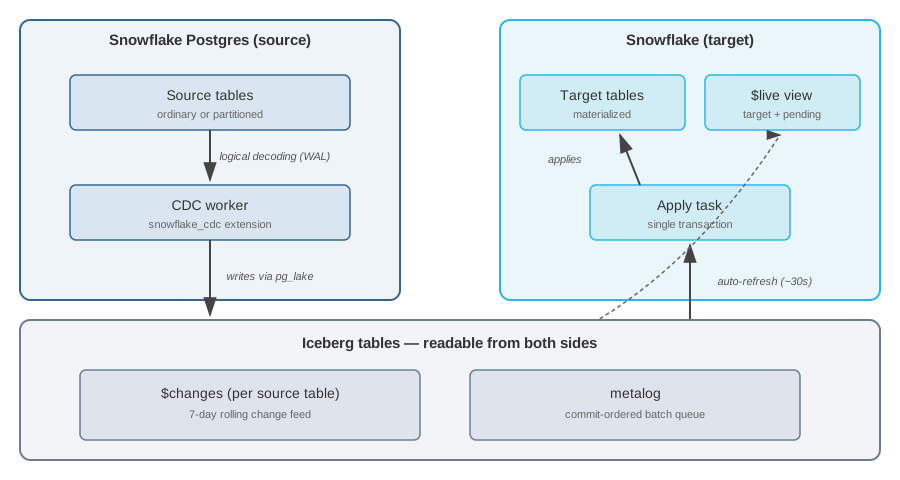
Mirroring is built on Postgres primitives you already trust: a publication, a logical replication slot, and standard WAL decoding, combined with two open building blocks that keep the pipeline transparent end-to-end. Apache Iceberg is the open table format the change log is stored in, and pg_lake, an open-source Postgres extension from Snowflake, is what writes those Iceberg tables directly from Postgres. No proprietary wire format, no external CDC service to operate. Less infrastructure to run, no vendor lock-in on your change data (it lives in open Iceberg tables) and full SQL visibility from both sides.
A mirror consists of the following components:
- A publication on the source Postgres instance, created by the
snowflake_cdcextension. - A replication slot (logical decoding) on the source, managed by a background CDC worker.
- Per-source-table change log tables (Iceberg, suffix
$changes) written by the CDC worker through pg_lake. - A per-mirror metalog table (Iceberg) carrying schema-change and change-batch operations in commit order.
- On the Snowflake side, a target database and a scheduled task that invokes the apply procedure.
- On the Snowflake side, per-source-table target tables and companion
$liveviews that combine the target with pending change log entries.
The $changes tables are the same Iceberg objects on both ends: readable from Postgres and from
Snowflake without a copy step in between. Low-latency $live views expose not-yet-merged change
log entries on top of the target tables so you can query the latest committed state without waiting
for the next apply run.
For the naming pattern of every artifact a mirror creates on the source and target sides, see Object layout.
Data flow
The CDC worker on the source Postgres instance captures changes using logical decoding and writes
change records to per-table $changes tables and a metalog through pg_lake. These Iceberg tables
auto-refresh on the Snowflake side, so new rows become visible to Snowflake queries within roughly
30 seconds, with no pull-based polling loop to tune. A scheduled apply procedure reads the metalog and
applies pending changes to the target tables in a single Snowflake transaction; if an apply run
fails, the transaction rolls back and the next run resumes from the same metalog position, so
exactly-once delivery is part of the design. The $live view
reads from $changes independently to expose not-yet-applied changes on top of the target.
Ongoing apply uses a delete-then-append pattern rather than MERGE, which lets insert-only batches
skip the target-table scan that MERGE-based CDC tools pay on every run. The trade-offs live in
Understanding mirroring costs and
Transactional guarantees.
Transactional guarantees
Postgres transactions are collected into batches and applied to the target database transactionally. All row changes from a single source transaction become visible on Snowflake at the same time, and any number of consecutive source transactions merged into one batch are also applied together. This means that cross-table invariants from the source, for example foreign-key relationships, are preserved in the target.
Applying each batch in a single transaction also provides exactly-once delivery: if an apply run fails partway through, the transaction rolls back and the next run starts from the same metalog position.
Schema changes (add/drop/rename column, rename table, truncate) auto-commit in Snowflake and mark a boundary within a batch. Changes to the table undergoing DDL are split into what happened before and after the DDL. Row changes to other tables in the same batch continue to respect source transaction boundaries.
Understanding mirroring costs
Mirroring’s architecture gives it inherent cost advantages over most other approaches to moving data between Postgres and Snowflake. It uses native Postgres logical replication and writes to open Iceberg tables that Snowflake reads directly, making it simpler and more efficient.
Cost drivers
Mirror costs have two main components:
- Compute for the serverless task that applies changes to the target tables, billed at the standard Snowflake serverless task rate.
- Storage split between the source Postgres instance (which holds the
$changesand metalog Iceberg tables via pg_lake) and the target Snowflake database (which holds the materialized target tables), billed at standard Snowflake storage rates.
Compute cost scales with how often the apply task runs and how much change data it processes. A
larger refresh_interval reduces apply cost because each run combines more source changes into a
single operation against the target table. The trade-off is that the target table is updated less
frequently, so readers see larger gaps between source commit and visibility. For workloads that
need lower lag without paying for more frequent merges, the $live view exposes pending changes
on top of the target table.
DDL operations (schema changes, renames, and snapshots) are applied immediately regardless of the
refresh_interval.
For current rates, see the Snowflake Service Consumption Table.
Viewing compute costs
Each mirror’s apply logic runs as a Snowflake serverless task named APPLY_MIRROR_<mirror_name>,
so you can attribute compute cost to each mirror.
From Snowsight. Open Admin » Cost Management » Consumption. Filter Usage type to Compute and Service type to Serverless task. Every mirror’s task appears as its own row; filter further by task name to isolate a specific mirror’s costs.
With SQL.
Use the SERVERLESS_TASK_HISTORY view in the Account Usage schema:
Update the WHERE clause to filter to a specific mirror or a set of mirrors. For example, to see
just two mirrors, use WHERE TASK_NAME IN ('APPLY_MIRROR_ORDERS_MIRROR', 'APPLY_MIRROR_CUSTOMERS_MIRROR').
Viewing storage costs
Storage is reported separately for the source Postgres instance and the target Snowflake database.
Postgres side ($changes and metalog). The Iceberg change log and metalog tables live on the
source Postgres instance via pg_lake, so their storage shows up in
POSTGRES_STORAGE_USAGE_HISTORY:
Snowflake side (target tables). Target tables are just like any other Snowflake table for billing purposes. They live in the mirror’s target database and show up in DATABASE_STORAGE_USAGE_HISTORY alongside the rest of your Snowflake data:
Cloud and region availability
Note
Mirroring is currently available only on Amazon Web Services (AWS) and Microsoft Azure, in all regions where Snowflake Postgres is available. Mirrors cannot be created between different accounts, regions, or cloud providers.
Next steps
- Create a mirror — walk through creating your first mirror.
- Query mirrored data — query target tables, the
$changesfeed, and the$liveview. - Manage and monitor mirrors — alter, drop, inspect, and monitor mirrors, plus troubleshooting and lag alerts.
- Postgres-to-Snowflake Mirroring Performance Considerations — plan, measure, and improve snapshot and CDC performance.
- Type mapping reference — how Postgres types map to Iceberg on the target.
- Mirror procedures reference — the
snowflake.postgresprocedures and$changesschema.