Collaboration and CI/CD for DCM Projects
This topic describes how multiple developers can collaborate on a DCM project, and how to automate PLAN and DEPLOY for development and production environments with CI/CD pipelines.
The following diagram shows a typical workflow for development on “DEV” and then automated deployment of a DCM project to production.
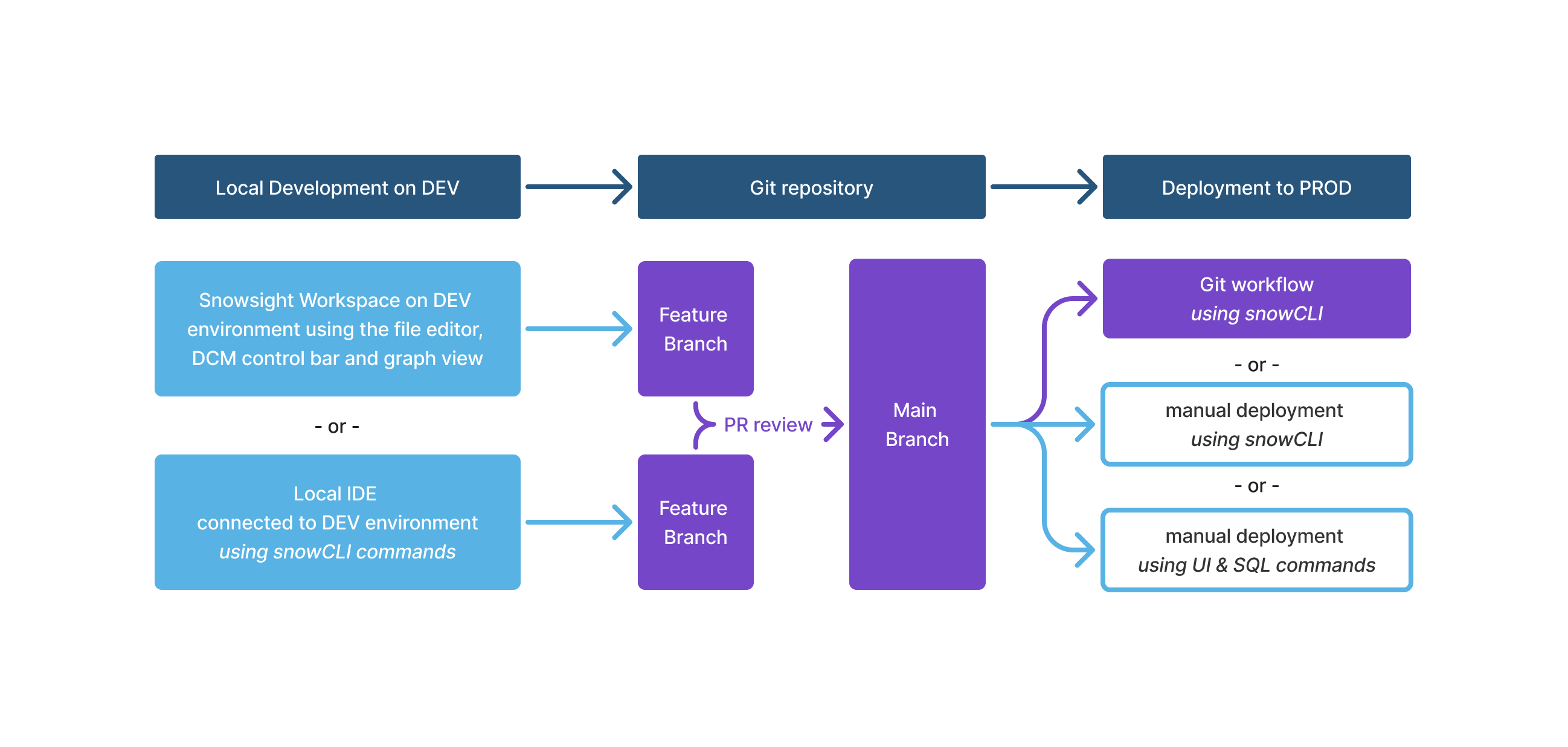
- Developers can choose between Snowsight workspaces or their local IDE using Snowflake CLI in the terminal.
- In either case, developers clone the remote Git repository that holds the DCM definitions folder and then create a Git branch to make changes to the definitions.
- Developers can run
DCM PLANandDCM DEPLOYagainst a personal or shared dev target to validate the changes. - The pull request can then trigger an automated
DCM PLANagainst a staging or production environment as an integration test. - Both the developer and the reviewer can now inspect the DCM changeset from the plan to confirm that all changes are as expected.
- Once the PR is merged to main it can trigger a Git workflow to deploy the changes to production through Snowflake CLI using a dedicated service user.
With this process teams can ensure that all infrastructure changes to production have been versioned, tested, and reviewed, including a full audit trail both in the Git repository and the DCM deployment history. Developers can validate their schema changes without having direct access to production.
Independent development in a shared environment
Multiple developers commonly share the same development account to build and iterate on data products in parallel. However, if multiple users work on the same project in parallel, their PLAN and DEPLOY operations can cause conflicts if they don’t use templating to create unique names. For the naming requirements that this section builds on, see Environment isolation and object naming.
The following is an example scenario:
- Users A and B are both testing changes to different parts of project
TASTYBYTES, which already runs on production. - Each user creates their own feature branch of
prod-mainand starts editing the entity definitions. - Each user creates their own DCM project target in the manifest using separate new DCM project objects (
TASTYBYTES_DEV_AandTASTYBYTES_DEV_B). - If both users deploy with the same
DEVtemplating configuration to the same Snowflake account, then:- User A deploys the new
_DEVinstance of all entities first including theTB_WAREHOUSE_DEV, so they are managed by their projectTASTYBYTES_DEV_A. - Once user B tries to deploy one or more of the same object names (for example,
TB_WAREHOUSE_DEV), the deployment forTASTYBYTES_DEV_Bfails because the warehouse is already managed byTASTYBYTES_DEV_A.
- User A deploys the new
- Alternatively, both users might deploy through the same project object
TASTYBYTES_DEV, each pointing at their different branch folders. This would lead to user B overwriting all deployed entity versions of user A and vice versa.
The following is a solution:
-
When working on the same development environment in parallel, users can use distinct entity names to avoid conflicting object names. You can achieve this by templating all account-level entities like database, warehouse, and role names with unique suffixes. For example,
DEFINE DATABASE DCM_PROJECT_{{db}}; -
When using configuration profiles like the following example, multiple developers can use the
DEVconfiguration to set their warehouses toX-SMALL. -
But each developer must use both a distinct DCM project object and distinct managed-object names. To avoid conflicting database names, developers can overwrite the
dbvariable with a unique string to create distinct suffixes (or prefixes). This could be based on user names, ticket numbers, or branch names.For example, a developer working on
DOC_1234can supply a developer-specific project identifier and object-name variable while retaining theDEVtarget’s configuration:
This creates a new distinct TB_WAREHOUSE_DOC_1234 warehouse instance that the developer can use for isolated testing purposes.
You can apply the same templating solution when one developer works on multiple projects.
At the end of this development cycle the user can PURGE the target to drop all objects and remove the target from the manifest, or
leave the manifest changes out of the commit that’s pushed to Git.
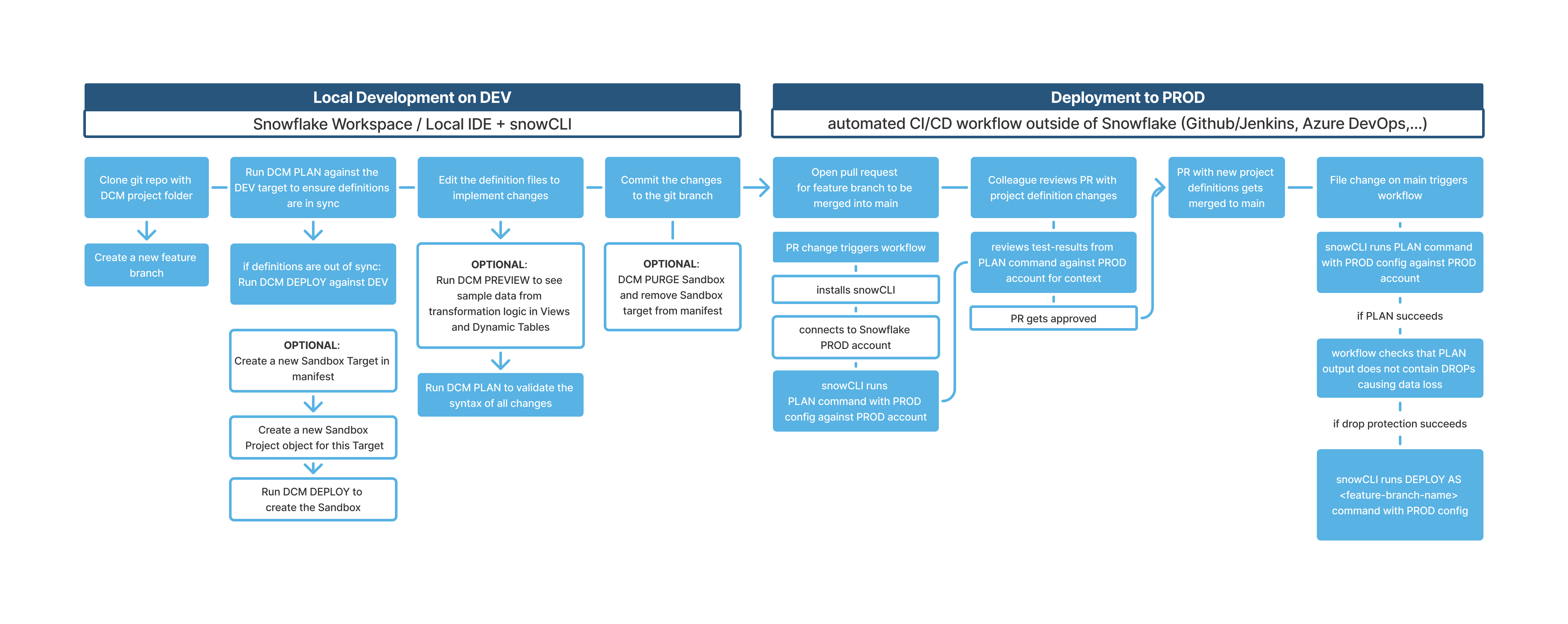
The following diagram shows the end-to-end lifecycle using DCM Projects across the development and deployment phases.
CI/CD best practices
Follow these practices when automating deployments with CI/CD pipelines:
- A DCM project targeting a non-production environment should be owned by a different role than its production counterpart to avoid accidental deployments to production.
- A DCM project targeting a production environment should be owned by a dedicated role for production deployments with specifically tailored access
privileges that are just enough to deploy all objects in the project.
- Avoid using general administrator roles for DCM project ownership. Grant such roles only to service users, not to individual developers.
- Grant the dedicated production deployment role only to service users, not to individual developers.
- Restrict the ownership to the production deployment role to ensure immutability of critical infrastructure or data products.
If the dedicated production deployment role grants ownership of production objects to other roles, users who are granted those roles can still modify or drop the production objects.
GitHub Actions
A set of reusable composite GitHub Actions that automate DCM Projects pipelines is available in the
snowflakedb/snowflake-actions repository on the
GitHub Marketplace.
Each action handles one step of the lifecycle, and you can compose them to build end-to-end CI/CD pipelines.
Note
These reusable actions are only available for GitHub. The same CI/CD concepts apply to Azure DevOps, GitLab CI/CD, Bitbucket Pipelines, and other providers. Only the workflow syntax differs. No published actions are available for those platforms yet. Consider building your own workflows using a coding agent such as Cortex Code.
The following reusable actions are available:
dcm/parse-manifestdcm/connection-testdcm/plandcm/deploy
For setup instructions, input/output documentation, and sample workflows, see the GitHub Marketplace listing.
To use an action in your workflow, reference it with:
You can pin it to a major version to avoid any impact from potential behavior changes.
Authentication
OIDC (OpenID Connect) is the recommended authentication method for CI/CD pipelines because it uses GitHub’s built-in identity tokens and requires no stored secrets. For setup instructions and alternative authentication options, see the GitHub Marketplace listing.
Sample workflows
The GitHub_workflows directory in the
snowflake-labs DCM repository contains ready-to-use workflow files that compose the reusable actions into complete CI/CD pipelines.
You can copy them into your repository’s .github/workflows/ directory and customize them for your project. For full setup
instructions, see the
sample workflows README.
All sample workflows read the Snowflake account_identifier and project_owner role directly from the manifest targets,
so that environment-specific configuration lives in the version-controlled manifest.yml rather than in duplicated
GitHub secrets. Only the service user credentials are stored as secrets.
The sample workflows demonstrate the following patterns applicable to any DCM Projects CI/CD setup:
- Manifest-driven configuration: Each workflow reads
account_identifier,project_owner, andproject_namefrom the manifest targets, keeping environment configuration in one place. - Selected
DROPdetection: The deploy workflow checks the savedPLANresult for top-levelDROPentries for databases, schemas, tables, and stages, and blocks the deployment if any are found. It serves as an example for adding test automations that parseplan_result.jsonand compare it against any user-defined patterns. - Pull request comments: Plan and deploy summaries are posted as comments on the originating pull request.
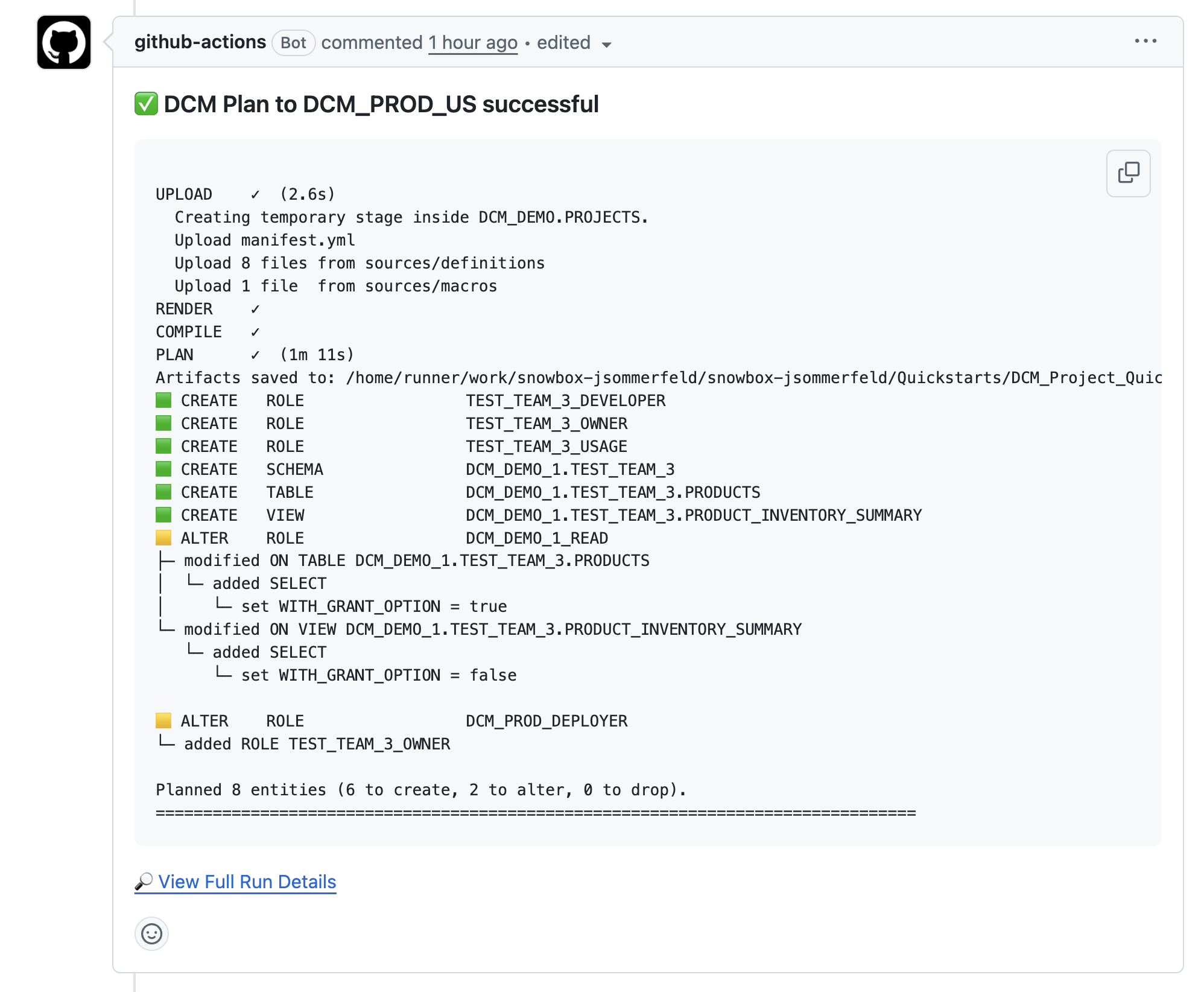
The following screenshot shows a sample PLAN summary that a workflow posted as a pull request comment.
The deployment workflows use the following sequence for each target:
- Plan: Runs
snow dcm planand summarizes the changeset. - Selected
DROPdetection: Checks the savedPLANfor top-levelDROPentries for databases, schemas, tables, or stages. - Deploy: Runs
snow dcm deploy. - Post-deployment scripts (optional): Runs separate SQL scripts with Jinja variable injection.
- Test expectations (optional): Runs
snow dcm testto validate data quality expectations.
Sample workflow: Test connections
- Workflow configuration file: DCM_1_Test_Connections.yml
- Trigger: Manual with the
workflow_dispatchevent
This workflow validates that the GitHub Actions service user can connect to every target environment defined in the manifest. Use it when setting up a new repository, onboarding a new account, or debugging authentication issues. The workflow performs the following steps:
- Parses all target names from
manifest.ymldynamically. - Uses a GitHub Actions matrix strategy to test each target in parallel.
- For each target, verifies the Snowflake connection, reports the connected account, user, and role, and checks whether the connected role matches the DCM project owner.
- Reports whether the DCM project object already exists and whether the service user has deployment privileges.
Sample workflow: Test PR to main
- Workflow configuration file: DCM_2_Test_PR_to_main.yml
- Trigger: Pull request opened, synchronized, or reopened against the
mainbranch
This workflow runs a PLAN against the production target as an integration test for every pull request. It provides reviewers with a summary of the planned changes directly on the pull request. The workflow performs the following steps:
- Runs
snow dcm planagainst the PROD target. - Parses
plan_result.jsonto summarize CREATE, ALTER, and DROP operations grouped by object domain. - Uploads plan artifacts for later inspection.
- Posts the plan summary as a comment on the pull request.
- Fails the check if the PLAN fails, blocking the merge.
Sample workflow: Deploy to Prod
- Workflow configuration file: DCM_3_Deploy_to_Prod.yml
- Trigger: Push to the
mainbranch (typically a merged pull request)
This workflow runs the deployment sequence once for the production target.
After deployment, the workflow optionally posts a status summary to the originating pull request.
You can extend the DEV and PROD setup by adding more environments, such as STAGE, QA, or TEST, to your pipeline.