Architectural recommendations for DCM Projects
This topic provides architectural recommendations for organizing DCM Projects definitions into project folders and deployment targets. It also explains how to work with multiple environments. For collaboration workflows, see Collaboration and CI/CD for DCM Projects.
Project folders and deployment targets
A project folder contains a manifest.yml file and a set of definitions under sources/definitions/. The manifest maps each target to a
DCM project object in a Snowflake account. Each target specifies the owner role for that object and can select a templating configuration.
The same set of definitions can therefore support several deployments. For more information, see
Project targets.
The following table summarizes how shared definitions and deployment boundaries affect the choice of structure:
| Structure | When it fits | Characteristics | Example |
|---|---|---|---|
| Option A: One project folder with one target | Most objects share an owner role, and the definitions are evaluated once or repeated for a small set of similar resources. Up to approximately 20 template iterations is a rule of thumb when the generated infrastructure is managed together. | A full PLAN or DEPLOY operation evaluates all definitions and loop iterations together. PLAN DELTA evaluates only changed definitions and their downstream dependencies. DCM Projects resolves dependencies within one deployment. | A platform team uses one template to create the same database structure for 20 regional teams. |
| Option B: One project folder with multiple targets | Deployments share most definitions but need different owner roles or independent deployment operations. | Targets share definitions and select their own templating configurations. Independent targets can be planned and deployed concurrently, with failures handled separately. Template changes are maintained in one place. | A platform team manages 100 or more tenants, each with a coexisting production target that supplies its namespace and other variables. |
| Option C: Separate project folders, each with its own targets | Teams maintain mostly different definitions. Dependencies across deployment boundaries are limited or explicitly coordinated. | Each folder has its own manifest and definitions. Teams maintain and deploy their definitions independently, while coordinating any dependencies across targets. | Marketing and finance maintain separate pipelines and serving layers with different definitions and ownership. |
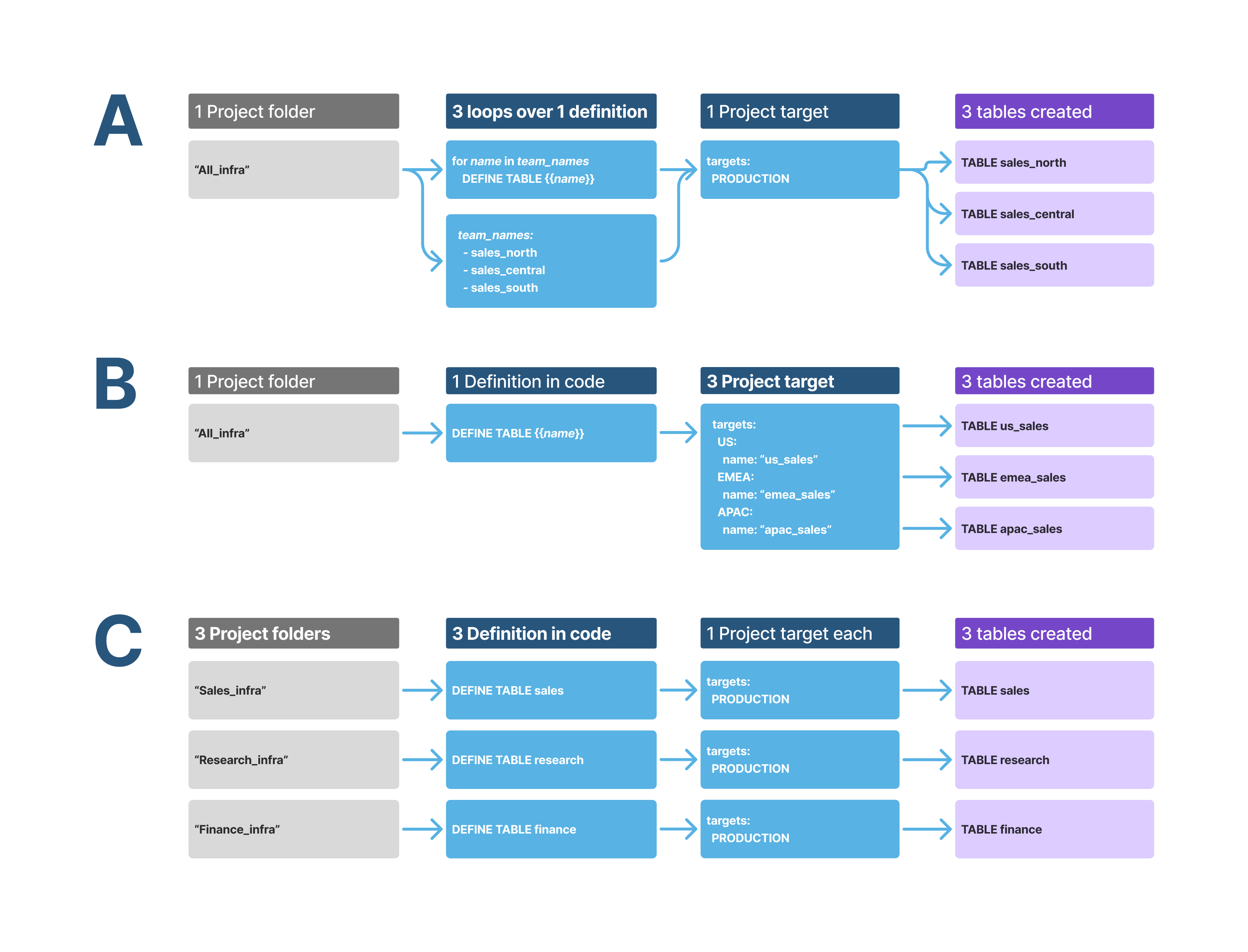
The following sections provide more detail about options A, B, and C. You can also combine these options, for example, to deploy templated infrastructure for multiple teams within each tenant across production and non-production environments.
Option A: One project folder with one target
One target can deploy a set of definitions once or render a parameterized template in a loop. Each full PLAN or DEPLOY operation
evaluates the definitions and all loop iterations together, allowing DCM Projects to resolve dependencies within that deployment. PLAN DELTA
evaluates only changed definitions and their downstream dependencies. For more information, see
Plan only changed definitions.
For example, a platform team provides a database for each regional team:
- Each region requires mostly the same infrastructure, including schemas and landing tables.
- The template also defines roles and a warehouse for each region.
- Additional regions are expected over time.
- Template changes, such as adding a read-only role, apply to all regions.
The platform team can maintain one set of definitions and use a Jinja loop for the regional teams listed in a templating configuration in the manifest. As a rule of thumb, up to approximately 20 iterations can remain in one target when most objects share an owner role and the generated infrastructure is managed together. This is an architectural guideline rather than a product limit.
Option B: One project folder with multiple targets
One project folder can also define multiple coexisting production targets. Targets can represent tenants or regional teams in addition to development, staging, or production environments.
For example, a platform team serving 100 or more tenants can maintain one set of definitions and give each tenant its own target. Each target selects a templating configuration that supplies the tenant’s namespace and other variables. Independent deployments use distinct DCM project objects and distinct names for the managed objects within the same account.
This structure provides the following capabilities:
- Changes to shared definitions are maintained in one place.
- Each target can specify a different owner role through
project_owner. - Each target can be planned and deployed independently, so a failure in one deployment doesn’t require stopping the others.
- Independent targets can be planned and deployed concurrently, which can reduce the total time to apply changes across tenants.
Option C: Separate project folders, each with its own targets
Separate project folders let teams maintain different sets of definitions, each with its own manifest and targets. This fits object groups
with limited dependencies between them, such as marketing and finance teams with separate pipelines and serving layers. Splitting a very
large set of definitions along these boundaries can also reduce the scope of each PLAN and DEPLOY operation.
For an example repository layout, see
Create a DCM project folder.
Each DCM project object has one owner role that can deploy its defined objects. Grants allow granular access to individual managed objects. When different teams are responsible for maintaining and deploying different definitions, separate project folders can reflect those responsibilities.
For example, a platform administrator provides infrastructure that a team administrator builds on:
- The platform administrator deploys a database and a warehouse, creates a team administrator role, and grants it the required privileges.
- Those privileges allow creation of a defined set of object types in the database and access to a defined set of account-level integrations.
- The platform administrator also grants the team administrator the privilege to create DCM project objects inside the database.
- The team administrator maintains a separate project folder and targets for team-owned definitions. These definitions organize schemas and dynamic tables, configure refresh frequencies, and manage granular access for team members.
The platform-managed infrastructure must exist before the team administrator deploys definitions that depend on it. Dependencies across these targets require explicit coordination of deployment order.
If a separate governance project transfers OWNERSHIP of an object, that project must also define the other privilege grants on the
ownership-transfer target. For more information, see
OWNERSHIP grants.
Separate project folders can also become easier to maintain when instances of a shared template diverge. As differences accumulate and templating conditions increase, independently maintained definitions can be easier to read than a shared template with many exceptions.
Considerations across architecture options
The following guidance applies across the architecture options:
- Separation of concerns and deployment dependencies are primarily considerations for Option C.
- Environment isolation and object naming apply to all three options.
- Independent development applies when developers create parallel instances of Option A or B. The object-naming requirements also apply when developers independently maintain Option C projects in the same account.
Separation of concerns and deployment dependencies
One set of definitions can cover both infrastructure and governance definitions, allowing DCM Projects to resolve their dependencies and determine the execution order for PLAN and DEPLOY.
When business or organizational requirements call for separate ownership or deployment processes, one common scenario is a separate project folder for grants, policies, and role privileges. Its definitions reference objects managed by the infrastructure definitions, creating a primarily one-directional dependency. The infrastructure target must be deployed first so that the objects exist, followed by the access-privilege target that applies grants to those objects.
Dependencies across these targets require manual coordination. Keeping the definitions together under one target avoids this coordination when separate ownership or deployment isn’t required.
Keep cross-project dependencies acyclic so that the projects have a valid deployment order. A downstream PLAN can’t validate references
to upstream changes that haven’t been deployed. For example, separating tables and views from functions and procedures can create a cycle
if each project references objects managed by the other. DCM Projects resolves dependencies within one deployment, but it doesn’t orchestrate
dependencies across projects.
Environment isolation and object naming
For a diagram of a typical workflow for deploying a DCM project to multiple environments, see Collaboration and CI/CD for DCM Projects.
Separate accounts compared with separate databases
Snowflake generally recommends setting up each environment as a separate Snowflake account. This ensures complete separation of production infrastructure from any experimental development and guarantees restricted developer access to production data.
However, with careful access management, you can successfully manage multiple environments on one Snowflake account. This is easier when the databases are clearly separated and can become more challenging when account-level objects and integrations are involved.
The benefit of a single-account setup is the ability to easily clone production infrastructure and data for testing alterations before deploying those changes to production. However, copying parts of production data and infrastructure to a different account, for example, through org-internal data shares, can be more costly.
Distinct object names across environments
Distinct object names for each environment are a requirement for single-account setups, for example, to keep EMEA_DB and EMEA_ADMIN
separate from EMEA_DB_DEV and EMEA_ADMIN_DEV. Snowflake also recommends this practice for multi-account setups. Templated names
allow for multiple instances of entities like EMEA_DB_DEV_JOHN and EMEA_DB_DEV_MARY to coexist for independent development and to
quickly create and destroy sandbox environments to test different solutions.
This applies to all account-level objects, such as databases, roles, and warehouses. You then need to apply these templated names to all fully qualified names of nested objects.