DCM Projects files and templates
A DCM project requires a manifest file and one or more SQL object definition files. These files are typically stored and managed in a Git repository or your local workspace.
The manifest file
Specifies which object definition files to include.
Defines configurations for different environments with template variables.
The object definition files
Define a group of Snowflake objects that you want to manage together in the DCM project.
The high-level workflow to create DCM project files is:
Create a DCM project folder to store your definition files
To create a new DCM project, create a folder to store your manifest file (manifest.yml) and SQL object definition files.
The snow init command with the DCM_PROJECT template creates example definition files in your project directory. You can open and
edit these files to define your DCM project.
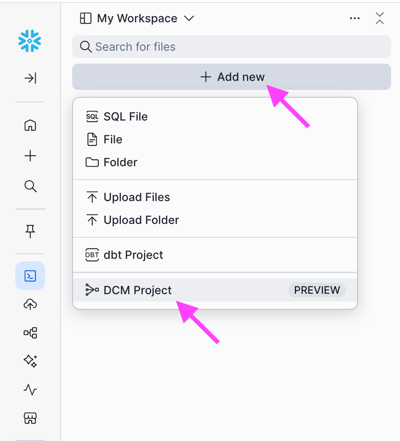
In the navigation menu, select Projects » Workspaces.
In the Workspaces menu, select + Add New.
Select DCM Project.
DCM Projects follow the standardized folder structure:
DCM Projects object definition files must be placed under
sources/definitions/.The optional global macro files can be placed under
sources/macros/.File naming and nesting inside these project directories are flexible.
Saved output artifacts from DCM commands are always written to
out/.If you have additional scripts or project files that you want to use for DCM commands, you can add them under
sources(for example, dbt project files).If you have other custom scripts that you want to store within the project folder that should not be used by DCM Projects commands and not uploaded from local, add them in a folder outside of the
sourcesfolder.The CLI commands only upload files within the
sourcesfolder.
Note
If you are using Git, add out/ to your .gitignore file to avoid pushing local output files to Git.
An example of a DCM project folder structure is:
Create a manifest file
Each DCM project requires a manifest.yml file. It holds the essential configuration details of the project and allows the project folder to be
identified as a DCM project.
You use the manifest file to control which DCM project objects and roles to use when deploying to different target environments and to manage sets of templating values.
The manifest file is a YAML file that contains the following properties:
Property |
Required |
Description |
|---|---|---|
|
Required |
Version of the manifest schema. The current version is 2. |
|
Required |
Type of the project. Set to |
|
Optional |
If you have more than one target, specify the default target. The Snowflake CLI and Workspaces use the default target if you do not specify a
target using the |
|
Required |
The |
|
Optional |
The |
Project targets
Each target in the manifest file contains the following properties:
Property |
Description |
|---|---|
|
The Snowflake account identifier for this target. |
|
The fully qualified name of the DCM project object, for example, Use the SHOW DCM PROJECTS SQL command to find it. |
|
The role with OWNERSHIP on this project object. Use the SHOW DCM PROJECTS or DESCRIBE DCM PROJECT SQL command to find it. |
|
The name of the templating configuration defined in the |
Map between project definitions and project objects
DCM Projects definition files aren’t strictly tied to a specific DCM project object. You can use the same set of definitions to deploy to multiple projects, either on different Snowflake accounts or by referencing different configuration profiles. For example, the same definition files on a repository branch can be deployed to both DEV and PROD accounts as shown in the following figure.
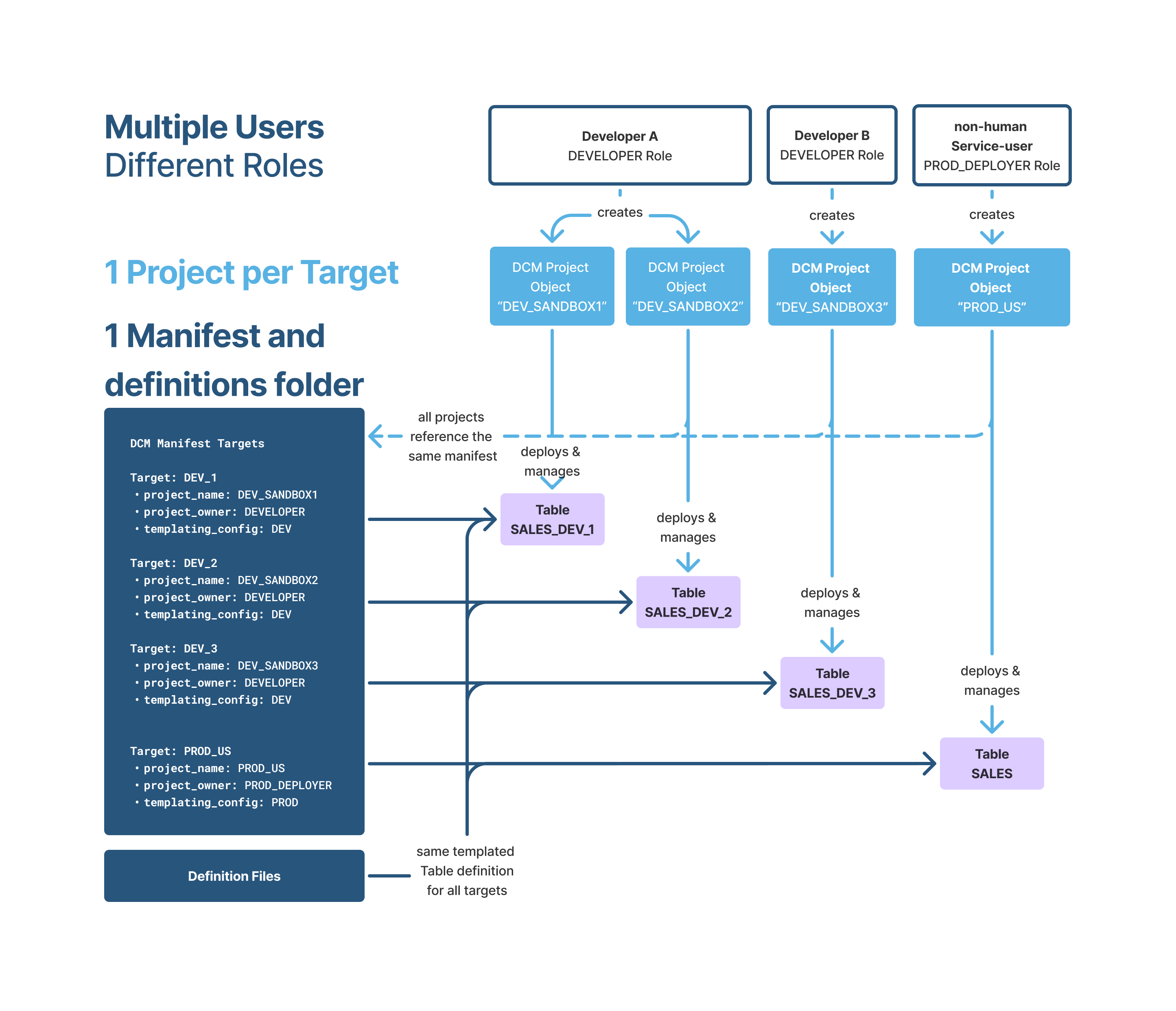
Similarly, you can execute a DCM Projects object by referencing definition files from different paths. For example, your CI/CD automation can deploy definitions from your main branch, and you can manually run a PLAN from your local definition files against the same project to check how your definitions diverge from the latest deployment. You can also use this approach for ad-hoc manual deployments from other branches or local paths.
Project templating configurations
Following is the high-level structure of the templating configuration in the manifest file. You can set only defaults, or only
configurations, or both.
Property |
Description |
|---|---|
|
The shared variable values, in key-value pairs, that apply across all configurations to avoid repetition. |
|
The templating configurations to use for the project. Individual configurations can override defaults with configuration-specific values. For details on how variables are resolved, see Configurations. |
|
The name of the templating configuration. Configuration names are case-insensitive. |
|
The name of the variable. Variable names should follow Python variable naming rules. All variables in project definitions must be declared either in defaults, the selected configuration, or at runtime. If you want string variables to resolve empty, specify them as |
|
The value of the variable. Values can be strings, numbers, booleans, lists, or dictionaries. Dictionaries can be defined in the manifest but cannot be overwritten at runtime. |
Example: manifest.yml
This is an example of a DCM project manifest file (manifest.yml) that includes three configurations,
DEV, STAGE, and PROD, with template variables and their default values:
Create object definition files
A DCM project definition file is a template that resolves to valid SQL statements for managing Snowflake objects. Each DCM project requires at least one definition file.
You can organize your object definitions and grants across multiple files and folders. Snowflake recommends choosing a structure that represents the business logic of the project (for example, bronze, silver, and gold) rather than grouping by object type.
Definition files can only contain DEFINE, GRANT, or ATTACH statements. Other SQL commands are not supported.
To get started quickly with DCM Projects, you can convert your existing SQL deployment scripts by using the DEFINE keyword for your existing DDLs (for supported object types).
The DEFINE statement works like the CREATE OR ALTER <object> command, but with the following key differences:
The order and location of DEFINE statements don’t matter. Snowflake collects and sorts all statements from all definition files during project execution.
If you remove a DEFINE statement, Snowflake drops the corresponding object the next time you deploy the project.
Only a subset of Snowflake objects is supported. For details, see Supported object types in DCM Projects.
All objects must be defined with a fully qualified name in the format
database.schema.object_name.
Definition files can contain various Jinja2 templating options and support advanced templating features, which allow you to do the following:
Customize file content at runtime using template variables.
Use Jinja2 syntax for logic such as loops and conditionals.
Make definition files reusable and adaptable for different scenarios.
Object definition templating
DCM Projects support the Jinja2 framework for templating SQL statements. You can declare variables and assign values using the Jinja2 syntax either from configuration profiles, in the EXECUTE DCM PROJECT command, or within Jinja. You can also construct loops through lists of values, case statements, reusable functions, and more. For more information, see the Jinja2 documentation.
Supported Jinja2 functionality includes:
String-replacements
Lists
Dictionaries and nested dictionaries
Conditions (IF statements)
Looping
Global and in-file macros
Macros defined in the
sources/macrosfolder can be used across all definition files.Macros defined in a file can be used within the file.
Unsupported Jinja2 functionality includes:
Note
The _snow identifier is reserved for future use, and cannot be used as a variable or macro name
Important
Do not use DCM Projects templating variables for object definitions that contain sensitive information or credentials. The rendered SQL definitions do not redact any values inserted by environment variables.
Similarly, do not enter any personal data, sensitive data, export-controlled data, or other regulated data as metadata, for example, file names, configuration and variable names, when using the Snowflake service. For more information, see Metadata fields in Snowflake.
The following is an example DCM project definition file that uses Jinja2 templating:
The following is an example of a DCM project manifest file (manifest.yml) that defines two configurations: DEV and PROD.
Rendering this warehouse definition with the DEV configuration (selected automatically through the target’s templating_config or at runtime)
resolves to:
Macros
Macro files are any SQL files located in the macros folder and its sub-folders. They can only contain macros.
An example of a directory structure of a DCM project with macro files is:
Similar to functions in regular programming languages, macros help organize often-used pieces of code into reusable functions, thereby avoiding repetition and following the DRY (Don’t Repeat Yourself) principle. Macros in DCM Projects work in the same way as Jinja2 macros with the following exceptions:
Dedicated location for macro files in the
macrosfolder.Macros defined in macro files are automatically visible in other source files. The import Jinja tag is not permitted.
Duplicate definition of a macro with the same name is detected and rejected.
Automatic import of global macros
During the definition file rendering process, source files are scanned for potential macro calls. If a called macro is defined in a macro file, the implicit from […] import tag is added automatically, so no explicit import is needed.
Similar to Jinja2 macros, you can define a local macro by prefixing it with an underscore. A local macro can be used only in the file where it’s declared and isn’t visible to other files.
Template comments
In SQL commands, you can add -- before your code to comment out the line. Jinja still processes variables within the SQL code but leaves the SQL
comments.
For example, the following Jinja code:
Renders as:
Commented out commands do not execute in SQL. You can use template comments to debug Jinja templating without affecting your SQL code.
To ignore Jinja code during rendering, add # inside opening and closing brackets as shown in the following example:
Configurations
When using templates in your object definitions, you have the following options:
Assign values to variables at runtime.
Define different configuration profiles under
templating: configurations:in themanifest.yml. Each target can reference a configuration throughtemplating_config. See Project templating configurations for more details.If configuration profiles are defined and a target references one through
templating_config, the configuration is automatically applied when using that target. For examples, see Plan a DCM project.The primary use case for configuration profiles in DCM Projects is to target different environments. Configuration profiles allow you to do the following:
Deploy the same code to multiple environments.
Test production code on a non-prod environment at a reduced scale.
Maintain multiple isolated environments on the same account.
Not all templating configurations have to be referenced by a target profile. You can keep unused configurations to switch the templating config for your target from one to another.
Define shared default values under
templating: defaults:to avoid repeating common variables across configurations. See Project templating configurations for more details.Overwrite specific variables with one-time values at runtime using the
--variableflag in CLI.
Variables are resolved with a three-tier hierarchy: global defaults < configuration variables < runtime execution variables.
Dictionaries
DCM Projects templating supports dictionaries as variable values, enabling structured configuration for complex multi-tenant or multi-resource deployments.
By grouping related configuration details into dictionaries, you get:
Granular control: Apply specific settings, such as warehouse sizes, retention policies, and grants, to individual resources without writing unique logic for every variation.
Cleaner code bases: Replace repetitive hard-coded scripts with dynamic loops that adapt based on the configuration.
Scalability: Onboard new teams or resources by adding entries to your configuration, rather than refactoring deployment pipelines.
Note
Dictionaries can be defined in the manifest but can’t be overwritten at runtime with the --variable flag or SQL
USING CONFIGURATION (...) overrides. Only scalar values and lists can be overwritten at runtime.
Example use case for dictionaries: Multi-tenant environment provisioning
Consider a platform shared by multiple departments, such as Marketing, Finance, and HR, each with different compliance and compute requirements. With dictionaries, you define a single configuration that captures each team’s needs.
Manifest example:
Definition example:
Your SQL template loops through this dictionary. It automatically creates schemas, assigns the correct retention policy, and conditionally creates extra resources only for the teams that request them.