Configure private connectivity to storage for catalog-vended credentials
When you use catalog-vended credentials for Apache Iceberg™ tables, Snowflake accesses your cloud storage using temporary credentials provided by the catalog. By default, this storage traffic traverses the public internet. For increased security, you can configure private connectivity so that Snowflake accesses your storage through a private endpoint instead.
The following diagram shows how Snowflake reads data from cloud storage using catalog-vended credentials.
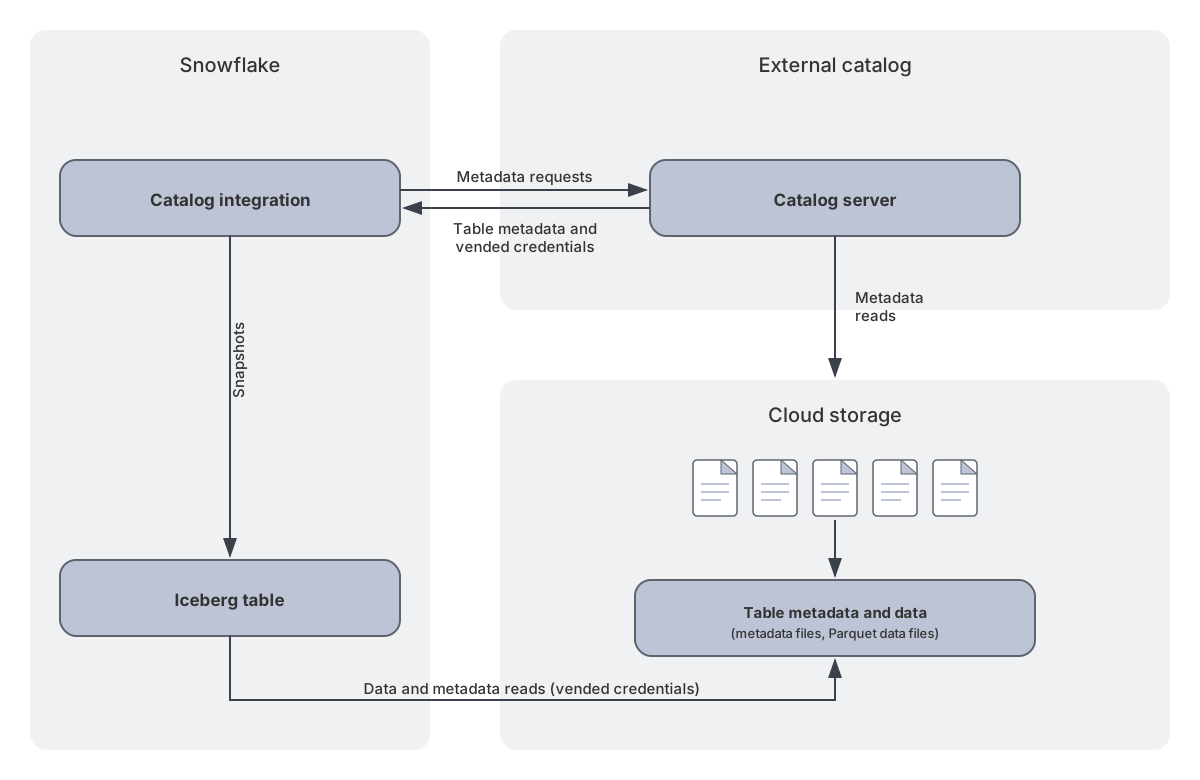
Three network paths are involved in this architecture:
- Snowflake to catalog: Snowflake sends metadata requests to the external catalog. You can configure this path to use private connectivity. See Step 4.
- Catalog to storage: The catalog reads metadata from cloud storage. You configure this on the catalog side. See Step 1.
- Snowflake to storage: Snowflake reads data and metadata files from cloud storage using vended credentials. You enable this
by setting
USE_PRIVATELINK_ENDPOINT = TRUEin theDEFAULT_STORAGE_CONFIGparameter of your catalog integration. This is the primary focus of this guide.
Note
If you use an external volume instead of vended credentials, outbound private connectivity to storage is already supported. See Private connectivity for outbound network traffic.
For general information about outbound private connectivity in Snowflake, including outbound private connectivity costs, see Private connectivity for outbound network traffic.
Considerations and limitations
- Private connectivity to storage with vended credentials is supported on AWS (using AWS PrivateLink) and Azure (using Azure Private Link). Google Cloud Platform (GCP) isn’t supported.
- With AWS Glue Data Catalog, Snowflake can route its storage traffic over PrivateLink using vended credentials, but you can’t fully enforce private-only access at the S3 bucket. For details, see the warning in Step 2.
- On AWS, your Snowflake account and storage buckets must be in the same region.
- This feature is supported for catalog integrations with
CATALOG_SOURCE = ICEBERG_RESTorCATALOG_SOURCE = POLARIS.POLARIScan refer to Snowflake Open Catalog or a self-hosted Polaris catalog.
Step 1: Set up private storage access on the catalog side
Before you block public access to your storage, ensure that your catalog server can access storage through private connectivity. This step is your responsibility to configure on the catalog side. The specific steps depend on your catalog vendor.
If your catalog is self-hosted or provided by a vendor that complies with the Apache Iceberg REST catalog specification, you’re responsible for configuring private connectivity from your catalog to your storage. The setup depends on your deployment environment and cloud provider.
Provision a private connectivity endpoint for S3 in your Open Catalog account and enable the PrivateLink toggle on the catalog.
For instructions, see Manage private connectivity endpoints for Snowflake Open Catalog: AWS.
Provision private connectivity endpoints for your Azure Storage account in your Open Catalog account. If you use
Data Lake Storage (ADLS Gen2), you must provision both a blob endpoint and a dfs endpoint. After provisioning,
enable the PrivateLink toggle on the catalog.
For instructions, see Manage private connectivity endpoints for Snowflake Open Catalog: Azure.
AWS Glue Data Catalog uses AWS Lake Formation to vend temporary credentials, and AWS Glue accesses your S3 storage as an AWS service, not from a VPC or VPC endpoint that you control. There’s no customer-managed private connection from Glue to storage for you to configure in this step.
This also means that you can’t block public access to your bucket in Step 2 without breaking Glue. See the warning in that step for details.
Databricks Unity Catalog supports two types of compute: Classic (customer-managed VPC) and Serverless (Databricks-managed).
- Classic compute: Configure an S3 Gateway endpoint or S3 Interface endpoint in your customer-managed VPC. For instructions, see Configure PrivateLink for a workspace with classic compute in the Databricks documentation.
- Serverless compute: Databricks manages the network configuration. For details, see Serverless compute plane networking in the Databricks documentation.
Databricks Unity Catalog supports two types of compute: Classic (VNet-injected workspace) and Serverless (Databricks-managed).
- Classic compute: Configure Azure Virtual Network service endpoints (
Microsoft.Storage) on the workspace subnet to establish a private connection to Azure Storage. For instructions, see Configure Azure virtual network service endpoint policies for storage access from classic compute in the Azure Databricks documentation. - Serverless compute: Databricks manages the network policies. For details, see Serverless compute plane networking in the Azure Databricks documentation.
Amazon S3 Tables is a fully managed AWS service. AWS handles the network path between the S3 Tables service and the underlying storage, so there’s no separate catalog server for you to configure.
Action items:
- Confirm your S3 Tables bucket is in the same AWS region as your Snowflake account.
- Confirm the IAM role used by your catalog integration has the
s3tables:*permissions listed in the S3 Tables topic.
For the full configuration, including the bucket policy that blocks public access and the
provisioning of two private connectivity endpoints (s3tables and s3), see
Configure private connectivity (optional)
in Configure a catalog integration for Amazon S3 Tables.
Step 2: Block public access to your storage
After your catalog has private access to storage (Step 1), restrict your storage so that only authorized private traffic is allowed.
Skip this step if you use AWS Glue Data Catalog
Don’t block public access to your storage when AWS Glue is your catalog. AWS provides no way to allowlist AWS Glue’s traffic to your bucket: even when Glue routes its traffic to S3 privately, there’s no bucket-policy condition that can identify and permit it. Any policy that locks the bucket down to Snowflake’s PrivateLink endpoint therefore also blocks Glue and breaks table operations.
Setting USE_PRIVATELINK_ENDPOINT = TRUE (Step 8) still routes Snowflake’s
storage traffic over PrivateLink, but you can’t enforce private-only access at the bucket. If that’s a
requirement, use a catalog whose storage traffic you can allowlist, such as Snowflake Horizon Catalog, Snowflake
Open Catalog, Databricks Unity Catalog, or a generic Iceberg REST catalog that you control.
Configure an S3 bucket policy that denies access except from approved VPC endpoints and VPCs. Use the
StringNotEqualsIfExists condition with both aws:SourceVpce and aws:SourceVpc keys to allowlist multiple
sources. This NOR logic ensures that a request is denied only if it doesn’t come from any of the listed VPC endpoints
or VPCs.
In the bucket policy, include:
- Your catalog’s VPC endpoint IDs or VPC IDs (see Step 3 for catalog-specific details).
- Snowflake’s VPC endpoint IDs, which you obtain later in Step 6. You can add them to the policy later.
The following example shows a bucket policy that allowlists both VPC endpoints (aws:SourceVpce) and VPCs
(aws:SourceVpc):
For more information about S3 bucket policies with VPC endpoints, see Private connectivity to external stages for Amazon Web Services and Restricting access to a specific VPC endpoint in the AWS documentation.
In the Azure portal, navigate to your storage account’s networking settings and configure public network access:
- Disable all public network access, or
- Allow access only from specific virtual networks and IP addresses that you allowlist.
In your firewall rules, include:
- Your catalog’s access (service endpoints or control plane IP addresses). See Step 3 for catalog-specific details.
- Snowflake’s private endpoint, which you provision later in Step 5.
For instructions, see Configure Azure Storage firewalls and virtual networks in the Azure documentation.
Configure an S3 Tables bucket policy that denies access unless the request originates from an approved VPC endpoint
or is mediated by the S3 Tables service itself. Use aws:CalledVia = s3tables.amazonaws.com to keep the
managed service paths working, and allowlist the VPC endpoint IDs for both the s3tables and s3 endpoints
that you provision in Step 5.
The following example blocks public access at the bucket level. Replace <region>, <account_id>, and
<table_bucket_name> with your values, and add the VPC endpoint IDs in the aws:SourceVpce list once you have
them from Step 6.
For an optional namespace-scoped variant and the full S3 Tables policy reference, see Configure private connectivity (optional) in Configure a catalog integration for Amazon S3 Tables.
Step 3: Verify the catalog can still access storage
After you block public access, confirm that your catalog can still read and write data. If access is broken, update your storage access policy to allowlist the catalog’s network identity.
Verify that your catalog can still read and write data to storage after the firewall changes. The verification method depends on your catalog deployment.
Verify that the Open Catalog PrivateLink toggle is enabled for your catalog and that the bucket policy allowlists the Open Catalog VPC endpoint.
You can verify by selecting a table in the Open Catalog UI. If the schema displays, storage access is working. If you get a “No permissions to access this resource” error, review the troubleshooting section in Manage private connectivity endpoints for Snowflake Open Catalog: AWS.
Verify that the Open Catalog PrivateLink toggle is enabled for your catalog and that you approved the private endpoint connection in the Azure portal.
You can verify by selecting a table in the Open Catalog UI. If the schema displays, storage access is working. If you get a “Failed to get subscoped credentials” error, review the troubleshooting section in Manage private connectivity endpoints for Snowflake Open Catalog: Azure.
Not applicable. Because you skip Step 2 when AWS Glue is your catalog (see the warning in that step), there’s no public-access block to verify.
Unity Catalog’s control plane accesses S3 through an S3 Gateway endpoint from the control plane VPC.
You must allowlist the control plane VPC IDs in your S3 bucket policy using the aws:SourceVpc condition key.
To find the VPC IDs for each AWS region, see IP addresses and domains in the Databricks documentation.
Ensure your bucket policy uses StringNotEqualsIfExists so that both the aws:SourceVpce
condition (for Snowflake) and the aws:SourceVpc condition (for Unity Catalog) are evaluated independently.
Unity Catalog classic compute uses Azure Virtual Network service endpoints (Microsoft.Storage) to access
storage over the Azure backbone. For more details, see
Configure Azure virtual network service endpoint policies for storage access from classic compute
in the Azure Databricks documentation.
You must add the Databricks control plane NAT IP addresses to the Azure Storage firewall rules. To find the control plane NAT IPs for each Azure region, see IP addresses and domains in the Azure Databricks documentation.
No action is required. Amazon S3 Tables is a fully managed AWS service: AWS handles the network path
between the S3 Tables service and the underlying storage, and the aws:CalledVia condition in the
bucket policy from Step 2 keeps the service paths working.
For background, see Configure private connectivity (optional) in Configure a catalog integration for Amazon S3 Tables.
Step 4: Configure private connectivity from Snowflake to the catalog server (Optional, recommended)
For full end-to-end private connectivity, configure the connection from Snowflake to the catalog’s API endpoint over PrivateLink. This covers the metadata path from Snowflake to the catalog server.
For complete instructions, see Configure an Apache Iceberg™ REST catalog integration with outbound private connectivity.
The key steps are:
- Gather private connectivity information for your catalog (endpoint service ID, host name, and similar details).
- Provision a private connectivity endpoint for the catalog server in Snowflake using SYSTEM$PROVISION_PRIVATELINK_ENDPOINT.
- Verify the endpoint status using SYSTEM$GET_PRIVATELINK_ENDPOINTS_INFO.
- Complete any catalog-side approval (for example, register the VPC endpoint in Databricks or approve the private endpoint in the Azure portal).
- Use
CATALOG_API_TYPE = PRIVATEwhen creating or altering the catalog integration.
Note
This step is independent of the storage private connectivity configuration in Step 5 through Step 9. You can configure catalog-server private connectivity, storage private connectivity, or both.
Note
For Amazon S3 Tables, this step is required. Provision a private connectivity endpoint for the S3 Tables
service (com.amazonaws.<region>.s3tables) and create the catalog integration with
CATALOG_API_TYPE = AWS_PRIVATE_S3TABLES. For the complete S3 Tables flow, see
Configure a catalog integration for Amazon S3 Tables.
Step 5: Provision a private connectivity endpoint for storage
Call the SYSTEM$PROVISION_PRIVATELINK_ENDPOINT system function to provision a private connectivity endpoint for S3:
Replace <region> with your AWS region (for example, us-west-2).
One endpoint covers all S3 buckets in the same region. The wildcard (*) doesn’t mean all S3 buckets
are accessed over a private connection. Only buckets used by catalog integrations configured with
USE_PRIVATELINK_ENDPOINT = TRUE in the DEFAULT_STORAGE_CONFIG parameter are accessed through the VPC endpoint.
Call the SYSTEM$PROVISION_PRIVATELINK_ENDPOINT system function to provision a private connectivity endpoint for your Azure Storage account.
The first argument is the full Azure resource ID of the storage account, the second is the hostname, and
the third is the sub-resource type (blob).
Important
If your catalog uses Data Lake Storage (ADLS Gen2) with a DFS endpoint, you must provision two private
connectivity endpoints: one for the blob sub-resource and one for the dfs sub-resource.
For more information, see Manage private connectivity endpoints for Snowflake Open Catalog: Azure.
Call the SYSTEM$PROVISION_PRIVATELINK_ENDPOINT system function to provision a private connectivity endpoint for S3 storage:
Replace <region> with your AWS region (for example, us-west-2).
One endpoint covers all S3 buckets in the same region. Only buckets used by catalog integrations configured with
USE_PRIVATELINK_ENDPOINT = TRUE in the DEFAULT_STORAGE_CONFIG parameter are accessed through the VPC endpoint.
Note
For S3 Tables, you also need a private connectivity endpoint for the S3 Tables service. Provision that endpoint in Step 4, which is required for S3 Tables.
Step 6: Allowlist Snowflake’s access on the storage side
After you provision the endpoint, allowlist Snowflake’s private endpoint on the storage side so that your storage accepts traffic from Snowflake.
-
In Snowflake, call the SYSTEM$GET_PRIVATELINK_ENDPOINTS_INFO system function to get the VPC endpoint ID for Snowflake:
Copy the value for
snowflake_endpoint_namefrom the response (for example,vpce-01c31eb5f4a1e817d). -
In AWS, add this VPC endpoint ID to the
aws:SourceVpcelist in the S3 bucket policy that you configured in Step 2.For more information about configuring a bucket policy for private connectivity, see Private connectivity to external stages for Amazon Web Services.
- In the Azure portal, navigate to your storage account.
- Under Networking, click Private endpoint connections.
- Find the pending connection from Snowflake and click Approve.
For more information, see Manage private endpoint connections in the Azure documentation.
No additional action is required in this step. Snowflake’s VPC endpoint IDs are added to the aws:SourceVpce list in
the S3 Tables bucket policy from Step 2.
For background, see Configure private connectivity (optional) in Configure a catalog integration for Amazon S3 Tables.
Step 7: Verify the endpoint status
Call the SYSTEM$GET_PRIVATELINK_ENDPOINTS_INFO system function to verify the endpoint status:
The endpoint is ready to use when the status changes from pending to available.
The endpoint is ready to use when the status changes to APPROVED (after you approve
the connection in the Azure portal in Step 6).
You can continue with the next steps while waiting for the endpoint to be ready.
Step 8: Configure the catalog integration
Configure a catalog integration with USE_PRIVATELINK_ENDPOINT = TRUE in the DEFAULT_STORAGE_CONFIG
parameter to enable private connectivity for storage access with vended credentials.
This example applies to any catalog that complies with the Apache Iceberg REST catalog specification, whether self-hosted or provided by a catalog vendor.
Create a new catalog integration:
Note
If you didn’t configure private connectivity to the catalog server in Step 4, omit
CATALOG_API_TYPE = PRIVATE from the REST_CONFIG parameters.
Enable private storage access for an existing catalog integration:
When using Snowflake Open Catalog with both catalog and storage private connectivity, use the
private endpoint URL for CATALOG_URI and OAUTH_TOKEN_URI, and set CATALOG_API_TYPE = PRIVATE.
Create a new catalog integration:
Note
If you didn’t configure private connectivity to the catalog server in Step 4, use the standard
Open Catalog account URL for CATALOG_URI and OAUTH_TOKEN_URI and omit CATALOG_API_TYPE = PRIVATE.
Enable private storage access for an existing catalog integration:
AWS Glue uses AWS Lake Formation to vend credentials with SigV4 authentication.
Warning
Setting USE_PRIVATELINK_ENDPOINT = TRUE routes Snowflake’s storage traffic over PrivateLink, but you can’t fully
enforce private-only access at the bucket, because a bucket policy that blocks public access also blocks Glue. For
details, see the warning in Step 2.
Create a new catalog integration:
Enable private storage access for an existing catalog integration:
For more information about configuring a Glue catalog integration, see Configure a catalog integration for AWS Glue Iceberg REST.
Create a new catalog integration:
Note
If you didn’t configure private connectivity to the catalog server in Step 4, omit
CATALOG_API_TYPE = PRIVATE from the REST_CONFIG parameters. When using CATALOG_API_TYPE = PRIVATE,
Snowflake routes traffic to the workspace URL through the provisioned private endpoint.
Enable private storage access for an existing catalog integration:
For Amazon S3 Tables, use CATALOG_API_TYPE = AWS_PRIVATE_S3TABLES and set
USE_PRIVATELINK_ENDPOINT = TRUE in the DEFAULT_STORAGE_CONFIG parameter.
Create a new catalog integration:
Enable private storage access for an existing catalog integration:
For the full S3 Tables flow including IAM policy, trust policy, and endpoint provisioning, see Configure a catalog integration for Amazon S3 Tables.
Step 9: Create Iceberg tables
After you configure the catalog integration, you can create Iceberg tables or a catalog-linked database. Snowflake uses the vended credentials from the catalog and accesses storage through the private connectivity endpoint.
Create an Iceberg table:
Don’t specify an EXTERNAL_VOLUME parameter when you use vended credentials.
Create a catalog-linked database:
You can also create a catalog-linked database to automatically discover and sync multiple Iceberg tables from your external catalog.
For more information, see CREATE DATABASE (catalog-linked).
Next steps
Monitor your private connectivity endpoints
- To monitor your private connectivity endpoints, see OUTBOUND_PRIVATELINK_ENDPOINTS view in the ACCOUNT_USAGE schema.
- To explore the cost of your private connectivity endpoints, see Outbound private connectivity costs.