External OAuth overview
This topic teaches you how to configure External OAuth servers that use OAuth 2.0 for accessing Snowflake.
External OAuth integrates the customer’s OAuth 2.0 server to provide a seamless SSO experience, enabling external client access to Snowflake.
Snowflake supports the following external authorization servers, custom clients, and partner applications:
- Okta
- Microsoft Entra ID
- Ping Identity PingFederate
- External OAuth Custom Clients
- Microsoft Power BI
- Sigma
After configuring your organization’s External OAuth server, which includes any necessary OAuth 2.0 Scopes mapping to Snowflake roles, the user can connect to Snowflake securely and programmatically without having to enter any additional authentication or authorization factors or methods. The user’s access to Snowflake data is dependent on both their role and the role being integrated into the access token for the session. For more information, refer to Scopes (in this topic).
Use cases and benefits
- Snowflake delegates the token issuance to a dedicated authorization server to ensure that the OAuth Client and user properly authenticate. The result is centralized management of tokens issued to Snowflake.
- Customers can integrate their policies for authentication (for example, multi-factor, subnet, biometric) and authorization (for example, no approval, manager approval required) into the authorization server. The result is greater security leading to more robust data protection by issuing challenges to the user. If the user doesn’t pass the policy challenges, the Snowflake session is not instantiated, and access to Snowflake data does not occur.
- For programmatic clients that can access Snowflake and users that only initiate their Snowflake sessions through External OAuth, no additional authentication configuration (that is, set a password) is necessary in Snowflake. The result is that service accounts or users used exclusively for programmatic access will only ever be able to use Snowflake data when going through the External OAuth configured service.
- Clients can authenticate to Snowflake without browser access, allowing ease of integration with the External OAuth server.
- Snowflake’s integration with External OAuth servers is cloud-agnostic.
- It does not matter whether the authorization server exists in a cloud provider’s cloud or if the authorization server is on-premises. The result is that customers have many options in terms of configuring the authorization server to interact with Snowflake.
General workflow
For each of the supported identity providers, the workflow for OAuth relating to External OAuth authorization servers can be summarized as follows. Note that the first step only occurs once and the remaining steps occur with each attempt to access Snowflake data.
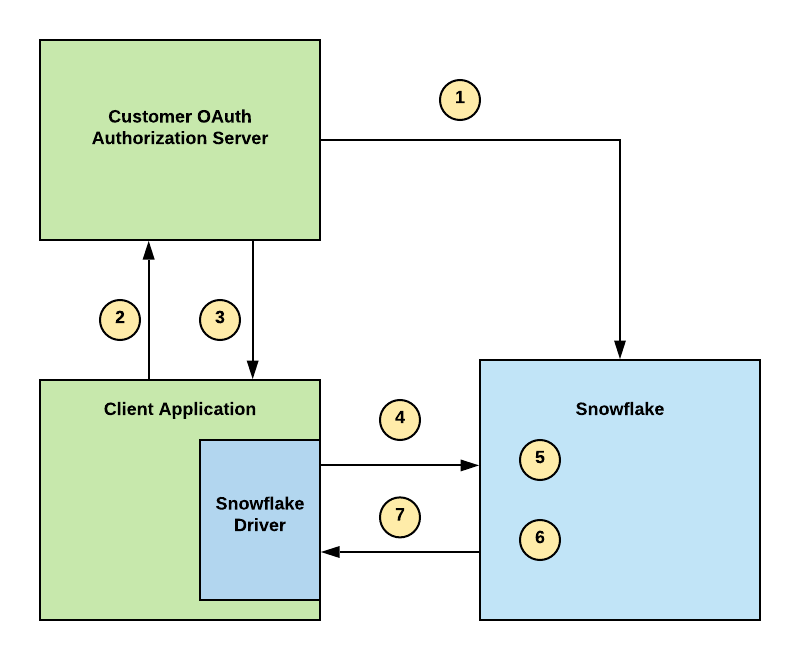
- Configure your External OAuth authorization server in your environment and the security integration in Snowflake to establish a trust.
- A user attempts to access Snowflake data through their business intelligence application, and the application attempts to verify the user.
- On verification, the authorization server sends a JSON Web Token (that is, an OAuth token) to the client application.
- The Snowflake driver passes a connection string to Snowflake with the OAuth token.
- Snowflake validates the OAuth token.
- Snowflake performs a user lookup.
- On verification, Snowflake instantiates a session for the user to access data in Snowflake based on their role.
MCP server integration
External OAuth security integrations can be bound to Snowflake MCP servers to let MCP clients (such as Claude, Cursor, and other AI tools) authenticate against your organization’s existing identity provider (IdP) instead of Snowflake OAuth.
When an MCP server has an External OAuth integration bound to it, the server advertises your IdP’s issuer URL in its Protected Resource Metadata (RFC 9728). MCP clients that support RFC 9728 discovery automatically discover the correct authorization server and obtain tokens from your IdP rather than from Snowflake.
How it works
Set two hierarchical parameters that bind an External OAuth integration to MCP servers:
OAUTH_AUTHORIZATION_SERVER: The name of an existing External OAuth security integration.OAUTH_SCOPES_SUPPORTED: A comma-separated list of OAuth scopes the MCP server advertises (optional). For accepted values, see OAUTH_SCOPES_SUPPORTED.
Both parameters follow Snowflake’s standard account/database/schema lineage. A single configuration can cover all MCP servers in an account, a database, or a specific schema. MCP servers inherit the OAuth binding from the enclosing account, database, or schema.
Example
The following example binds an Okta-based External OAuth integration to all MCP servers in a database:
After this configuration, all MCP servers created in analytics_db advertise the Okta issuer from external_oauth_okta in
authorization_servers.
For the full workflow, parameter inheritance details, and failure modes, see Configure External OAuth authentication for MCP servers.
Scopes
The scope parameter in the authorization server limits the operations and roles permitted by the access token and what the user can access after instantiating a Snowflake session.
The ACCOUNTADMIN, GLOBALORGADMIN, ORGADMIN, and SECURITYADMIN roles are blocked by default. If it is necessary to use one or more of these roles, use the ALTER ACCOUNT command to set the EXTERNAL_OAUTH_ADD_PRIVILEGED_ROLES_TO_BLOCKED_LIST account parameter to FALSE.
- For Okta, PingFederate, and Custom, use the role scope pattern in the following table.
- For Microsoft Entra ID, refer to Determine the OAuth flow in Microsoft Entra ID.
- If you do not want to manage Snowflake roles in your External OAuth server, pass the static value of SESSION:ROLE-ANY in the scope attribute of the token.
The following table summarizes External OAuth scopes. Note that if you do not define a scope, the connection attempt to Snowflake will fail.
| Scope/Role Connection Parameter | Description |
|---|---|
session:role-any | Maps to the ANY role in Snowflake. Use this scope if the user’s default role in Snowflake is desirable. The |
session:role:custom_role | Maps to a custom Snowflake role. For example, if your custom role is ANALYST, your scope is session:role:analyst. |
session:role:public | Maps to the PUBLIC Snowflake role. |
Using secondary roles with External OAuth
Snowflake supports using secondary roles with External OAuth.
Snowflake OAuth does not support in-session role switching to secondary roles.
For more information, refer to:
Configuring External OAuth support
Snowflake supports the use of partner applications and custom clients that support External OAuth.
Refer to the list below if you need to configure partner applications or custom clients:
Restricting network traffic for External OAuth
You can associate a network policy with the External OAuth security integration to restrict network traffic from the client to Snowflake as the resource server. This network policy governs login requests and queries against Snowflake.
When you associate a network policy with the security integration, it overrides network policies associated with the user or the account. For more information, see Network policy precedence.
To associate a network policy with the External OAuth security integration, set the NETWORK_POLICY parameter when creating or updating the integration. For example:
Error codes
Refer to the table below for descriptions of error codes associated with External OAuth:
| Error Code | Error | Description |
|---|---|---|
| 390318 | OAUTH_ACCESS_TOKEN_EXPIRED | OAuth access token expired. {0} |
| 390144 | JWT_TOKEN_INVALID | JWT token is invalid. |
Troubleshooting
- Use the SYSTEM$VERIFY_EXTERNAL_OAUTH_TOKEN function to determine whether your External OAuth access token is valid or needs to be regenerated.
- If you encounter an error message associated with a failed External OAuth login attempt, and the error message has a UUID, you can ask an administrator who has a MONITOR privilege assigned to their role to use the UUID from the error message to get a more detailed description of the error using the SYSTEM$GET_LOGIN_FAILURE_DETAILS function.