Snowpipe Streaming
Snowpipe Streaming is Snowflake’s real-time ingestion service built on the high-performance architecture. It enables applications to load streaming data directly into Snowflake tables as rows arrive, without staging files or managing intermediate storage. Data becomes available for query within seconds of ingestion, supporting use cases from IoT telemetry and Change Data Capture (CDC) pipelines to fraud detection and live analytics.
Snowpipe Streaming delivers:
Up to 10 GB/s throughput per table
As low as 5 second end-to-end ingest-to-query latency
Exactly-once delivery through built-in offset token tracking
Ordered ingestion within each channel
Streaming into Snowflake-managed Apache Iceberg tables
Why use Snowpipe Streaming
Exactly-once delivery: Built-in offset token tracking enables exactly-once semantics. Your application tracks committed offsets and replays from the last committed position on recovery, preventing duplicate data and data loss. For more information, see Offset tokens and exactly-once delivery.
Ordered ingestion: Rows are ingested in order within each channel. Channels map naturally to source partitions (for example, Kafka topic partitions), enabling deterministic replay and zero-loss recovery.
High throughput, low latency: Designed to support ingest speeds of up to 10 GB/s per table, with data available for query in as low as 5 seconds.
In-flight transformations: Cleanse, reshape, and transform data during ingestion by using COPY command syntax within the PIPE object. Filter rows, reorder columns, cast types, and apply expressions before data is committed to the target table, with no separate ETL step needed.
Pre-clustering at ingest time: Sort data during ingestion for optimized query performance on tables with clustering keys.
Apache Iceberg table support: Stream data into Snowflake-managed Iceberg tables, including both Iceberg v2 and Iceberg v3 tables. For more information, see Snowpipe Streaming high-performance architecture with Apache Iceberg™ tables.
Schema evolution: Automatically adapt table schemas to changing data structures. Snowflake can add new columns detected in the incoming stream without manual DDL changes.
Simplified pipelines: SDKs write rows directly into tables, bypassing the need for staging files or intermediate cloud storage.
Serverless and scalable: Compute resources scale automatically based on ingestion load. No infrastructure to manage.
Transparent pricing: Throughput-based billing calculated by credits per uncompressed GB of data ingested. For more information, see Snowpipe Streaming high-performance architecture: Understand your costs.
How to connect
Snowpipe Streaming supports multiple ingestion paths to fit different workloads:
Integration |
Best for |
|---|---|
High-throughput custom applications. Requires Java 11 or later. |
|
Data engineering and Python-native workflows. Requires Python 3.9 or later. |
|
Lightweight workloads, IoT devices, and edge deployments. |
|
Apache Kafka topic ingestion. |
Both the Java and Python SDKs use a Rust-based client core for improved client-side performance and lower resource usage.
Note
We recommend that you begin with the Snowpipe Streaming SDK over the REST API to benefit from the improved performance and getting-started experience.
To get started, see Tutorial: Get started with the SDK or Tutorial: Get started with the REST API.
For technical details about the PIPE object, channels, offset tokens, and supported data types, see Key concepts.
Recommended for
High-volume streaming workloads requiring up to 10 GB/s throughput
Real-time analytics and dashboards with data freshness as low as 5 seconds
IoT and edge deployments using the REST API
CDC (Change Data Capture) pipelines with exactly-once delivery guarantees
Apache Kafka topic ingestion using the Snowflake Connector for Kafka
Streaming into Apache Iceberg tables for open table format analytics
Note
Looking for SQL-native streaming? See Dynamic Tables and Streams with Tasks for declarative streaming pipelines.
Snowpipe Streaming versus Snowpipe
Snowpipe Streaming is intended to complement Snowpipe, not replace it. Use Snowpipe Streaming in scenarios where data arrives as rows (for example, from Apache Kafka topics, IoT devices, or application events) instead of files. With Snowpipe Streaming, you don’t need to create files to load data into Snowflake tables.
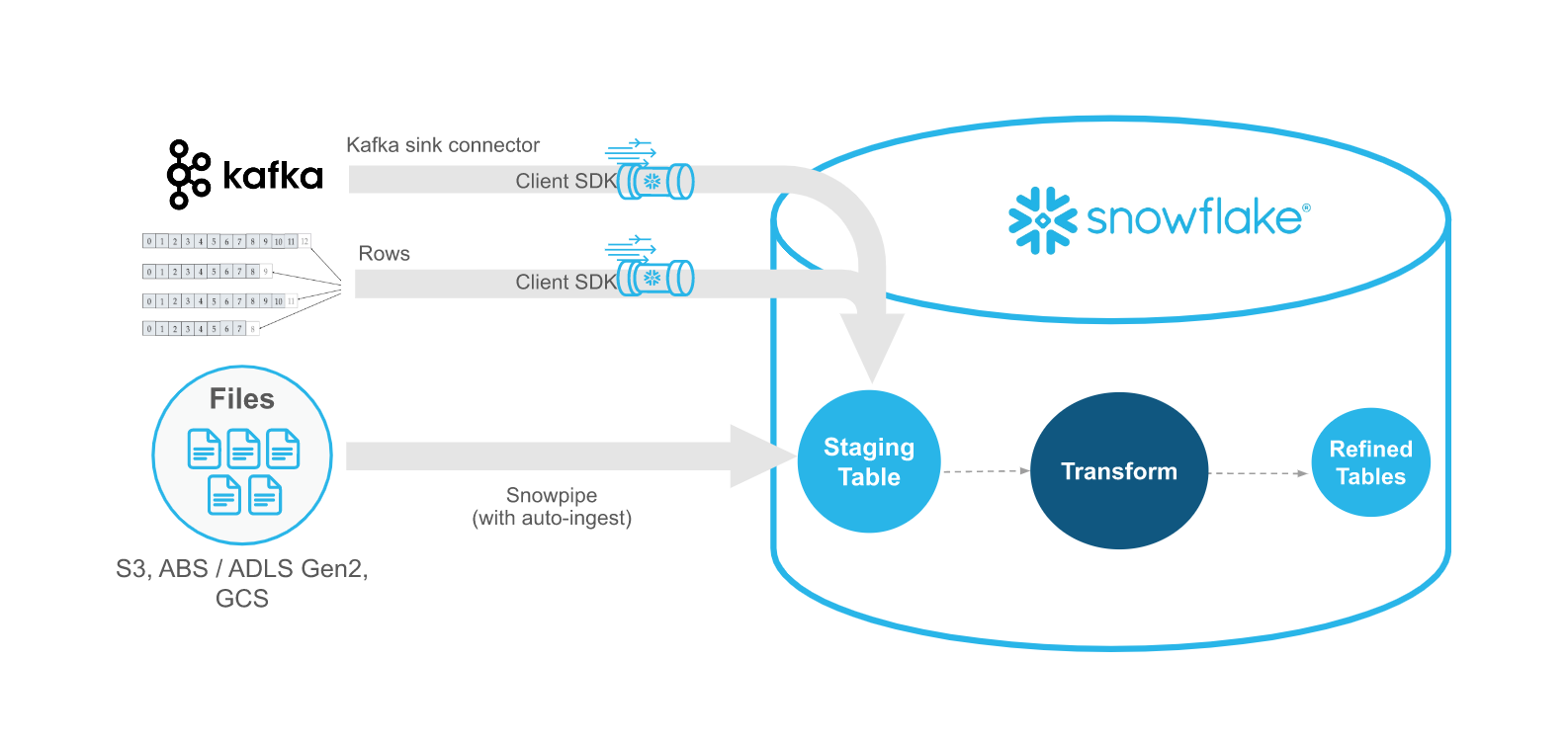
The following table describes the differences between Snowpipe Streaming and Snowpipe:
Category |
Snowpipe Streaming |
Snowpipe |
|---|---|---|
Form of data to load |
Rows |
Files. If your existing data pipeline generates files in blob storage, we recommend using Snowpipe instead. |
Data ordering |
Ordered insertions within each channel |
Not supported. Snowpipe can load data from files in an order different from the file creation timestamps in cloud storage. |
Load history |
Load history recorded in SNOWPIPE_STREAMING_FILE_MIGRATION_HISTORY view (Account Usage) |
Load history recorded in COPY_HISTORY (Account Usage) and COPY_HISTORY function (Information Schema) |
Pipe object |
The PIPE object is the server-side processing layer for all streaming ingestion. It handles schema validation, in-flight transformations, and pre-clustering. A default pipe is created automatically for each table, or you can create a custom pipe for advanced processing. |
A pipe object queues and loads staged file data into target tables. |
Classic architecture
Important
The classic architecture, which uses the snowflake-ingest-sdk Java SDK, is planned for deprecation. No immediate changes are required. Current workloads continue to be fully supported.
For full details, see Notice of planned deprecation.
If you have existing workloads running on the classic architecture, see Classic architecture. For a detailed comparison of differences, see Comparison between high-performance and classic SDKs.
If you’re upgrading to the high-performance architecture, see Migration guide.