Vom Anbieter durchgeführte Analysen
Übersicht
Die Standardkonfiguration des Clean Room ermöglicht es nur dem Verbraucher, eine Analyse im Clean Room auszuführen. Der Anbieter kann jedoch vom Verbraucher die Berechtigung anfordern, eine bestimmte Vorlage in einem bestimmten Clean Room unter Verwendung von Verbraucherdaten auszuführen. Die vom Anbieter durchgeführte Analyse kann aktiviert und mit der UI der Clean Rooms oder durch Code ausgeführt werden.
Die folgende Abbildung zeigt den Datenfluss und die Hauptkomponenten einer grundlegenden vom Anbieter durchgeführten Analyse.
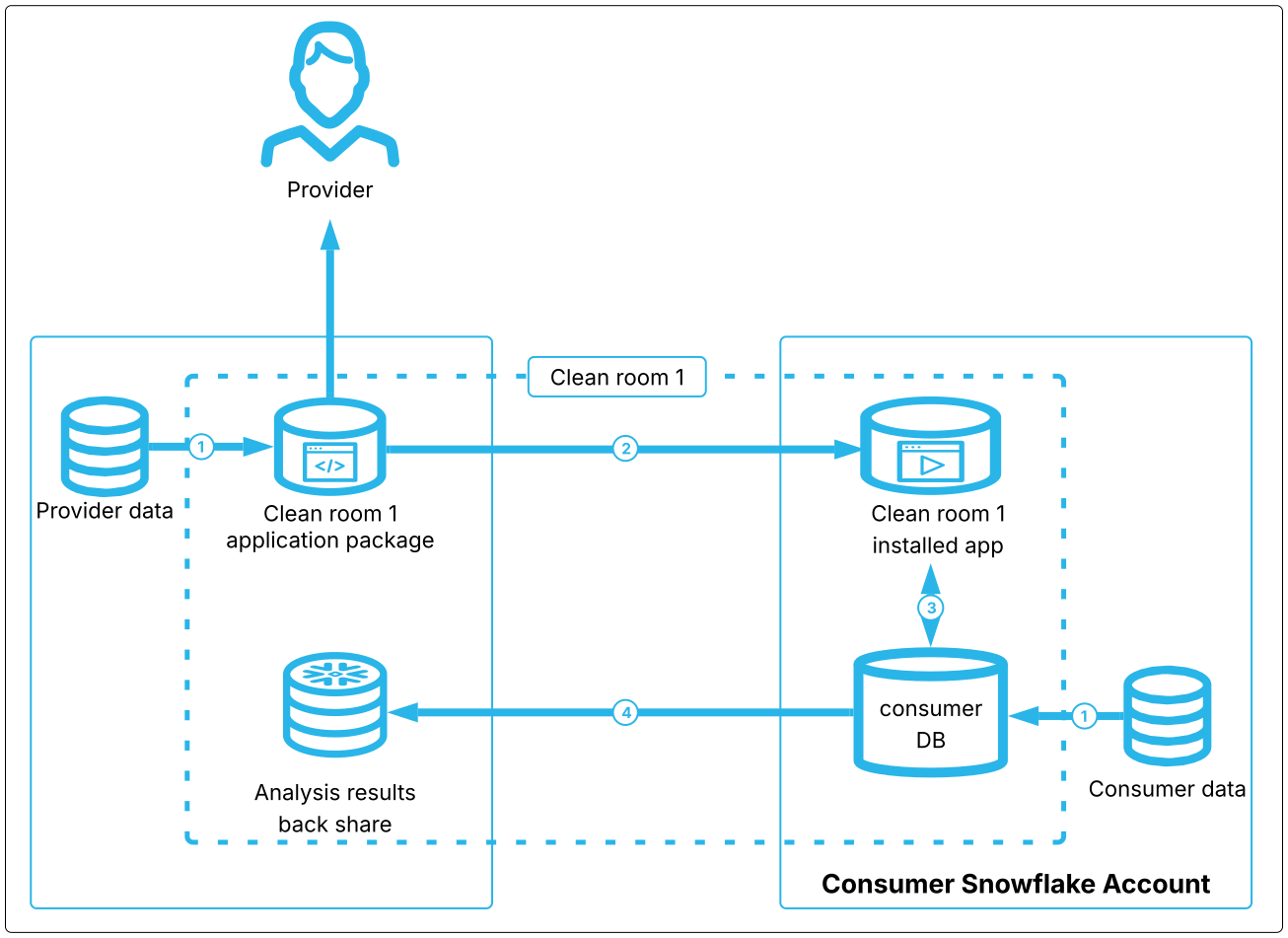
Bei einer grundlegenden, vom Anbieter durchgeführten Analyse verknüpfen der Verbraucher und der Anbieter ihre Daten mit dem Clean Room. Die Quelldaten sind als private Ansichten in dem Konto, in dem sich die Daten befinden, mit dem Clean Room verknüpft.
Wenn der Anbieter eine Analyse durchführt, werden die Daten des Anbieters mit der Clean Room-App im Konto des Verbrauchers geteilt. Die Analyse wird im Konto des Verbrauchers ausgeführt.
Die verschlüsselten Ergebnisse werden temporär in die Verbraucher-DB im Verbraucherkonto geschrieben.
Als Nächstes werden die verschlüsselten Ergebnisse in einen Analyseergebnis-Backshare im Anbieterkonto (auch Governance-Backshare genannt) kopiert und entschlüsselt. Da die Analyse im Verbraucherkonto ausgeführt wird, wird die Analyse den Verbrauchenden in Rechnung gestellt.
Weitere Informationen dazu finden Sie unter Snowflake Data Clean Rooms: Installierte Objekte.
Vorlagen, die vom Anbieter durchgeführte Analysen unterstützen
Die folgenden Vorlagen unterstützen vom Anbieter durchgeführte Analysen:
Audience Overlap & Segmentation
SQL Query (nur UI)
Benutzerdefinierte Vorlagen (nur API)
Abrechnungs- und Kostendetails
Vom Anbieter durchgeführte Analysen werden im Konto des Verbrauchers ausgeführt, und den Verbrauchern wird eine vom Anbieter durchgeführte Analyse in Rechnung gestellt. Damit keine zusätzlichen Kosten durch Anbieteranalysen anfallen, müssen Verbrauchende den Clean Room deinstallieren.
Ein Verbrauchender kann die Anzahl der vom Anbietenden in den letzten N Tagen verbrauchten Credits abschätzen, indem er die folgende Abfrage ausführt. Geben Sie die Anzahl der vorangegangenen Tage als negative Zahl an.
Wenn ein Anbieter eine Analyse in der UI der Clean Rooms ausführt, verwendet der Clean Room eine automatische Skalierungslogik auf der Grundlage von Datenset-Größen, um ein Warehouse für die Analyse des Anbieters auszuwählen.
Wenn ein Anbieter einen Clean Room unter Verwendung der API erstellt und ausführt, kann der Anbieter explizit eine Warehouse-Größe und einen Warehouse-Typ aus einer Menge von zulässigen Werten auswählen, die vom Verbraucher angegeben wurden.
Allgemeine Hinweise
Anbieter können Ergebnisse für ihr eigenes Konto aktivieren, indem sie die UI oder API verwenden, oder für Drittanbieter-Anwender, wenn sie die UI verwenden. Informationen darüber, wie Sie die Aktivierung durchführen und die Ergebnisse anzeigen können, finden Sie unter Aktivieren von Abfrageergebnissen.
Wenn sich Verbraucher und Anbieter in unterschiedlichen Cloudregionen befinden, müssen Sie die Cloud-übergreifende automatische Ausführung in beiden Konten und für beide Clean Rooms aktivieren.
Beachten Sie, dass die Durchführung vom Anbieter ausgeführter Cloud-übergreifender Abfragen einige Zeit in Anspruch nehmen kann, da die Quelldaten des Anbieters vom Anbieter zum Verbraucher repliziert werden müssen und die Ergebnisse vom Verbraucher zum Anbieter abgefragt werden müssen, und zwar über alle Cloudregionen hinweg.
Alle vom Anbieter ausgeführten Vorlagen erfordern Spaltennamen oder Aliasse für alle Spalten, die in den Ergebnissen generiert werden. Wenn eine Spalte aggregiert ist (z. B.
SUM(col1)) oder eine benutzerdefinierte Funktion aufruft (z. B.cleanroom.my_function(p.hashed_email)), muss die Vorlage explizit einen Spaltennamenalias angeben, wie hier gezeigt:
Vom Anbieter in der UI ausgeführte Analysen
So aktivieren Sie die vom Anbieter ausgeführte Analyse in einem neuen Clean Room, wenn Sie UI der Clean Rooms verwenden:
Der Anbietende erstellt und konfiguriert einen Clean Room unter Verwendung einer der unterstützten Vorlagen. Konfigurieren Sie den Clean Room bis zum Schritt Share Clean Room.
Im Schritt Share Clean Room der Clean Room-Konfiguration aktiviert der Anbieter die Option Enable run analysis & query neben dem eigenen Konto, damit er alle Vorlagen in diesem Clean Room ausführen kann, die Anbieter ausgeführte Analysen unterstützen.
Diese Einstellung kann nicht mehr geändert werden, nachdem ein Clean Room erstellt wurde. Wenn Sie die Berechtigung für ein bestimmtes Konto zum Ausführen von Abfragen in einem veröffentlichten Clean Room ändern möchten, müssen Sie den Clean Room löschen und einen neuen erstellen.
Der Verbraucher tritt bei und konfiguriert den Clean Room wie normal für alle Vorlagen im Clean Room, einschließlich aller Vorlagen, die vom Anbieter ausgeführte Analysen unterstützen. Wenn Verbrauchende nicht möchten, dass ein Anbieter eine bestimmte Vorlage ausführt, können sie die erforderlichen Details für diese Vorlage weglassen.
Wenn Verbrauchende dem Clean Room beitreten, werden sie vor dem Beitritt gewarnt, dass die vom Anbieter durchgeführte Analyse für diesen Clean Room aktiviert ist.
Verbrauchende können Abfragen ausführen, sobald der Clean Room verknüpft ist, aber es gibt eine Verzögerung von bis zu 30 Minuten, bevor der Anbieter die Vorlage ausführen kann. Diese Setup-Verzögerung tritt nur beim ersten Verknüpfungsschritt auf. Wenn der Anbieter später weitere vom Anbieter ausgeführte Vorlagen hinzufügt, kann der Anbieter diese ausführen, sobald die Verbraucher ihren Clean Room für diese Vorlage konfiguriert haben.
Nachdem der Verknüpfungsschritt abgeschlossen ist, steht der Clean Room sowohl für vom Anbieter ausgeführte Analysen als auch für vom Verbraucher ausgeführte Analysen zur Verfügung.
Wichtig:
Anbieter müssen etwa 10 Minuten warten, nachdem der Verbraucher den Clean Room installiert hat, bevor sie eine Analyse ausführen können. Die Verzögerung entsteht für zusätzliche Hintergrundkonfigurationen, die für vom Anbieter durchgeführte Analysen erforderlich sind.
Den Verbrauchenden werden alle Analysen in diesem Clean Room in Rechnung gestellt, unabhängig davon, ob sie vom Anbieter oder von Verbrauchenden ausgeführt wurden.
Vom Anbieter in der API ausgeführte Analysen
So aktivieren Sie die vom Anbieter ausgeführte Analyse in einem neuen Clean Room, wenn Sie die API der Clean Rooms verwenden:
Anbieter
Erstellt und konfiguriert den Clean Room sowie Daten und Richtlinien gemäß der Standardmethode.
Fügt Verbraucher gemäß der Standardmethode hinzu.
Aktiviert vom Anbieter ausgeführte Analysen für bestimmte Verbraucherkonten im Clean Room, indem
provider.enable_provider_run_analysisaufgerufen wird.Wichtig:
Der Anbieter muss
provider.enable_provider_run_analysisaufrufen, nachdem Verbraucher zum Clean Room hinzugefügt wurden, aber bevor ein Verbraucher den Clean Room installiert. Jedes Verbraucherkonto muss diese Anfrage genehmigen, da die Daten sonst für vom Anbieter durchgeführte Analysen in diesem Clean Room nicht zugänglich sind.Immer dann, wenn der Anbieter die Einstellung für die vom Anbieter durchgeführte Analyse ändert, muss der Clean Room von allen Verbrauchern neu installiert werden, damit die Änderung wirksam wird. Da es schwierig sein kann, alle Teilnehmenden zur Neuinstallation eines Clean Rooms zu zwingen, ist es zuverlässiger, wenn der Anbieter einen veröffentlichten, freigegebenen Clean Room löscht, wenn er die Analyseberechtigungen ändert, und dann einen neuen Clean Room mit den gewünschten Berechtigungen erstellt.
Veröffentlicht den Clean Room.
Informiert den Verbraucher, dass der Clean Room verfügbar ist, gibt den Namen des Clean Rooms an und gibt an, welche Vorlagen Sie im Clean Room ausführen können.
Verbraucher
Installiert den Clean Room und verknüpft die Daten auf die standardmäßige Weise.
Legt alle Verknüpfungs- und Spaltenrichtlinien fest, die für die Daten benötigt werden.
Erlaubt vom Anbieter durchgeführte Analysen für bestimmte Vorlagen im Clean Room, indem entweder
consumer.enable_templates_for_provider_run(für mehrere Vorlagen) oderconsumer.approve_template(für eine Vorlage) aufgerufen wird.Bemerkung
Wenn der Anbieter eine Vorlage ändert, nachdem sie von Verbrauchenden genehmigt wurde, müssen die Verbrauchenden die Vorlage erneut genehmigen. Bis zur erneuten Genehmigung der Vorlage wird die alte zwischengespeicherte Version der genehmigten Vorlage vom Anbieter ausgeführt.
(Optional) Ein Verbraucher kann den Warehouse-Typ oder die Größen begrenzen, die für vom Anbieter durchgeführte Analysen verfügbar sind, Siehe Einschränken der Warehouse-Größe und des Warehouse-Typs.
Teilt dem Anbieter mit, dass der Clean Room installiert und vom Anbieter durchgeführte Analysen genehmigt wurden.
Anbieter
Nachdem der Verbraucher den Clean Room installiert hat, ermöglicht der Anbieter den Analysen Zugriff auf Verbraucherdaten, indem die Datenfreigabe zwischen Verbraucher- und Anbieterkonto aktiviert wird. Der Prozess hierfür hängt davon ab, ob sich Anbieter und Verbraucher in derselben Cloudregion oder in verschiedenen Cloudregionen befinden:
Wenn sich Anbieter und Verbraucher in derselben Cloudregion befinden, ruft der Anbieter
provider.mount_request_logs_for_all_consumersauf. Wenn ein neues Verbraucherkonto den Clean Room später installiert und der Anbieter die Verbraucherdaten in dieser Vorlage verwenden möchten, muss der Anbieter diese Prozedur erneut ausführen, um auf diese Daten zugreifen zu können.Wenn sich Anbieter und Verbraucher in verschiedenen Cloudregionen befinden, müssen Anbieter und Verbraucher die Cloud-übergreifende automatische Ausführung aktivieren. Wenn ein Anbietender eine Analyse über Regionen hinweg durchführt, kann die Abfrage einige Zeit in Anspruch nehmen, da die Abfragedaten von der Region des Anbietenden in die Region des Verbrauchenden und zurück gesendet werden.
Ruft
provider.view_warehouse_sizes_for_templateauf, um zu ermitteln, ob der Verbraucher den Typ und die Größe des für die Analyse verwendeten Warehouses eingeschränkt hat. Wenn der Verbraucher die Warehouse-Größen für vom Anbieter durchgeführte Analysen eingeschränkt hat, muss der Anbieter zulässige Werte fürwarehouse_typeundwarehouse_sizein der Analyseanfrage im nächsten Schritt angeben. Wenn der Verbraucher keine Warehouse-Grenzen angegeben hat, sind diese Felder in der Analyseanforderung optional. Weitere Informationen dazu finden Sie unter Einschränken der Warehouse-Größe und des Warehouse-Typs.Führt die Analyse aus, indem
provider.submit_analysis_requestmit dem Namen der Vorlage, den Tabellennamen und den Argumenten der Vorlage aufgerufen wird. Wenn der Verbraucher Beschränkungen für Warehouse-Größen oder -Typen angegeben hat, muss der Anbieter in der Analyseanfrage auch die Warehouse-Größe und den Warehouse-Typ angeben.Speichern Sie die Anforderungs-ID, die von
provider.submit_analysis_requestzurückgegeben wird; die ID wird benötigt, um den Status und die Ergebnisse der Analyse zu überprüfen.
Prüft den Status der Analyse durch Aufruf von
provider.check_analysis_status. Wenn der Status alsCOMPLETEDgemeldet wird, rufen Sieprovider.get_analysis_resultauf, um die Analyseergebnisse zu erhalten.
Einschränken der Warehouse-Größe und des Warehouse-Typs
Da dem Verbraucher die vom Anbieter durchgeführten Analysen in Rechnung gestellt werden, kann der Verbraucher bestimmen, welche Größen und Typen von Warehouses der Anbieter verwenden kann, um eine Analyse in seinem Konto auszuführen. Hier erfahren Sie, wie Verbraucher eine Beschränkung der Warehouse-Größe und des -Typ festlegen und wie ein Anbieter die Größe und den Typ eines Warehouses auswählt, wenn er eine Analyse durchführt:
Verbrauchende rufen
consumer.set_provider_run_configurationauf und geben an, welche Warehouse-Größen und -Typen ein Anbietender für eine bestimmte Vorlage verwenden kann. Im folgenden Ausschnitt beschränkt der Verbrauchende die Anbietenden auf die Verwendung von STANDARD-Warehouses der Größe MEDIUM oder LARGE beim Ausführen vontemplate_1:Der Anbieter ruft auf
provider.view_warehouse_sizes_for_templateauf, um zu sehen, welche Warehouse-Größen und -Typen für vom Anbieter durchgeführte Analysen für diese Vorlage zulässig sind.Der Anbieter gibt eine Warehouse-Größe und einen Warehouse-Typ an, die für seine Analyseausführungsanfrage verwendet werden sollen.
Tipp
Die folgenden Prozeduren regeln, welche Seite eine Analyse im Clean Room durchführen kann:
Von Verbrauchenden durchgeführte Analyse (standardmäßig erlaubt): Änderungen werden sofort übernommen.
provider.enable_consumer_run_analysis
provider.disable_consumer_run_analysis
Von Anbieter durchgeführte Analyse (standardmäßig deaktiviert): Änderungen erfordern eine Neuinstallation durch die Verbrauchenden.
provider.enable_provider_run_analysis(erfordert die Genehmigung des Verbrauchers durch Aufruf von „consumer.enable_templates_for_provider_run“)
provider.disable_provider_run_analysis
Installieren und Ausführen des Codebeispiels
Sie können ein vollständiges Ausführungsbeispiel herunterladen und installieren, um eine vom Anbieter durchgeführte Analyse zu erstellen und auszuführen. Um dieses Beispiel auszuführen, benötigen Sie zwei Snowflake-Konten in derselben Organisation und Cloud-Hosting-Region, in der die Snowflake Data Clean Room-Umgebung installiert ist.
Installieren Sie das Notizbuch sowohl in Ihren Anbieter- als auch in Ihren Verbraucherkonten.
Um ein Notizbuch hochzuladen, gehen Sie wie folgt vor:
Sign in to Snowsight.
In the navigation menu, select Projects » Notebooks.
Wählen Sie + Notebook » Import .ipynb file aus.
Wählen Sie die heruntergeladene .ipynb-Datei aus.
Benennen Sie die Datei wie gewünscht, und wählen Sie eine Datenbank und ein Schema.
Behalten Sie das Standard-Warehouse
APP_WHbei.Wählen Sie Create aus.
Um den Clean Room zu erstellen, öffnen Sie das Notebook im Anbieterkonto und füllen den Anbieter-Teil aus.
Öffnen Sie das Notebook im Verbraucherkonto und füllen Sie den Verbraucherteil aus, um den Clean Room zu installieren und zu konfigurieren und die Vorlage auszuführen.
Führen Sie die Anbieter- und Verbraucheraktionen wie angegeben und in der im Notebook angezeigten Reihenfolge aus.