Query directory tables
This topic covers how to query a directory table to retrieve a list of all files on a stage with metadata, such as the Snowflake file URL, for each file.
Syntax for querying a directory table:
Where:
stage_nameName of a stage that has a directory table enabled.
For information about SELECT as a statement, and the other clauses within the statement, see Query syntax in the Snowflake SQL Command Reference.
Output
The output from a directory table query can include the following columns:
Column
Data Type
Description
RELATIVE_PATH
TEXT
Path to the files to access using the file URL.
SIZE
NUMBER
Size of the file (in bytes).
LAST_MODIFIED
TIMESTAMP_TZ
Timestamp when the file was last updated in the stage.
MD5
HEX
MD5 checksum for the file.
ETAG
HEX
ETag header for the file.
FILE_URL
TEXT
Snowflake file URL to the file.
The file URL has the following format:
Where:
account_identifierHostname of the Snowflake account for your stage. The hostname starts with an account locator (provided by Snowflake) and ends with the Snowflake domain (
snowflakecomputing.com):
account_locator.snowflakecomputing.comFor more details, see Account identifiers.
Note
For Business Critical accounts, a
privatelinksegment is prepended to the URL just beforesnowflakecomputing.com(privatelink.snowflakecomputing.com), even if private connectivity to the Snowflake service is not enabled for your account.db_nameName of the database that contains the stage where your files are located.
schema_nameName of the schema that contains the stage where your files are located.
stage_nameName of the stage where your files are located.
relative_pathPath to the files to access using the file URL.
Usage notes
If files downloaded from an internal stage are corrupted, verify with the stage creator that
ENCRYPTION = (TYPE = 'SNOWFLAKE_SSE')is set for the stage.
Examples
This example retrieves all metadata columns in a directory table for a stage named mystage:
This example retrieves the FILE_URL column values from a directory table for files greater than 100 K bytes in size:
This example retrieves the FILE_URL column values from a directory table for comma-separated value files:
Create a view for unstructured data using a directory table
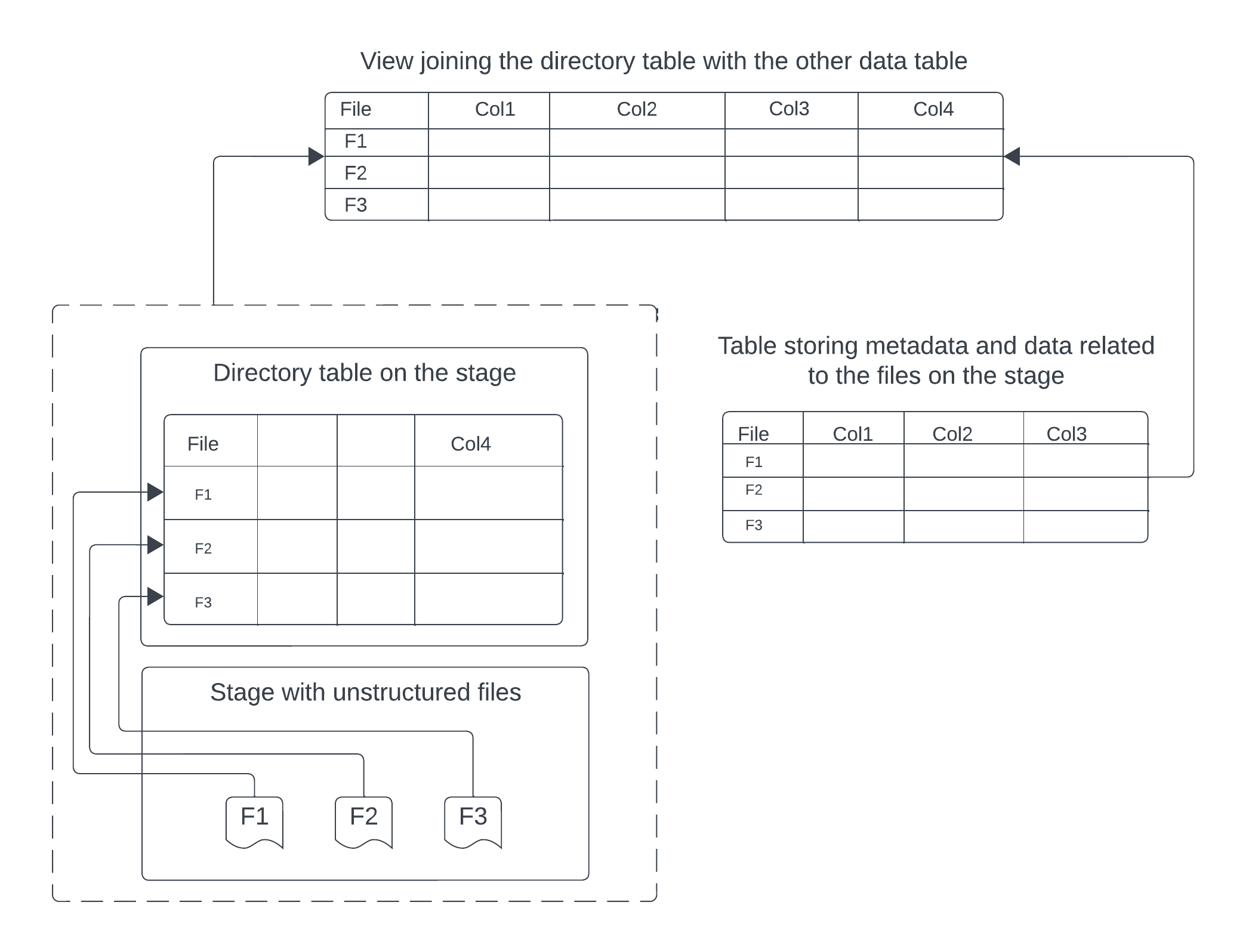
You can join a directory table with other Snowflake tables to produce a view of unstructured data that combines the file URLs with metadata about the files.
The following diagram illustrates how you can use a stage with a directory table enabled along with a separate data table to create a comprehensive view for unstructured files on a stage.
Example: Create a view of PDF files and their data
The following example creates a view called reports_information by joining a directory table on a stage named my_pdf_stage with a table named
report_metadata using the file_url key. The stage contains PDF reports, while the report_metadata table contains
structured information about each PDF report such as the author and publish_date.
The resulting view provides a way to get information about the unstructured PDFs and their related, structured metadata.