Cortex AI Function Evaluation and Optimization
Snowflake provides creation, evaluation, and optimization capabilities for building production-ready Cortex AI Functions for unstructured data workflows. These capabilities help you measure quality and cost, search across prompts and models for more efficient implementations, and create optimized AI functions as first-class Snowflake objects.
There are two primary interfaces for authoring, evaluating, and optimizing AI Functions:
- Create, evaluation, and optimization functions: Use CREATE AI FUNCTION, AI_FUNCTION_EVALUATION, and AI_FUNCTION_OPTIMIZATION to create production-ready Cortex AI Functions for unstructured data workflows, measure their quality and cost, and automatically identify more efficient implementations.
- Cortex AI Function Studio provides a guided, agentic experience for defining an AI task and moving through the same create, evaluate, and optimize lifecycle.
Both experiences use the same underlying Snowflake objects and evaluation and optimization capabilities. Customers can work directly in SQL or use AI Function Studio to guide the workflow.
Workflow overview
The following table summarizes the workflow:
| Stage | Snowflake function | Result |
|---|---|---|
| Create | CREATE AI FUNCTION | Packages custom AI logic as a reusable AI function. |
| Evaluate | AI_FUNCTION_EVALUATION | Measures output quality against a labeled dataset. |
| Optimize | AI_FUNCTION_OPTIMIZATION | Generates and evaluates candidate function implementations. |
| Create optimized function | CREATE AI FUNCTION … FROM EXPERIMENT | Creates a selected optimization result as a new AI function. |
Note
AI evaluation and optimization require creating a Snowflake experiment. Use
CREATE EXPERIMENT ... TYPE = '<type>' FROM SPECIFICATION $$...$$ to define the workload and
EXECUTE EXPERIMENT to start it. Executions run asynchronously on serverless compute; read results with
SHOW RUNS, SHOW RUN METRICS, and SHOW RUN PARAMETERS. See EXPERIMENT.
Create
CREATE AI FUNCTION packages custom AI logic as a named, reusable Snowflake function.
The function body is a scalar SQL expression built with Cortex AI Functions such as AI_COMPLETE, AI_CLASSIFY, or AI_FILTER. After the function is created, you can invoke it from SQL like any other scalar function.
For example:
An AI function is a first-class Snowflake object. You can manage it using standard Snowflake capabilities for access control, object lifecycle, discovery, and governance.
Create with AI Function Studio
AI Function Studio provides a guided alternative to writing the function definition directly.
Start the workflow from CoCo in Snowsight or the CoCo CLI:
Select Create, or enter a direct request that describes the function you want to build.
Evaluate
AI_FUNCTION_EVALUATION measures the output quality of an AI function or Cortex AI call against a labeled dataset.
You specify:
- The SQL expression to evaluate.
- A versioned Snowflake dataset containing input records and expected outputs.
- A metric that compares each generated output with the expected output.
- Optionally, the number of times to repeat the evaluation.
Snowflake executes the expression for each dataset row and reports an aggregate quality score together with cost and token usage. Evaluation measures the current implementation; it does not modify the function.
Define an evaluation with SQL
The following example evaluates a support-ticket classifier using exact-match scoring:
Read evaluation results
Use SHOW RUNS to determine whether the evaluation has finished:
Prepare an evaluation dataset
Evaluation and optimization require a versioned SNOWFLAKE.ML.DATASET object. Plain tables and views are not accepted directly.
The dataset normally contains:
- One or more input columns referenced by the AI function.
- A ground-truth column containing the expected output.
The dataset should represent the inputs and expected behavior that matter for the intended use of the function. Evaluation and optimization results depend on the selected examples and labels.
A dataset of approximately 50–200 representative rows is recommended. The maximum supported dataset size is 1,000 rows.
Prepare data with AI Function Studio
AI Function Studio supports three evaluation-data paths:
| Path | Use |
|---|---|
| Labeled dataset | Use an existing dataset containing input records and known expected outputs. |
| Label generation | Generate expected outputs when input records exist but labels do not. |
| Synthetic dataset generation | Generate representative inputs and expected outputs when no evaluation dataset exists. |
For label generation, AI Function Studio can use a capable reasoning model to create expected outputs. For synthetic generation, it uses the task definition to create representative examples and labels that can bootstrap evaluation and optimization.
Choose an evaluation metric
Select a metric based on the expected output:
| Metric | Use |
|---|---|
exact_match | The generated output must match the expected output exactly. |
fuzzy_match | Minor string or formatting differences are acceptable. |
contains_match | One value must contain the other. |
redaction_match | The generated result is compared with an expected redacted output. |
llm_judge | A judge model evaluates semantic correctness against the expected output. |
custom | A scalar UDF assigns a task-specific score. |
Use rule-based metrics such as exact_match for classification and other constrained-output tasks. Use
llm_judge for open-ended outputs, such as summaries or generated answers, where exact string comparison is
not appropriate.
Important
An evaluation supports one metric. To evaluate the same function with multiple metrics, create a separate evaluation for each metric.
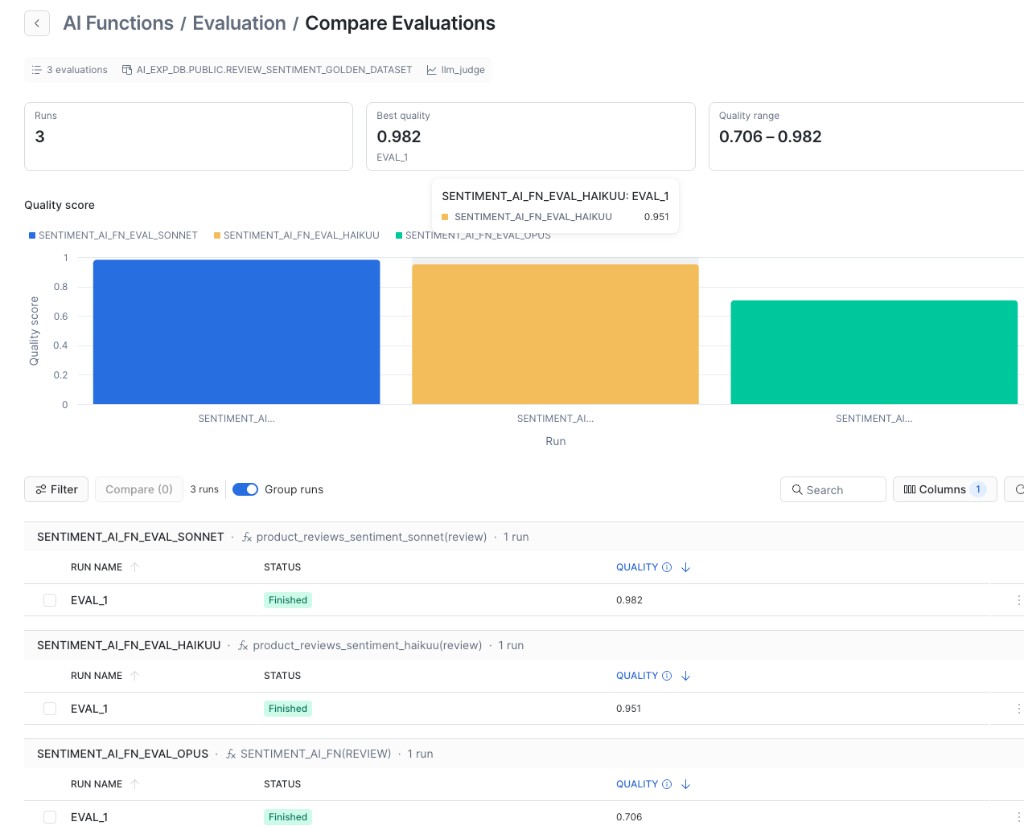
Compare evaluation results
To compare prompts, models, or function implementations, run each evaluation against the same dataset version and use the same evaluation criteria. This isolates the implementation as the variable being measured. Evaluation is designed to compare implementations using a consistent dataset and metric. You can compare the results directly in Snowsight:
Note
Evaluation scores produced using different datasets, dataset versions, ground-truth labels, metrics, judge models, or custom metric UDFs are not directly comparable because they measure performance under different evaluation conditions.
Optimize
AI_FUNCTION_OPTIMIZATION searches for improved implementations of an AI function using a labeled dataset and a scoring metric.
You can specify:
- The AI function or inline function body to optimize.
- The dataset and metric used to score candidates.
- One or more candidate models.
- A reflection model used to generate candidate improvements.
- An optimization objective.
- A search budget.
Snowflake generates candidate implementations by changing the function prompt and model configuration. It evaluates each candidate against the specified dataset and records its quality and cost.
Note
The original AI function is not modified. Optimization produces candidate implementations that you can inspect and selectively create as new AI functions.
Define an optimization with SQL
The following example optimizes a support-ticket classification function:
Compare optimization candidates
The following command lists the runs and retrieves the metrics for all candidates in an optimization experiment:
An optimization experiment includes a SEED run for the original implementation and one or more
ITER_<N> runs for candidate implementations. The following view combines fields returned separately by
SHOW RUN METRICS for
illustration. These are also visible in Snowsight:
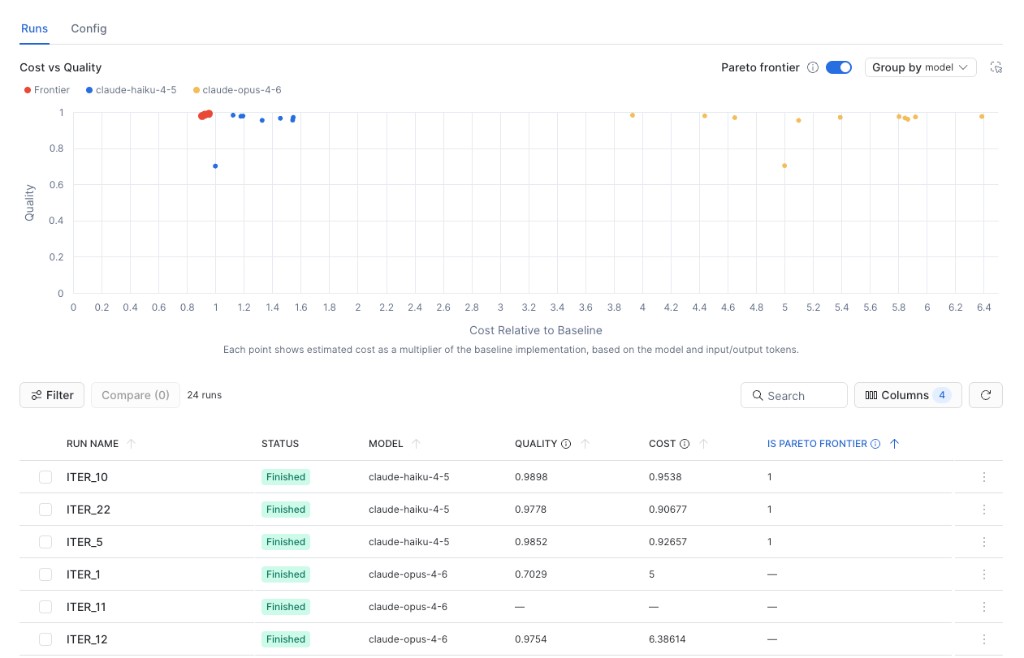
In this example:
ITER_10has the highest quality among the visible frontier candidates, with a quality score of0.9898at0.9538times the baseline cost, approximately 4.6 percent less than the baseline.ITER_22has the lowest cost among the visible frontier candidates, at0.90677times the baseline cost, approximately 9.3 percent less than the baseline, with a quality score of0.9778.- The visible
claude-opus-4-6candidates are not on the Pareto frontier. For example,ITER_12has a quality score of0.9754at6.38614times the baseline cost, whileITER_1has a quality score of0.7029at 5 times the baseline cost.
Select a candidate based on the workload’s minimum quality requirement and acceptable cost. In this
example, ITER_10 prioritizes quality, ITER_22 minimizes cost, and ITER_5 provides a result between
the two. Then you can create it as a new AI function:
Select candidate models
Select models that represent the capability and cost tiers relevant to your workload. For example, you can compare smaller, lower-cost models with larger models that provide stronger reasoning, instruction following, or support for complex and multimodal inputs.
Snowflake optimizes each selected model against the same dataset and metric and reports its quality and cost. This lets you determine whether:
- A smaller model meets your quality requirements at a lower inference cost.
- A more capable model produces a material quality improvement.
- Different model families perform differently on your specific data.
- An optimized lower-cost model can match or exceed the baseline quality.
For a meaningful comparison, use the same dataset version, ground-truth labels, metric, and metric-specific configuration for all candidate models.
Each candidate model is optimized independently, and selecting more models therefore increases the amount of evaluation work, runtime, and inference usage.
Select an optimization strategy
The optimization strategy setting controls how much guidance the optimizer provides when generating candidate improvements.
| Strategy | Behavior |
|---|---|
quality_first | Uses the full reflection guidance. This is the default. |
balanced | Alternates between full and compressed reflection guidance. |
cost_first | Uses compressed reflection guidance to reduce proposer-token usage. |
The strategy affects the search process and the token usage of the reflection prompts. It does not change the evaluation metric or apply a cost penalty when candidates are scored.
Optimization iterations
You can choose the optimization budget that controls how extensively the system searches for improvements to your AI Function. Higher budgets explore a broader range of prompt, model, and workflow variations to maximize quality:
| Budget | Approximate proposal iterations per candidate model | Use |
|---|---|---|
ultra-light | 4–6 | A small search for end-to-end validation. |
light | 10–15 | A standard search for most optimization runs. |
medium | 18–27 | A broader search across more candidate implementations. |
heavy | 27–40 | The broadest search, with the highest expected runtime and cost. |
auto | Currently resolves to light | Lets Snowflake select the search budget. |
The budget applies independently to each candidate model. For example, if you select three candidate
models with a light budget, Snowflake performs three separate light searches. It does not divide one
light budget across the three models.
Cost considerations
-
Development phase: Authoring, evaluation, and optimization are billed in two parts:
- The tokens processed by the models used during the experimentation process.
- Cortex Code usage.
-
Production phase: Once registered, a Custom AI Function is billed according to the underlying models it uses. There is no additional surcharge for the function abstraction itself.
To monitor and control costs, we recommend:
- Using the
SNOWFLAKE.ACCOUNT_USAGE.CORTEX_AI_FUNCTIONS_USAGE_HISTORYview and associated examples in Managing Cortex AI Function costs with Account Usage.
- Using the
-
Cost/quality tradeoffs: During optimization, AI Function Studio evaluates multiple models across different cost and performance tiers. This allows teams to select configurations that balance accuracy requirements against per-token costs, for example, using a smaller model that achieves acceptable accuracy at significantly lower cost.
To get the number of tokens consumed by your custom AI function, issue the following query: