Snowflake AIM for Virtualization of Teradata
Important
Generally Available
Available in government environments. As a customer-deployed RPM, Snowflake AIM for Virtualization runs within your own infrastructure and does not require FedRAMP authorization. Available only to select customers, please contact your account representative for more detail.
1. Product Overview
This is an overview of Snowflake AIM for the Virtualization of Teradata, along with key requirements to run the software.
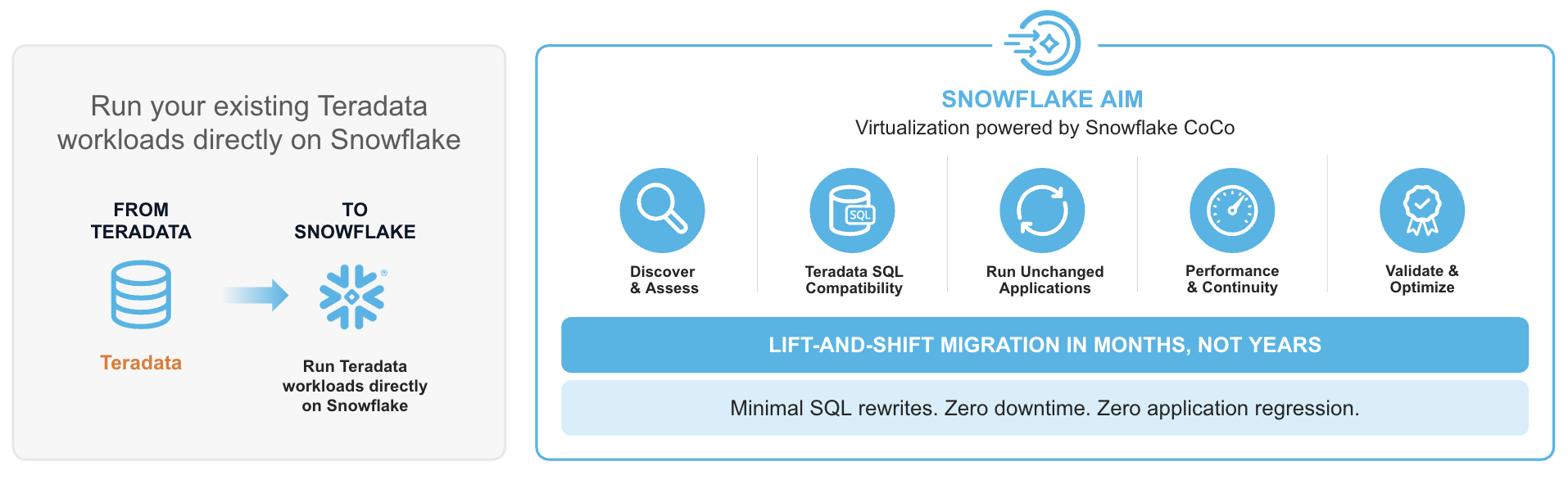
Snowflake AIM’s virtualization capabilities enable existing Teradata-based applications to maintain native functionality on Snowflake, minimizing the need for any SQL modifications or code rewrites. By translating SQL in real time, Snowflake AIM allows existing applications to run natively on Snowflake with identical results, interoperability, and minimal switching costs.
2. Core Architecture
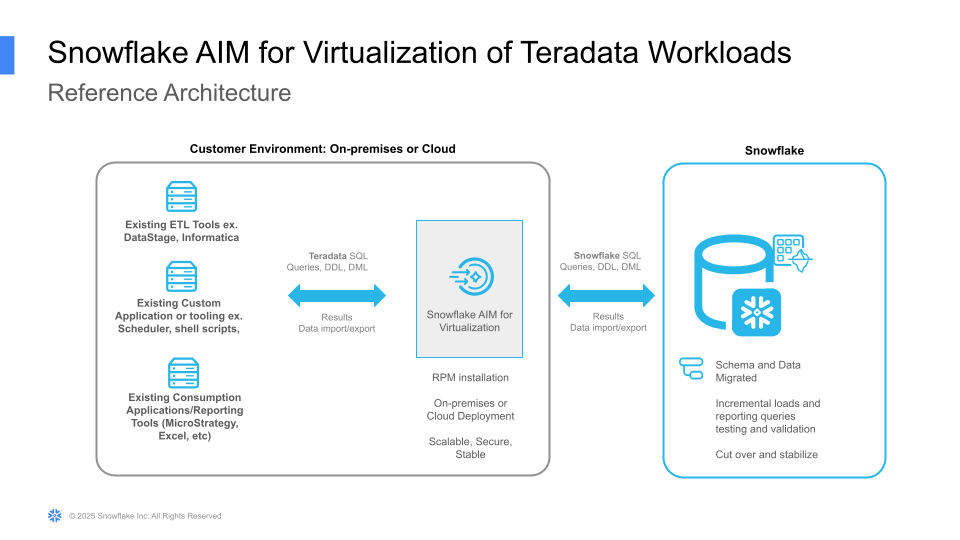
Snowflake AIM for the Virtualization of Teradata is a gateway situated between the enterprise’s existing applications (on-premises or in-cloud) and the Snowflake AI Data Cloud. Snowflake AIM for Virtualization can be deployed on premises or in a customer’s cloud subscription. Snowflake AIM is available as an RPM for the customer to deploy and manage on a Red Hat-compatible Linux VM.
2.1. System Requirements
- 32 - 64 core VM (the product scales both horizontally and vertically)
- 2 VMs for production workloads, behind a standard load balancer designed for failover
- Red Hat Linux 8.x or 9.x compatible
- 500GB of SSD data disk
- Inbound port 1025 for existing client tools
- Inbound port 22 for operators of the virtual machine to install, test, and run the software.
2.2. Deployment
- Architecture: Snowflake AIM for Virtualization is a stateless database virtualization engine, deployed within the customer’s environment: on-premises or in-cloud.
- Scalability: Snowflake AIM for Virtualization scales vertically with CPU resources and horizontally across multiple VMs using a standard load balancer.
- Self-Contained: Snowflake AIM for Virtualization has no external dependencies; all auxiliary metadata is stored directly within Snowflake.
3. XTRA Engine
Central to Snowflake AIM for Virtualization is the XTRA (Extensible Relational Algebra) engine. Snowflake AIM for Virtualization performs a deep semantic analysis of every SQL request.
- Analysis & Type Inference: Snowflake AIM for Virtualization analyzes the incoming Teradata SQL, resolves table/column references, and performs type inference for all variables.
- XTRA Transformation: The query is represented internally in the XTRA algebra. Snowflake AIM for Virtualization performs normalization and optimization specifically for Snowflake’s architecture.
- Snowflake SQL Synthesis: Snowflake AIM for Virtualization generates optimized Snowflake SQL to leverage Snowflake’s massively parallel processing (MPP) capabilities.
- Result Conversion: Result sets from Snowflake are converted and returned to the application in the format they expect.
4. Metadata Management
For features where no direct mapping exists between Teradata and Snowflake (for example, SET Tables, Global Temporary Tables), Snowflake AIM for Virtualization utilizes a specialized Metadata Store which stores Teradata-specific properties. These are consulted at run time for translation and emulation of SQL and the conversion of results.
- Metadata Store: A collection of objects stored within a dedicated Snowflake schema.
- Functionality: It records how specific objects should be interpreted. For example, if a table is marked as a “SET Table,” Snowflake AIM for Virtualization enforces row uniqueness during DML and bulk load operations.
- Synchronization: Storing metadata within Snowflake ensures that schema annotations and actual data remain synchronized.
5. Supported Application Types
- All commonly used SQL and protocols associated with Teradata 14.0 and higher are supported.
- All data warehousing applications that connected previously to Teradata via ODBC or JDBC drivers or other connectors work immediately with Snowflake AIM for Virtualization.
- Snowflake AIM for Virtualization is used for both ETL systems and BI/Reporting applications, including but not limited to Informatica™, IBM DataStage™, AbInitio™, SAS™, MicroStrategy™, Cognos™, SAP Business Objects™, and Tableau™.
6. Supported Data Types and Formats
- Snowflake AIM for Virtualization supports all data types and formats commonly used in Teradata SQL, including data types not natively available in Snowflake.
- With Snowflake AIM for Virtualization, customers can use all Snowflake built-in table types as well as Iceberg tables.
For a complete list of how Teradata data types map to Snowflake types across native and Iceberg table modes, see Teradata to Snowflake data type mappings.
7. Supported Syntax
While there are no technical limits to virtualization, Snowflake AIM for Virtualization supports primarily commonly used SQL and APIs. In practice, Snowflake AIM for Virtualization provides an average of at least 99.5% syntax coverage for typical Teradata workloads.
- Supported Features: A sample set of features include Case sensitivity/insensitivity, Recursion, Macros, Stored Procedures, Global Temporary Tables, and Teradata-specific NULL handling.
- Data Parity: Snowflake AIM for Virtualization reconciles the semantic differences between systems to deliver identical results.
- Teradata Workload Assessment: To understand the Teradata workload coverage by Snowflake AIM for Virtualization and identify any workarounds needed, an assessment of the Teradata schema and query logs is conducted. To learn more about this critical step, contact your Snowflake representative.
8. Implementation Workflow: Repoint, Test, Transition
The transition to Snowflake follows a non-disruptive, phased approach which allows IT leaders to:
- Analyze: Use the Snowflake AIM for Virtualization assessment to inspect Teradata schema and query logs and determine workload compatibility.
- Synchronize: Move initial data and schemas into Snowflake.
- Repoint: Update application connection strings (JDBC/ODBC) to the Snowflake AIM for Virtualization endpoint.
- Verify: Execute dual-run testing to confirm parity between Teradata and Snowflake results.
- Transition: Cut over production traffic (for example, by changing a central DNS record) and decommission the legacy Teradata system.
9. Pricing & Cost Considerations
Use of the Snowflake AIM for Virtualization software is subject to the price terms in your Order Form. AIM for Virtualization connects to the Snowflake Service. Queries routed to and run on the Snowflake Service will incur costs as described in the Snowflake Service Consumption table.
For details on product capability, demo, product guide, and to check if you are eligible to use Snowflake AIM for Virtualization and for a Teradata Assessment, please contact your Snowflake representatives.
LEGAL NOTICE - AIM Virtualize is licensed to you as Client Software under your governing agreement with Snowflake.