AI_
The Cortex AI_COMPLETE function is a general purpose AI Function that can understand data stored in PDF, Microsoft Word, and other document file formats. You can use AI_COMPLETE to perform a variety of document data extraction tasks, such as:
- Answer questions using data in graphs and charts.
- Finding relations between charts and document text.
- Summarizing document content in the a specific question.
- Extracting entities from documents.
An advantage of AI_COMPLETE over other document processing AI Functions is the ability to choose a model, so you can use the best model for your specific document processing task.
Processing documents with AI_
The COMPLETE function processes documents files stored in an internal Snowflake stage or an external stage. The completion prompt can reference a single document or multiple documents. For example, you compare the correctness of a translation of marketing materials by providing the original and translated documents as input to the function, along with a prompt asking the model to evaluate the translation quality.
When calling the function, you must specify the model to use and a prompt. The prompt should include instructions along with a FILE object reference for each document you want to process. See Examples for sample prompts and completions, and AI_COMPLETE (Prompt object) for function call syntax.
Input requirements
AI_COMPLETE is optimized for documents both digital-born and scanned. The following table lists the limitations and requirements of input documents:
| Supported file type | All models: .txt, .md, .pdf Claude models: .txt, .md, .pdf, .doc, .docx, .xls, .xlsx, .csv, .xhtml |
|---|---|
| Stage encryption | Server-side encryption |
| Data type | FILE object |
Note
Processing files from stages with AI_COMPLETE is currently incompatible with custom network policies.
Examples
The following examples illustrate how to use AI_COMPLETE to process documents for three common use cases: chart Q&A, contextualized document summarization, and technical report exploration.
Chart Q&A example

The following example uses Anthropic’s Claude Opus 4 model to analyze data represented in a chart within the context of
the document hdr2023-24snapshoten.pdf stored in the @docs stage.
Response:
Contextualized document summarization example
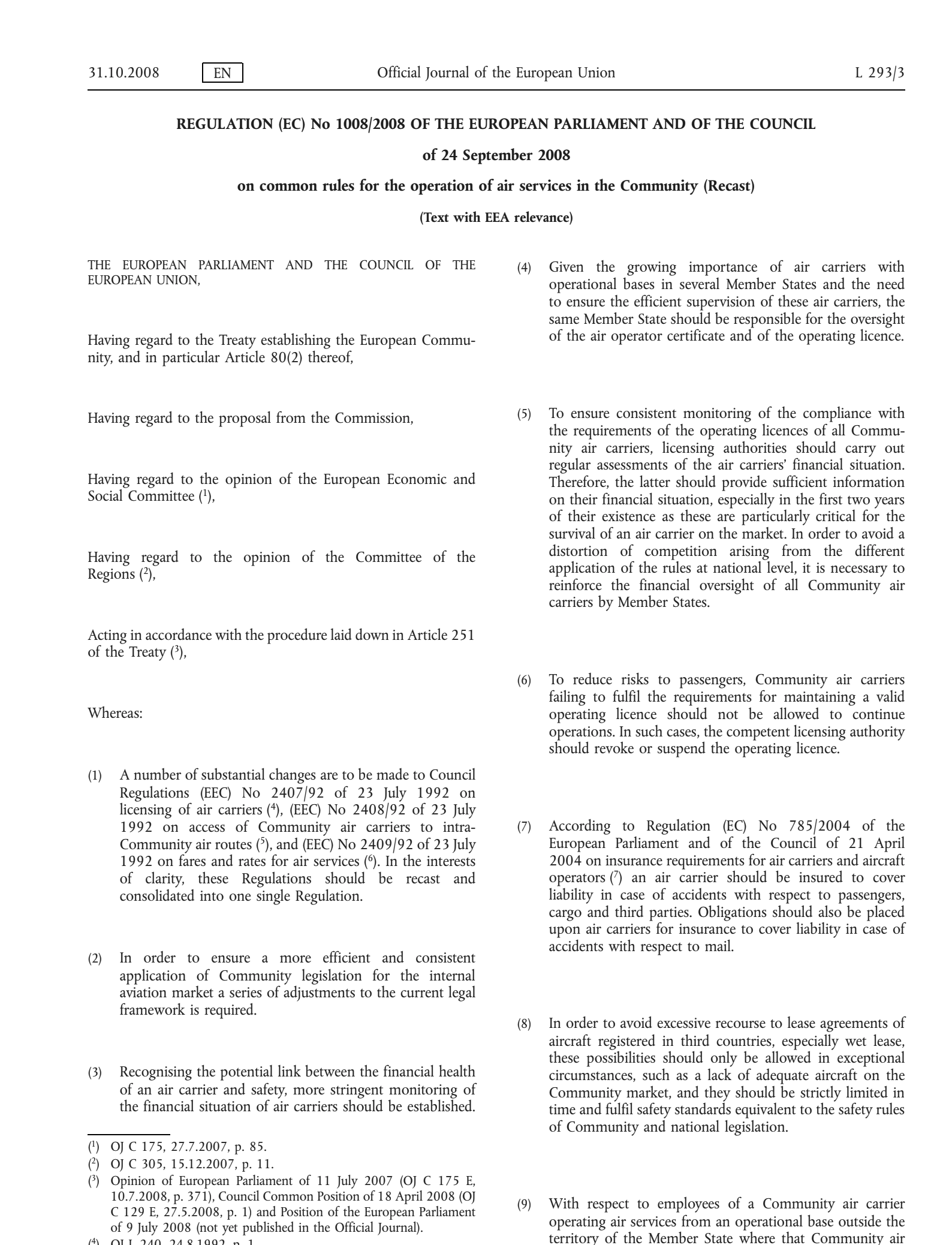
The following example uses Anthropic’s Claude Sonnet 4 model to extract the summary of a legal text with a complex
layout. The document CELEX_32008R1008_EN_TXT.pdf is stored inthe @docs stage; the prompt narrows the summarization
context.
Response:
Technical report exploration
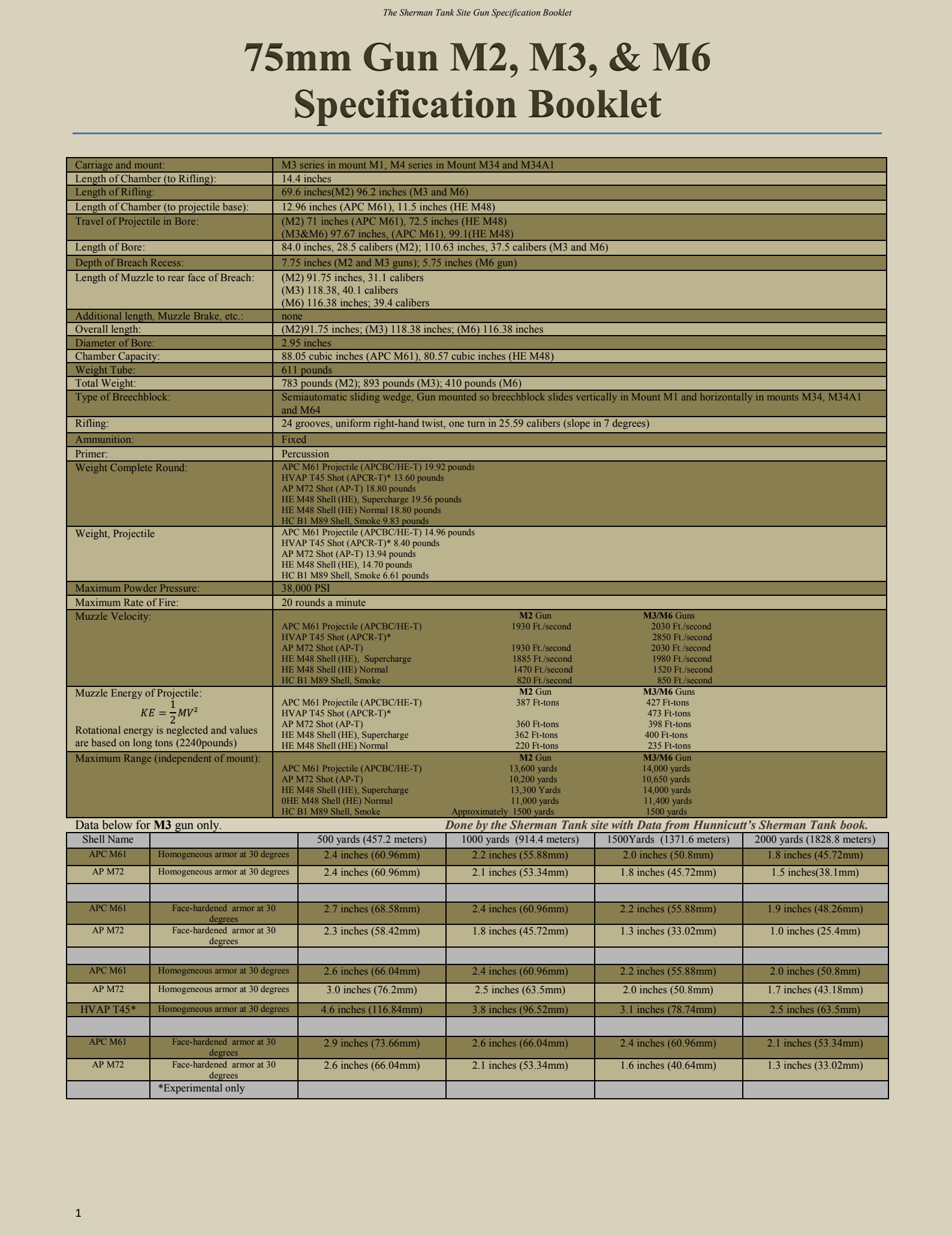
The following example uses the Gemini 3.1 Pro model to analyze casualty data represented in the diagrams of a technical report. The document 75mm-M3-spec-booklet-MK-VI.pdf is stored in the @docs stage.
Response:
Supported models and limitations
All models available to Snowflake Cortex have limitations on the total number of input and output tokens, known as the model’s context window. The context window size is measured in tokens. Inputs exceeding the context window limit result in an error.
For text models, tokens generally represent approximately four characters of text; the word count corresponding to a limit is somewhat less than the context window given in tokens. For image models, the token count per document depends on the vision model’s architecture. Tokens within a prompt (e.g., “summarize this document:”) also contribute to the model’s context window.
| Model | Context window (tokens) | File types | File size | Max pages | Documents per prompt |
|---|---|---|---|---|---|
gemini-3.1-pro | 1,000,000 | .pdf, .txt, .md | 37.5MB | 3,000 | 20 |
gemini-3.1-flash-lite | 1,000,000 | .pdf, .txt, .md | 37.5MB | 1,000 | 20 |
gemini-3.5-flash | 1,000,000 | .pdf, .txt, .md | 37.5MB | 1,000 | 20 |
claude-4-sonnet | 200,000 | .txt, .md, .pdf, .doc, .docx, .xls, .xlsx, .csv, .xhtml | 22MB | 100 | 5 |
claude-4-opus | 200,000 | .txt, .md, .pdf, .doc, .docx, .xls, .xlsx, .csv, .xhtml | 22MB | 100 | 5 |
claude-haiku-4-5 | 200,000 | .txt, .md, .pdf, .doc, .docx, .xls, .xlsx, .csv, .xhtml | 22MB | 100 | 5 |
claude-sonnet-4-5 | 200,000 | .txt, .md, .pdf, .doc, .docx, .xls, .xlsx, .csv, .xhtml | 22MB | 100 | 5 |
claude-opus-4-5 | 200,000 | .txt, .md, .pdf, .doc, .docx, .xls, .xlsx, .csv, .xhtml | 22MB | 100 | 5 |
claude-sonnet-4-6 | 1,000,000 | .txt, .md, .pdf, .doc, .docx, .xls, .xlsx, .csv, .xhtml | 22MB | 100 | 5 |
claude-opus-4-6 | 1,000,000 | .txt, .md, .pdf, .doc, .docx, .xls, .xlsx, .csv, .xhtml | 22MB | 100 | 5 |
claude-opus-4-7 | 1,000,000 | .txt, .md, .pdf, .doc, .docx, .xls, .xlsx, .csv, .xhtml | 22MB | 100 | 5 |
claude-opus-4-8 | 1,000,000 | .txt, .md, .pdf, .doc, .docx, .xls, .xlsx, .csv, .xhtml | 22MB | 100 | 5 |
claude-sonnet-5 | 1,000,000 | .txt, .md, .pdf, .doc, .docx, .xls, .xlsx, .csv, .xhtml | 22MB | 100 | 5 |
claude-opus-5 | 1,000,000 | .txt, .md, .pdf, .doc, .docx, .xls, .xlsx, .csv, .xhtml | 22MB | 100 | 5 |
Access control requirements
To use the AI_COMPLETE function, a user with the ACCOUNTADMIN role must grant the SNOWFLAKE.CORTEX_USER database role to the user who will call the function. See Cortex LLM privileges topic for details.
Users must also have READ access to the stage and file being processed.
Cost considerations
Cost is determined by the total number of tokens processed, not by file size. When documents are uploaded, textual content is extracted and converted into tokens; visual page segments (images) are also transformed into tokens. Billing is based on the sum of input tokens (text plus images that the model reads) and output tokens (text the model generates).
Actual token counts vary based on the underlying architecture of a model, as well as the document composition and structure. Content such as dense tables, spreadsheets, structured data, code, repeated headers and footers, or OCR-derived text may increase token volume. Conversely, image-heavy or slide-based documents with minimal extractable text may result in lower token counts.
Note
The AI_COUNT_TOKENS function does not currently support document inputs in multimodal models.
Choosing a model
The MMLongBench-Doc benchmark is used for evaluating model capabilities in multimodal and long context comprehension, including cross page information retrieval.
| Model | MMLongBench-Doc score |
|---|---|
| claude-3-7-sonnet | 52.8% |
| claude-4-sonnet | 50.2% |
| claude-4-opus | 53.0% |
| claude-haiku-4-5 | 48.9% |
| claude-sonnet-4-5 | 61.4% |
| claude-opus-4-5 | 63.8% |
| claude-sonnet-4-6 | 62.3% |
| gemini-3.1-pro | 60.5% |
Regional availability
Error conditions
Snowflake Cortex AI_COMPLETE can produce the following error messages:
| Message | Explanation |
|---|---|
| _COMPLETE_WITH_PROMPT_HISTORY_LLM$V1 with remote service error: 400 ‘”invalid request parameters: unsupported document content type: application/vnd.ms-excel” | The selected file of an unsupported type (in this example, a Microsoft Excel file). Only Claude models support Excel files. |
| Request failed for external function _COMPLETE_WITH_PROMPT_HISTORY_LLM$V1 with remote service error: 400 ‘”invalid request parameters: File data exceeds the limit of 10.00 MB for file prefix/file.pdf” | File size exceeds limit (10MB in this example). |
| Remote file ‘@docs/file.pdf’ was not found. There are several potential causes. The file might not exist. The required credentials may be missing or invalid. If you are running a copy command, please make sure files are not deleted when they are being loaded or files are not being loaded into two different tables concurrently with auto purge option. | Possibly an error in the filename. Filenames are case-sensitive. Or the file might have been deleted. |
| Error in secure object | May indicate that the stage does not exist. Check the stage name and ensure that the stage exists and is accessible. Be sure to use an at sign (@) at the beginning of the stage name. Ensure that the stage uses server-side encryption. |
| Request failed for external function COMPLETE$V6 with remote service error: 400 ‘”model “model_name” does not support given modality” | The model provided in the request doesn’t support document or text modality. |
| Request failed for external function _COMPLETE_WITH_PROMPT with remote service error: 500 ‘”internal error” | Issue with processing the request on the server side. It could be the case that the file is corrupted or truncated. |
Legal notices
The data classification of inputs and outputs are as set forth in the following table.
| Input data classification | Output data classification | Designation |
|---|---|---|
| Usage Data | Customer Data | Generally available functions are Covered AI Features. Preview functions are Preview AI Features. [1] |
For additional information, refer to Snowflake AI and ML.