Snowpipe Streaming REST API endpoints
Note
Where possible, use the Snowpipe Streaming SDK instead of the REST API to benefit from automatic batching and simpler integration. Use direct REST when an SDK isn’t suitable for your environment.
The Snowpipe Streaming REST API is designed for lightweight workloads and provides a flexible way to integrate with external applications without using a Snowpipe Streaming SDK.
This reference documents both ingestion modes:
- Elastic Channel endpoints for at-least-once ingestion without channel lifecycle or offset-token management.
- Named Channel endpoints for ordered, exactly-once ingestion.
Request headers
The following request headers apply to all the endpoints for the Snowpipe Streaming REST API:
| Header | Description |
|---|---|
Authorization | Authentication token |
X-Snowflake-Authorization-Token-Type (optional) | JWT/OAuth |
Content-Type (required when the request has a body) | Media type of the request body. Use application/x-ndjson for append-rows requests. Use application/json for open-channel, drop-channel, and bulk channel-status bodies. Use application/x-www-form-urlencoded for the scoped-token exchange. |
Content-Encoding (optional) | Specifies the compression format of the payload. Supported: gzip, zstd. |
User-Agent (optional) | Identifies the client application. Recommended format: SnowpipeStreamingSDK/{version} ({platform}) {LANGUAGE}/{language_version} (app={partner-name}). Example: SnowpipeStreamingSDK/1.0.0 (Linux amd64) PYTHON/3.11.0 (app=MyPartnerApp). |
Direct REST clients must group rows into newline-delimited JSON (NDJSON), with one JSON object per line, and handle compression themselves. Both Elastic and Named Channel append requests have a 4 MB payload limit (the payload size sent over the network, after compression if used). Batch rows and use ZSTD or Gzip compression to reduce request overhead; bound batch size and elapsed time before sending.
Client requirements
A request that doesn’t meet the following requirements returns an HTTP 4xx error. These errors generally aren’t retryable, except for the cases in Retry policy.
The requirements are:
- Use the ingest hostname for your account, the documented HTTP method, and the documented request path and query parameters.
- Include the required headers with valid values, including
Authorizationand the content type the endpoint expects. When you compress a body, setContent-Encodingtogziporzstd. - Send a valid, unexpired authentication token whose role is authorized for the target account, pipe, and table.
- Stay within the account, channel, request, and byte-rate limits. For those limits, see Snowpipe Streaming high-performance limitations.
For retry delays, retryable status codes, and Named Channel recovery, see REST API error handling.
Get Hostname
The Get Hostname returns the hostname used to interact with the Snowpipe Streaming REST API. Each account has a unique hostname.
Note
For private connectivity (AWS PrivateLink, Azure Private Link, or Google Cloud Private Service Connect), call this endpoint through your private account URL, and configure private DNS for the returned ingest hostname before you use it for the scoped-token exchange and streaming operations. For discovery commands, DNS configuration, and verification checks shared by SDK, REST, and Kafka clients, see Network connectivity prerequisites.
Response:
The response body is the ingest hostname as plain text, not a JSON object.
Description of the response:
| Field | Type | Description |
|---|---|---|
| Response body | String | The account-specific streaming ingest hostname. |
Exchange Scoped Token
The Exchange Scoped Token returns a security token that can be used to access only the Snowpipe Streaming API-related service. This provides security protection for the customer.
Request:
| Attribute | Required | Component | Description |
|---|---|---|---|
| content_type | Yes | Header | “application/x-www-form-urlencoded” |
| grant_type | Yes | Payload | “urn:ietf:params:oauth:grant-type:jwt-bearer” |
| scope | Yes | Payload | The hostname of the account. |
Response:
Description of response fields:
| Field | Type | Description |
|---|---|---|
| Token | String | The scoped token. |
Elastic Channel endpoints
Elastic Channels don’t require a separate open-channel operation. Send a batch of NDJSON rows directly to a table or to the implicit ELASTIC channel of a pipe:
The table endpoint is only for Elastic Channels. On the first request, Snowflake creates or resolves the managed default pipe named <tableName>-STREAMING. Each streaming pipe includes an implicit ELASTIC channel, which the request uses without a separate open-channel operation. Use the pipe endpoint for an Elastic Channel on a custom pipe with in-flight transformations or pre-clustering.
Elastic request attributes
| Attribute | Required | Component | Description |
|---|---|---|---|
databaseName | Yes | URI | Database name, case-insensitive. |
schemaName | Yes | URI | Schema name, case-insensitive. |
tableName or pipeName | Yes | URI | The target table for the default pipe, or the custom pipe name. |
rows | Yes | Body | NDJSON rows. The maximum Elastic request payload is 4 MB (the payload size sent over the network, after compression if used). |
requestId | No | Query parameter | A UUID that tracks the request. Use the same value on every retry of the same rowset (batch of rows), and generate a new UUID for each distinct rowset. |
retryCount | No | Query parameter | The retry attempt number, starting at 0. Increment it for each retry. A value greater than 0 signals that duplicate rows are possible; it doesn’t prove that a duplicate occurred. |
Send a non-empty NDJSON rowset. Elastic requests must not include continuationToken, offsetToken, startOffsetToken, or endOffsetToken.
Elastic response and delivery semantics
A successful HTTP 200 response is the durable acknowledgement: Snowflake has durably buffered the request payload. It doesn’t mean that rows are immediately queryable in the target table. Row-level processing errors are persisted to the error table when error logging is enabled.
Elastic Channels provide at-least-once delivery without an ordering guarantee. Retrying after an ambiguous response can produce duplicate rows. Include a stable event identifier in the row payload and reconcile or deduplicate downstream when duplicates matter.
Elastic append example
For a retry of this rowset, reuse REQUEST_ID and increment retryCount. To use a custom pipe, replace the table path with /pipes/$PIPE/channels/ELASTIC/rows.
Named Channel endpoints
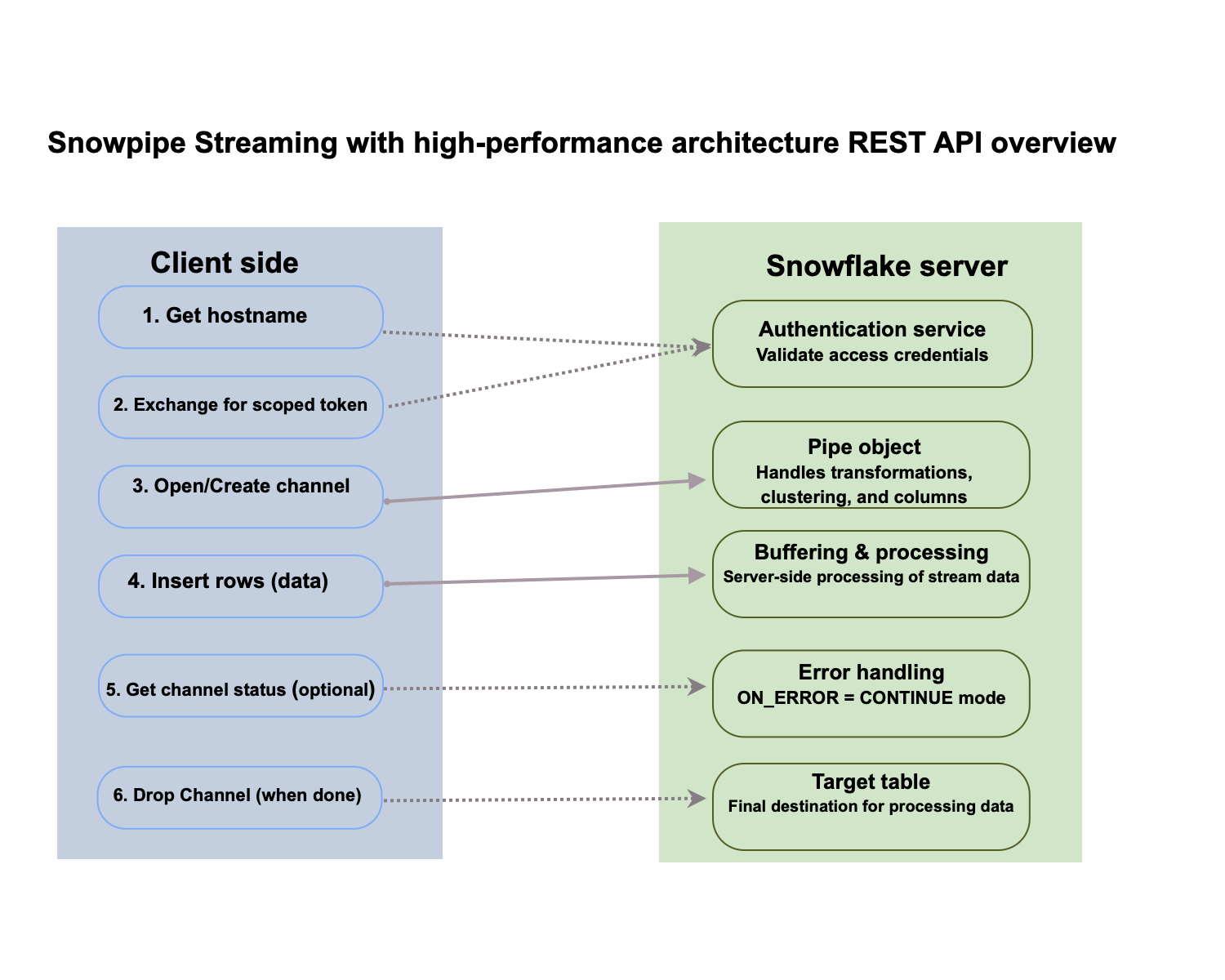
Named Channels require explicit channel lifecycle, continuation tokens, and source offset tokens. The following operations support ordered, exactly-once ingestion.
The following diagram shows the Named Channel request flow:
Open a Named Channel
The Open Channel operation creates or opens a new channel against a pipe or table. If the channel already exists, Snowflake bumps the client sequencer of the channel and returns the last committed offset token.
Request:
| Attribute | Required | Component | Description |
|---|---|---|---|
| databaseName | Yes | URI | Database name, case-insensitive. |
| schemaName | Yes | URI | Schema name, case-insensitive. |
| pipeName | Yes | URI | Pipe name, case-insensitive. |
| channelName | Yes | URI | The name of the channel that you create or re-open, case-insensitive. |
| offset_token | No | Payload | String used to set an offset token when opening a channel. |
| fail_on_uncommitted_rows | No | Payload | Boolean. When true, the server rejects the request with HTTP 409 Conflict (ERR_CHANNEL_HAS_UNCOMMITTED_DATA) if the channel has uncommitted in-flight data. Otherwise, in-flight data is silently discarded and can slow co-located channels on the pipe (default: false). For how to use this field during recovery, see Recover a Named Channel after a REST error. |
| requestId | No | Query parameter | A universally unique identifier (UUID) used to track requests through the system. |
Response:
Description of response fields:
| Field | Type | Description |
|---|---|---|
| next_continuation_token | String | An API-managed token that must be used in the subsequent Append Rows request. The token links a series of calls, ensuring a contiguous, in-order stream of data and maintaining the session state for exactly once delivery. |
| channel_status | Object | A nested object with the following detailed information about the channel:
|
Open channel requirements
- Use the same
databaseName,schemaName,pipeName, andchannelNamefor later open, append, drop, and status calls on that channel. - Send open requests for one channel name one at a time. Overlapping open calls against the same name are rejected.
- Store
next_continuation_tokenfor the next append andlast_committed_offset_tokenfrom this response when the open succeeds. For the recovery sequence, see Recover a Named Channel after a REST error.
Append rows to a Named Channel
The Append Rows operation inserts a batch of rows to the given channel.
Send this request to the ingest hostname returned by Get Hostname, not to your Snowflake account hostname.
Set the continuationToken query parameter to the next_continuation_token value returned by the Open Channel request
for the first request, and to the next_continuation_token value returned by the previous Append Rows response for each
later request.
Named Channel append workflow
Every Named Channel append request must include a continuation token. Snowflake issues this token, and your client sends it back unchanged. You get the first token when you open the channel. Each successful append returns the token to use for the next append.
- Call Open a Named Channel. In the JSON response body, read the top-level
next_continuation_tokenfield and save its value in your client. - Send an Append Rows request. Set these query parameters:
continuationToken: The saved token value, unchanged.offsetToken: Your source offset for this batch, such as a Kafka offset. This value records exactly-once progress, and a later open-channel response returns it aslast_committed_offset_token.
- When the append succeeds, read
next_continuation_tokenfrom the append response body. Replace your saved token with this new value, and discard the old one. - Repeat steps 2 and 3 for each batch.
Send appends for one channel one at a time. Wait for each append response before you send the next append, because the next request needs the token from that response.
The request body must be a non-empty NDJSON rowset, and the payload sent on the network must be 4 MB or smaller. For retries, see REST API retry policy. For Named Channel recovery, see Recover a Named Channel after a REST error.
Request:
| Attribute | Required | Component | Description |
|---|---|---|---|
| databaseName | Yes | URI | Database name, case-insensitive. |
| schemaName | Yes | URI | Schema name, case-insensitive. |
| pipeName | Yes | URI | Pipe, case-insensitive. |
| channelName | Yes | URI | Channel name, case-insensitive. |
| continuationToken | Yes | Query parameter | Continuation token from Snowflake. It encapsulates both client and row sequencers. Use next_continuation_token from the latest successful open or append response. See Named Channel append workflow. |
| offsetToken | No | Query parameter | User-defined source offset for this request. Set offsetToken on each append so a later open-channel response can return it as last_committed_offset_token. For how this token differs from continuationToken, see Roles of offsetToken and continuationToken. |
| startOffsetToken | No | Query parameter | Offset token for the first row in the batch. |
| endOffsetToken | No | Query parameter | Offset token for the last row in the batch. |
| rows | Yes | Payload | The actual data payload to be ingested in NDJSON format. The maximum allowed size for this attribute is 4 MB. |
| requestId | No | Query parameter | A UUID used to track requests through the system. |
Note
The JSON text within the NDJSON payload must strictly conform to the RFC 8259 standard. Each JSON text must be followed by a newline character \n (0x0A). You can also insert a carriage return \r (0x0D) before the newline character.
Response:
Description of response fields:
| Field | Type | Description |
|---|---|---|
| next_continuation_token | string | The next continuation token from Snowflake, which encapsulates both client and row sequencers. It should be used for inserting the next batch. |
Drop a Named Channel
The Drop Channel operation drops a Named Channel and its metadata on the server. Set fail_on_uncommitted_rows to true to reject the drop when uncommitted rows exist. If you leave it false, Snowflake can discard in-flight data.
Request:
| Attribute | Required | Component | Description |
|---|---|---|---|
| databaseName | Yes | URI | Database name, case-insensitive |
| schemaName | Yes | URI | Schema name, case-insensitive |
| pipeOrTableName | Yes | URI | Pipe or table name, case-insensitive |
| channelName | Yes | URI | Channel name, case-insensitive |
| fail_on_uncommitted_rows | No | Payload | Boolean. When true, the server rejects the request with HTTP 409 Conflict (ERR_CHANNEL_HAS_UNCOMMITTED_DATA) if the channel has uncommitted in-flight data. Otherwise, in-flight data is silently discarded and can slow co-located channels on the pipe (default: false). |
| requestId | No | Query parameter | A UUID used to track requests through the system |
Response:
This operation returns a payload with no specific successful response other than the HTTP status code.
Get Named Channel status in bulk
The Bulk Get Channel Status operation returns the status of a channel for a specific client sequencer.
Request:
| Attribute | Required | Component | Description |
|---|---|---|---|
| databaseName | Yes | URI | Database name, case-insensitive |
| schemaName | Yes | URI | Schema name, case-insensitive |
| pipeName | Yes | URI | Pipe name, case-insensitive |
| channel_names | Yes | Payload | An array of String channel names that the customer wants to get status for; the names are case-sensitive. For example, {"channel_names":["channel1", "channel2"]}. |
Response:
Note
If no requested channel is found in the service, the response payload doesn’t have an entry for that channel within the channel_statuses object.
Description of channel_statuses fields for each channel:
| Field | Type | Description |
|---|---|---|
| channel_status_code | String | Indicates the status of the channel. |
| last_committed_offset_token | String | Latest committed offset token. |
| database_name | String | The name of the database that the channel belongs to. |
| schema_name | String | The name of the schema that the channel belongs to. |
| pipe_name | String | The name of the pipe that the channel belongs to. |
| channel_name | String | The name of the channel. |
| rows_inserted | int | A count of all rows inserted into this channel. |
| rows_parsed | int | A count of all rows parsed, but not necessarily inserted into this channel. |
| rows_errors | int | A count of all rows that experienced errors when inserted into this channel and were therefore rejected. |
| last_error_offset_upper_bound | String | The upper bound for an ingestion error. The error will be located at or before this committed offset token. |
| last_error_message | String | A human readable message corresponding to the latest error code for that channel, with sensitive customer data redacted. |
| last_error_timestamp | timestamp_utc | Timestamp at the time when the last error occurred. |
| snowflake_avg_processing_latency_ms | int | Average end-to-end processing time for this channel. |
Error response structure
The Snowpipe Streaming REST APIs return a JSON payload for error responses. This structure provides actionable information for both automated error handling and human analysis. For which status codes to retry, how to refresh authentication, and how to recover a Named Channel, see REST API error handling.
The response payload has the following structure:
Response fields
| Field | Type | Description |
|---|---|---|
| Code | String | A stable, programmatic error code. This value can be used for automated error handling and logging. For example, an application’s logic can check for a specific code to trigger a predefined action. |
| Message | String | A human-readable message that describes the error. This message is subject to change and shouldn’t be used for automated parsing. |
Example
The following example shows an error response you might receive:
This example shows the response for an attempt to use a continuation token with a stale channel sequencer. The code provides a clear, machine-readable identifier for the error, and the message offers a helpful, descriptive text for a user.