基本的なコンシューマーが実行するデータ分析
概要
このトピックでは、クリーンルーム API を使用してコンシューマーが実行する基本的な分析を説明します。この例では、プロバイダーがデータのあるクリーンルームの作成と共有をどのようにプログラムで行っているのか、コンシューマーがプロバイダーのデータに対してどのように分析を実行するのかを示しています。プロバイダーは、データに対して実行できる SQLクエリを定義します。プロバイダーは、プロバイダーのデータのみ、コンシューマーのデータのみをクエリする、またはプロバイダーとコンシューマーのデータを結合するクエリを定義できます。
コード例全体 をダウンロードし、Snowflakeアカウントにアップロードして実行することができます。
次の図は、基本的なコンシューマー実行分析における、主要コンポーネントを通じたデータフローを示しています。
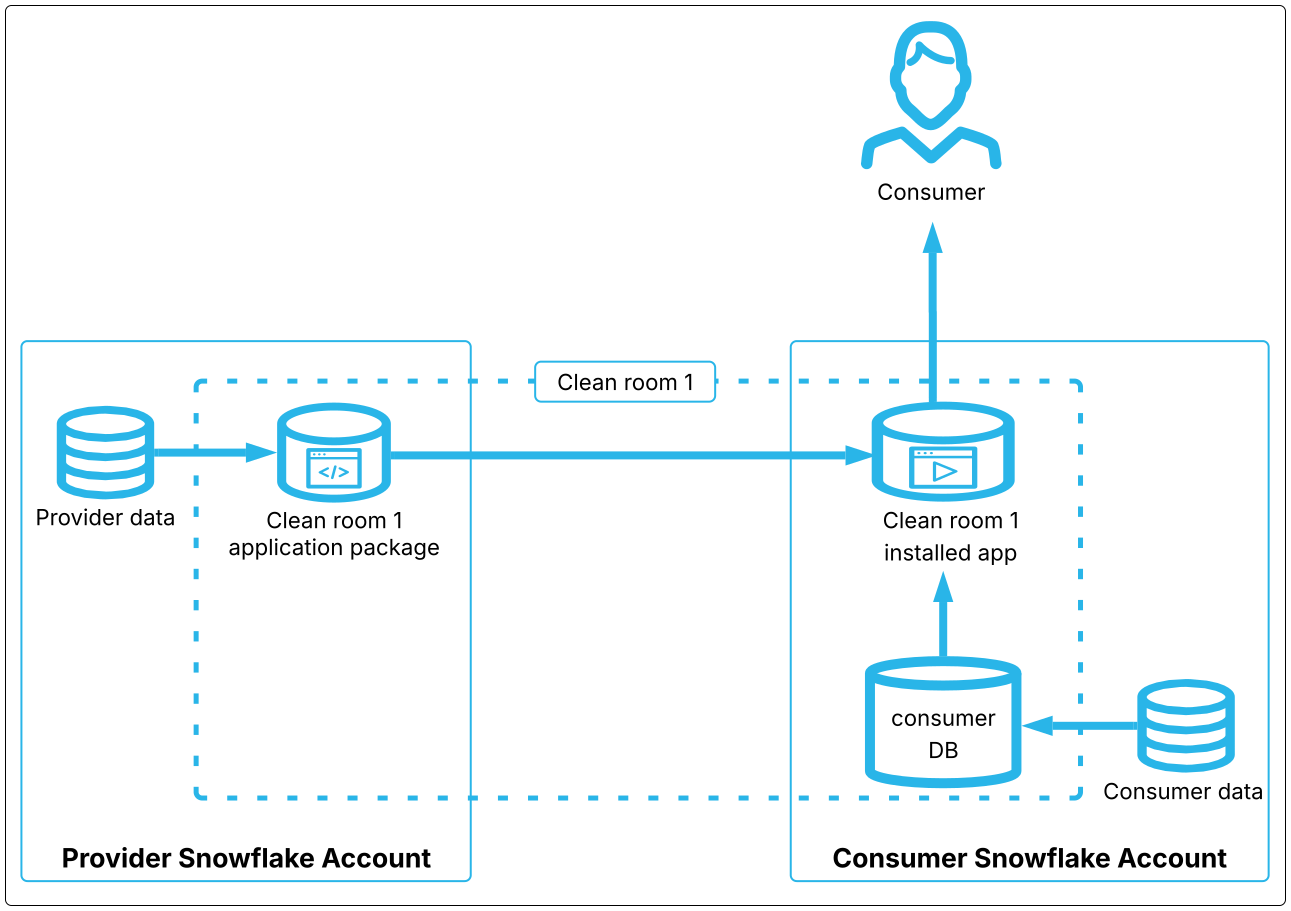
2者が関与する基本的なコンシューマー実行分析では、プロバイダーとコンシューマーがデータをクリーンルームにリンクします。このデータには、コンシューマーアカウントのクリーンルームアプリケーションパッケージのコンシューマー DB に保存されたセキュアビューを使用して、アクセスします。
分析中、コンシューマーのアカウント上のクリーンルームアプリは、指定されたコンシューマーとプロバイダーのセキュアビューを使用し、結果はコンシューマーと共有されます。
プロバイダーのステップ
以下のリストは、クリーンルームの作成、公開、コンシューマーとの共有を行うための主なステップを示しています。
環境の設定
API を使用するには、 SAMOOHA_APP_ROLE に権限があるウェアハウスを使用する必要があります。app_whは API へのアクセス権がある 多くのウェアハウス のうちの1つです。ニーズに適したウェアハウスを選択してください。(選択した場合は、 :ref:`独自のウェアハウスを使用する <label-cleanrooms_admin_add_warehouse>`こともできます。)
APIにアクセスするには、 SAMOOHA_APP_ROLE ロールが必要です。
クリーンルームの作成
次のステップでは、新しいクリーンルームを作成します。これは、クリーンルームが内部用か外部用かを指定する単一の APIコールで行われます。内部クリーンルームは、同じ組織内のコンシューマーのみがアクセスできます。外部クリーンルームは組織外のコンシューマーが利用できます。どちらのタイプのクリーンルームでも、コンシューマーがクリーンルームにアクセスするためには、クリーンルームの使用に招待される必要があります。
外部クリーンルームは、特定のアクションが実行されると、追加のセキュリティチェックがトリガーされます。これが発生した場合は、``provider.view_cleanroom_scan_status``を呼び出す必要があり、セキュリティスキャンがいつ完了するかを確認します。その後、次のアクションに進むことができます。
次の例では、内部クリーンルームを作成します。
クリーンルームにデータをリンクする
プロバイダーもコンシューマーも、テーブル、ビュー、および :ref:`その他のサポートされているデータオブジェクト <label-dcr_supported_linkable_objects>`をクリーンルームに *リンク*(インポート)できます。データをリンクすると、API はクリーンルーム内に、リンクされたソースオブジェクトに基づいて非表示のセキュアなビューを作成します。すべてのクリーンルームプロシージャにおいて、内部のビュー名ではなく、ソース名でリンクされたオブジェクトを参照します。
クリーンルームにリンクされたデータは、クリーンルームのコラボレーターが直接アクセスすることはできません。リンクされたデータは、クリーンルームにインポートされたテンプレートを使用してアクセスされます(データに対する:doc:自由形式 SQL クエリ</user-guide/cleanrooms/v1/web-app-sql-template> を有効にしない限り)
オブジェクトをクリーンルームにリンクする前に、オブジェクトを 登録 する必要があります。オブジェクトを登録すると、そのオブジェクトに対して SAMOOHA_APP_ROLEに適切なアクセス権限が付与されます。オブジェクトを直接登録することも、子オブジェクトにアクセスする親オブジェクト(データベースやスキーマなど)を登録することもできます。オブジェクトは UI または API のいずれかを使って登録できます。
Tip
UI では、API よりも登録の実行と管理が簡単です。
オブジェクトはクリーンルームレベルではなく、アカウントレベルで登録されます。オブジェクトはアカウントごとに1回だけ登録する必要があり、アカウント内の任意のクリーンルームにリンクできます。(自分のアカウントに登録されているオブジェクトのみをリンクできます。)オブジェクトを登録すると、そのアカウント内のどのクリーンルームでもそのオブジェクトをリンクすることができます。登録の詳細はこちら。
次の例は、サンプルデータベースSAMOOHA_SAMPLE_DATABASEのCUSTOMERSテーブルにリンクしています。このデータベースは、アカウントにクリーンルーム環境をインストールすると自動的に登録されるので、登録の必要はありません。クリーンルームでは、いつでもオブジェクトのリンクとリンクの解除ができ、結果はすべてのコラボレーターに素早く伝播されます。
結合ポリシーの設定
コンシューマーがデータに参加できるテンプレートをクリーンルームに追加する場合は、データに対して :ref:`クリーンルームの結合ポリシー<label-dcr_join_policies>`を設定する必要があります。クリーンルームの結合ポリシーは、コラボレーターによって実行されたクエリでどの列が結合できるのかを指定 :emph:`できます `。独自の結合ポリシーは、独自のクエリを制約しません。
クリーンルームは、リンクされたデータについて設定できる いくつかのタイプのデータポリシー をサポートしています。これらのポリシーは、同等のSnowflakeポリシーと似ていますが、同じではありません。また、ソースデータではなく、内部ビューにのみ適用されます。ソースデータに設定されたSnowflakeポリシーは、クリーンルームにリンクされたビューに伝播されます。クリーンルームのポリシーはリンクされたデータに対してのみ設定され、ソースデータには設定されません。
重要
テンプレートは、 JinjaSQL フィルターを使用してポリシーを強制する 役割を担います。テンプレートがポリシーフィルターを使用しない場合、ポリシーは尊重されません。作成したテンプレートに常にポリシーフィルターを設定し、実行するテンプレートを調べて、クリーンルームのポリシーが適用されていることを確認します。
ポリシーは、リンクしたデータにのみ設定できます。他の関係者のデータにポリシーを設定することはできません。
次の例は、リンクされたテーブルの2つの列が結合可能となるように許可する結合ポリシーを設定する方法を示しています。
クリーンルームにテンプレートを追加する
クリーンルームテンプレートは、通常 SQLクエリに評価される有効な JinjaSQL テンプレートです。テンプレート(分析 と呼ばれることもあります)は、呼び出し元によって引数が渡されることがあり、クリーンルームにリンクされた任意のデータにアクセスできます。プロバイダーもコンシューマーも、クリーンルームにテンプレートを追加して実行することができます。
Snowflakeはいくつかの標準テンプレートを提供しますが、おそらく独自のカスタムテンプレートを作成することになります。
設定したクリーンルームポリシーは、テンプレートにポリシーフィルターが含まれている場合にのみ強制されます。したがって、クリーンルームに追加するテンプレートにこれらのフィルターが確実に含まれるようにしてください。ポリシーの詳細については、 Snowflake Data Clean Roomのポリシーについて をご参照ください。
デフォルトでは、コンシューマーのみがテンプレートを実行できます。:doc:`プロバイダーがテンプレートの実行を希望する</user-guide/cleanrooms/demo-flows/provider-run-analysis>`場合は、コンシューマーに権限を求める必要があります。同様に、:ref:`コンシューマーがテンプレートのアップロードを希望する<label-dcr_consumer_written_templates>`場合、プロバイダーに権限を求める必要があります。
カスタムテンプレートの作成について、詳細は:doc:/user-guide/cleanrooms/demo-flows/custom-templates`および:doc:/user-guide/cleanrooms/custom-templates`をご参照ください。
次の例は、Snowflakeが提供するテンプレートをクリーンルームに追加する方法を示しています。
列ポリシーを設定する
クリーンルームの列ポリシーは、コラボレーターが実行するクエリで、テーブルのどの列を投影できるかを指定します。列ポリシーは列とテンプレートの両方に関連付いているため、異なる列を異なるテンプレートで投影可能として定義できます。テンプレートは、そのテンプレートの列ポリシーを設定する前に、クリーンルームに存在する必要があります。
すべてのポリシーと同様に、列ポリシーは 上書き専用 です。これは、列ポリシーを設定すると、そのアカウントによって設定された既存の列ポリシーが完全に上書きされることを意味します。プロバイダーもコンシューマーも、データに列ポリシーを設定できます。列ポリシーの詳細はこちら。
次の例は、以前にリンクしたクリーンルームのサンプルデータベースから4つの列を投影できるようにする方法を示しています。
デフォルトバージョンを設定する
クリーンルームはバージョン管理されたネイティブアプリケーションです。クリーンルームにコードを追加するなど、特定のアクションはアプリケーションの新しいパッチバージョンを生成します。コンシューマーは自分のアカウントにクリーンルームをインストールする必要があります。インストールするバージョンは、指定したデフォルトのバージョン番号に基づいています。後でクリーンルームの新しいバージョンを公開し、デフォルトのバージョン番号をインクリメントすると、コンシューマーがインストールするバージョンは自動的に更新され、新しいインストールはデフォルトで新しいバージョンになります。クリーンルームのバージョン管理について詳細はこちら。
次の例は、コードがアップロードされていない場合、クリーンルームのデフォルトバージョンをV1.0.0に設定する方法を示しています。これは、クリーンルームの初期バージョンです。
クリーンルームを公開する
以下の例に示すように、クリーンルームを公開または再公開します。このプロシージャが初めて呼び出されると、クリーンルームが表示され、共有されたコンシューマーは誰でもインストールできるようになります。デフォルトバージョンを更新したり、クリーンルームUIに固有の変更を加えたりするときなど、重要な変更を行うたびに、このプロシージャを呼び出す必要があります。
これで、コンシューマーは次に説明するように、クリーンルームのインストール、データのリンク、ポリシーの設定、テンプレートの実行ができるようになります。
Tip
クリーンルームが不要になったら、プロバイダーとコンシューマーのアカウントからクリーンルームを削除する必要があります( provider.drop_cleanroom および consumer.uninstall_cleanroom )。1アカウントあたりのクリーンルームとコラボレーターの数に制限があります。アカウントに多くの未使用のクリーンルームを残すと、クォータに達する可能性があります。
コンシューマーのステップ
プロバイダーがクリーンルームを公開すると、コラボレーターとして追加されたすべてのコンシューマーは、UIまたはAPIのどちらかを使用してクリーンルームを表示したり、インストールしたりすることができます。このセクションでは、コンシューマーがどのようにクリーンルームをインストールし、APIを使用して分析を実行するかを示します。
コンシューマーがクリーンルームをインストールして分析を実行するステップの概要を説明します。
環境の設定
プロバイダーと同様に、コンシューマーは <label-cleanrooms_installation_details_warehouses>`にアクセスできる ウェアハウス SAMOOHA_APP_ROLEを使用する必要があります。ただし、プロバイダーとは異なり、コンシューマーは API に完全にアクセスするために SAMOOHA_APP_ROLE ロールを直接使用できます。または、そのアカウントのクリーンルーム管理者が、コンシューマー向けに API のサブセットを実行する権限を与える、より制限されたロールを付与できます。この制限されたロールは、一般的に「実行ロール」と呼ばれることもあり、クリーンルームの完全な権限を持つユーザーによって付与されます。:ref:`制限された API アクセスを付与する方法について詳細はこちら
実行ロールではクリーンルームをインストールできないため、次の例に示すように、SAMOOHA_APP_ROLEを使用する必要があります。
クリーンルームをインストールする
次のスニペットは、インストールするよう招待されたすべてのクリーンルームを一覧表示する方法を示しています。
次の例に示すように、プロバイダーから共有されたクリーンルームをインストールします。クリーンルームをインストールする際には、プロバイダーのアカウントロケーターを指定する必要があります。
Tip
クリーンルームには名前とIDの両方があります。APIを使用して作成されたクリーンルームの場合は、APIのプロシージャでクリーンルームの名前が必要な場合は常に、そのクリーンルーム名を使用します。UIで作成されたクリーンルームの場合は、APIのプロシージャでクリーンルームの名前が必要な場合は常に、そのクリーンルームの名前ではなく、IDを使用します。
クリーンルームUIでは、API を使用して:ui:`Supported with Developer APIs`として作成されたクリーンルームをラベル付けします。
データを追加してポリシーを設定する
クリーンルームテンプレートで、コンシューマーが自分のデータをクエリに含めることを許可している場合、コンシューマーはプロバイダーが行うのと同様に、データを登録し、データをリンクし、ポリシーを設定します。次の例に示すように、プロシージャについては必ず consumer バージョンを使用してください。
プロバイダーの結合ポリシーは、どのプロバイダー列を結合できるかを示します。この例では、どのプロバイダー列を結合できるか確認する方法を示しています。
プロバイダーがクリーンルームでテンプレートを実行するには、コンシューマーの承認が必要です。その結果、ほとんどのコンシューマーは、リンクするテーブルにポリシーを設定する手間がかかりません。ただし、プロバイダーが後でテンプレートの実行を求めた場合に備えて、ポリシーの追加を検討することをお勧めします。その時点では適切なポリシーを追加することを忘れる可能性があるためです。
ポリシーを設定すると、テンプレートにテンプレートの列に対する join_policy または column_policy フィルターが含まれている場合にのみポリシーが強制されます。したがって、クリーンルームに追加するテンプレートには、ポリシーを強制するこれらのフィルターが確実に含まれるようにしてください。クリーンルームのテンプレートを調べるには、 consumer.view_added_templates を呼び出します。ポリシーの詳細については、 Snowflake Data Clean Roomのポリシーについて をご参照ください。
分析を実行する
テンプレートを実行する前に、通常は、テンプレートが何を行い、どのような変数を受け入れるのかを調べ、次にクリーンルームで利用可能なプロバイダーテーブルを調べます。
テンプレートを調査する
クリーンルームのテンプレートを一覧表示し、それぞれのコードを調べることができます(プロバイダーが明示的に :ref:`コードを難読化<dcr_provider_add_custom_sql_template>`している場合を除く)。これは、クエリをよりよく理解するのに役立ちます。また、クリーンルームにテンプレートを解析させ、コードを実行するときにどの変数を渡すことができるのかを示すように依頼することもできます。
テンプレートの設計に従って、クエリで使用するテーブルのリストを渡すことができます。クリーンルームにリンクされたテーブルは、テンプレートに渡すことができます。
ほとんどのテンプレートは、実行時に指定できる変数もサポートしています。たとえば、特定の値に一致させる場合や、表示する列を指定する場合などです。理想的には、プロバイダーはテンプレートが何を行い、どのような引数を受け入れるかを知らせるべきです。しかし通常は、コードを確認するためにテンプレートも調べる必要があります。次のスニペットは、任意のコラボレーターによってクリーンルームに追加されたテンプレートを一覧表示し、特定のテンプレートでサポートされる引数を取得します。
Tip
テンプレートで使用される``my_table`` 配列変数が表示された場合、この変数はテンプレートの実行時に渡すコンシューマーテーブル名のリストを保持します。``source_table``配列変数が表示された場合、この変数はテンプレートの実行時に渡すプロバイダーテーブル名のリストを保持します。
どのデータが利用可能か確認する
次の例に示すように、あなた自身やプロバイダーがクリーンルームにリンクしたデータセットを表示することができます。
テーブル名を渡す場合は、これらのプロシージャの結果からの取得したテーブル名を使用します。ビュー名は使用 しません。
テンプレートを実行する
前の2つのステップでは、どのようなデータを持っていて、どのような変数を渡すことができるのかを学びました。これで分析を実行する準備が整いました。
クエリとデータサイズに応じて、ウェアハウスのサイズを:ref:より適切なもの <label-cleanrooms_installation_details_warehouses> に変更することができます。
以下の例では、ユーザーがコンシューマーテーブルとプロバイダーテーブルの両方、および2つの変数として dimensions (グループ化に使用される列)とオプションの where_clause (クエリの WHERE 句で使用される)を取るテンプレートを呼び出す方法を示しています。
テンプレートは単一のプロバイダーテーブルに対してクエリを実行するため、リクエストはコンシューマーテーブルを省略します。
次の例では、 dimensions 値が`p`を先頭にした列名であることに注意してください。その p は、この列が渡されたプロバイダーテーブルからのものであることを示します。通常、列名には`p` または c を追加する必要があります。プロバイダーまたはコンシューマーのどのテーブルからのものであるかを示し、列名を区別するためです。ただし、この要件は非常にテンプレート固有のものです。これらの接頭語がいつ必要かを理解するには、テンプレートプロバイダーとコミュニケーションをとるか、テンプレートコードを調べる必要があります。
コード例
以下のワークシートファイルは、クリーンルーム分析の作成、共有、実行方法を示しています。
以下の例をダウンロードし、Snowflakeアカウントにワークシートファイルとしてアップロードします。プロバイダーとコンシューマーには、それぞれクリーンルーム APIがインストールされた別々のアカウントが必要です。SQL ワークシートをSnowflakeアカウントにアップロードする手順をご参照ください。