Snowpark Migration Accelerator: Anleitung zur SMA-Ausführung

PySpark-Eingabe

Das Feature SMA-Checkpoints erfordert einen PySpark-Workload als Einstiegspunkt, da dieser davon abhängt, die Verwendung von PySpark DataFrames zu erkennen. Diese Anleitung führt Sie anhand eines einzigen Python-Skripts durch das Feature und bietet ein einfaches Beispiel dafür, wie Checkpoints generiert und innerhalb eines typischen PySpark-Workflows verwendet werden.

Eingabe-Workload

Eingabe-Workload

Beispiel für Inhalt einer .py-Datei

from pyspark.sql import SparkSession
from pyspark.sql import functions as F

spark = SparkSession.builder.appName("SparkFunctionsExample2").getOrCreate()

df1 = spark.createDataFrame([("Alice", "NY"), ("Bob", "LA")], ["name", "city"])
df2 = spark.createDataFrame([(10,), (20,)], ["number"])

df1_with_index = df1.withColumn("index", F.monotonically_increasing_id())
df2_with_index = df2.withColumn("index", F.monotonically_increasing_id())

df3 = df1_with_index.join(df2_with_index, on="index").drop("index")
df3.show()

Migration von Workload

Feature aktiviert

If the SMA-Checkpoints feature is enabled, a checkpoints.json file will be generated. If the feature is disabled, this file will not be created in either the input or output folders. Regardless of whether the feature is enabled, the following inventory files will always be generated: DataFramesInventory.csv and CheckpointsInventory.csv. These files provide metadata essential for analysis and debugging.

Konvertierungsprozess

To create a convert your own project please follow up the following guide: SMA User Guide.

Einstellungen für das Feature SMA-Checkpoints

As part of the conversion process you can customize your conversion settings, take a look on the SMA-Checkpoints feature settings.

Hinweis: In diesem Benutzerhandbuch werden die standardmäßigen Konvertierungseinstellungen verwendet.

Konvertierungsergebnisse

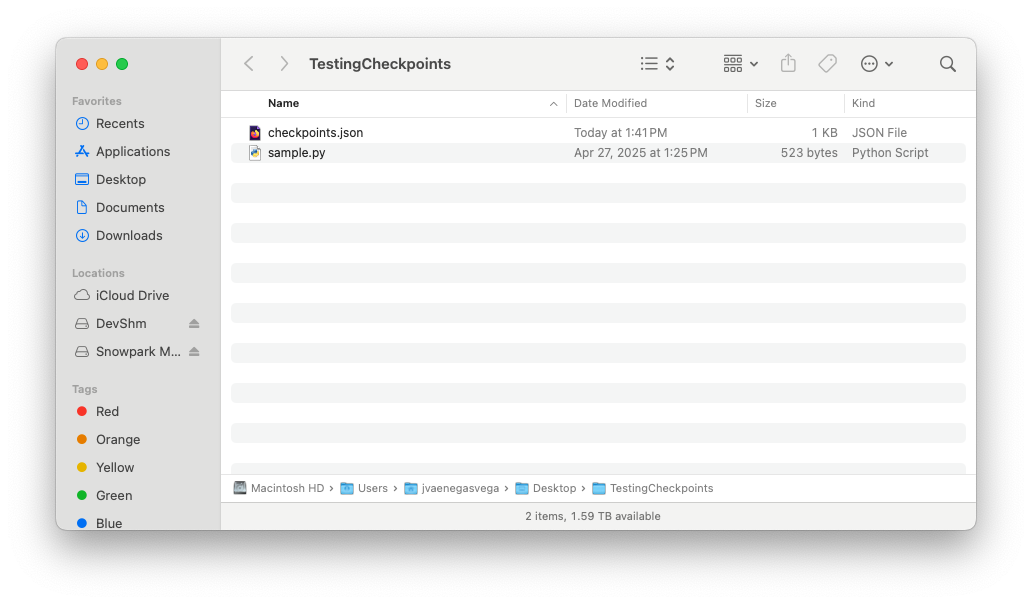
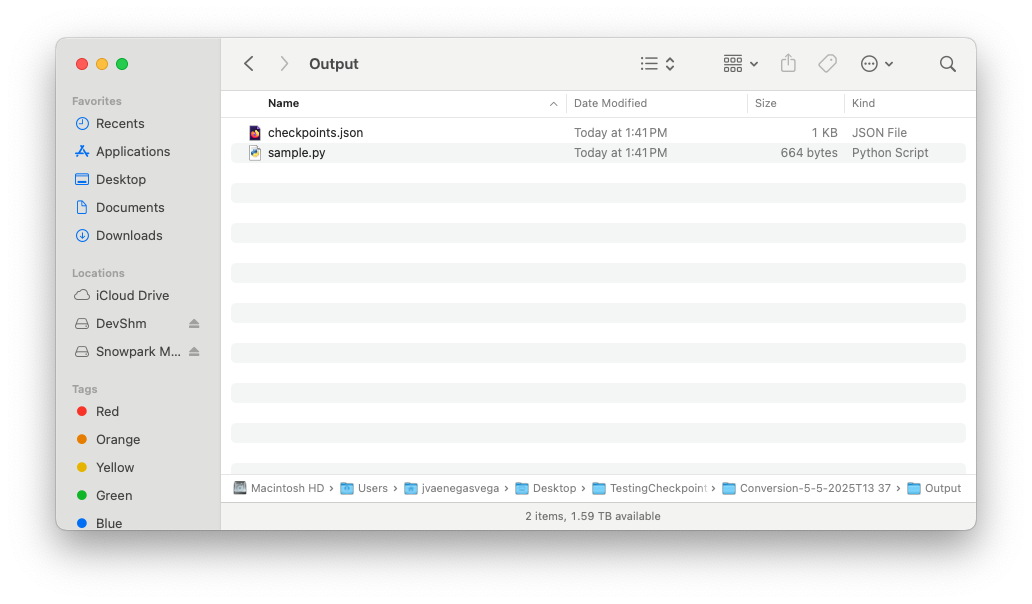
Once the migration process is complete, the SMA-Checkpoints feature should have created two new inventory files and added a checkpoints.json file to both the input and output folders.

Take a look on SMA-Checkpoints inventories to review the related inventories.

Eingabeordner

Eingabeordner

Inhalt der Datei „checkpoints.json“

{
  "createdBy": "Snowpark Migration Accelerator",
  "comment": "This file was automatically generated by the SMA tool as checkpoints collection was enabled in the tool settings. This file may also be modified or deleted during SMA execution.",
  "type": "Collection",
  "pipelines": [
    {
      "entryPoint": "sample.py",
      "checkpoints": [
        {
          "name": "sample$BBVOC7$df1$1",
          "file": "sample.py",
          "df": "df1",
          "location": 1,
          "enabled": true,
          "mode": 1,
          "sample": "1.0"
        },
        {
          "name": "sample$BBVOC7$df2$1",
          "file": "sample.py",
          "df": "df2",
          "location": 1,
          "enabled": true,
          "mode": 1,
          "sample": "1.0"
        },
        {
          "name": "sample$BBVOC7$df3$1",
          "file": "sample.py",
          "df": "df3",
          "location": 1,
          "enabled": true,
          "mode": 1,
          "sample": "1.0"
        }
      ]
    }
  ]
}

Ausgabeordner

Ausgabeordner

Inhalt der Datei „checkpoints.json“

{
  "createdBy": "Snowpark Migration Accelerator",
  "comment": "This file was automatically generated by the SMA tool as checkpoints collection was enabled in the tool settings. This file may also be modified or deleted during SMA execution.",
  "type": "Validation",
  "pipelines": [
    {
      "entryPoint": "sample.py",
      "checkpoints": [
        {
          "name": "sample$BBVOC7$df1$1",
          "file": "sample.py",
          "df": "df1",
          "location": 1,
          "enabled": true,
          "mode": 1,
          "sample": "1.0"
        },
        {
          "name": "sample$BBVOC7$df2$1",
          "file": "sample.py",
          "df": "df2",
          "location": 1,
          "enabled": true,
          "mode": 1,
          "sample": "1.0"
        },
        {
          "name": "sample$BBVOC7$df3$1",
          "file": "sample.py",
          "df": "df3",
          "location": 1,
          "enabled": true,
          "mode": 1,
          "sample": "1.0"
        }
      ]
    }
  ]
}

Once the SMA execution flow is complete and both the input and output folders contain their respective checkpoints.json files, you are ready to begin the Snowpark-Checkpoints execution process.