SnowConvert AI - Oracle - Oracle Built-in Data Types
Extended Data Types
Description
Beginning with Oracle Database 12_c_, you can specify a maximum size of 32767 bytes for the
VARCHAR2,NVARCHAR2, andRAWdata types. You can control whether your database supports this new maximum size by setting the initialization parameterMAX_STRING_SIZE.A
VARCHAR2orNVARCHAR2data type with a declared size of greater than 4000 bytes, or aRAWdata type with a declared size of greater than 2000 bytes, is an extended data type. (Oracle SQL Language Reference Extended Data Type).
Oracle allows increasing the database max string size from STANDARD to EXTENDED, however, Snowflake does not contain an equivalent for this functionality.
Therefore VARCHAR2, NVARCHAR2 and RAW extended Data Types are not supported in Snowflake, and they are transformed just as regular VARCHAR2, NVARCHAR2, and RAW data types. Check Character Data Types and RAW Data Types for more information.
Known Issues
1. MAX STRING SIZE not recognized
ALTER SYSTEM SET MAX_STRING_SIZE='EXTENDED';
Is not being parsed by SnowConvert.
JSON Data Type
Description
Oracle Database supports JSON natively with relational database features, including transactions, indexing, declarative querying, and views. Unlike relational data, JSON data can be stored in the database, indexed, and queried without any need for a schema that defines the data. (Oracle SQL Language Reference JSON Data Type).
The JSON data types are transformed to VARIANT to emulate the Oracle behavior.
Sample Source Patterns
JSON Data Type as a column in Create Table
Oracle
Result
COL1 |
|---|
{“id”:1,”content”:”json content”} |
{“stringdata”:”this is a text”,”number”:1,”numberNeg”:-1,”booleanT”:true,”booleanGF”:false,”nullvalue”:null,”object”:{“1”:1,”2”:2},”array”:[1,2,3]} |
{“id”:4} |
Snowflake
Warning
JSON data insertions are not being correctly handled. Check the Recommendations section for workarounds.
Known Issues
1. JSON data insertions
JSON data insertions are not being correctly handled by SnowConvert.
2. JSON objects manipulation
The usages of JSON objects (columns, variables, or parameters) are not correctly converted by SnowConvert AI. Check the Recommendations section for workarounds
Recommendations
1. JSON Data Type translation workaround
JSON datatype is translated to VARIANT, so the information can be formatted using the Snowflake PARSE_JSON function. This approach will allow you to store, query, and operate the JSON data in Snowflake using similar syntax as Oracle.
Oracle
Result 1
JSON_SERIALIZE(JSON_COLUMN) |
|---|
{“id”:1,”content”:”json content”} |
{“id”:2,”content”:{“header”:”header text one”,”content”:”content text one”}} |
{“id”:3,”content”:{“header”:”header tex two”,”content”:”content text two”}} |
Result 2
‘ID:’ JT.JSON_COLUMN.ID |
‘HEADER:’ UPPER(JT.JSON_COLUMN.CONTENT.HEADER) |
|---|---|
ID: 1 |
HEADER: |
ID: 2 |
HEADER: “HEADER TEXT ONE” |
ID: 3 |
HEADER: “HEADER TEX TWO” |
Snowflake
Result 1
JSON_COLUMN |
|---|
{ “content”: “json content”, “id”: 1} |
{ “content”: { “content”: “content text one”, “header”: “header text one” }, “id”: 2} |
{ “content”: { “content”: “content text two”, “header”: “header tex two” }, “id”: 3} |
Result 2
‘ID: ‘ JT.JSON_COLUMN:ID |
‘HEADER: ‘ UPPER(JT.JSON_COLUMN:CONTENT:HEADER) |
|---|---|
ID: 1 |
|
ID: 2 |
HEADER: HEADER TEXT ONE |
ID: 3 |
HEADER: HEADER TEX TWO |
Note
You must use SELECT as the INSERT INTO argument instead of the VALUES clause to use the PARSE_JSON function.
Note
Use the ‘:’ instead of the ‘.’ operator to access the JSON object properties. It allows several levels of nesting in both engines.
Related EWIs
SSC-EWI-0073: Pending Functional Equivalence Review
LONG Data Type
LONGcolumns store variable-length character strings containing up to 2 gigabytes -1, or 231-1 bytes.LONGcolumns have many of the characteristics ofVARCHAR2columns. You can useLONGcolumns to store long text strings. The length ofLONGvalues may be limited by the memory available on your computer. (Oracle SQL Language Reference Long Data Type)
Sample Source Patterns
Long in Create Table
Oracle
Snowflake
Retrieving data from a Long column
Oracle
Result
LONG_COLUMN |
|---|
this is a text |
Snowflake
Result
LONG_COLUMN |
|---|
this is a text |
Known Issues
1. The max length of long (Oracle) and varchar (Snowflake) are different
According to Oracle documentation, Long column can store up to 2 gigabytes of data, but Snowflake varchar is limited to 16Mb.
2. Cast of Long column
The Long data type can only be cast to a CLOB data type by using the TO_LOB function. This function only works when used in the select list of a subquery in an INSERT statement. Consider the following sample
Oracle
Warning
If the target table column data type is different from CLOB, Oracle may insert null values or display an error when attempting to insert the data.
Related EWIs
SSC-FDM-0006: Number type column may not behave similarly in Snowflake
RAW and LONG RAW Data types
Description
The
RAWandLONGRAWdata types store data that is not to be explicitly converted by Oracle Database when moving data between different systems. These data types are intended for binary data or byte strings. (Oracle SQL Language Reference Row and Long Raw Data Types)
Sample Source Patterns
Raw and Long Raw in Create Table
Oracle
Snowflake CREATE OR REPLACE TABLE raw_table
Retrieving data from Raw and Long Raw column
Oracle
Result
ID |
RAW_COLUMN |
LONG_RAW_COLUMN |
|---|---|---|
1 |
ªº««««© 2 B7 :ºººº«ºª»¬ßý |
|
2 |
ªªªªª |
«««««««««««««««««««ªººªºººººººººº |
3 |
ªªªªªªªªªªªªªªªªªªªªªªªªªªªªªªªªªªªªªªªªªªªªªªªªªªªªªªªªªªªªªªªªªªªªªªªªªªªªªªªªªªªªªªªªªªªªªªªªªªªªªªªªªªªªªªªªªªªªªªªªªªªªªªªªªªªªªªªªªªªªªªªªªªªªªªªªªªªªªªªªªªªªªªªªªªªªªªªªªªªªªªªªªªªªªªªªªªªªªªªªªªªªªªªªªªªªªªªªªªªªªªªªªªªªªªªªªªªªªªªªªªªªªªªªªªªªªªª |
ªªªªªªªªªªªªªªªªªªªªªªªªªªªªªªªªªªªªªªªªªªªªªªªªªªªªªªªªªªªªªªªªªªªªªªªªªªªªªªªªªªªªªªªªªªªªªªªªªªªªªªªªªªªªªªªªªªªªªªªªªªªªªªªªªªªªªªªªªªªªªªªªªªªªªªªªªªªªªªªªªªªªªªªªªªªªªªªªªªªªªªªªªªªªªªªªªªªªªªªªªªªªªªªªªªªªªªªªªªªªªªªªªªªªªªªªªªªªªªªªªªªªªªªªªªªªªªª |
Snowflake
Result
ID |
RAW_COLUMN |
LONG_RAW_COLUMN |
|---|---|---|
1 |
ªº««««© 2 B7 :ºººº«ºª»¬ßý |
|
2 |
ªªªªª |
«««««««««««««««««««ªººªºººººººººº |
3 |
ªªªªªªªªªªªªªªªªªªªªªªªªªªªªªªªªªªªªªªªªªªªªªªªªªªªªªªªªªªªªªªªªªªªªªªªªªªªªªªªªªªªªªªªªªªªªªªªªªªªªªªªªªªªªªªªªªªªªªªªªªªªªªªªªªªªªªªªªªªªªªªªªªªªªªªªªªªªªªªªªªªªªªªªªªªªªªªªªªªªªªªªªªªªªªªªªªªªªªªªªªªªªªªªªªªªªªªªªªªªªªªªªªªªªªªªªªªªªªªªªªªªªªªªªªªªªªªª |
ªªªªªªªªªªªªªªªªªªªªªªªªªªªªªªªªªªªªªªªªªªªªªªªªªªªªªªªªªªªªªªªªªªªªªªªªªªªªªªªªªªªªªªªªªªªªªªªªªªªªªªªªªªªªªªªªªªªªªªªªªªªªªªªªªªªªªªªªªªªªªªªªªªªªªªªªªªªªªªªªªªªªªªªªªªªªªªªªªªªªªªªªªªªªªªªªªªªªªªªªªªªªªªªªªªªªªªªªªªªªªªªªªªªªªªªªªªªªªªªªªªªªªªªªªªªªªªª |
Known Issues
No issues were found.
Related EWIs
No related EWIs.
Numeric Data Types
Description
The Oracle Database numeric data types store positive and negative fixed and floating-point numbers, zero, infinity, and values that are the undefined result of an operation—“not a number” or
NAN. (Oracle Language Reference Numeric Data Types)
Notes on arithmetic operations
Please be aware that every operation performed on numerical datatypes is internally stored as a Number. Furthermore, depending on the operation performed it is possible to incur an error related to how intermediate values are stored within Snowflake, for more information on Snowflake’s post on intermediate numbers in Snowflake.
FLOAT Data Type
Description
The
FLOATdata type is a subtype ofNUMBER. It can be specified with or without precision, which has the same definition it has forNUMBERand can range from 1 to 126. Scale cannot be specified but is interpreted from the data. (Oracle Language Reference Float Data Type)
Warning
Notes on arithmetic operations
Please be aware that every operation performed on numerical datatypes is internally stored as a Number. Furthermore, depending on the operation performed it is possible to incur an error related to how intermediate values are stored within Snowflake, for more information please check this post on Snowflake’s post on intermediate numbers in Snowflake.
Sample Source Patterns
Please, consider the following table and its inserts for the examples below:
Float data type in Create Table
Oracle
Snowflake
FLOAT
There are no differences between Oracle and Snowflake regarding FLOAT data type without precision.
Oracle
Result
col1 |
|---|
100.55555 |
1.9 |
Snowflake
Result
col1 |
|---|
100.55555 |
1.9 |
FLOAT ( p )
Queries results may not be equivalent when the precision (p) is specified in theFLOATdata type. There are small rounding differences.
Oracle
Result
col2 |
|---|
1.2 |
7.9 |
13 |
120 |
col3 |
—————————————————————————————————- |
1111111111111111111111111111111111111100000000000000000000000000000000000000000000000000000000000000 |
Snowflake
Result
col2 |
|---|
1.23 |
7.89 |
12.79 |
123.45 |
col3 |
—————————————————————————————————- |
1111111111111111000000000000000000000000000000000000000000000000000000000000000000000000000000000000 |
Known Issues
1. FLOAT data type with precision
When the FLOAT data type has precision, the queries results may have small rounding differences.
Related EWIs
No related EWIs.
NUMBER Data Type
Description
The
NUMBERdata type stores zero as well as positive and negative fixed numbers with absolute values from 1.0 x 10-130 to but not including 1.0 x 10126. If you specify an arithmetic expression whose value has an absolute value greater than or equal to 1.0 x 10126, then Oracle returns an error. EachNUMBERvalue requires from 1 to 22 bytes. (Oracle Language Reference Number Data Type).
The NUMBER data type can be specified using the following form NUMBER(p, s) (both parameters are optional) where:
pis the precision or the maximum number of significant decimal digits, where the most significant digit is the left-most nonzero digit, and the least significant digit is the right-most known digit. The precision can range from 0 to 38.sis the scale or the number of digits from the decimal point to the least significant digit. The scale can range from -84 to 127.
On Oracle, not specifying precision (using NUMBER or NUMBER(*)) causes the column to be created as an “undefined precision”. This means that Oracle will store values dynamically, allowing to store any number within that column. Snowflake does not support this functionality; for this reason, they will be changed to NUMBER(38, 18), allowing to store the widest variety of numbers.
Warning
Notes on arithmetic operations
Please be aware that every operation performed on numerical data types is internally stored as a Number. Furthermore, depending on the operation performed it is possible to incur an error related to how intermediate values are stored within Snowflake, for more information please check this post on Snowflake’s post on intermediate numbers in Snowflake or check the functional equivalence message SSC-FDM-0006.
Sample Source Patterns
Please, consider the following table and its inserts for the examples below:
Number data types in Create Table
Oracle
Snowflake
NUMBER ( default case )
When the precision and the scale are not specified, the default values are the maximum availableNUMBER(38, 127) . The current transformation for the default case is NUMBER(38,19).
Warning
In Oracle, not defining Precision nor scale defaults to an “Undefined Precision and Scale”. It behaves by storing the input “as received”, which means it can both deal with Integer and Floating point numbers. We use 38, 18 to try to cover both of them, by using 20 for integers, and leaving 18 for floating-point digits.
Oracle
Result
col1 |
|---|
100 |
Snowflake
Result
col1 |
|---|
100.0000000000000000000 |
NUMBER ( p )
In this case, the precision will specify the number of digits that the number could have at the left of the decimal point.
Oracle
Result
col2 |
|---|
2 |
Snowflake
Result
col2 |
|---|
2 |
NUMBER ( p, s ) p > s
In the case where the s is lower than the p, the precision will specify the number of digits that the number could have. The scale will specify the number of significant digits to the right of the decimal point, so the number of digits at the left of the decimal point will depend on the scale specified.
Oracle
Result
col3 |
|---|
12345.12345 |
Snowflake
Result
col3 |
|---|
12345.12345 |
NUMBER ( p, -s )
A negative scale is the number of significant digits to the left of the decimal point, to but not including the least significant digit. For the negative scale, the least significant digit is on the left side of the decimal point, because the actual data is rounded to the specified number of places to the left of the decimal point. The current transformation is to remove the negative scale.
Oracle
Result
col4 |
|---|
16400 |
17600 |
Snowflake
Result
col4 |
|---|
16431 |
17551 |
NUMBER ( p, s ) s > p
When the scale is greater than the precision, consider the following aspects:
The number to insert could not have significant digits to the left of the decimal point. Only zero is available.
The first digit to the right of the decimal point must be zero.
The precision specifies the maximum number of significant digits to the right of the decimal point.
Oracle
Result
col5 |
|---|
0.00009 |
0.00002 |
0.01268 |
Snowflake
Result
col5 |
|---|
0.00009 |
0.00002 |
0.01268 |
Known Issues
1. Scale value exceeds the maximum allowed by Snowflake
When specifying a scale greater than the maximum allowed in Snowflake (37) it is being changed to 18. To get more information about this please go to the SSC-FDM-0006 documentation.
2. Negative scale
Snowflake does not allow negative scale, so it is being removed. This could cause functional inequivalence. To get more information about this issue please go to the SSC-EWI-0R0092 documentation.
Recommendations
1. UDF for NUMBER datatype Operations
It is possible to migrate these operations manually by using the next UDF when performing arithmetic operations to avoid incurring the issues noted:
UDF
Related EWIs
SSC-EWI-OR0092 Number datatype negative scale was removed from output.
SSC-FDM-0006: Number type column may not behave similarly in Snowflake
SSC-FDM-OR0010 Number datatype smaller precision was increased to match scale
Floating-Point Numbers
Description
Floating-point numbers can have a decimal point anywhere from the first to the last digit or can have no decimal point at all. An exponent may optionally be used following the number to increase the range, for example, 1.777 e-20. A scale value is not applicable to floating-point numbers, because the number of digits that can appear after the decimal point is not restricted.Binary floating-point numbers are stored using binary precision (the digits 0 and 1)(Oracle Language Reference Floating-Point Numbers)
BINARY_DOUBLE
Description
BINARY_DOUBLEis a 64-bit, double-precision floating-point number data type. EachBINARY_DOUBLEvalue requires 8 bytes. In aBINARY_DOUBLEcolumn, floating-point numbers have binary precision. The binary floating-point numbers support the special values infinity andNaN(not a number). (Oracle Language Reference Binary_Double data type)
It is possible to specify floating-point numbers within the next limits:
Maximum positive finite value = 1.79769313486231E+308
Minimum positive finite value = 2.22507485850720E-308
Sample Source Patterns
Please, consider the following table and its inserts for the example below:
Binary Double in Create Table
Oracle
Snowflake
Note
‘NaN’ means Not a Number, this value is allowed by theBINARY_DOUBLE data type in Oracle and by theFLOATdata type in Snowflake.
BINARY_DOUBLE -> FLOAT
Since theBINARY_DOUBLEdata type is not supported by Snowflake it is being converted to FLOAT.
Oracle
Result
col1 |
|---|
0 |
179769313486231000000000000000000000000000000000000000000000000000000000000000000000000000000000000000000000000000000000000000000000000000000000000000000000000000000000000000000000000000000000000000000000000000000000000000000000000000000000000000000000000 |
NaN |
Snowflake
Result
col1 |
|---|
0 |
179769313486231000000000000000000000000000000000000000000000000000000000000000000000000000000000000000000000000000000000000000000000000000000000000000000000000000000000000000000000000000000000000000000000000000000000000000000000000000000000000000000000000 |
NaN |
Known Issues
1. The BINARY_DOUBLE data type is not supported by Snowflake
The BINARY_DOUBLE data type is converted to FLOAT since it is not supported by Snowflake.
Related EWIs
No related EWIs.
BINARY_FLOAT
Description
BINARY_FLOATis a 32-bit, single-precision floating-point number data type. EachBINARY_FLOATvalue requires 4 bytes. In aBINARY_FLOATcolumn, floating-point numbers have binary precision. The binary floating-point numbers support the special values infinity andNaN(not a number). (Oracle Language Reference Binary_Float data type)
It is possible to specify floating-point numbers within the next limits:
Maximum positive finite value = 3.40282E+38F
Minimum positive finite value = 1.17549E-38F
Sample Source Patterns
Please, consider the following table and its inserts for the example below:
Binary Float in Create Table
Oracle
Snowflake
Note
‘NaN’ means Not a Number, this value is allowed by theBINARY_FLOAT data type in Oracle and by theFLOATdata type in Snowflake.
BINARY_FLOAT -> FLOAT
Since theBINARY_FLOATdata type is not supported by Snowflake it is being converted to FLOAT.
Oracle
Result
col1 |
|---|
0 |
340282001837565600000000000000000000000 |
NaN |
Snowflake
Result
col1 |
|---|
0 |
340282000000000000000000000000000000000 |
NaN |
Known Issues
1. The BINARY_FLOAT data type is not supported by Snowflake
The BINARY_FLOAT data type is converted to FLOAT since it is not supported by Snowflake.
Related EWIs
No related EWIs.
Datetime and Interval Data Types
The datetime data types are
DATE,TIMESTAMP,TIMESTAMPWITHTIMEZONE, andTIMESTAMPWITHLOCALTIMEZONE. Values of datetime data types are sometimes called datetimes. The interval data types areINTERVALYEARTOMONTHandINTERVALDAYTOSECOND. Values of interval data types are sometimes called intervals. (Oracle SQL Language Reference Datetime and Interval Data Types)
DATE Data Type
Description
Oracle’s date data type stores both date and time information, however Snowflake’s date data type only stores date information. (Oracle SQL Language Reference Date Data Type)
The default transformation for Oracle DATE is to Snowflake TIMESTAMP. You can add the disableDateAsTimestamp flag (SnowConvert AI Command Line Interface) or disable the Transform Date as Timestamp setting (SnowConvert AI desktop application) to transform the DATE type to TIMESTAMP. Keep in mind that Snowflake DATE only stores date information and Oracle stores date and time information, if you want to avoid losing information you should transform DATE to TIMESTAMP.
Note
Important Rounding Behavior Difference: When performing operations between date/timestamp data types and intervals involving seconds, Oracle does not round the seconds but preserves the precision as specified, while Snowflake rounds the seconds to the nearest whole second. This difference in rounding behavior can lead to different results.
Sample Source Patterns
Date in Create Table
Oracle
Snowflake without –disableDateAsTimestamp flag or with “Transform Date as Timestamp” setting enabled
Snowflake with –disableDateAsTimestamp flag or with “Transform Date as Timestamp” setting disabled
Retrieving data from a Date column
Oracle
Result
DATE_COL |
|---|
2010-10-10 00:00:00.000 |
Snowflake
Result
DATE_COL |
|---|
2010-10-10 00:00:00.000 |
Result with disableDateAsTimestamp flag
DATE_COL |
|---|
2010-10-10 |
Known Issues
1. Input and output format may differ between languages
In Snowflake, DATE input and output formats depend on the DATE_INPUT_FORMAT and DATE_OUTPUT_FORMAT session variables. Insertions may fail because the DATE_INPUT_FORMAT enforces the user to use a specific format when a date is added by text. You can modify those variables using the following syntax.
Related EWIs
SSC-FDM-OR0042: Date Type Transformed To Timestamp Has A Different Behavior
INTERVAL DAY TO SECOND Data Type
Description
INTERVAL DAY TO SECOND stores a period of time in terms of days, hours, minutes, and seconds. (Oracle SQL Language Reference INTERVAL DAY TO SECOND Data Type)
By default, there is no equivalent for this data type in Snowflake and it is transformed to VARCHAR.
Note
Preview Feature: When the --UseIntervalDatatype preview flag is enabled, Oracle INTERVAL DAY TO SECOND columns are preserved as native Snowflake INTERVAL DAY TO SECOND types. See the Interval Data Types translation reference for complete transformation details.
Sample Source Patterns
Interval Day to Second in Create Table
Oracle
Snowflake
The Interval value is transformed to a supported Snowflake format and then inserted as text inside the column. Since Snowflake does not support Interval as a data type, it is only supported in arithmetic operations. To use the value, it needs to be extracted and used as an Interval constant (if possible).
Original Oracle value: INTERVAL '1 2:3:4.567' DAY TO SECOND
Value stored in Snowflake column: '1d, 2h, 3m, 4s, 567ms'
Value as Snowflake Interval constant: INTERVAL '1d, 2h, 3m, 4s, 567ms'
Retrieving data from an Interval Day to Second column
Oracle
Result
INTERVAL_DAY_COL1 |
INTERVAL_DAY_COL2 |
|---|---|
1 2:3:4.567 |
|
1 2:3:4.567 |
Snowflake
Result
INTERVAL_DAY_COL1 |
INTERVAL_DAY_COL2 |
|---|---|
1d, 2h, 3m, 4s, 56ms |
|
1d, 2h, 3m, 4s, 56ms |
Known Issues
1. Only arithmetic operations are supported
Snowflake Intervals have several limitations. Only arithmetic operations between DATE or TIMESTAMP and Interval Constants are supported, every other scenario is not supported.
Related EWIs
SSC-EWI-0036: Data type converted to another data type.
INTERVAL YEAR TO MONTH Data Type
Description
INTERVAL YEAR TO MONTH stores a period of time using the YEAR and MONTH datetime fields. There is no equivalent in Snowflake so it is transformed to Varchar (Oracle SQL Language Reference INTERVAL YEAR TO MONTH Data Type)
By default, there is no equivalent for this data type in Snowflake and it is transformed to VARCHAR.
Note
Preview Feature: When the --UseIntervalDatatype preview flag is enabled, Oracle INTERVAL YEAR TO MONTH columns are preserved as native Snowflake INTERVAL YEAR TO MONTH types. See the Interval Data Types translation reference for complete transformation details.
Sample Source Patterns
Interval Year To Month in Create Table
Oracle
Snowflake
The Interval value is transformed to a supported Snowflake format and then inserted as text inside the column. Since Snowflake does not support Interval as a data type, it is only supported in arithmetic operations. To use the value, it needs to be extracted and used as an Interval constant (if possible).
Original Oracle value: INTERVAL '1-2' YEAR TO MONTH
Value stored in Snowflake column: '1y, 2m'
Value as Snowflake Interval constant: INTERVAL '1y, 2m'
Retrieving data from an Interval Year To Month column
Oracle
Result
INTERVAL_YEAR_COL1 |
INTERVAL_YEAR_COL2 |
|---|---|
1-2 |
|
1000-11 |
Snowflake
Result
INTERVAL_YEAR_COL1 |
INTERVAL_YEAR_COL2 |
|---|---|
1y, 2m |
Known Issues
1. Only arithmetic operations are supported
Snowflake Intervals have several limitations. Only arithmetic operations between DATE or TIMESTAMP and Interval Constants are supported, every other scenario is not supported.
Related EWIs
SSC-EWI-0036: Data type converted to another data type.
TIMESTAMP Data Type
Description
The TIMESTAMP data type is an extension of the DATE data type. It stores the year, month, and day of the DATE data type, plus hour, minute, and second values. (Oracle SQL Language Reference Timestamp Data Type)
Both Oracle and Snowflake TIMESTAMP data types have the same precision range (0-9) but different default values. In Oracle, the default precision value is 6 and in Snowflake is 9.
However, there is a difference in behavior when an inserted value exceeds the set precision. Oracle rounds up the exceeding decimals, while Snowflake just trims the values.
Sample Source Patterns
Timestamp in Create Table
Oracle
Snowflake
Retrieving data from a Timestamp column
Oracle
Result
TIMESTAMP_COL1 |
TIMESTAMP_COL2 |
|---|---|
2010-10-10 12:00:00.000 |
2010-10-10 12:00:00.000 |
Snowflake
Result
TIMESTAMP_COL1 |
TIMESTAMP_COL2 |
|---|---|
2010-10-10 12:00:00.000 |
2010-10-10 12:00:00.000 |
Known Issues
No issues were found.
Related EWIs
No related EWIs.
TIMESTAMP WITH LOCAL TIME ZONE Data Type
Description
It differs from TIMESTAMP WITH TIME ZONE in that data stored in the database is normalized to the database time zone, and the time zone information is not stored as part of the column data..(Oracle SQL Language Reference Timestamp with Local Time Zone Data Type)
The Snowflake equivalent is TIMESTAMP_LTZ.
For more information, see also the TIMESTAMP section.
Sample Source Patterns
Timestamp with Time Zone in Create Table
Oracle
Snowflake
Retrieving data from a Timestamp with Local Time Zone column
Oracle
Result
TIMESTAMP_COL1 |
|---|
2010-10-10 18:00:00.000 |
2010-10-10 20:00:00.000 |
Snowflake
Result
TIMESTAMP_COL1 |
|---|
2010-10-10 12:00:00.000 -0700 |
2010-10-10 12:00:00.000 -0700 |
Note
Note that the results are different in both engines because each database is set with a different time zone. The Oracle timezone is ‘+00:00’ and the Snowflake timezone is ‘America/Los_Angeles’.
Use the following syntax to change the default timezone of the database:
Known Issues
1. Default database timezone
The operations with this kind of data type will be affected by the database timezone, the results may be different. You can check the default timezone using the following queries:
Oracle
Snowflake
2. Oracle Timestamp with local timezone behavior
When operating timestamps with local timezone data types, Oracle converts the timestamps to the default timezone of the database. To emulate this behavior in Snowflake, the TIMESTAMP_TYPE_MAPPING session parameter should be set to ‘TIMESTAMP_LTZ’.
3. Timestamp formats may be different
Snow Convert does not perform any conversion for the date/timestamps format strings, so there may be errors when deploying the code. Example:
Oracle
Snowflake
Warning
The query will fail in Snowflake because the default timestamp input format does not recognize ‘-8:00’ as a valid UTC offset. It should be replaced with ‘0800’ or ‘-08:00’ to get the same result.
Related EWIs
No related EWIs.
TIMESTAMP WITH TIME ZONE Data Type
Description
TIMESTAMP WITH TIME ZONE is a variant of TIMESTAMP that includes a time zone region name or a time zone offset in its value. The Snowflake equivalent is TIMESTAMP_TZ.(Oracle SQL Language Reference Timestamp with Time Zone Data Type)
The Snowflake equivalent is TIMESTAMP_TZ.
For more information, see also the TIMESTAMP section.
Sample Source Patterns
Timestamp with Time Zone in Create Table
Oracle
Snowflake
Retrieving data from a Timestamp with Time Zone column
Oracle
Result
TIMESTAMP_COL1 |
|---|
2010-10-10 12:00:00.000 -0600 |
Snowflake
Result
TIMESTAMP_COL1 |
|---|
2010-10-10 12:00:00.000 -0700 |
Note
Note that the timezone is different in both engines because when the timezone is not specified, the default timezone of the database is added.
Use the following syntax to change the default timezone of the database:
Known Issues
1. Timestamp formats may be different
Snow Convert does not perform any conversion for the date/timestamps format strings, so there may be errors when deploying the code. Example:
Oracle
Snowflake
Warning
The query will fail in Snowflake because the default timestamp input format does not recognize ‘-8:00’ as a valid UTC offset. It should be replaced with ‘-0800’ or ‘-08:00’ to get the same result.
Related EWIs
No related EWIs.
Datetime Arithmetic
This content explains the current transformation for some arithmetic operations between datetime types.
Description
In Oracle, some arithmetic operations could be performed between DateTime types, like addition, subtraction, multiplication, and division. Currently, SnowConvert AI can resolve some cases of addition and subtraction. These cases are explained below.
Sample Source Patterns
This is a summary of the current transformation for the different combinations of the addition and subtraction operations with date, timestamps, number, and unknown types.
Note
Consider the next table for the examples below.
Oracle
Snowflake
Addition
Combination Matrix
This is a summary of how the migrator resolves the addition operations for the different combinations with date, timestamps, number, and unknown types.
Addition |
Date |
Timestamp |
Number |
Interval |
Unknown |
Float |
|---|---|---|---|---|---|---|
Date |
INVALID |
INVALID |
Date + Interval day |
Date + Interval IntervalUnit |
DATEADD_UDF |
DATEADD_UDF |
Timestamp |
INVALID |
INVALID |
Timestamp + Interval day |
Timestamp + Interval IntervalUnit |
DATEADD_UDF |
DATEADD_UDF |
Number |
Date + Interval day |
Timestamp + Interval day |
Number + Number |
INVALID |
Number + Float |
|
Interval |
Date + Interval IntervalUnit |
Timestamp + Interval IntervalUnit |
INVALID |
Unknown + Interval IntervalUnit |
INVALID |
|
Unknown |
DATEADD_UDF |
DATEADD_UDF |
Unknown + Number |
Unknown + Interval IntervalUnit |
||
Float |
DATEADD_UDF |
DATEADD_UDF |
Float + Number |
INVALID |
Float + Float |
Note
An Unknown Type column is the result of the migrator being unable to establish the data type that the column contains. This can happen for many reasons, for example, missing DDLs for the tables being operated on, or columns resulting from operations on views, CTEs, or subqueries.
Warning
By default, Snow Convert migrates operations of type Date/Timestamp + Interval to the native Snowflake operations, but in some cases may be useful to use UDF instead. For further details, see Interval UDFs vs. Snowflake native interval operation.
The different paths that the migrator can use for resolving the add operations will be explained below:
Invalid
Certain combinations are not valid to perform addition operations in Oracle:
Oracle
Result
Date + Interval day
This is the current transformation for the addition operation between a date type and a number (and vice versa). For example
Oracle
Result
ASDATE+1 |
|---|
2021-11-07 00:00:00.000 |
1+ASDATE |
|---|
2021-11-07 00:00:00.000 |
Snowflake
Result
ASDATE + INTERVAL ‘1 DAY’ |
|---|
2021-11-07 |
Timestamp + Interval day
This is the current transformation for the addition operation between a timestamp type and a number (and vice versa). For example
Oracle
Result
ASTIMESTAMP+1 |
|---|
2021-11-06 11:00:00.000 |
1+ASTIMESTAMP |
|---|
2021-11-06 11:00:00.000 |
Note
Note: In Oracle, both DATE and TIMESTAMP columns contain a time component, but Oracle has used the format mask specified by the NLS_DATE_FORMAT parameter to decide how to implicitly convert the date to a string, that is why when performing some operations between TIMESTAMP and Intervals, he result could be shown as DATE, hiding the time component, unless the NLS_DATE_FORMAT parameter is changed.
Snowflake
Result
ASTIMESTAMP + INTERVAL ‘1 DAY’ |
|---|
2021-11-06 11:00:00.000 |
DATEADD_UDF
For those cases where there is an addition operation between a date or timestamp type and an unknown type, a user-defined function (UDF) is added. See the DATEADD_UDF implementation for details. The UDF is located in the UDFs folder. For example:
Note
For the following examples, a subquery will be used, trying to simulate the Unknown Type column
Oracle
Result
ASDATE+(SELECTEXTRACT(DAYFROMASTIMESTAMPTWO)FROMTIMES) |
|---|
2021-11-11 00:00:00.000 |
ASTIMESTAMP+(SELECTEXTRACT(DAYFROMASTIMESTAMPTWO)FROMTIMES) |
|---|
2021-11-10 11:00:00.000 |
Snowflake
Result
PUBLIC.DATEADD_UDF( ASDATE, (SELECT EXTRACT(DAY FROM ASTIMESTAMPTWO) FROM PUBLIC.TIMES)) |
|---|
2021-11-11 |
PUBLIC.DATEADD_UDF( ASTIMESTAMP, (SELECT EXTRACT(DAY FROM ASTIMESTAMPTWO) FROM PUBLIC.TIMES)) |
|---|
2021-11-10 11:00:00.000 |
Subtraction
Combination Matrix
Subtraction |
Date |
Timestamp |
Number |
Interval |
Unknown |
Float |
|---|---|---|---|---|---|---|
Date |
DATEDIFF |
TIMESTAMP_DIFF___UDF |
Date - Interval day |
Date - Interval IntervalUnit |
DATEDIFF_UDF |
DATEDIFF_UDF |
Timestamp |
TIMESTAMP_DIFF___UDF |
TIMESTAMP_DIFF___UDF |
Timestamp - Interval day |
Timestamp - Interval IntervalUnit |
DATEDIFF_UDF |
DATEDIFF_UDF |
Number |
INVALID |
INVALID |
Number - Number |
INVALID |
Number - Float |
|
Interval |
INVALID |
INVALID |
INVALID |
Unknown - Interval IntervalUnit |
NOT SUPPORTED IN ORACLE |
|
Unknown |
DATEDIFF_UDF |
DATEDIFF_UDF |
Unknown - Interval IntervalUnit |
|||
Float |
DATEDIFF_UDF |
DATEDIFF_UDF |
Float - Number |
NOT SUPPORTED IN ORACLE |
Float - Float |
Note
An Unknown Type column is the result of the migrator being unable to establish the data type that the column contains. This can happen for many reasons, for example, missing DDLs for the tables being operated on, or columns resulting from operations on views, CTEs, or subqueries.
Warning
By default, Snow Convert migrates operations of type Date/Timestamp + Interval to the native Snowflake operations, but in some cases may be useful to use UDF instead. For further details, see Interval UDFs vs. Snowflake native interval operation.
The different paths that the migrator can use for resolving the subtract operations will be explained below:
Invalid
Certain combinations are not valid to perform subtraction operations in Oracle:
Oracle
Result
DATEDIFF
The subtraction between two operands of date type is converted to the Snowflake DATEDIFF function, using as a time unit (first parameter) ‘day’. For example
Oracle
Result
ASDATE-ASDATETWO |
|---|
1 |
Snowflake
Result
DATEDIFF(DAY, ASDATETWO, ASDATE) |
|---|
1 |
Date - Interval day
This is the current transformation for the subtraction operation between a date type and a number. For example
Oracle
Result
ASDATE-1 |
|---|
2021-11-05 00:00:00.000 |
ASDATE+-1 |
|---|
2021-11-05 00:00:00.000 |
Snowflake
Result
ASDATE - INTERVAL ‘1 DAY’ |
|---|
2021-11-05 |
ASDATE + INTERVAL ‘-1 DAY’ |
|---|
2021-11-05 |
Timestamp - Interval day
This is the current transformation for the addition operation between a timestamp type and a number. For example
Oracle
Result
ASTIMESTAMP-1 |
|---|
2021-11-04 11:00:00.000 |
ASTIMESTAMP+-1 |
|---|
2021-11-04 11:00:00.000 |
Snowflake
Result
ASTIMESTAMP - INTERVAL ‘1 DAY’ |
|---|
2021-11-04 11:00:00.000 |
ASTIMESTAMP + INTERVAL ‘-1 DAY’ |
|---|
2021-11-04 11:00:00.000 |
Note
Note: In Oracle, both DATE and TIMESTAMP columns contain a time component, but Oracle uses the format mask specified by the NLS_DATE_FORMAT parameter to decide how to implicitly convert the date to a string, that is why when performing some operations between the TIMESTAMP and Intervals, the result could be shown as DATE, hiding the time component, unless the NLS_DATE_FORMAT parameter is changed.
For more information, see the Oracle NLS_DATE_FORMAT documentation.
TIMESTAMP_DIFF_UDF
The subtractions between timestamp types and dates with a timestamp and vice versa; are resolved by inserting the TIMESTAMP_DIFF_UDF user-defined function, (see the TIMESTAMP_DIFF_UDF implementation). For example
Oracle
Result
ASTIMESTAMP-ASTIMESTAMPTWO |
|---|
+000000000 01:00:00.000000 |
ASTIMESTAMP-ASDATETWO |
|---|
+000000000 11:00:00.000000 |
ASDATETWO-ASTIMESTAMP |
|---|
-000000000 11:00:00.000000 |
Snowflake
Result
PUBLIC.TIMESTAMP_DIFF_UDF( ASTIMESTAMP, ASTIMESTAMPTWO) |
|---|
+000000000 01:00:00.00000000 |
PUBLIC.TIMESTAMP_DIFF_UDF( ASTIMESTAMP, ASDATETWO) |
|---|
+000000000 11:00:00.00000000 |
PUBLIC.TIMESTAMP_DIFF_UDF( ASDATETWO, ASTIMESTAMP) |
|---|
-000000000 -11:00:00.00000000 |
DATEDIFF_UDF
For those cases where there is an addition operation between a date or timestamp type and an unknown type, a user-defined function (UDF) is added. See the DATEDIFF_UDF implementation, which could be edited to perform what is required. The UDF is located in the UDFs folder. For example:
Oracle
Result
ASDATE-(EXTRACT(DAYFROMASDATE)) |
|---|
2021-10-31 00:00:00.000 |
ASTIMESTAMP-(EXTRACT(DAYFROMASDATE)) |
|---|
2021-10-30 11:00:00.000 |
Snowflake
Result
PUBLIC.DATEDIFF_UDF( ASDATE, (EXTRACT(DAY FROM ASDATE))) |
|---|
2021-10-31 |
PUBLIC.DATEDIFF_UDF( ASTIMESTAMP, (EXTRACT(DAY FROM ASDATE))) |
|---|
2021-10-30 11:00:00.000 |
Common Cases
Warning: SSC-EWI-OR0036
This warning is used to indicate whether an addition or subtraction operation may not behave correctly due to the operands data types. It means that maybe the result of the operation in Snowflake is not functionally equivalent to Oracle. The addition and subtraction between a date or numeric type and an unknown type are one of the most common cases. For example
Oracle
Snowflake
This EWI is added in operations where the type of a column could not be resolved, if the column type is INTERVAL and it is operated only with other intervals, EWI will be added but code will not be commented out. The following example describes this behavior:
Oracle
Snowflake
Known Issues
1. TIMESTAMP DIFF UDF improvement
The TIMESTAMP_DIFF_UDF must be improved to be able to specify the return type. It means adding a third parameter where it is possible to specify the time part, such as day, hour, or month.
2. Built-in functions as operators
There is currently no management for date operations between built-in functions that return date types.
3. Multiple operands
Currently, there is no management for date operation with more than two operands, it may work but you may also find issues.
4. Comparison operators
Currently, there is no management for date operations with comparison operators, such as greater than or less than.
5. Output format
The result’s format of the arithmetic operations could be changed by using the next command ALTER SESSION SET DATE_OUTPUT_FORMAT = 'DESIRED-FORMAT'; in Snowflake.
6. Issues in interval operations with seconds precision
Some operations may differ in precision, specifically those that include intervals with seconds precision, this is because Oracle rounds depending on the precision, Snowflake’s interval does not support seconds with decimal places, to have the same result, it is necessary to change the second decimal places by milliseconds in intervals considering the rounding that Oracle performs. The following example shows this issue
Oracle
Result
ASTIMESTAMP+INTERVAL’15.6789’SECOND(2,3) |
|---|
2021-11-05 11:00:15.679 |
ASTIMESTAMP+INTERVAL’15.6783’SECOND(2,3) |
|---|
2021-11-05 11:00:15.678 |
Snowflake
Result
ASTIMESTAMP + INTERVAL ‘15.6789 SECOND’ |
|---|
2021-11-05 11:00:16.000 |
ASTIMESTAMP + INTERVAL ‘15.6783 SECOND’ |
|---|
2021-11-05 11:00:16.000 |
ASTIMESTAMP + INTERVAL ‘15 SECOND, 679 MILLISECOND’ |
|---|
2021-11-05 11:00:15.679 |
ASTIMESTAMP + INTERVAL ‘15 SECOND, 678 MILLISECOND’ |
|---|
2021-11-05 11:00:15.678 |
Related EWIs
SSC-EWI-0108: The following subquery matches at least one of the patterns considered invalid and may produce compilation errors.
SSC-EWI-OR0036: Types resolution issues, the arithmetic operation may not behave correctly between string and date.
Interval UDFs vs Snowflake native interval operation
Description
The following table shows a comparison between the DATEADD_UDF INTERVAL and DATEDIFF_UDF INTERVAL vs the Snowflake native operation for interval arithmetic.
Necessary Code
To run the queries of the comparative table it is necessary to run the following code:
Comparison Table
Oracle
Snowflake
Snowflake UDF
Results
Oracle |
Snowflake Operation |
UDF |
|---|---|---|
2022-12-05 11:00:00.000 |
2022-12-05 11:00:00.000 |
2022-12-05 11:00:00.000 |
2020-10-05 11:00:00.000 |
2020-10-05 11:00:00.000 |
2020-10-05 11:00:00.000 |
2023-12-05 11:00:00.000 |
2023-12-05 11:00:00.000 |
2023-12-05 11:00:00.000 |
2019-10-05 11:00:00.000 |
2019-10-05 11:00:00.000 |
2019-10-05 11:00:00.000 |
2021-12-05 11:00:00.000 |
2021-12-05 11:00:00.000 |
2021-12-05 11:00:00.000 |
2021-10-05 11:00:00.000 |
2021-10-05 11:00:00.000 |
2021-10-05 11:00:00.000 |
2022-01-05 11:00:00.000 |
2022-01-05 11:00:00.000 |
2022-01-05 11:00:00.000 |
2021-09-05 11:00:00.000 |
2021-09-05 11:00:00.000 |
2021-09-05 11:00:00.000 |
2021-11-06 12:00:00.222 |
2021-11-06 12:00:00.222 |
2021-11-06 12:00:00.222 |
2021-11-04 09:59:59.778 |
2021-11-04 09:59:59.778 |
2021-11-04 09:59:59.778 |
2021-11-06 12:10:00.000 |
2021-11-06 12:10:00.000 |
2021-11-06 12:10:00.000 |
2021-11-04 09:50:00.000 |
2021-11-04 09:50:00.000 |
2021-11-04 09:50:00.000 |
2021-11-06 12:00:00.000 |
2021-11-06 12:00:00.000 |
2021-11-06 12:00:00.000 |
2021-11-04 10:00:00.000 |
2021-11-04 10:00:00.000 |
2021-11-04 10:00:00.000 |
2021-11-15 11:00:00.000 |
2021-11-15 11:00:00.000 |
2021-11-15 11:00:00.000 |
2021-10-26 11:00:00.000 |
2021-10-26 11:00:00.000 |
2021-10-26 11:00:00.000 |
2021-11-05 14:05:00.000 |
2021-11-05 14:05:00.000 |
2021-11-05 14:05:00.000 |
2021-11-05 07:55:00.000 |
2021-11-05 07:55:00.000 |
2021-11-05 07:55:00.000 |
2021-11-05 16:00:00.000 |
2021-11-05 16:00:00.000 |
2021-11-05 16:00:00.000 |
2021-11-05 06:00:00.000 |
2021-11-05 06:00:00.000 |
2021-11-05 06:00:00.000 |
2021-11-05 11:05:10.000 |
2021-11-05 11:05:10.000 |
2021-11-05 11:05:10.000 |
2021-11-05 10:54:50.000 |
2021-11-05 10:54:50.000 |
2021-11-05 10:54:50.000 |
2021-11-05 11:30:00.000 |
2021-11-05 11:30:00.000 |
2021-11-05 11:30:00.000 |
2021-11-05 10:30:00.000 |
2021-11-05 10:30:00.000 |
2021-11-05 10:30:00.000 |
2021-11-19 08:00:00.000 |
2021-11-19 08:00:00.000 |
2021-11-19 08:00:00.000 |
2021-10-22 14:00:00.000 |
2021-10-22 14:00:00.000 |
2021-10-22 14:00:00.000 |
2021-11-05 11:00:15.679 |
2021-11-05 11:00:16.000 |
2021-11-05 11:00:15.678 |
2021-11-05 10:59:44.321 |
2021-11-05 10:59:44.000 |
2021-11-05 11:00:15.678 |
2022-12-06 00:00:00.000 |
2022-12-06 |
2022-12-06 |
2020-10-06 00:00:00.000 |
2020-10-06 |
2020-10-06 |
2023-12-06 00:00:00.000 |
2023-12-06 |
2023-12-06 |
2019-10-06 00:00:00.000 |
2019-10-06 |
2019-10-06 |
2021-12-06 00:00:00.000 |
2021-12-06 |
2021-12-06 |
2021-12-06 00:00:00.000 |
2021-10-06 |
2021-10-06 |
2022-01-06 00:00:00.000 |
2022-01-06 |
2022-01-06 |
2021-09-06 00:00:00.000 |
2021-09-06 |
2021-09-06 |
2021-11-07 01:00:00.000 |
2021-11-07 01:00:00.222 |
2021-11-07 |
2021-11-04 22:59:59.000 |
2021-11-04 22:59:59.778 |
2021-11-04 |
2021-11-07 01:10:00.000 |
2021-11-07 01:10:00.000 |
2021-11-07 |
2021-11-04 22:50:00.000 |
2021-11-04 22:50:00.000 |
2021-11-04 |
2021-11-07 01:00:00.000 |
2021-11-07 01:00:00.000 |
2021-11-07 |
2021-11-04 23:00:00.000 |
2021-11-04 23:00:00.000 |
2021-11-04 |
2021-11-16 00:00:00.000 |
2021-11-16 |
2021-11-16 |
2021-10-27 00:00:00.000 |
2021-10-27 |
2021-10-27 |
2021-11-06 03:05:00.000 |
2021-11-06 03:05:00.000 |
2021-11-06 |
2021-11-05 20:55:00.000 |
2021-11-05 20:55:00.000 |
2021-11-05 |
2021-11-06 05:00:00.000 |
2021-11-06 05:00:00.000 |
2021-11-06 |
2021-11-05 19:00:00.000 |
2021-11-05 19:00:00.000 |
2021-11-05 |
2021-11-06 00:05:10.000 |
2021-11-06 00:05:10.000 |
2021-11-06 |
2021-11-05 23:54:50.000 |
2021-11-05 23:54:50.000 |
2021-11-05 |
2021-11-06 00:30:00.000 |
2021-11-06 00:30:00.000 |
2021-11-06 |
2021-11-05 23:30:00.000 |
2021-11-05 23:30:00.000 |
2021-11-05 |
2021-11-19 21:00:00.000 |
2021-11-19 21:00:00.000 |
2021-11-19 |
2021-10-23 03:00:00.000 |
2021-10-23 03:00:00.000 |
2021-10-23 |
2021-11-06 00:00:15.000 |
2021-11-06 00:00:16.000 |
2021-11-06 |
2021-11-05 23:59:44.000 |
2021-11-05 23:59:44.000 |
2021-11-05 |
2010-11-01 12:00:00.000 |
2010-11-01 12:00:00.000 |
2010-11-01 12:00:00.000 |
2008-09-01 12:00:00.000 |
2008-09-01 12:00:00.000 |
2008-09-01 12:00:00.000 |
2011-11-01 12:00:00.000 |
2011-11-01 12:00:00.000 |
2011-11-01 12:00:00.000 |
2007-09-01 12:00:00.000 |
2007-09-01 12:00:00.000 |
2007-09-01 12:00:00.000 |
2009-11-01 12:00:00.000 |
2009-11-01 12:00:00.000 |
2009-11-01 12:00:00.000 |
2009-09-01 12:00:00.000 |
2009-09-01 12:00:00.000 |
2009-09-01 12:00:00.000 |
2009-12-01 12:00:00.000 |
2009-12-01 12:00:00.000 |
2009-12-01 12:00:00.000 |
2009-08-01 12:00:00.000 |
2009-08-01 12:00:00.000 |
2009-08-01 12:00:00.000 |
2009-10-02 13:00:00.222 |
2009-10-02 13:00:00.222 |
2009-10-02 13:00:00.222 |
2009-09-30 10:59:59.778 |
2009-09-30 10:59:59.778 |
2009-09-30 10:59:59.778 |
2009-10-02 13:10:00.000 |
2009-10-02 13:10:00.000 |
2009-10-02 13:10:00.000 |
2009-09-30 10:50:00.000 |
2009-09-30 10:50:00.000 |
2009-09-30 10:50:00.000 |
2009-10-02 13:00:00.000 |
2009-10-02 13:00:00.000 |
2009-10-02 13:00:00.000 |
2009-09-30 11:00:00.000 |
2009-09-30 11:00:00.000 |
2009-09-30 11:00:00.000 |
2009-10-11 12:00:00.000 |
2009-10-11 12:00:00.000 |
2009-10-11 12:00:00.000 |
2009-09-21 12:00:00.000 |
2009-09-21 12:00:00.000 |
2009-09-21 12:00:00.000 |
2009-10-01 15:05:00.000 |
2009-10-01 15:05:00.000 |
2009-10-01 15:05:00.000 |
2009-10-01 08:55:00.000 |
2009-10-01 08:55:00.000 |
2009-10-01 08:55:00.000 |
2009-10-01 17:00:00.000 |
2009-10-01 17:00:00.000 |
2009-10-01 17:00:00.000 |
2009-10-01 07:00:00.000 |
2009-10-01 07:00:00.000 |
2009-10-01 07:00:00.000 |
2009-10-01 12:05:10.000 |
2009-10-01 12:05:10.000 |
2009-10-01 12:05:10.000 |
2009-10-01 11:54:50.000 |
2009-10-01 11:54:50.000 |
2009-10-01 11:54:50.000 |
2009-10-01 12:30:00.000 |
2009-10-01 12:30:00.000 |
2009-10-01 12:30:00.000 |
2009-10-01 11:30:00.000 |
2009-10-01 11:30:00.000 |
2009-10-01 11:30:00.000 |
2009-10-15 09:00:00.000 |
2009-10-15 09:00:00.000 |
2009-10-15 09:00:00.000 |
2009-09-17 15:00:00.000 |
2009-09-17 15:00:00.000 |
2009-09-17 15:00:00.000 |
2009-10-01 12:00:15.679 |
2009-10-01 12:00:16.000 |
2009-10-01 12:00:15.678 |
2009-10-01 11:59:44.321 |
2009-10-01 11:59:44.000 |
2009-10-01 11:59:44.321 |
Known Issues
No issues were found.
Related EWIs
SSC-FDM-OR0042: Date Type Transformed To Timestamp Has A Different Behavior
PL SQL Data Types
BINARY_INTEGER Data Type
This data type is identical to the PLS_INTEGER data type.
PLS_INTEGER Data Type
Description
The
PLS_INTEGERdata type stores signed integers in the range -2,147,483,648 through 2,147,483,647, represented in 32 bits. (Oracle Language Reference PLS_INTEGER Data Type)
The PLS_INTEGER datatype is transformed to NUMBER. This transformation also applies for each PLS_INTEGER subtype:
NATURALNATURALNPOSITIVEPOSITIVENSIGNTYPESIMPLE_INTEGER
Warning
Some of these subtypes are currently not recognized by SnowConvert AI so they are converted to VARIANT and considered user-defined types. There is already a work item to fix the issue.
Sample Source Patterns
Please, consider the following table and its inserts for the examples below:
Code
PLS_INTEGER usage in procedural blocks
Oracle
Result
COL |
|---|
2147483647 |
2147483648 |
2147483649 |
Snowflake
Result
COL |
|---|
2147483647 |
2147483648 |
2147483649 |
Known Issues
1. Storage and performance features were not preserved
Oracle PLS_INTEGER has some advantages in terms of storage size and performance in arithmetic operations. These features were not emulated because Snowflake NUMBER does not have them. For more information, check the PLS_INTEGER documentation.
Related EWIs
No related EWIs.
Character Data Types
Character data types store character (alphanumeric) data, which are words and free-form text, in the database character set or national character set. (Oracle SQL Language Reference Character Data Types)
CHAR Data type
Description
The
CHARdata type specifies a fixed-length character string in the database character set.(Oracle SQL Language Reference CHAR Data type)
As denoted in the Oracle documentation, size in CHAR data type is a length constraint and should not be confused with capacity. Total characters that can be stored in a CHAR may vary according to the database character set and configuration, but commonly the maximum size allowed is 2000.
In Snowflake, CHAR types are synonymous with VARCHAR, and as you can check here:
Snowflake SQL Language reference text data types
The standard maximum size is quite bigger. But, this doesn’t mean that a Snowflake VARCHAR will consume more storage, as mentioned in their documentation:
A 1-character string in a VARCHAR(16777216) column only consumes a single character.
Sample Source Patterns
Char data types in Create Table
Oracle
Snowflake
Retrieving data from char columns
Oracle
Result
CHAR_COLUMN1 |
CHAR_COLUMN2 |
CHAR_COLUMN3 |
CHAR_COLUMN4 |
|---|---|---|---|
H |
Hello world |
Hello world |
Hello world |
Snowflake
Result
CHAR_COLUMN1 |
CHAR_COLUMN2 |
CHAR_COLUMN3 |
CHAR_COLUMN4 |
|---|---|---|---|
H |
Hello world |
Hello world |
Hello world |
Note
In Oracle, the value is filled with empty spaces to fit the fixed size determined in the column definition. On the other hand, Snowflakes uses dynamic size (keeping the length restriction) to store the value.
Checking internal data types for CHAR
As mentioned in the beginning, Snowflake internally uses a VARCHAR for the CHAR type columns, we can confirm it by describing the tables:
Oracle
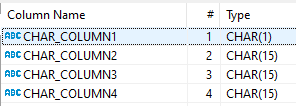
Snowflake
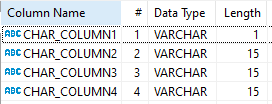
Note
The length restriction is preserved, but the memory that the columns are using is different on each DBMS.
Retrieving the size in bytes of each column:
Oracle
Result
LENGTHB(CHAR_COLUMN1) |
LENGTHB(CHAR_COLUMN2) |
LENGTHB(CHAR_COLUMN3) |
LENGTHB(CHAR_COLUMN4) |
|---|---|---|---|
1 |
15 |
15 |
15 |
Snowflake
Result
OCTET_LENGTH(CHAR_COLUMN1) |
OCTET_LENGTH(CHAR_COLUMN2) |
OCTET_LENGTH(CHAR_COLUMN3) |
OCTET_LENGTH(CHAR_COLUMN4) |
|---|---|---|---|
1 |
11 |
11 |
11 |
Note
Besides these slight differences, the integrity of the data is preserved.
Known Issues
1. Results obtained from some built-in functions may vary
As explained in the previous section, there may be cases using built-in functions over the columns that may retrieve different results. For example, get the length of a column.
Related EWIs
SSC-FDM-OR0015: LENGTHB transformed to OCTET_LENGTH.
NCHAR Data Type
Description
The NCHAR data type specifies a fixed-length character string in the national character set. (Oracle SQL Language Reference NCHAR)
NCHAR allows to store special characters with their Unicode to be preserved across any usage, these special characters may need more bits to be stored and that is why, by default, the NCHAR character set is AL16UTF16, contrary to the common character data set for CHAR which is usually AL32UTF8.
NCHAR is preserved as NCHAR in Snowflake, but, in the background, Snowflake uses VARCHAR. Transformation information related to CHAR is also valid for NCHAR.
Sample Souce Patterns
Nchar data types in Create Table
Oracle
Snowflake
Note
In Oracle, trying to insert these values in a CHAR column with the same size, will trigger an error: value too large for column.
Retrieving information from Nchar columns
Oracle
Result
NCHAR_COLUMN1 |
NCHAR_COLUMN2 |
|---|---|
ភ |
ភាសាខ |
Snowflake
Result
NCHAR_COLUMN1 |
NCHAR_COLUMN2 |
|---|---|
ភ |
ភាសាខ |
Retrieving the size in bytes of each column
Oracle
Result
LENGTHB(NCHAR_COLUMN1) |
LENGTHB(NCHAR_COLUMN2) |
|---|
Snowflake
Result
OCTET_LENGTH(NCHAR_COLUMN1) |
OCTET_LENGTH(NCHAR_COLUMN2) |
|---|
Note that the number specified in the column declaration is the size in characters and not in bytes, That is why we see more space used to store those special characters.
Note
In Snowflake, VARCHAR uses UTF-8, size can vary depending on the Unicode character that can be represented in 1, 2, 3, or 4 bytes. In this case, the Cambodian character is using 3 bytes to be stored.
Note
Besides these slight differences, the integrity of the data is preserved.
Known Issues
1. Results obtained from some built-in functions may vary
As explained in the previous section, there may be cases using built-in functions over the columns that may retrieve different results. For example, get the length of a column.
Related EWIs
SSC-FDM-OR0015: LENGTHB transformed to OCTET_LENGTH.
NVARCHAR2 Data Type
Description
The
NVARCHAR2data type specifies a variable-length character string in the national character set. (Oracle SQL Language Reference NVARCHAR2)
NVARCHAR2 allows to store special characters with their Unicode to be preserved across any usage, these special characters may need more bits to be stored and that is why, by default, the NVARCHAR2 character set is AL16UTF16, contrary to the common character data set for VARCHAR2 which is usually AL32UTF8.
NVARCHAR transformed to Snowflake VARCHAR, Transformation information related to VARCHAR2, is also valid for NVARCHAR2.
Sample Souce Patterns
Nvarchar2 data type in Create Table
Oracle
Snowflake
Note
In Oracle, trying to insert these values in a VARCHAR2 column with the same size, will trigger an error: value too large for column.
Retrieving information from Nchar columns
Oracle
Result
NVARCHAR2_COLUMN |
|---|
ភាសាខ |
Snowflake
Result
NVARCHAR2_COLUMN |
|---|
ភាសាខ |
Retrieving the size in bytes of each column
Oracle
Result
LENGTHB(NVARCHAR2_COLUMN) |
|---|
10 |
Snowflake
Result
OCTET_LENGTH(NVARCHAR2_COLUMN) |
|---|
15 |
Note that the number specified in the column declaration is the size in characters and not in bytes, That is why we see more space used to store those special characters.
Note
In Snowflake, VARCHAR uses UTF-8, size can vary depending on the Unicode character that can be represented in 1, 2, 3, or 4 bytes. In this case, the Cambodian characters are using 3 bytes to be stored.
Note
Besides these slight differences, the integrity of the data is preserved.
Known Issues
1. Results obtained from some built-in functions may vary
As explained in the previous section, there may be cases using built-in functions over the columns that may retrieve different results. For example, get the length of a column.
Related EWIs
SSC-FDM-OR0015: LENGTHB transformed to OCTET_LENGTH.
VARCHAR Data Type
Description
Oracle recommends using VARCHAR2 instead of VARCHAR as explained in their documentation:
Oracle SQL Language reference Varchar
Even though, the syntaxis is parsed and transformed using the ANSI, DB2, and SQL/DS Data Types.
VARCHAR2 Data Type
Description
The
VARCHAR2data type specifies a variable-length character string in the database character set. (Oracle SQL Language Reference VARCHAR2)
As denoted in the Oracle documentation, size in VARCHAR2 data type is a length constraint and should not be confused with capacity. Total characters that can be stored in a VARCHAR2 may vary according to the database character set and configuration, but commonly the maximum size allowed is 4000.
VARCHAR2 is translated to Snowflake VARCHAR which can store a bigger number of bytes/characters by default. Either way, the memory used is variable using the size of the value stored in the column as same as in Oracle.
Sample Source Patterns
Varchar2 data types in Create Table
Oracle
Snowflake
Retrieving data from varchar columns
Oracle
Result
VARCHAR2_COLUMN1 |
VARCHAR2_COLUMN2 |
VARCHAR2_COLUMN3 |
|---|---|---|
H |
Hello |
Hell |
Snowflake
Result
VARCHAR2_COLUMN1 |
VARCHAR2_COLUMN2 |
VARCHAR2_COLUMN3 |
|---|---|---|
H |
Hello |
Hell |
Reviewing the variable size in the columns
Oracle
Result
LENGTHB(VARCHAR2_COLUMN1) |
LENGTHB(VARCHAR2_COLUMN2) |
LENGTHB(VARCHAR2_COLUMN3) |
|---|---|---|
1 |
5 |
4 |
Snowflake
Result
OCTET_LENGTH(VARCHAR2_COLUMN1) |
OCTET_LENGTH(VARCHAR2_COLUMN2) |
OCTET_LENGTH(VARCHAR2_COLUMN3) |
|---|---|---|
1 |
5 |
4 |
Known Issues
No issues were found.
Related EWIs
SSC-FDM-OR0015: LENGTHB transformed to OCTET_LENGTH.
LOB Data Types
Description
The built-in LOB data types
BLOB,CLOB, andNCLOB(stored internally) andBFILE(stored externally) can store large and unstructured data such as text, image, video, and spatial data. (Oracle SQL Language Reference LOB Data Type)
Warning
LOB data types are not supported in Snowflake. Per Snowflake’s documentation, it is recommended to transform CLOB to VARCHAR, and BLOB to BINARY, however, there are several limitations.
{% endhint %}
Warning
LOB properties for tables are also not supported in Snowflake. {% endhint %}
BFILE Data Type
Description
Contains a locator to a large binary file stored outside the database. Enables byte stream I/O access to external LOBs residing on the database server. A
BFILEcolumn or attribute stores aBFILElocator, which serves as a pointer to a binary file on the server file system. The locator maintains the directory name and the filename. (Oracle SQL Language Reference BFILE Data Type).
Warning
BFILE Data Type is not supported in Snowflake. VARCHAR is used instead.
Sample Source Patterns
Bfile data type in Create Table
Warning
Oracle BFILE columns are used to store a locator with the directory and filename. They are changed to Snowflake VARCHAR to store the directory and filename into the column. However, loading the content of the file must be done manually.
Oracle
Result
COL1 |
|---|
[BFILE:myfile.png] |
Snowflake
Result
COL1 |
|---|
mydirectory\myfile.png |
Warning
UDF added to replace BFILENAME().
UDF Added
Known Issues
1. No access to the DBMS_LOB built-in package
Since LOB data types are not supported in Snowflake there is no equivalent for the DBMS_LOB functions and there are no implemented workarounds yet.
Related EWIs
SSC-EWI-OR0105: Additional work is needed for BFILE column usage. BUILD_STAGE_URL function is a recommended workaround.
BLOB Data Type
Description
The
BLOBdata type stores unstructured binary large objects.BLOBobjects can be thought of as bitstreams with no character set semantics. (Oracle SQL Language Reference BLOB Data Type).
Warning
BLOB Data Type is not supported in Snowflake. BINARY is used instead.
Sample Source Patterns
BLOB in Create Table
Oracle
Snowflake
Retrieving Data
Oracle
Result
BLOB_COLUMN |
EMPTY_COLUMN |
|---|---|
[NULL] |
[BLOB] |
Snowflake
Result
BLOB_COLUMN |
EMPTY_COLUMN |
|---|---|
NULL |
Functional Example
Warning
This example is not a translation of SnowConvert AI, it is only used to show the functional equivalence between Oracle BLOB and Snowflake BINARY
Warning
We are using “utl_raw.cast_to_raw” and “DBMS_LOB.SUBSTR” functions. The conversion for these functions is currently not supported by SnowConvert.
Oracle
Result
RESULT |
|---|
[NULL] |
hello world |
Snowflake
Result
RESULT |
|---|
[NULL] |
hello world |
Known Issues
1. The difference in max length BLOB (Oracle) and BINARY (Snowflake)
An Oracle BLOB column’s maximum size is (4 gigabytes - 1) * (database block size), but Snowflake BINARY is limited to 8MB.
2. Empty value with EMPTY_BLOB
Initializing a column using EMPTY_BLOB() will return an empty LOB locator. While after translation the column will return a string with ‘ ‘.
3. No access to the DBMS_LOB built-in package
Since LOB data types are not supported in Snowflake there is no equivalent for the DBMS_LOB functions and there are no implemented workarounds yet.
Related EWIs
SSC-EWI-OR0076: Built In Package Not Supported.
CLOB Data Type
Description
A character large object containing single-byte or multibyte characters. Both fixed-width and variable-width character sets are supported, both using the database character set. (Oracle SQL Language Reference CLOB Data Type).
Warning
CLOB Data Type is not supported in Snowflake. VARCHAR is used instead.
Sample Source Patterns
CLOB in Create Table
Oracle
Snowflake
Retrieving Data
Oracle
Result
CLOB_COLUMN |
EMPTY_COLUMN |
|---|---|
THIS IS A TEST |
Snowflake
Result
CLOB_COLUMN |
EMPTY_COLUMN |
|---|---|
THIS IS A TEST |
- |
Known Issues
1. The difference in max length CLOB (Oracle) and VARCHAR (Snowflake)
An Oracle CLOB column maximum size is (4 gigabytes - 1) * (database block size), but Snowflake VARCHAR is limited to 16MB.
2. Empty value with EMPTY_CLOB
Initializing a column using EMPTY_CLOB() will return an empty LOB locator. While in Snowflake after translation the column will return a string with ‘ - ‘.
3. No access to the DBMS_LOB built-in package
Since LOB data types are not supported in Snowflake there is not an equivalent for the DBMS_LOB functions and there are no implemented workarounds yet.
Related EWIs
No related EWIs.
NCLOB Data type
Description
A character large object containing Unicode characters. Both fixed-width and variable-width character sets are supported, both using the database national character set. (Oracle SQL Language Reference NCLOB Data Type).
Warning
NCLOB Data Type is not supported in Snowflake. VARCHAR is used instead.
Sample Source Patterns
NCLOB in Create Table
Oracle
Snowflake
Retrieving Data
Oracle
Result
NCLOB_COLUMN |
EMPTY_COLUMN |
|---|---|
THIS IS A TEST |
Snowflake
Result
NCLOB_COLUMN |
EMPTY_COLUMN |
|---|---|
THIS IS A TEST |
- |
Known Issues
1. The difference in max length CLOB (Oracle) and VARCHAR (Snowflake)
An Oracle NCLOB column maximum size is (4 gigabytes - 1) * (database block size), but Snowflake VARCHAR is limited to 16MB.
2. Empty value with EMPTY_CLOB
Initializing a column using EMPTY_CLOB() will return an empty LOB locator. While after translation the column will return a string with ‘ - ‘.
3. No access to the DBMS_LOB built-in package
Since LOB data types are not supported in Snowflake there is not an equivalent for the DBMS_LOB functions and there are no implemented workarounds yet.
Related EWIs
No related EWIs.