SnowConvert AI - プレビュー機能の設定
プレビュー機能の設定
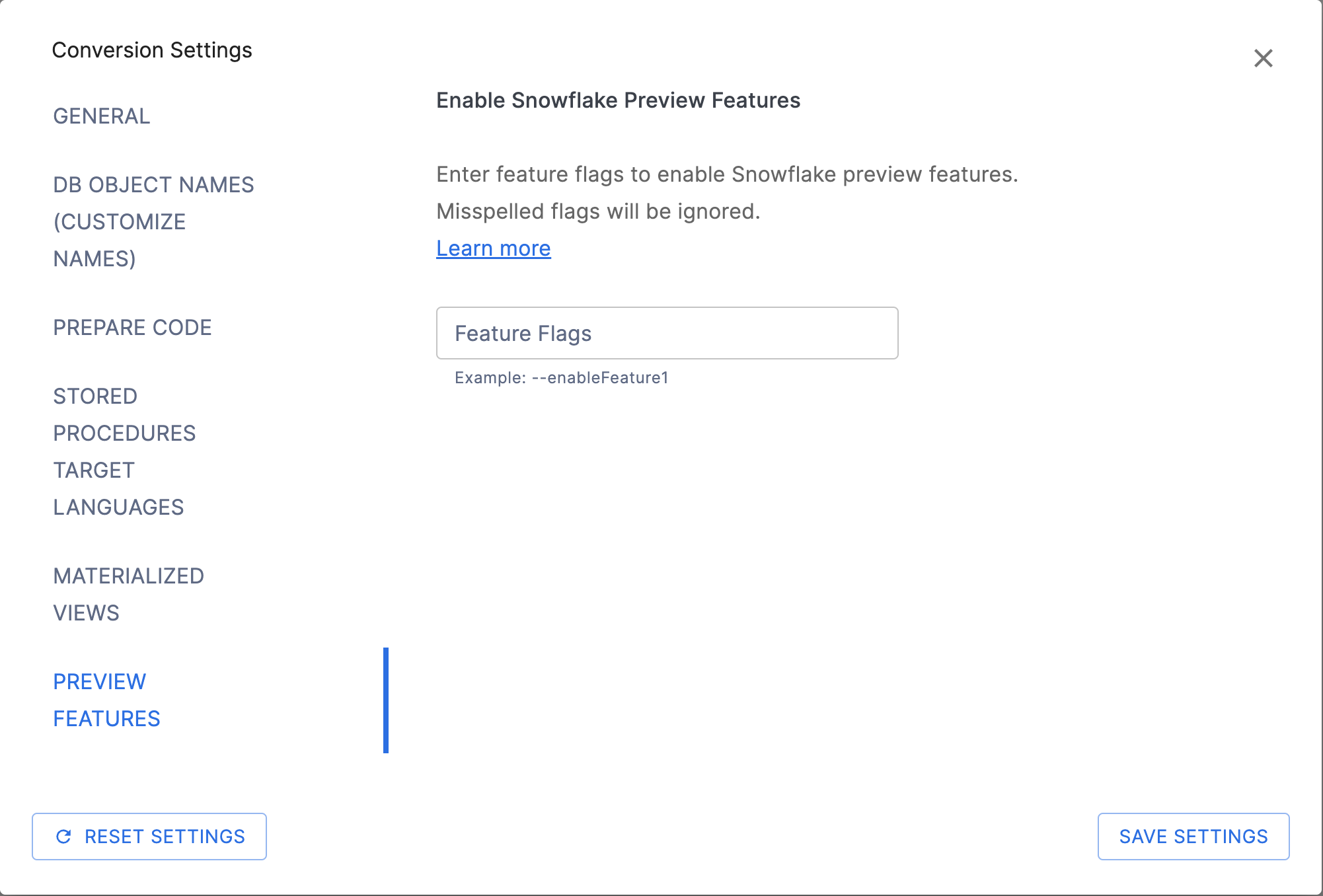
SnowConvert AIのプレビュー機能の設定では、 Snowflakeパブリックプレビューの機能 を利用した変換を有効にすることができます。利用可能なフラグ のいずれかをテキストボックスに入力することで、SnowConvert AIは、一般提供ステータス(GA)のSnowflake機能のみに制限されるのではなく、現在パブリックプレビューステータスのSnowflake機能を利用するコードを生成することができます。
警告
プレビュー機能とは、評価およびテスト目的で利用可能なSnowflakeの機能ですが、まだ一般提供(GA)ではありません。実稼働システムでは使用しないでください。Snowflakeプレビュー機能の詳細については、 Snowflakeプレビュー利用規約 を参照してください。
Snowflakeのプレビュー機能を理解する
Snowflakeパブリックプレビューの機能は、Snowflakeに実装されテストされた新機能ですが、ユーザビリティやコーナーケースの処理が完全でない場合があります。SnowConvert AIでプレビュー機能を有効にすると、変換プロセスでより良い変換結果が得られる場合に、これらのプレビュー機能を使用するコードを生成できます。
プレビュー機能の使い方
**SnowConvert AIで有効:**プレビュー機能の設定内のテキストボックスに、 利用可能なフラグ のいずれかを入力すると、SnowConvert AIがSnowflakeのプレビュー機能を使用してコードを生成できるようになります。
Snowflakeで有効にする:
SYSTEM_ENABLE_PREVIEW_ACCESSのようなシステム機能を使用して、Snowflakeアカウントでプレビュー機能が有効になっていることを確認してください。**徹底的にテストする:**プレビュー機能を使用する場合は、必ず本番環境以外のSnowflake環境で変換したコードをテストしてください。
重要な考慮事項
Snowflakeアカウントの互換性 :生成されたコードを使用するには、Snowflakeアカウントでプレビュー機能を有効にする必要があります
機能の安定性 :Snowflakeのプレビュー機能は、将来のSnowflakeリリースで動作が変更されたり、削除されたりする可能性があります
実稼働の制限 :プレビュー機能を使用したコードは、実稼働のSnowflake環境にデプロイしないでください。
ドキュメント :SnowConvert AIは、プレビュー機能が使用されていることを示すコメントを追加する場合があります
プレビュー機能の設定にアクセスする
SnowConvert AIでプレビュー機能を設定するには、以下を行います。
SnowConvert AIインターフェースの Conversion Settings セクションに移動します。
Preview Features タブまたはセクションを選択します。
利用可能なフラグ のいずれかをテキストボックスに入力し、SnowConvert AIがSnowflakeのプレビュー機能を使用できるようにします。各フラグのスペルが正しいことを確認してください。いずれかのフラグのスペルが間違っていると、変換時にすべてのフラグが無視されます。
変換を進めます。SnowConvert AIは、変換結果を向上させるプレビュー機能を自動的に使用します。
CLIからのプレビュー機能の使用
コマンドラインインターフェース(CLI)からSnowConvert AIを使用する場合、 --previewFlags 引数を使用することでプレビュー機能を有効にすることができます。値は引用符でくくられ、以下の形式でフラグが含まれていなければなりません。
例:
複数のフラグの場合:
ベストプラクティス
意味を理解する :変換されたコードでは、Snowflakeのプレビュー機能を有効にする必要があることを理解してください
注釈
どのSnowflakeプレビュー機能(SnowConvert AI)を利用できるかについての最新情報については、最新のSnowConvert AIリリースノートを参照するか、サポートにお問い合わせください。
利用可能なプレビュー機能
以下のセクションでは、変換中に特定のSnowflakeプレビュー機能を有効にするためにテキストボックスに入力できるプレビュー機能フラグの一覧を示します。各フラグにより、SnowConvert AIで特定のSnowflakeプレビュー機能を使用できます。
--enableSnowScriptUDF
バージョン1.19.7から非推奨。この機能はすでに一般提供されています。
このオプションにより、SnowScript UDFプレビュー機能を利用して、SnowConvert AIはユーザー定義関数を変換することができます。詳しくはこちらのドキュメントを参照してください: SnowflakeスクリプトUDFs 。
以下の言語でのみ利用可能です:
SQL Server
Azure Synapse
--enableFormatSpecifiersPreview
This option enables SnowConvert AI to utilize new Snowflake date/time format specifiers that are currently in preview. These improvements in Snowflake's formatting capabilities provide better translation accuracy for SQL Server date/time formatting functions.
注釈
Numeric format specifiers are now GA. Advanced numeric format specifiers (P, N, custom % patterns, and TM9 grouping) are now translated by default without requiring this flag. The translations in the Numeric format specifiers (now default) section below are always active.
What This Flag Enables:
This preview feature introduces new date/time format elements in Snowflake's TO_CHAR function, allowing SnowConvert AI to generate more accurate translations of SQL Server FORMAT() calls:
New Date/Time Format Elements - Non-padded format specifiers (Y, MO, D, H24, H12, ME, S, P)
These are Snowflake improvements, not just SnowConvert AI translation features. Your Snowflake account must have these preview features enabled to execute the converted date/time code.
Note: To use date/time code generated with this flag, you must request access to these preview features in your Snowflake account. Submit your request using this form: Snowflake Format Improvements Preview Access Request
Date Format Specifiers (Preview)
This flag enables SnowConvert AI to use new Snowflake date/time format elements that support non-padded output, providing accurate translations of SQL Server's custom single-character format specifiers.
New Snowflake Format Elements:
These format elements are new in Snowflake (in preview) and enable better migration from SQL Server:
Y- Year last 2 digits without padding (e.g.,25from 2025,5from 2005)MO- Month without padding (e.g.,3for March)D- Day without padding (e.g.,5for the 5th day)H24- Hour in 24-hour format without padding (e.g.,14for 2 PM)H12- Hour in 12-hour format without padding (e.g.,2for 2 PM)ME- Minute without padding (e.g.,7for 07 minutes)S- Second without padding (e.g.,3for 03 seconds)P- Single-character AM/PM indicator (e.g.,Afor AM,Pfor PM)
Translation Examples:
The following examples show how SQL Server FORMAT() patterns are translated to Snowflake using these new format elements:
SQL Server Code |
SQL Server Output |
Snowflake Translation |
Snowflake Output |
|---|---|---|---|
|
|
|
|
|
|
|
|
|
|
|
|
|
|
|
|
|
|
|
|
|
|
|
|
|
|
|
|
Combined Format Patterns:
SQL Server Code |
SQL Server Output |
Snowflake Translation |
Snowflake Output |
|---|---|---|---|
|
|
|
|
|
|
|
|
|
|
|
|
|
|
|
|
Key Points:
MO replaces SQL Server's
%M(uppercase M = month)ME replaces SQL Server's
%m(lowercase m = minute)H24 replaces SQL Server's
%H(uppercase H = 24-hour)H12 replaces SQL Server's
%H(lowercase h = 12-hour)P provides single-character AM/PM output (A or P)
All formats maintain SQL Server's behavior of no leading zeros
Numeric format specifiers (now default)
The following numeric format translations are now applied by default without requiring the --enableFormatSpecifiersPreview flag. SnowConvert AI translates SQL Server's percentage and number formatting patterns using Snowflake's numeric format capabilities.
Percentage Formats (P and %):
SQL Server's P format and custom % patterns automatically multiply values by 100 and add percentage symbols. The Snowflake translations use fixed-point formats with % symbols:
SQL Server Code |
SQL Server Output |
Snowflake Translation |
Snowflake Output |
|---|---|---|---|
|
|
|
|
|
|
|
|
|
|
|
|
|
|
|
|
|
|
|
|
|
|
|
|
Number Formats (N):
SQL Server's N format provides thousand separators and controlled decimal precision. The Snowflake translations use the enhanced TM9 format element with arguments:
SQL Server Code |
SQL Server Output |
Snowflake Translation |
Snowflake Output |
|---|---|---|---|
|
|
|
|
|
|
|
|
|
|
|
|
|
|
|
|
|
|
|
|
TM9 Format Element Enhancement (Now Default)
The existing Snowflake TM9 format element has been enhanced to accept two optional arguments for better control over numeric formatting. This is a Snowflake improvement that enables better translations from SQL Server. These translations are now applied by default.
Syntax: TM9(fractional_digits, grouping_size)
Translation Examples:
SQL Server Code |
Snowflake Translation |
Input Value |
Snowflake Output |
Description |
|---|---|---|---|---|
|
|
|
|
2 decimals with grouping |
|
|
|
|
No decimals, rounded |
|
|
|
|
4 decimals with grouping |
(Direct usage) |
|
|
|
All decimals, grouped |
(Direct usage) |
|
|
|
3 decimals, no grouping |
(Direct usage) |
|
|
|
All decimals, no grouping (default) |
Behavior Details:
Available for: SQL Server only
--UseIntervalDatatype
This option enables SnowConvert AI to translate INTERVAL data types to native Snowflake INTERVAL types (INTERVAL YEAR TO MONTH and INTERVAL DAY TO SECOND) instead of converting them to VARCHAR. This takes advantage of the Snowflake INTERVAL data type that is currently in public preview. Learn more from the documentation here: Snowflake INTERVAL Data Type.
For a comprehensive reference on how interval transformations work across all languages, see the Interval Data Types translation reference.
What This Flag Enables:
Native INTERVAL column types - INTERVAL columns in
CREATE TABLEare preserved as Snowflake INTERVAL types instead of being converted toVARCHAR(30)Interval literal normalization - Dialect-specific interval literal syntax is normalized to Snowflake-compatible INTERVAL literals
Interval arithmetic preservation - Datetime subtraction expressions that produce intervals are transformed to use Snowflake's native interval output
CAST to INTERVAL - CAST expressions targeting interval types are preserved
Translation Examples:
Source SQL |
Without Flag |
With |
|---|---|---|
|
|
|
|
|
|
|
|
|
|
Not transformed to interval |
|
Known Limitations:
When this flag is enabled, SnowConvert AI emits warnings for scenarios where Snowflake does not yet fully support INTERVAL:
Dynamic Tables (SSC-EWI-0118): Snowflake does not support INTERVAL columns in Dynamic Tables
UDFs and Snowflake Scripting (SSC-EWI-0117): Snowflake does not support the INTERVAL data type in UDF/procedure parameters, return types, or variable declarations
Semi-structured types (SSC-EWI-0116): Snowflake does not support INTERVAL values inside VARIANT, ARRAY, or other semi-structured type columns
Qualifier normalization (SSC-FDM-0042): For languages with unqualified or mixed INTERVAL types, the qualifier is changed to
DAY TO SECONDbecause Snowflake does not support mixing year-to-month and day-to-second time parts
Available for: All supported languages (Teradata, Oracle, SQL Server, Azure Synapse, BigQuery, Hive, Spark, Databricks, PostgreSQL, Greenplum, Netezza, Redshift, Vertica, DB2)