Share data with non-Snowflake consumers
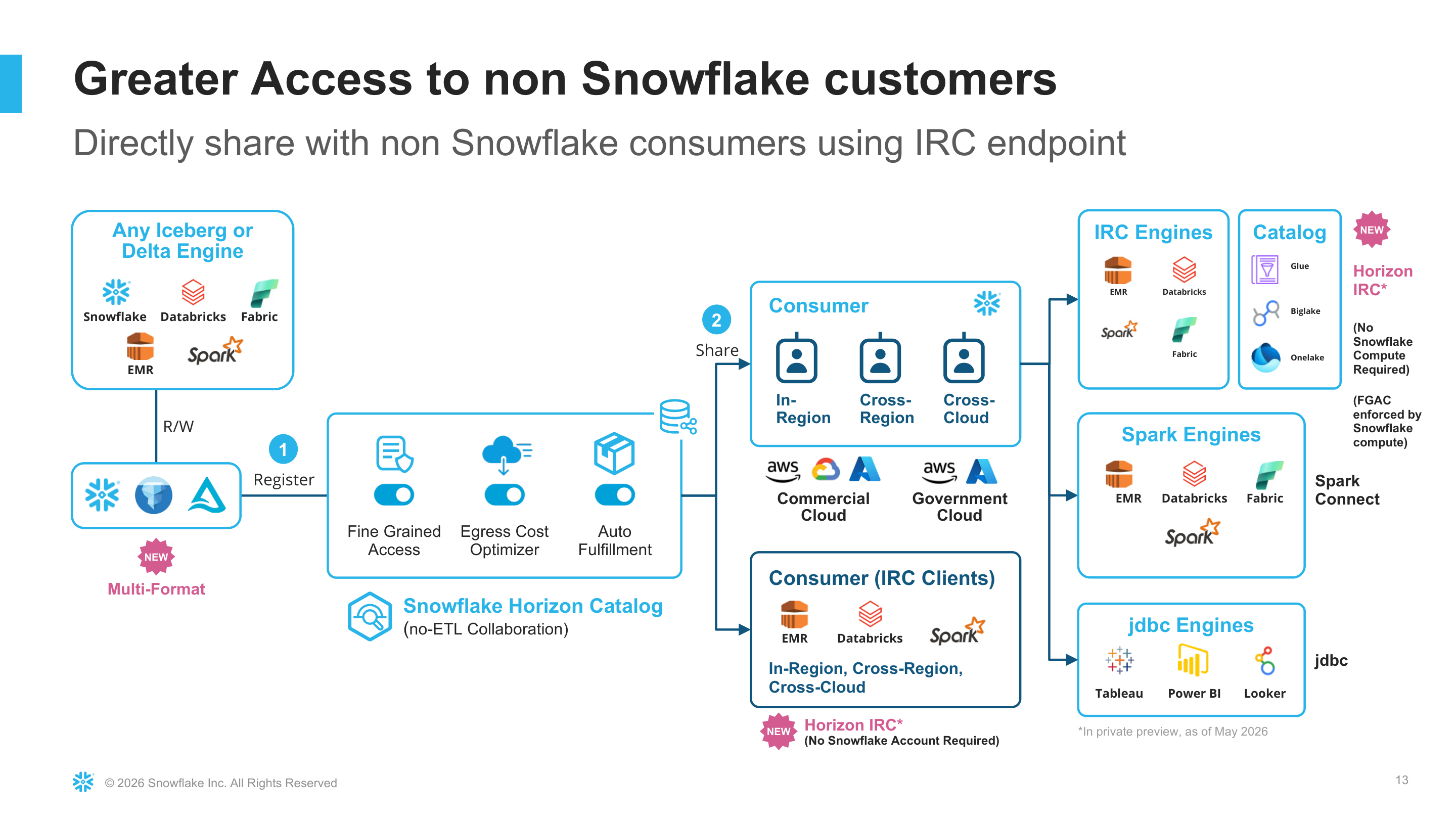
Snowflake Sharing allows you to securely share live, read-only data assets with consumers who do not use Snowflake, eliminating the need for complex ETL pipelines, data duplication, or manual file exports.
Note
During Public Preview, the only supported target region for shared data is the region where your provider account is located.
Why use Snowflake Sharing?
-
Universal access: Consumers query live data using standard, open-source Iceberg REST Catalog APIs from any analytical tool or platform where this protocol is supported.
-
Zero data movement: Data remains securely in your Snowflake storage layer, ensuring a single source of truth while removing data egress costs and storage duplication.
-
Granular control: Secure data distribution using restricted external consumer identities and region-specific Programmatic Access Tokens (PATs) that you manage directly.
-
Automated replication: The underlying framework handles cross-region replication seamlessly based on your listing configuration, placing data closer to your external consumers for optimal performance.
Secure data sharing with external consumers
The following steps walk through how to share with non-Snowflake customers: create an external consumer and access token, prepare shared Iceberg table data, create a share and listing, and retrieve the catalog URL for the external consumer.
Determine your account region
Run the following command to return your account region:
The result is the Snowflake region ID for your account (for example, AWS_US_WEST_2 or PUBLIC.AWS_US_WEST_2).
You can also identify your region from your account URL. If your URL includes a cloud region ID, such as us-east-2 in
organization-account.us-east-2.aws.snowflakecomputing.com, your account is
hosted in that cloud region. For more information, see Account identifiers.
Step 1: Use a role with the required privileges
To complete this workflow, use a role that has one of the following:
- The
ACCOUNTADMINrole, or - The
CREATE EXTERNAL CONSUMERprivilege granted at the account level, along with the privileges required to create shares, listings, and the database objects you plan to share.
To grant CREATE EXTERNAL CONSUMER to a custom role:
The following example uses ACCOUNTADMIN:
Step 2: Create an external consumer
Create an external consumer for the party that will access your shared data outside Snowflake.
External consumers are restricted users bound to a specific region at creation time. You cannot grant roles or other standard user options to these accounts.
Step 3: Add a programmatic access token
Add a Programmatic Access Token (PAT) for the external consumer.
Important
You must save the PAT secret when Snowflake returns it. You cannot retrieve the secret later.
Note
During Public Preview, only Programmatic Access Tokens (PATs) are supported for external consumer authentication. Other authentication methods will be available in later release phases.
Note
If your account uses a network policy, you must add an entry for each external consumer you want to grant access to. If your account does not use a network policy, external consumers can connect without any additional configuration.
Step 4: Create shared data
Create a database, schema, and Iceberg table for the data you want to share. The following example uses Snowflake-managed storage for the simplest demo setup:
Share data from an external volume (optional)
If you do not use Snowflake-managed storage, you can create an Iceberg table that references an external volume instead. You can skip this section if you used the Snowflake-managed table above.
First, create an external volume:
Then create an Iceberg table that uses the external volume:
Step 5: Create a share and grant privileges
Create a share and grant the required privileges on the database, schema, and table.
Step 6: Create an external listing
Create an external listing that attaches the share to the external consumer.
For more information about listing manifest fields, see Listing manifest reference.
Step 7: Verify the listing
Confirm that the listing was created and review its properties.
Step 8: Get the catalog URL for the external consumer
Call SYSTEM$GET_LISTING_URL_FOR_EXTERNAL_CONSUMER to retrieve the catalog and catalog_uri values for the external consumer.
Provide the returned catalog URL and the PAT from Step 3 to the external consumer so they can connect with an Iceberg REST Catalog client.
Listing manifest properties
The example listing uses the following manifest fields:
title and description
Identify the listing for providers and external consumers.
listing_terms
Specifies how consumers accept terms for the listing. The example uses OFFLINE.
external_targets.access.external_consumers
Lists the external consumer identities that can access the listing.
open_sharing.catalog_identifier
A unique identifier for the catalog exposed to external consumers via the Iceberg REST Catalog API. This value is used by the consumer when configuring their Iceberg REST Catalog client to connect to the shared data.