Items installed with the Snowflake Data Clean Room environment
This topic provides information about objects created in your account when you install the Snowflake Data Clean Room environment and create or join a collaboration. For information about Provider and Consumer clean rooms, see Snowflake Data Clean Rooms: Installed objects.
High-level overview
The following diagram is a simplified representation of a two-party collaboration:
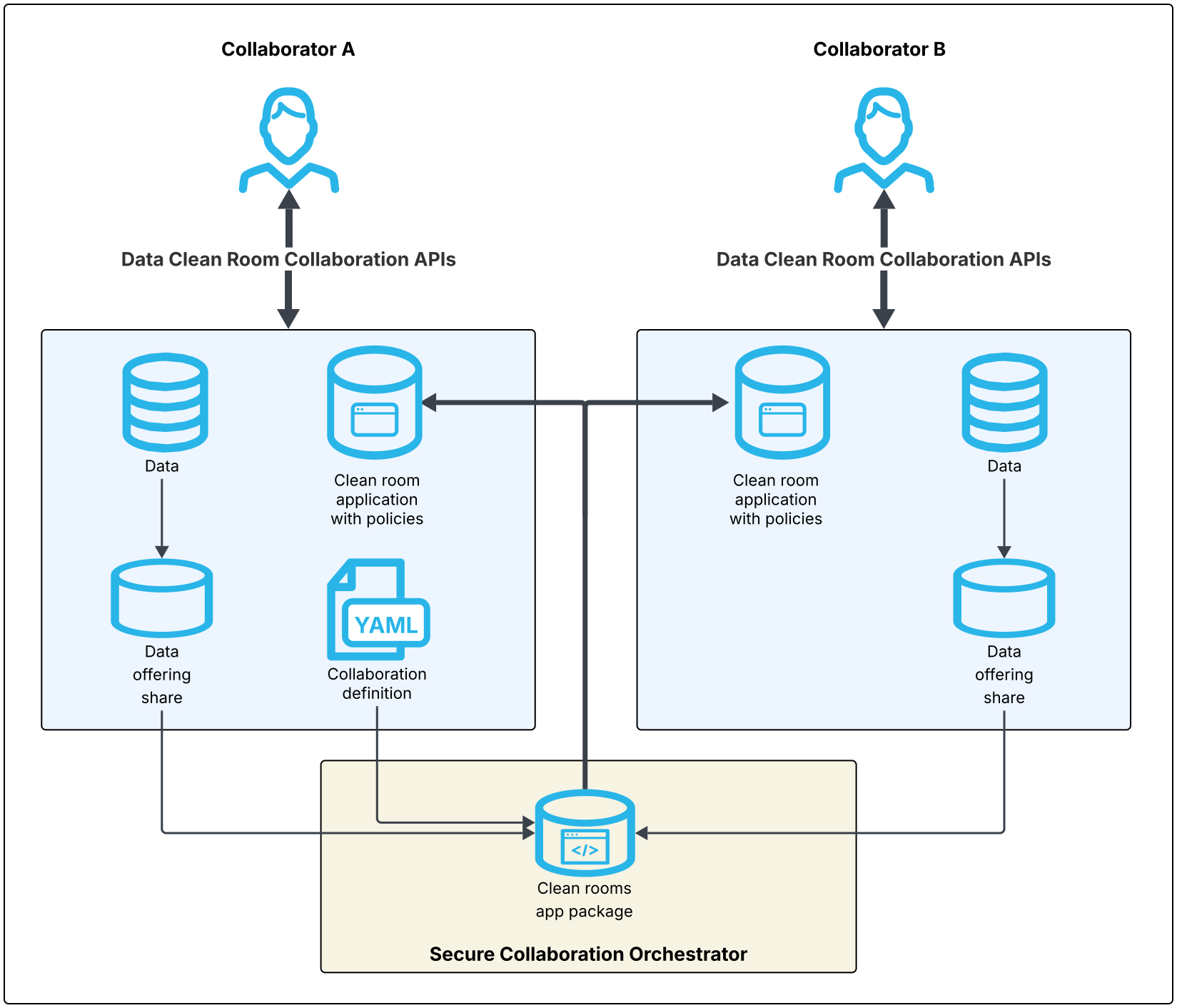
Notes about the diagram:
This diagram shows two collaborators that are using the Data Clean Rooms Collaboration API to create and manage a collaboration.
- Collaborator A is the owner and creator, as indicated by the collaboration definition YAML in the diagram.
- Both Collaborator A and B are data providers, as indicated by the data offering share in the diagram.
- Both collaborators A and B can act as analysis runners, if the collaboration definition allows it.
- Collaborator B has added a template to the collaboration.
- The Secure Collaboration Orchestrator (SCO) is a dedicated Snowflake account used to manage collaborations for all accounts in its region. There is an SCO for each region. The SCO for a collaboration is determined based on the owner’s account region.
- For each collaboration, the SCO creates an app package along with a listing. Collaborators install an application named
SFDCR_collaboration_namefrom this listing, which provides them access to the collaboration. - Collaborators interact with the collaboration through the DCR Collaboration API in their local SAMOOHA_BY_SNOWFLAKE_LOCAL_DB.
Collaborators create data offerings, and the SCO shares that data with the collaborators according to the collaboration definition. The SCO uses the collaboration, data offering, template, and analysis specifications to enforce collaboration policies, such as who can access which data by using which templates; what data can be activated, and to whom, and whether free-form SQL access is provided.
Applications
The following applications are installed when installing the Snowflake Data Clean Rooms environment or joining a collaboration:
- Data Clean Rooms Native Application
SAMOOHA_BY_SNOWFLAKE Installed application during the installation of the Snowflake Data Clean Rooms environment. Each account has this bootstrapper application installed from the Snowflake Data Clean Rooms Marketplace listing. It provides library procedures, delegation roles, and helper functions used by the local DB, and operates on local DB and clean room objects.
- Collaboration Application
SFDCR_collaboration_name Installed application per collaboration an account joins. It provides a COLLABORATION schema with secure views (such as DATA_OFFERINGS, TEMPLATE_SPECS, and CODE_SPECS) filtered to the installing account, and a COLLABORATION_INTERNAL schema with stored procedures for handling join, run, and leave operations. It writes to the clean room local DB and sends messages back to the SCO.
Databases
The following databases are created when installing the Snowflake Data Clean Rooms environment or joining a collaboration:
SFDCR_LOCAL_collaboration_nameContains information local to an installed collaboration, including activated data, and views of local-only data.
- SAMOOHA_BY_SNOWFLAKE_LOCAL_DB
This database is created when installing the Snowflake Data Clean Rooms environment in your account. It is local to your account. It is not an application, but does contain application logic.
This database has the following schemas:
- ADMIN schema
Schema in the local DB for administrative functions including privilege management, version info, and external table analysis enablement.
- COLLABORATION schema
Main schema in the local DB for collaboration clean room functionality. Contains tasks, streams, and procedures for message processing.
- REGISTRY schema
Stores registered templates, data offerings, code specs, and the object-to-registry mapping table.
registry_name_REGISTRYschemaSchema created when you create a custom registry. For example, if you create a custom named
sales_data, the system creates a schema calledsales_data_registry.
Shares and listings
Below are shares and listings that are involved and created per collaboration, depending on your role defined in the collaboration.
| Object Name/Format | Type | Description |
|---|---|---|
SFDCR: SCO collaboration_id | Incoming Listing | Listing shared by the SCO for every collaboration you create or are invited to. |
SCO_DATA_OFFERINGS_LISTING_hash | Outgoing Listing | Listing name for data offerings shared from the data provider to collaborators. |
SCO_ACTIVATION_LISTING_hash | Outgoing Listing | Listing name for activation result shared by an analysis runner to another collaborator. |
SCO_STAGED_CODE_LISTING_hash | Outgoing Listing | Listing name for staged code shared from a code provider to an analysis runner for code execution. |
SCO_DATA_OFFERINGS_SHARE_hash | Outgoing Share | Share created by a data provider to share data offerings (datasets, policies) to collaborators. |
SCO_ACTIVATION_SHARE_hash | Outgoing Share | Share created by an analysis runner to share activation results back to another collaborator. |
SCO_STAGED_CODE_SHARE_hash | Outgoing Share | Share created by a code provider to an analysis runner for code execution. |
Tasks
Below are tasks related to operating the new Snowflake Data Clean Rooms environment. For tasks related to legacy provider & consumer clean rooms, refer to Snowflake Data Clean Rooms: Installed objects.
| Task Name | Description | Warehouse |
|---|---|---|
EXPECTED_VERSION_TASK | Automatically upgrades the native app and local db as new versions are released. Frequency: Triggered by request. | SAMOOHA_TASK_WAREHOUSE |
collaboration_name_hash_OWNER_AUTO_JOIN | Task enabled by owner to auto-join a collaboration they initiate. Frequency: Every 1 minute, suspends after 1 hour. | User specified warehouse |
Sample data
Sample data is stored in the SAMOOHA_SAMPLE_DATABASE database. This database contains sample data tables named DEMO.CUSTOMERS and DEMO.CUSTOMERS_2 that you can use as test data.
Note
The CUSTOMERS_2 table was added in September 2025. If you installed your clean rooms environment before then, you might not have this sample table installed. To see whether you have CUSTOMERS_2 installed, you can run the following SQL code:
If the response contains no rows, then you, or someone with ACCOUNTADMIN role, must run the following command to install the sample table:
Warehouses
Snowflake Data Clean Rooms installs the following warehouses in your account. You can change the size of any warehouse as needed. We recommend that you use XS warehouses for general clean room editing, creation, or deletion commands. Consider using larger warehouses, or Snowpark-optimized warehouses, when running large analyses, such as machine learning workloads.
Learn how to view your warehouse usage costs.
| Warehouse name | Notes |
|---|---|
| APP_WH | XSMALL warehouse which is provided access by default to SAMOOHA_APP_ROLE. |
| SAMOOHA_TASK_WAREHOUSE | XSMALL warehouse used for operations such as auto-upgrades. |